官方Github;官方下载地址。没有Git加速的话很难下载,分享一下发布日期为2023.01.29的当前最新稳定版v2.12.0网盘连接。
包含文件:
- WinSW-x64.exe
- sample-minimal.xml
- sample-allOptions.xml
链接:https://pan.baidu.com/s/1sN3hL5HvFzzNwuz8npaQNw
提取码:vsvg
为什么要注册为服务: 服务器重启后服务可以自行重启。
WinSW官网使用说明及实例分享
1.官网使用说明
1.1 使用配置说明
Use WinSW as a global tool
- Take WinSW.exe or WinSW.zip from the distribution.
- Write myapp.xml (see the XML config file specification and samples for more details).
- Run winsw install myapp.xml [options] to install the service.
- Run winsw start myapp.xml to start the service.
- Run winsw status myapp.xml to see if your service is up and running.
作为全局工具使用,不同服务使用不同的xml文件进行操作。
Use WinSW as a bundled tool
- Take WinSW.exe or WinSW.zip from the distribution, and rename the .exe to your taste (such as myapp.exe).
- Write myapp.xml (see the XML config file specification and samples for more details).
- Place those two files side by side, because that’s how WinSW discovers its co-related configuration.
- Run myapp.exe install [options] to install the service.
- Run myapp.exe start to start the service.
作为绑定工具使用,默认使用同名的xml文件进行操作,个人感觉这种方式更适合实施的小伙伴儿。
Sample configuration file
You write the configuration file that defines your service. The example below is a primitive example being used in the Jenkins project:
<service>
  <id>jenkins</id>
  <name>Jenkins</name>
  <description>This service runs Jenkins continuous integration system.</description>
  <env name="JENKINS_HOME" value="%BASE%"/>
  <executable>java</executable>
  <arguments>-Xrs -Xmx256m -jar "%BASE%\jenkins.war" --httpPort=8080</arguments>
  <log mode="roll"></log>
</service>
The full specification of the configuration file is available here. You can find more samples here.
这个配置文件举例是很典型的可执行文件+参数,适合很多服务。
1.2 Usage
WinSW is being managed by the XML configuration file.
Your renamed WinSW.exe binary also accepts the following commands:
| Command | Description |
| install | Installs the service. |
| uninstall | Uninstalls the service. |
| start | Starts the service. |
| stop | Stops the service. |
| restart | Stops and then starts the service. |
| status | Checks the status of the service. |
| refresh | Refreshes the service properties without reinstallation. |
| customize | Customizes the wrapper executable. |
| dev | Experimental commands. |
Experimental commands:
| Command | Description |
| dev ps | Draws the process tree associated with the service. |
| dev kill | Terminates the service if it has stopped responding. |
| dev list | Lists services managed by the current executable. |
Most commands require Administrator privileges to execute. WinSW will prompt for UAC in non-elevated sessions.
这些命令不再详细说明,用到的时候再介绍。
2.实例分享
2.1 将exe注册成服务
这里使用对象存储MinIO的minio.exe进行Use WinSW as a bundled tool举例,详细步骤如下:
- 将
WinSW-x64.exe重命名为minio-server.ext - 添加配置文件
minio-server.xim内容如下,配置详情可查看sample-allOptions.xml
<service>
  <id>minio-server</id>
  <name>MinIO-Server</name>
  <description>This service runs MINIO OBJECT STORE.</description>
  <env name="MINIO_HOME" value="%BASE%"/>
  <executable>%BASE%\minio.exe</executable>
  <arguments>server D:\minio_data --console-address ":9001"</arguments>
  <logpath>%BASE%\logs</logpath>
  <log mode="roll-by-size-time">
    <sizeThreshold>1024</sizeThreshold>
    <pattern>yyyyMMdd</pattern>
    <autoRollAtTime>00:00:00</autoRollAtTime>
    <zipOlderThanNumDays>5</zipOlderThanNumDays>
    <zipDateFormat>yyyyMMdd</zipDateFormat>
  </log>
  <env name="MINIO_ROOT_USER" value="admin" />
  <env name="MINIO_ROOT_PASSWORD" value="admin123" />
</service>
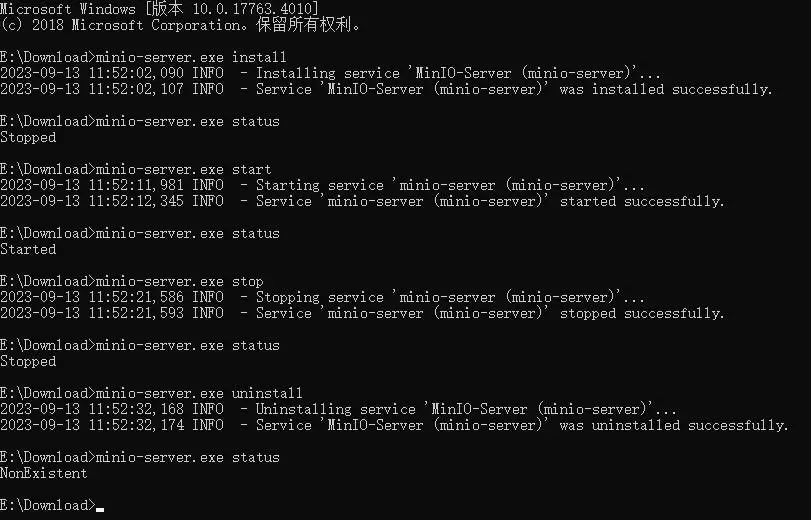
cmd执行命令minio-server.exe install安装为服务(此时服务并未启动)
INFO  - Installing service 'MinIO-Server (minio-server)'...
INFO  - Service 'MinIO-Server (minio-server)' was installed successfully.
- 执行命令
minio-server.exe start启动服务
完整流程测试:
2.2 将jar注册成服务
这里使用 Arthas(阿尔萨斯)用于测试的math-game.jar包进行Use WinSW as a bundled tool举例,详细步骤如下:
- 将
WinSW-x64.exe重命名为math-game-server.exe - 添加配置文件
math-game-server.xml内容如下
<service>
  <id>math-game-server</id>
  <name>Math-Game-Server</name>
  <description>This service runs math-game server.</description>
  <env name="MATHGAME_HOME" value="%BASE%"/>
  <executable>java</executable>
  <arguments>-Xrs -Xmx128m -jar "%BASE%\math-game.jar"</arguments>
  <logpath>%BASE%\logs</logpath>
  <log mode="roll-by-size-time">
    <sizeThreshold>1024</sizeThreshold>
    <pattern>yyyyMMdd</pattern>
    <autoRollAtTime>00:00:00</autoRollAtTime>
    <zipOlderThanNumDays>5</zipOlderThanNumDays>
    <zipDateFormat>yyyyMMdd</zipDateFormat>
  </log>
</service>
-Xrs 参数是"Reduce Signal Usage"的缩写,它告诉JVM降低对操作系统信号的使用。通常情况下,JVM会捕获一些操作系统信号,如SIGTERM(终止信号)和SIGINT(中断信号),用于优雅地关闭Java进程。然而,使用 -Xrs 参数后,JVM会尽量减少对这些信号的使用,而是依赖于Java代码来处理关闭操作。这可以提高JVM在某些情况下的稳定性。
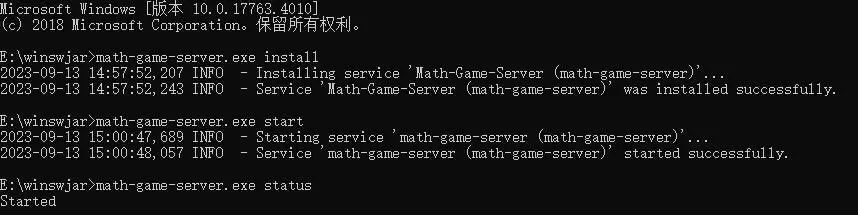
cmd执行命令math-game-server.exe install安装为服务(此时服务并未启动,状态为:已停止)
INFO  - Installing service 'Math-Game-Server (math-game-server)'...
INFO  - Service 'Math-Game-Server (math-game-server)' was installed successfully.
- 执行命令
minio-server.exe start启动服务
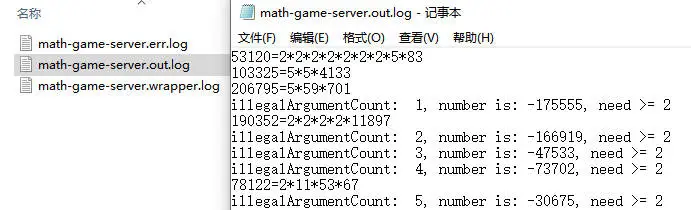
启动后打印的日志:
跟exe一样,这里仅作部分测试:
3.总结
WinSW(Windows Service Wrapper)是一个开源的项目,它允许将任何可执行文件(通常是.NET应用程序、exe应用程序、Java JAR文件等)转化为Windows服务。WinSW的目标是使在Windows操作系统上运行非Windows服务变得更加容易。它提供了一种将应用程序包装为Windows服务的方式,允许你以服务的形式启动、停止、暂停和恢复应用程序。
以下是WinSW的主要特点和用途:
- 应用程序包装为服务:WinSW允许你将各种类型的应用程序包装为Windows服务,而无需修改应用程序代码。这对于将常规应用程序部署为服务非常有用。
- 简化管理:一旦应用程序被包装为服务,你可以使用Windows服务管理器或命令行工具来管理它,例如
sc命令。这使得在Windows上部署和管理应用程序更加方便。 - 自定义配置:WinSW允许你通过XML或YAML配置文件自定义服务的行为,包括服务名称、描述、工作目录、启动参数等。这使得你可以灵活地配置服务以适应不同的需求。