
前言
本文主要讲解如何用mysql+springboot+mybatis+thymeleaf引擎模板实现一个增删改查的操作.流程如下:
制作数据库数据表=>
配置pom+application.properties+application.yml+maven=>(非必选)在idea中加数据库=>写增删改查接口+postman测试接口=>做html样式+ajax交互
提示:以下是本篇文章正文内容,下面案例可供参考
一、后端实现过程
1.做数据库和数据表
-- 创建名为 manager 的数据库
CREATE DATABASE IF NOT EXISTS manager;
-- 使用 manager 数据库
USE manager;
-- 创建名为 student 的数据表
CREATE TABLE IF NOT EXISTS student (
    id INT(11) NOT NULL AUTO_INCREMENT,
    name VARCHAR(255) DEFAULT NULL,
    PRIMARY KEY (id)
) ENGINE=InnoDB DEFAULT CHARSET=utf8;
在上述代码中,我们主要实现了创建数据库和数据表的操作.创建成功后的数据库如下图所示.

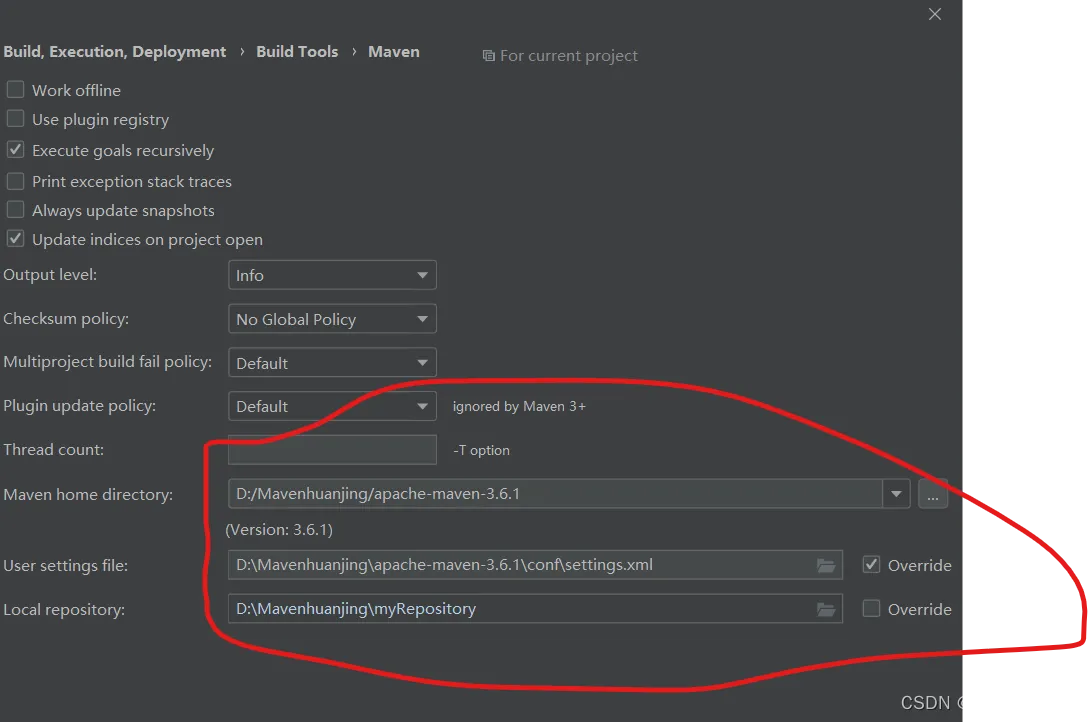
2.配置maven、pom、application.properties以及application.yml
点击File=>setting=>搜索maven=>找到修改下图画圈位置,如果没有则也可以用idea自带配置
pom配置
<?xml version="1.0" encoding="UTF-8"?>
<project xmlns="http://maven.apache.org/POM/4.0.0" xmlns:xsi="http://www.w3.org/2001/XMLSchema-instance"
         xsi:schemaLocation="http://maven.apache.org/POM/4.0.0 https://maven.apache.org/xsd/maven-4.0.0.xsd">
    <modelVersion>4.0.0</modelVersion>
    <parent>
        <groupId>org.springframework.boot</groupId>
        <artifactId>spring-boot-starter-parent</artifactId>
        <version>2.7.9</version>
        <relativePath/> <!-- lookup parent from repository -->
    </parent>
    <groupId>com.student</groupId>
    <artifactId>demo</artifactId>
    <version>0.0.1-SNAPSHOT</version>
    <name>demo</name>
    <description>Demo project for Spring Boot</description>
    <properties>
        <java.version>17</java.version>
    </properties>
    <dependencies>
        <dependency>
            <groupId>org.springframework.boot</groupId>
            <artifactId>spring-boot-starter-thymeleaf</artifactId>
        </dependency>
        <dependency>
            <groupId>org.springframework.boot</groupId>
            <artifactId>spring-boot-starter-web</artifactId>
        </dependency>
        <dependency>
            <groupId>org.projectlombok</groupId>
            <artifactId>lombok</artifactId>
            <optional>true</optional>
        </dependency>
        <dependency>
            <groupId>org.springframework.boot</groupId>
            <artifactId>spring-boot-starter-test</artifactId>
            <scope>test</scope>
        </dependency>
        <dependency>
            <groupId>mysql</groupId>
            <artifactId>mysql-connector-java</artifactId>
            <version>5.1.49</version>
        </dependency>
        <dependency>
            <groupId>org.mybatis.spring.boot</groupId>
            <artifactId>mybatis-spring-boot-starter</artifactId>
            <version>2.3.0</version>
        </dependency>
    </dependencies>
    <build>
        <plugins>
            <plugin>
                <groupId>org.springframework.boot</groupId>
                <artifactId>spring-boot-maven-plugin</artifactId>
                <configuration>
                    <excludes>
                        <exclude>
                            <groupId>org.projectlombok</groupId>
                            <artifactId>lombok</artifactId>
                        </exclude>
                    </excludes>
                </configuration>
            </plugin>
        </plugins>
    </build>
</project>
在上述代码中,我们除了基本配置外,还配置了mybatis/mysql/lombok,分别有高效数据管理/数据存储/省略getset方法的功能.
application.properties
//springboot别名
spring.application.name=springboot-w
//端口号
server.port=8082
//数据库引擎
spring.datasource.driver-class-name=com.mysql.jdbc.Driver
//用的数据库和编码格式等
spring.datasource.url=jdbc:mysql://localhost:3306/manager?characterEncoding=utf-8&&useSSL=false
//数据库账户名
spring.datasource.username=root
//密码
spring.datasource.password=x5
//mapper.xml的路径
mybatis.mapper-locations=classpath:mapper/*.xml
application.yml
thymeleaf:
  prefix:
    classpath: /templates   # 访问template下的html文件需要配置模板,映射
3.写接口和测试
写接口流程:pojo(实体类)=>mapper接口=>mapper.xml=>service接口=>serviceImpl实体类=>controller控制层=>测试
下面的具体流程的代码:
pojo类
@Data
public class student {
    private Integer id;
    private String name;
}
@Data是lombod注解,旨在不需要写getset方法了.
mapper接口
@Mapper
public interface stumapper {
    public List<student> querystu();
    public boolean addstu(student stu);
    public boolean updstu(student stu);
    public boolean delstu(int id);
}
mapper.xml
<?xml version="1.0" encoding="UTF-8" ?>
<!DOCTYPE mapper PUBLIC "-//mybatis.org//DTD Mapper 3.0//EN" "http://mybatis.org/dtd/mybatis-3-mapper.dtd" >
<mapper namespace="com.student.mapper.stumapper">
    <insert id="addstu" parameterType="com.student.pojo.student">
        INSERT INTO student(id,name) VALUES (#{id},#{name})
    </insert>
    <update id="updstu">
        update student set id=#{id},name=#{name} where id=#{id}
    </update>
    <delete id="delstu">
        delete from student where id=#{id}
    </delete>
    <select id="querystu" resultType="com.student.pojo.student">
        select * from student
    </select>
</mapper>
service
public interface service {
    List<student> querystu();
    boolean addstu(student stu);
    boolean updstu(student stu);
    boolean delstu(int id);
}
serviceImpl实体类
@Service
public class serviceImpl implements service {
    @Autowired
    stumapper m;
    @Override
    public List<student> querystu()
    {
        return m.querystu();
    }
    @Override
    public boolean addstu(student stu){
        return m.addstu(stu);
    }
    @Override
    public boolean updstu(student stu)
    {
        return m.updstu(stu);
    }
    @Override
    public boolean delstu(int id)
    {
        return m.delstu(id);
    }
}
controller控制层
@RestController
public class controller {
    @Autowired
    service s;
    @RequestMapping("querystu")
    public List<student> querystu()
    {
        return s.querystu();
    }
    @RequestMapping("addstu")
    public boolean addstu(student stu)
    {
        return s.addstu(stu);
    }
    @RequestMapping("updstu")
    public boolean updstu(student stu)
    {
        return s.updstu(stu);
    }
    @RequestMapping("delstu")
    public boolean delstu(int id)
    {
        return s.delstu(id);
    }
}
二、前端实现过程(thymeleaf模板+html+ajax)
1.html
代码如下:
<!DOCTYPE html>
<html lang="en">
<head>
    <meta charset="UTF-8">
    <title>Title</title>
    <script src="https://cdn.bootcdn.net/ajax/libs/jquery/3.6.0/jquery.min.js"></script>
    <script>
        function queryData() {
            // 发送 AJAX 请求
            $.ajax({
                url: 'http://localhost:8082/querystu',
                type: 'GET',
                dataType: 'json',
                success(res){
                    var html='';
                    for(var i =0;i<res.length;i++)
                    {
                        html+='<tr><td>'+res[i].id+'</td>'+'<td>'+res[i].name+'</td><td> <button onclick="del('+res[i].id+')">删除</button></td></tr>';
                    }
                        console.log(html);
                    $('#tt').html(html);
                },
                error: function(xhr, status, error) {
                    console.error(error); // 处理错误情况
                }
            });
        }
        function add(){
            const id=document.getElementById('InputId').value;
            const name=document.getElementById('InputName').value;
            $.ajax({
                url: `http://localhost:8082/addstu?id=${id}&name=${name}`,
                type: 'post',
                dataType: 'json',
                success: function(res) {
                    console.log(res); // 将响应数据输出到控制台
                    queryData()
                },
                error: function(xhr, status, error) {
                    console.error(error); // 处理错误情况
                }
            });
            document.getElementById('InputId').value='',
                document.getElementById('InputName').value=''
        }
        function upd(Id,Name){
            const id=document.getElementById('InputupdId').value;
            const name=document.getElementById('InputupdName').value;
            $.ajax({
                url: `http://localhost:8082/updstu?id=${id}&name=${name}`,
                type: 'post',
                dataType: 'json',
                success: function(res) {
                    console.log(res); // 将响应数据输出到控制台
                    queryData()
                },
                error: function(xhr, status, error) {
                    console.error(error); // 处理错误情况
                }
            });
            document.getElementById('InputupdId').value='',
                document.getElementById('InputupdName').value=''
        }
        function del(Id){
            // const id=document.getElementById('InputdelId').value;
            const id=Id;
            $.ajax({
                url: `http://localhost:8082/delstu?id=${id}`,
                type: 'post',
                dataType: 'json',
                success: function(res) {
                    console.log(res); // 将响应数据输出到控制台
                    queryData()
                },
                error: function(xhr, status, error) {
                    console.error(error); // 处理错误情况
                }
            });
        }
        queryData()
    </script>
</head>
<body>
<!--<button onclick="queryData()">查询</button>-->
<div>
        <input type="text" value="" placeholder="请输入id" id="InputId"/>
        <input type="text" value="" placeholder="请输入名称" id="InputName">
    <button onclick="add()">添加</button>
</div>
<div>
    <input type="text" value="" placeholder="请输入id" id="InputupdId"/>
    <input type="text" value="" placeholder="请输入名称" id="InputupdName">
    <button onclick="upd()">修改</button>
</div>
<table>
    <thead>
    <tr>
        <th>学生Id</th>
        <th>学生名称</th>
        <th>操作</th>
    </tr>
    </thead>
    <tbody id="tt">
    </tbody>
</table>
</body>
<style>
    table{
        margin:20px;
        border-collapse: collapse;
    }
    th{
        background-color: #cccccc;
    }
    tr{
        text-align: center;
        border: 1px solid #ccc;
    }
    td{
        padding:20px;
        border:1px solid #ccc;
    }
    button{
        background-color: white;
        width:70px;
        border-radius:20px;
        border:1px solid #ccc;
    }
    button :hover{
        background-color: #cccccc;
    }
</style>
</html>
2.代码解析和实现截图
在html代码中,我们主要利用onclick点击事件和jquery框架中的ajax交互.
jquery中ajax的语法格式
$.ajax({
url: 接口名,
type: ‘get’,
dataType: ‘json’,
success: function(res) {
console.log(res); // 将响应数据输出到控制台
queryData()
},
error: function(xhr, status, error) {
console.error(error); // 处理错误情况
}
});

总结
单表增删改查,springboot+html简单使用
