一、自定义登录成功处理器
一般采用的是实现接口的方式:implements AuthenticationSuccessHandler
但是如果想要实现登录成功后跳转回登录前的页面可以直接继承SavedRequestAwareAuthenticationSuccessHandler这个类,该类的父类SimpleUrlAuthenticationSuccessHandler实现了AuthenticationSuccessHandler。
package com.example.securityzimug.config.auth;
import com.example.securityzimug.config.auth.exception.AjaxResponse;
import com.fasterxml.jackson.databind.ObjectMapper;
import org.springframework.beans.factory.annotation.Value;
import org.springframework.security.core.Authentication;
import org.springframework.security.web.authentication.SavedRequestAwareAuthenticationSuccessHandler;
import org.springframework.stereotype.Component;
import javax.servlet.ServletException;
import javax.servlet.http.HttpServletRequest;
import javax.servlet.http.HttpServletResponse;
import java.io.IOException;
/**
 * @author baikunlong
 * @date 2020/9/22 0:06
 */
@Component
public class MyAuthenticationSuccessHandler extends SavedRequestAwareAuthenticationSuccessHandler {
    @Value("${spring.security.loginType}")
    private String loginType;
    private static ObjectMapper objectMapper=new ObjectMapper();
    @Override
    public void onAuthenticationSuccess(HttpServletRequest request, HttpServletResponse response, Authentication authentication)
            throws ServletException, IOException {
        //如果配置了json格式返回则返回json串
        if(loginType.equals("JSON")){
            response.setContentType("application/json;charset=utf-8");
            response.getWriter().write(objectMapper.writeValueAsString(AjaxResponse.success()));
        }else {
            //否则返回登录之前的页面
            super.onAuthenticationSuccess(request, response, authentication);
        }
    }
}
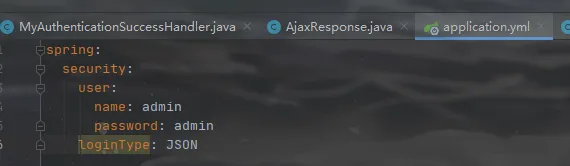
在配置文件配置下loginType参数,就是个登录类型
返回对象随便写个就行,上面用到的AjaxResponse这个对象代码如下:
package com.example.securityzimug.config.auth.exception;
import lombok.Data;
@Data
public class AjaxResponse {
    private boolean isok;
    private int code;
    private String message;
    private Object data;
    private AjaxResponse() {
    }
    public static AjaxResponse success() {
        AjaxResponse resultBean = new AjaxResponse();
        resultBean.setIsok(true);
        resultBean.setCode(200);
        resultBean.setMessage("success");
        return resultBean;
    }
    public static AjaxResponse success(Object data) {
        AjaxResponse resultBean = new AjaxResponse();
        resultBean.setIsok(true);
        resultBean.setCode(200);
        resultBean.setMessage("success");
        resultBean.setData(data);
        return resultBean;
    }
}
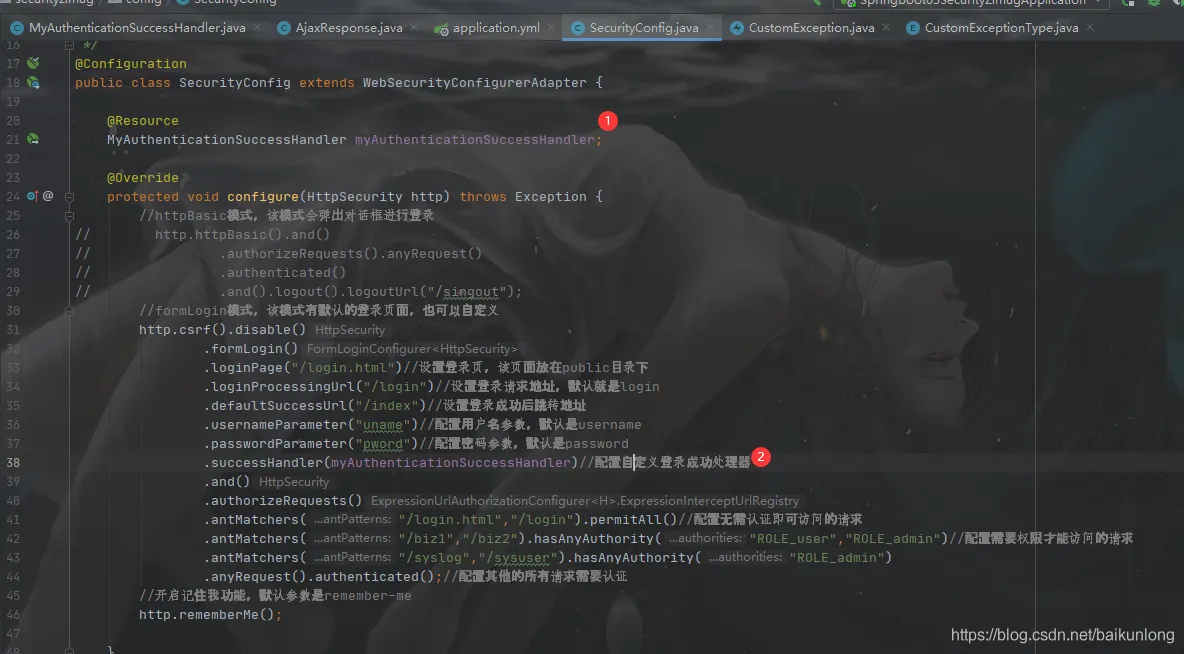
然后在配置类下配置下自定义的登录成功处理器
二、自定义登陆失败处理器
该类和成功处理器基本一样,但是继承的是SimpleUrlAuthenticationFailureHandler ,该类实现了登录失败后跳转到默认或者指定的页面。
package com.example.securityzimug.config.auth;
import com.example.securityzimug.config.auth.exception.AjaxResponse;
import com.example.securityzimug.config.auth.exception.CustomException;
import com.example.securityzimug.config.auth.exception.CustomExceptionType;
import com.fasterxml.jackson.databind.ObjectMapper;
import org.springframework.beans.factory.annotation.Value;
import org.springframework.security.core.AuthenticationException;
import org.springframework.security.web.authentication.SimpleUrlAuthenticationFailureHandler;
import org.springframework.stereotype.Component;
import javax.servlet.ServletException;
import javax.servlet.http.HttpServletRequest;
import javax.servlet.http.HttpServletResponse;
import java.io.IOException;
/**
 * @author baikunlong
 * @date 2020/9/22 12:59
 */
@Component
public class MyAuthenticationFailureHandler extends SimpleUrlAuthenticationFailureHandler {
    @Value("${spring.security.loginType}")
    private String loginType;
    private static ObjectMapper objectMapper=new ObjectMapper();
    @Override
    public void onAuthenticationFailure(HttpServletRequest request, HttpServletResponse response, AuthenticationException exception) throws IOException, ServletException {
        //如果配置了json格式返回则返回json串
        if(loginType.equals("JSON")){
            response.setContentType("application/json;charset=utf-8");
            response.getWriter().write(objectMapper.writeValueAsString(
                    AjaxResponse.error(new CustomException(CustomExceptionType.USER_INPUT_ERROR,"用户名或密码错误!"))));
        }else {
            //否则返回配置的登录失败后需跳转的页面,没配置就是登录页
            super.onAuthenticationFailure(request, response, exception);
        }
    }
}
上面用到了一个自定义异常和自定义的枚举类型,代码如下:
package com.example.securityzimug.config.auth.exception;
public class CustomException extends RuntimeException {
    //异常错误编码
    private int code ;
    //异常信息
    private String message;
    private CustomException(){}
    public CustomException(CustomExceptionType exceptionTypeEnum, String message) {
        this.code = exceptionTypeEnum.getCode();
        this.message = message;
    }
    public int getCode() {
        return code;
    }
    @Override
    public String getMessage() {
        return message;
    }
}
package com.example.securityzimug.config.auth.exception;
public enum CustomExceptionType {
    USER_INPUT_ERROR(400,"用户输入异常"),
    SYSTEM_ERROR (500,"系统服务异常"),
    OTHER_ERROR(999,"其他未知异常");
    CustomExceptionType(int code, String typeDesc) {
        this.code = code;
        this.typeDesc = typeDesc;
    }
    private String typeDesc;//异常类型中文描述
    private int code; //code
    public String getTypeDesc() {
        return typeDesc;
    }
    public int getCode() {
        return code;
    }
}
在AjaxResponse里加入处理失败的方法:
    //请求出现异常时的响应数据封装
    public static AjaxResponse error(CustomException e) {
        AjaxResponse resultBean = new AjaxResponse();
        resultBean.setIsok(false);
        resultBean.setCode(e.getCode());
        if(e.getCode() == CustomExceptionType.USER_INPUT_ERROR.getCode()){
            resultBean.setMessage(e.getMessage());
        }else if(e.getCode() == CustomExceptionType.SYSTEM_ERROR.getCode()){
            resultBean.setMessage(e.getMessage() + ",系统出现异常,请联系管理员电话:1375610xxxx进行处理!");
        }else{
            resultBean.setMessage("系统出现未知异常,请联系管理员电话:13756108xxx进行处理!");
        }
        return resultBean;
    }
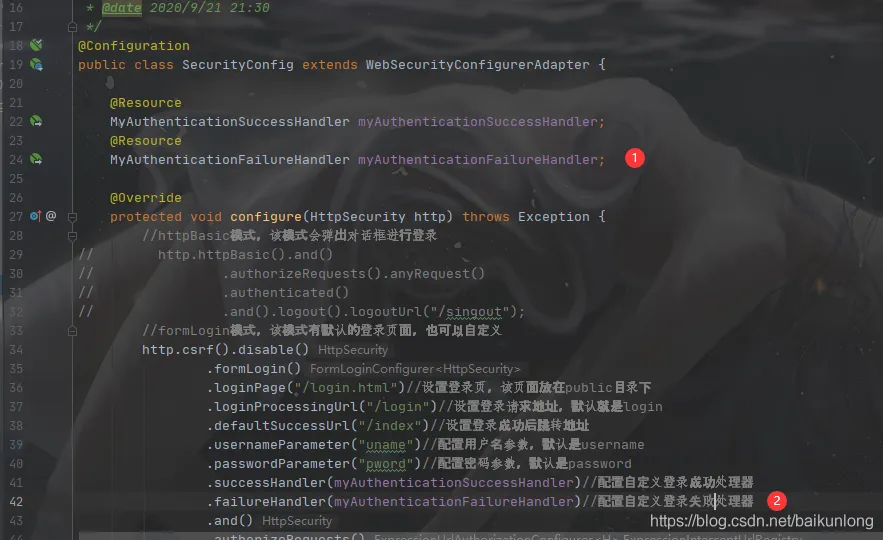
然后在配置类里配置失败处理器:
访问页面,登录失败后,即可看到:
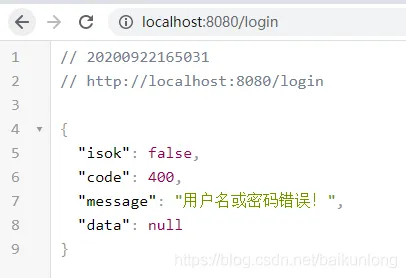
三、配置最大登录人数和是否阻止登录
编写session过期策略类:
package com.example.securityzimug.config.auth;
import com.fasterxml.jackson.databind.ObjectMapper;
import org.springframework.security.web.session.SessionInformationExpiredEvent;
import org.springframework.security.web.session.SessionInformationExpiredStrategy;
import javax.servlet.ServletException;
import java.io.IOException;
import java.util.HashMap;
/**
 * @author baikunlong
 * @date 2020/9/22 20:38
 */
public class MyExpiredSessionStrategy implements SessionInformationExpiredStrategy {
    private static ObjectMapper objectMapper=new ObjectMapper();
    @Override
    public void onExpiredSessionDetected(SessionInformationExpiredEvent sessionInformationExpiredEvent) throws IOException, ServletException {
        HashMap<String, Object> map = new HashMap<>();
        map.put("code",0);
        map.put("msg","您的账号在别处进行登录,被迫下线!");
        sessionInformationExpiredEvent.getResponse().setContentType("application/json;charset=UTF-8");
        sessionInformationExpiredEvent.getResponse().getWriter().write(objectMapper.writeValueAsString(map));
    }
}
然后在配置类里配置一下:
        //配置最大登录人数和是否阻止登录(false就是不阻止此次登录,挤掉上一个登陆的人)
        http.sessionManagement()
                .maximumSessions(1)
                .maxSessionsPreventsLogin(false)
                .expiredSessionStrategy(new MyExpiredSessionStrategy());
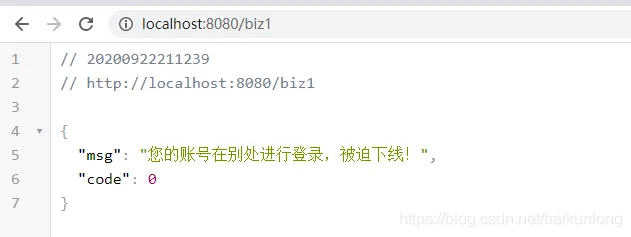
然后在两个浏览器登录,第一个登录的则会提示一下信息: