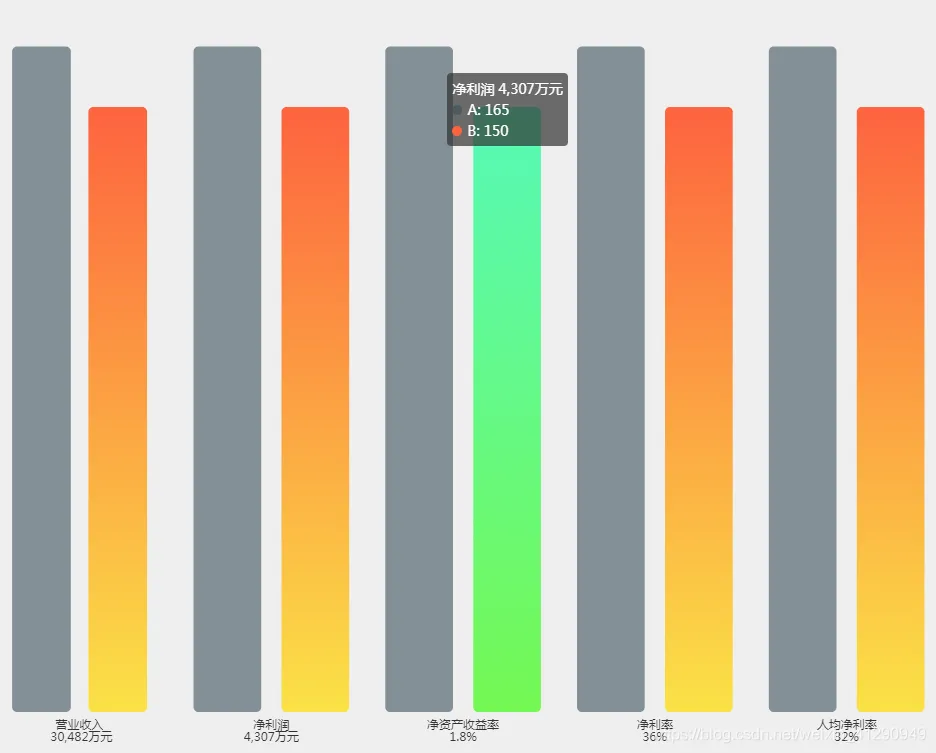
Echarts实战案例代码(2):柱图堆叠方案备选案例

简介: Echarts实战案例代码(2):柱图堆叠方案备选案例

20200617200230179.png


option = {
        tooltip: {
        trigger: 'axis'
    },
    title:[{
        text:"70%",
        left:"2%",
        right: '85%'
    },{
        text:"15%",
        left:"32%",
        right: '51%'
    },{
        text:"-1.46%",
        left:"17%",
        right: '68%'
    },{
        text:"6.2%",
         left:"47%",
        right: '34%'
    },{
        text:"5.3%",
         left:"62%",
        right: '17%'
    }],
        grid: [{
        left:"1%",
        right: '86%'
    }, {
        left:"17%",
        right: '68%'
    }, {
        left:"34%",
        right: '51%'
    }, {
        left:"51%",
        right: '34%'
    }, {
        left:"68%",
        right: '17%'
    }],
    xAxis: [{
        type: 'category',
        inverse: true,
        data: ['营业收入\n 30,482万元'],
        axisTick: {show: false},
        axisLine: {show: false},
        splitLine: {show: false},
        axisLabel: {
            formatter: function (value) {
                return value;
            }
        }
    },{
        type: 'category',
        inverse: true,
        data: ['净利润\n4,307万元'],
        gridIndex: 1,
        axisTick: {show: false},
        axisLine: {show: false},
        splitLine: {show: false},
        axisLabel: {
            formatter: function (value) {
                return value;
            }
        }
    },{
        type: 'category',
        inverse: true,
        data: ['净资产收益率\n1.8%'],
        gridIndex: 2,
        axisTick: {show: false},
        axisLine: {show: false},
        splitLine: {show: false},
        axisLabel: {
            formatter: function (value) {
                return value;
            }
        }
    },{
        type: 'category',
        inverse: true,
        data: ['净利率\n36%'],
        gridIndex: 3,
        axisTick: {show: false},
        axisLine: {show: false},
        splitLine: {show: false},
        axisLabel: {
            formatter: function (value) {
                return value;
            }
        }
    },{
        type: 'category',
        inverse: true,
        data: ['人均净利率\n32%'],
        gridIndex: 4,
        axisTick: {show: false},
        axisLine: {show: false},
        splitLine: {show: false},
        axisLabel: {
            formatter: function (value) {
                return value;
            }
        }
    }],
    yAxis: [{
        type: 'value',
        axisTick: {show: false},
        axisLine: {show: false},
        splitLine: {show: false},
        axisLabel: {show: false}
    },{
        type: 'value',
        gridIndex: 1,
        axisTick: {show: false},
        axisLine: {show: false},
        splitLine: {show: false},
        axisLabel: {show: false}
    },{
        type: 'value',
        gridIndex: 2,
        axisTick: {show: false},
        axisLine: {show: false},
        splitLine: {show: false},
        axisLabel: {show: false}
    },{
        type: 'value',
        gridIndex: 3,
        axisTick: {show: false},
        axisLine: {show: false},
        splitLine: {show: false},
        axisLabel: {show: false}
    },{
        type: 'value',
        gridIndex: 4,
        axisTick: {show: false},
        axisLine: {show: false},
        splitLine: {show: false},
        axisLabel: {show: false}
    }],
   series: [{
            name: 'A',
            type: 'bar',
              barWidth: "40%",
                itemStyle: {
                    barBorderRadius: 5,
                    color: "rgba(59,80,91,.6)"
                },
                emphasis: {
                    itemStyle: {
                        color: new echarts.graphic.LinearGradient(0, 0, 0, 1, [
                                {offset: 0, color: '#fba145'},
                                {offset: 0.7, color: '#fed53f'},
                                {offset: 1, color: '#fbe247'}
                            ]
                        )
                    }
                },
            data: [165],
        },
        {
            name: 'B',
            type: 'bar',
             barWidth: "40%",
                itemStyle: {
                    barBorderRadius: 5,
                    color: new echarts.graphic.LinearGradient(0, 0, 0, 1, [
                                {offset: 0, color: '#fd633f'},
                                {offset: 1, color: '#fbe247'}
                            ]
                        )
                },
                emphasis: {
                    itemStyle: {
                        color: new echarts.graphic.LinearGradient(0, 0, 0, 1, [
                                {offset: 0, color: '#fba145'},
                                {offset: 0.7, color: '#fed53f'},
                                {offset: 1, color: '#fbe247'}
                            ]
                        )
                    }
                },
            data: [150]
        }, {
            name: 'A',
            type: 'bar',
            barWidth: "40%",
                itemStyle: {
                    barBorderRadius: 5,
                    color: "rgba(59,80,91,.6)"
                },
                emphasis: {
                    itemStyle: {
                        color: new echarts.graphic.LinearGradient(0, 0, 0, 1, [
                                {offset: 0, color: '#fba145'},
                                {offset: 0.7, color: '#fed53f'},
                                {offset: 1, color: '#fbe247'}
                            ]
                        )
                    }
                },
            data: [165],
            xAxisIndex: 1,
            yAxisIndex: 1
        },
        {
            name: 'B',
            type: 'bar',
            barWidth: "40%",
                itemStyle: {
                    barBorderRadius: 5,
                    color: new echarts.graphic.LinearGradient(0, 0, 0, 1, [
                                {offset: 0, color: '#fd633f'},
                                {offset: 1, color: '#fbe247'}
                            ]
                        )
                },
                emphasis: {
                    itemStyle: {
                        color: new echarts.graphic.LinearGradient(0, 0, 0, 1, [
                                {offset: 0, color: '#fba145'},
                                {offset: 1, color: '#fbe247'}
                            ]
                        )
                    }
                },
            data: [150],
            xAxisIndex: 1,
            yAxisIndex: 1
        }, {
            name: 'A',
             barWidth: "40%",
                itemStyle: {
                    barBorderRadius: 5,
                    color: "rgba(59,80,91,.6)"
                },
                emphasis: {
                    itemStyle: {
                        color: new echarts.graphic.LinearGradient(0, 0, 0, 1, [
                                {offset: 0, color: '#fba145'},
                                {offset: 0.7, color: '#fed53f'},
                                {offset: 1, color: '#fbe247'}
                            ]
                        )
                    }
                },
            type: 'bar',
            data: [165],
            xAxisIndex: 2,
            yAxisIndex: 2
        },
        {
            name: 'B',
            type: 'bar',
             barWidth: "40%",
                itemStyle: {
                    barBorderRadius: 5,
                    color: new echarts.graphic.LinearGradient(0, 0, 0, 1, [
                                {offset: 0, color: '#56f9b8'},
                                {offset: 1, color: '#74f853'}
                            ]
                        )
                },
                emphasis: {
                    itemStyle: {
                        color: new echarts.graphic.LinearGradient(0, 0, 0, 1, [
                                {offset: 0, color: '#fba145'},
                                {offset: 0.7, color: '#fed53f'},
                                {offset: 1, color: '#fbe247'}
                            ]
                        )
                    }
                },
            data: [150],
            xAxisIndex: 2,
            yAxisIndex: 2
        }, {
            name: 'A',
            type: 'bar',
             barWidth: "40%",
                itemStyle: {
                    barBorderRadius: 5,
                    color: "rgba(59,80,91,.6)"
                },
                emphasis: {
                    itemStyle: {
                        color: new echarts.graphic.LinearGradient(0, 0, 0, 1, [
                                {offset: 0, color: '#fba145'},
                                {offset: 0.7, color: '#fed53f'},
                                {offset: 1, color: '#fbe247'}
                            ]
                        )
                    }
                },
            data: [165],
            xAxisIndex: 3,
            yAxisIndex: 3
        },
        {
            name: 'B',
            type: 'bar',
             barWidth: "40%",
                itemStyle: {
                    barBorderRadius: 5,
                    color: new echarts.graphic.LinearGradient(0, 0, 0, 1, [
                                {offset: 0, color: '#fd633f'},
                                {offset: 1, color: '#fbe247'}
                            ]
                        )
                },
                emphasis: {
                    itemStyle: {
                        color: new echarts.graphic.LinearGradient(0, 0, 0, 1, [
                                {offset: 0, color: '#fba145'},
                                {offset: 0.7, color: '#fed53f'},
                                {offset: 1, color: '#fbe247'}
                            ]
                        )
                    }
                },
            data: [150],
            xAxisIndex: 3,
            yAxisIndex: 3
        }, {
            name: 'A',
            type: 'bar',
             barWidth: "40%",
                itemStyle: {
                    barBorderRadius: 5,
                    color: "rgba(59,80,91,.6)"
                },
                emphasis: {
                    itemStyle: {
                        color: new echarts.graphic.LinearGradient(0, 0, 0, 1, [
                                {offset: 0, color: '#fba145'},
                                {offset: 0.7, color: '#fed53f'},
                                {offset: 1, color: '#fbe247'}
                            ]
                        )
                    }
                },
            data: [165],
            xAxisIndex: 4,
            yAxisIndex: 4
        },
        {
            name: 'B',
            type: 'bar',
             barWidth: "40%",
                itemStyle: {
                    barBorderRadius: 5,
                    color: new echarts.graphic.LinearGradient(0, 0, 0, 1, [
                                {offset: 0, color: '#fd633f'},
                                {offset: 1, color: '#fbe247'}
                            ]
                        )
                },
                emphasis: {
                    itemStyle: {
                        color: new echarts.graphic.LinearGradient(0, 0, 0, 1, [
                                {offset: 0, color: '#fba145'},
                                {offset: 0.7, color: '#fed53f'},
                                {offset: 1, color: '#fbe247'}
                            ]
                        )
                    }
                },
            data: [150],
            xAxisIndex: 4,
            yAxisIndex: 4
        }
    ]
};

相关文章
|
搜索推荐 前端开发 数据可视化
【优秀python web毕设案例】基于协同过滤算法的酒店推荐系统,django框架+bootstrap前端+echarts可视化,有后台有爬虫
本文介绍了一个基于Django框架、协同过滤算法、ECharts数据可视化以及Bootstrap前端技术的酒店推荐系统,该系统通过用户行为分析和推荐算法优化,提供个性化的酒店推荐和直观的数据展示,以提升用户体验。
793 1
【优秀python web毕设案例】基于协同过滤算法的酒店推荐系统,django框架+bootstrap前端+echarts可视化,有后台有爬虫
|
XML 前端开发 数据格式
echarts柱图前后端代码SpringCloud+Vue3
245 1
|
数据可视化 数据挖掘
ECharts综合案例一:近七天跑步数据
使用ECharts进行一周跑步数据分析,通过雷达图展示多维度指标(如距离、速度、时间),颜色对比体现个人与平均表现。折线图则清晰显示每日里程趋势,代码示例展示了自定义的`radar`和`line`图表配置。图表交互性强,支持点击高亮,动画流畅,提供完整代码资源。#ECharts #跑步数据 #数据可视化
453 3
ECharts综合案例一:近七天跑步数据
|
数据采集 自然语言处理 数据可视化
ECharts 词云案例四—电影《千与千寻》部分短评
**使用ECharts和电影《千与千寻》短评创建的词云案例展示了数据可视化的力量。通过Python处理评论,提取关键词并计算频率,利用jieba和WordCloud生成词云,ECharts进一步增强了视觉效果。词云突出了角色如“千寻”、“无脸男”及关键词“勇气”、“成长”,揭示了观众的情感共鸣。示例代码和资源可在链接中获取。**
292 0
 ECharts 词云案例四—电影《千与千寻》部分短评
|
前端开发 数据可视化 JavaScript
【揭秘神器】如何用Pyecharts轻松召唤出Echarts?只需几行Python代码,让你的数据瞬间生动起来!
【8月更文挑战第21天】Pyecharts是一款基于Python的图表生成库,利用Echarts强大的JavaScript可视化能力,让开发者无需编写前端代码即可在Python环境中创建美观图表。本文通过实例演示如何安装Pyecharts并生成一个展示城市气温分布的柱状图,包括基本图表生成及自定义样式设置,如颜色调整、图例显示等,最终将图表嵌入HTML文件展示,适合各水平开发者快速掌握数据可视化技能。
459 0
|
前端开发
大屏自适应/适配方案【详解】(echarts自适配、rem、flexible.js、vscode中px2rem插件自动计算rem)
1789 0
|
小程序 JavaScript
微信小程序使用echarts图表(ec-canvas)
这篇文章介绍了在微信小程序中使用`ec-canvas`集成echarts图表的方法,包括解决加载时报错的问题、配置图表组件、以及在小程序页面中引入和使用这些图表组件的步骤。
2174 1
微信小程序使用echarts图表(ec-canvas)
|
小程序 前端开发 JavaScript
微信小程序图表制作利器:ECharts组件的使用与技巧
1430 1
|
前端开发 数据可视化 JavaScript
Echarts如何实现多图表缩放和自适应?附源码
|
Web App开发 数据可视化 前端开发
Echart的使用初体验,Echarts的基本使用及语法格式,简单图表绘制和使用及图例添加【学习笔记】
本文介绍了ECharts的基本使用和语法格式,包括如何引入ECharts、创建容器、初始化echarts实例对象、配置option参数和一些基础图表的绘制方法。文章还提供了简单图表绘制和使用图例添加的示例代码,以及对ECharts特性和优势的概述。
Echart的使用初体验,Echarts的基本使用及语法格式,简单图表绘制和使用及图例添加【学习笔记】

热门文章

最新文章