#使用方法:使用generator插件可以帮助我们生成model,mapper等文件,因而简化开发流程,加快开发速度,以下是使用方法:
##在pom.xml中添加插件
<! - 代码自动生成插件 - >
      <! - 使用完必须注释掉下面这个插件 - >
      <plugin>
      <groupId> org.mybatis.generator </ groupId>
      <artifactId> mybatis-generator-maven-plugin </ artifactId>
      <version > 1.3.5 </ version>
      <configuration>
      <verbose> true </ verbose>
      <overwrite> true </ overwrite>
      </ configuration>
      <executions>
      <execution>
      <id>生成MyBatis构件</ id>
      <goals>
      <goal>生成</ goal>
      </ goals>
      </ execution>
      </ executions>
      <dependencies>
      <dependency>
      <groupId>org.mybatis.generator</groupId>
      <artifactId>mybatis-generator-core</artifactId>
      <version>1.3.5</version>
      </dependency>
      </dependencies>
      </plugin>
<!-- 注释 -->
    <commentGenerator>
        <!-- 是否生成注释代时间戳 -->
        <property name="suppressDate" value="true"/>
        <!-- 是否去除自动生成的注释 true:是 : false:否 -->
        <property name="suppressAllComments" value="true"/>
    </commentGenerator>
    <!-- JDBC连接 -->
    <jdbcConnection
            driverClass="${spring.datasource.driver-class-name}"
            connectionURL="${spring.datasource.url}"
            userId="${spring.datasource.username}"
            password="${spring.datasource.password}">
    </jdbcConnection>
    <!-- 非必需,类型处理器,在数据库类型和java类型之间的转换控制-->
    <!-- 默认false,把JDBC DECIMAL 和 NUMERIC 类型解析为 Integer,为 true时把JDBC DECIMAL 和
     NUMERIC 类型解析为java.math.BigDecimal -->
    <javaTypeResolver>
        <!-- 是否使用bigDecimal, false可自动转化以下类型(Long, Integer, Short, etc.) -->
        <property name="forceBigDecimals" value="false" />
    </javaTypeResolver>
    <!-- 生成实体类地址 -->
    <javaModelGenerator targetPackage="com.example.myproject.model" targetProject="src/main/java">
        <!-- 从数据库返回的值被清理前后的空格 -->
        <property name="trimStrings" value="true" />
        <!-- enableSubPackages:是否让schema作为包的后缀 -->
        <property name="enableSubPackages" value="false" />
    </javaModelGenerator>
    <!-- 生成mapper xml文件 -->
    <sqlMapGenerator targetPackage="mapper"  targetProject="src/main/resources">
        <!-- enableSubPackages:是否让schema作为包的后缀 -->
        <property name="enableSubPackages" value="false" />
    </sqlMapGenerator>
    <!-- 生成mapper xml对应Client-->
    <javaClientGenerator targetPackage="com.example.myproject.mapper" targetProject="src/main/java" type="XMLMAPPER">
        <!-- enableSubPackages:是否让schema作为包的后缀 -->
        <property name="enableSubPackages" value="false" />
    </javaClientGenerator>
    <!-- 配置表信息 -->
    <!-- schema即为数据库名 tableName为对应的数据库表 domainObjectName是要生成的实体类 enable*ByExample
        是否生成 example类 -->
    <table schema="user" tableName="user"
    domainObjectName="User" enableCountByExample="false"
    enableDeleteByExample="false" enableSelectByExample="false"
    enableUpdateByExample="false">
    </table>
    <!--<table schema="blog" tableName="article"-->
    <!--domainObjectName="Article" enableCountByExample="false"-->
    <!--enableDeleteByExample="false" enableSelectByExample="false"-->
    <!--enableUpdateByExample="false">-->
    <!--</table>-->
    <!--<table schema="blog" tableName="document"-->
    <!--domainObjectName="Document" enableCountByExample="false"-->
    <!--enableDeleteByExample="false" enableSelectByExample="false"-->
    <!--enableUpdateByExample="false">-->
    <!--</table>-->
    <!--<table schema="blog" tableName="tag"-->
    <!--domainObjectName="Tag" enableCountByExample="false"-->
    <!--enableDeleteByExample="false" enableSelectByExample="false"-->
    <!--enableUpdateByExample="false">-->
    <!--</table>-->
</context>
```
在application.properties中添加以下部分
一定要注意jdbc.location中的路径一定不要包含中文
#数据库设置
spring.datasource.url=jdbc:mysql://localhost:3306/user?characterEncoding=UTF-8&useUnicode=true&useSSL=false
spring.datasource.username=root
spring.datasource.password=123456
spring.datasource.driver-class-name=com.mysql.jdbc.Driver
Mybatis 配置
mybatis.typeAliasesPackage=com.example.myproject.domain
mybatis.mapperLocations=classpath:mapper/*.xml
jdbc.location=F:/MyDownloads/mysql-connector-java-5.1.39-bin.jar
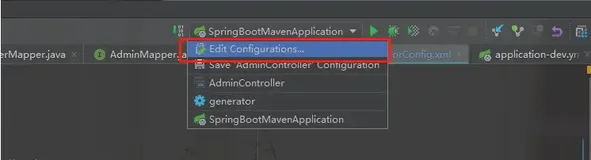
最后点击run->edit configuration->点击+号新建一个maven
点击apply,ok,然后点击run generator运行即可(一定要自己提前建立好对应的文件夹)