Spring Cloud【Finchley】专栏
如果还没有系统的学过Spring Cloud ,先到我的专栏去逛逛吧
概述
点餐系统,重点体会使用Spring Cloud微服务组件如何拆分系统
优秀的系统都是演进而来的,不要害怕出错,大胆折腾吧。
我们先来针对商品微服务进行设计和构建
版本说明
- spring boot : 2.0.3.RELEASE
- spring cloud: Finchley.RELEASE
搭建Eureka Server注册中心
如果没有了解过Eureka ,建议先学习下
Spring Cloud【Finchley】-02服务发现与服务注册Eureka + Eureka Server的搭建
Spring Cloud【Finchley】-13 Eureka Server HA高可用 2个/3个节点的搭建及服务注册调用
工程结构
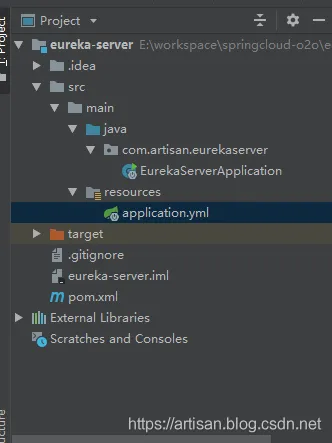
Step1. pom添加依赖
<?xml version="1.0" encoding="UTF-8"?>
<project xmlns="http://maven.apache.org/POM/4.0.0" xmlns:xsi="http://www.w3.org/2001/XMLSchema-instance"
         xsi:schemaLocation="http://maven.apache.org/POM/4.0.0 http://maven.apache.org/xsd/maven-4.0.0.xsd">
    <modelVersion>4.0.0</modelVersion>
    <groupId>com.artisan</groupId>
    <artifactId>eureka-server</artifactId>
    <version>0.0.1-SNAPSHOT</version>
    <name>eureka-server</name>
    <description>eureka server</description>
    <parent>
        <groupId>org.springframework.boot</groupId>
        <artifactId>spring-boot-starter-parent</artifactId>
        <version>2.0.3.RELEASE</version>
        <relativePath/> <!-- lookup parent from repository -->
    </parent>
    <properties>
        <project.build.sourceEncoding>UTF-8</project.build.sourceEncoding>
        <project.reporting.outputEncoding>UTF-8</project.reporting.outputEncoding>
        <java.version>1.8</java.version>
   </properties>
    <dependencies>
        <dependency>
            <groupId>org.springframework.cloud</groupId>
            <artifactId>spring-cloud-starter-netflix-eureka-server</artifactId>
        </dependency>
    </dependencies>
    <dependencyManagement>
        <dependencies>
            <dependency>
                <groupId>org.springframework.cloud</groupId>
                <artifactId>spring-cloud-dependencies</artifactId>
                <version>Finchley.RELEASE</version>
                <type>pom</type>
                <scope>import</scope>
            </dependency>
        </dependencies>
    </dependencyManagement>
    <build>
        <plugins>
            <plugin>
                <groupId>org.springframework.boot</groupId>
                <artifactId>spring-boot-maven-plugin</artifactId>
            </plugin>
        </plugins>
    </build>
</project>
Step2.application.yml 配置Eureka的信息
# app name
spring:
  application:
    name: eureka-server
# 启动端口
server:
  port: 8761
# 单节点的eureka (后续会改成集群模式)
eureka:
  client:
    # 是否将自己注册到Eureka Server ,默认为true.因为当前应用是作为Eureka Server用,因此设置为false
    register-with-eureka: false
    # eureka.client.fetch-registry:是否从Eureka Server获取注册信息,默认为true.
    # 因为我们这里目前是个单节点的Eureka Server ,不需要与其他的Eureka Server节点的数据,因此设为false
    fetch-registry: false
    # 置与Eureka Server交互的地址,查询服务和注册服务都依赖这个地址。
    # 默认为 http://localhost:8761/eureka ,多个地址可使用 , 分隔
    service-url:
      defaultZone: http://localhost:8761/eureka
Step3. 启动类增加@EnableEurekaServer
package com.artisan.eurekaserver;
import org.springframework.boot.SpringApplication;
import org.springframework.boot.autoconfigure.SpringBootApplication;
import org.springframework.cloud.netflix.eureka.server.EnableEurekaServer;
@SpringBootApplication
@EnableEurekaServer
public class EurekaServerApplication {
    public static void main(String[] args) {
        SpringApplication.run(EurekaServerApplication.class, args);
    }
}
Step4 启动测试
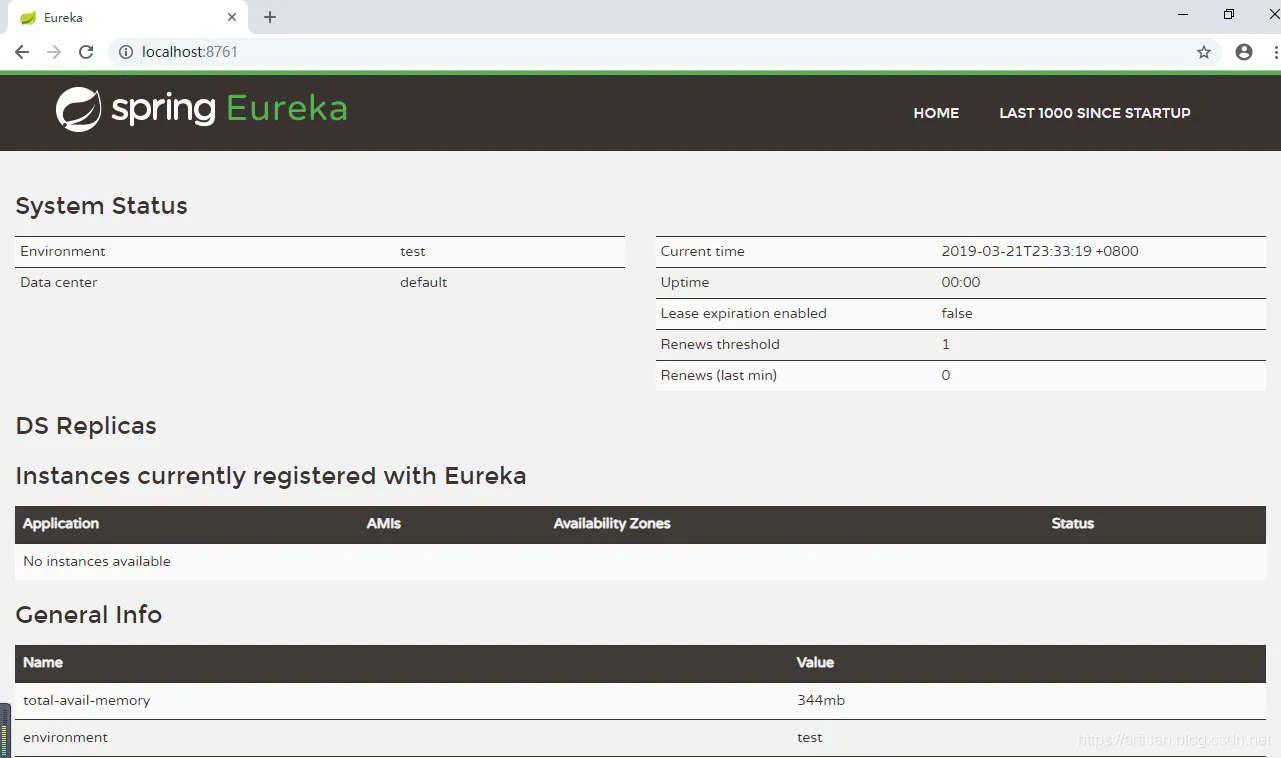
启动application,访问 http://localhost:8761/
Github地址
https://github.com/yangshangwei/springcloud-o2o/tree/master/eureka-server
数据模型-商品微服务
我们先来整理商品微服务模块的库表设计。
- 商品目录
- 商品
商品要归属于某个商品目录,我们通过在category_type字段来将产品product和产品目录product_category关联起来。
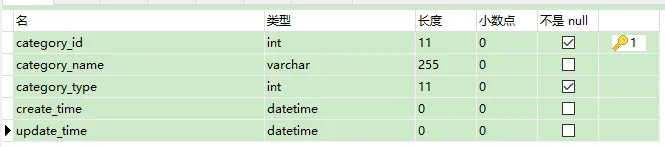
-- ----------------------------
-- Table structure for product_category
-- ----------------------------
DROP TABLE IF EXISTS `product_category`;
CREATE TABLE `product_category` (
  `category_id` int(11) NOT NULL AUTO_INCREMENT,
  `category_name` varchar(255) DEFAULT NULL COMMENT '产品目录名称',
  `category_type` int(11) NOT NULL COMMENT '产品目录类型,用于存储特定类型的商品',
  `create_time` datetime DEFAULT NULL ON UPDATE CURRENT_TIMESTAMP,
  `update_time` datetime DEFAULT NULL ON UPDATE CURRENT_TIMESTAMP,
  PRIMARY KEY (`category_id`)
) ENGINE=InnoDB AUTO_INCREMENT=4 DEFAULT CHARSET=utf8mb4;
-- ----------------------------
-- Records of product_category
-- ----------------------------
INSERT INTO `product_category` VALUES ('1', '热饮', '99', '2019-03-20 22:47:41', '2019-03-20 22:47:41');
INSERT INTO `product_category` VALUES ('2', '酒水', '98', '2019-03-20 22:48:13', '2019-03-20 22:48:13');
INSERT INTO `product_category` VALUES ('3', '甜品', '97', '2019-03-20 22:47:51', '2019-03-20 22:47:51');
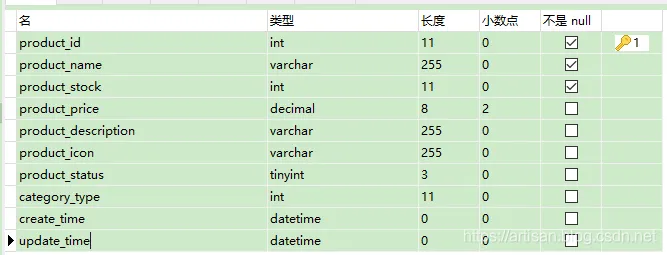
-- ----------------------------
-- Table structure for product
-- ----------------------------
DROP TABLE IF EXISTS `product`;
CREATE TABLE `product` (
  `product_id` int(11) NOT NULL AUTO_INCREMENT,
  `product_name` varchar(255) NOT NULL,
  `product_stock` int(11) NOT NULL COMMENT '库存',
  `product_price` decimal(8,2) DEFAULT NULL,
  `product_description` varchar(255) DEFAULT NULL,
  `product_icon` varchar(255) DEFAULT NULL,
  `product_status` tinyint(3) DEFAULT '0' COMMENT '商品状态, 0正常  1下架',
  `category_type` int(11) DEFAULT NULL COMMENT '产品目录',
  `create_time` datetime DEFAULT NULL ON UPDATE CURRENT_TIMESTAMP,
  `update_time` datetime DEFAULT NULL ON UPDATE CURRENT_TIMESTAMP,
  PRIMARY KEY (`product_id`)
) ENGINE=InnoDB AUTO_INCREMENT=4 DEFAULT CHARSET=utf8mb4;
-- ----------------------------
-- Records of product
-- ----------------------------
INSERT INTO `product` VALUES ('1', '拿铁咖啡', '99', '20.99', '咖啡,提神醒脑', null, '0', '99', '2019-03-20 22:49:47', '2019-03-20 22:49:50');
INSERT INTO `product` VALUES ('2', '青岛纯生', '200', '7.50', '啤酒', null, '0', '98', '2019-03-20 22:50:48', '2019-03-20 22:50:55');
INSERT INTO `product` VALUES ('3', '卡布奇诺', '87', '15.00', '卡布奇诺的香味', null, '0', '99', '2019-03-20 22:51:53', '2019-03-20 22:51:56');
Product 微服务构建
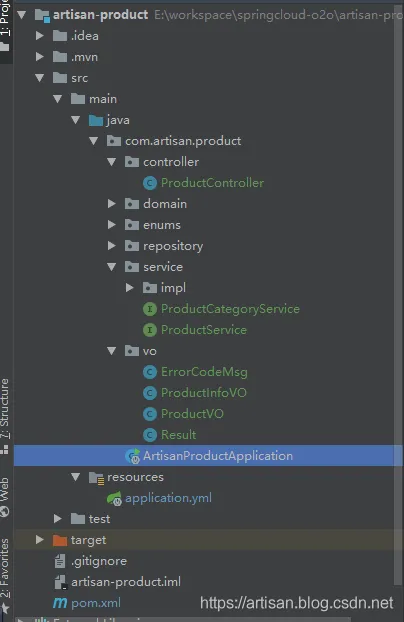
新建工程作为 Eureka Client,注册到Eureka Server上
Step1. pom.xml 添加依赖
    <dependency>
            <groupId>org.springframework.cloud</groupId>
            <artifactId>spring-cloud-starter-netflix-eureka-client</artifactId>
        </dependency>
        <dependency>
            <groupId>org.springframework.boot</groupId>
            <artifactId>spring-boot-starter-web</artifactId>
        </dependency>
Step2 启动类增加@EnableEurekaClient注解
package com.artisan.product;
import org.springframework.boot.SpringApplication;
import org.springframework.boot.autoconfigure.SpringBootApplication;
import org.springframework.cloud.netflix.eureka.EnableEurekaClient;
@SpringBootApplication
@EnableEurekaClient
public class ArtisanProductApplication {
    public static void main(String[] args) {
        SpringApplication.run(ArtisanProductApplication.class, args);
    }
}
Step3 .启动 验证
先启动eureka-server这个服务,然后启动 artisan-product这个服务。访问eureka的地址 http://localhost:8761/

说明成功注册到了Eureka Server上
API-约定前后台数据交互格式
请求Get方式 - /product/list
返回:
{
  "code":0,
  "msg":"成功",
  "data":[
    {
      "name":"商品目录名称",
      "type":"商品目录类型",
      "product":[
        {
          "id":"商品id",
            "name":"商品名称",
          "price": 100,
          "description":"商品描述",
          "icon":"商品图片地址"
        }
      ]
    }
  ]
}
[] 表示数组,可以返回多条
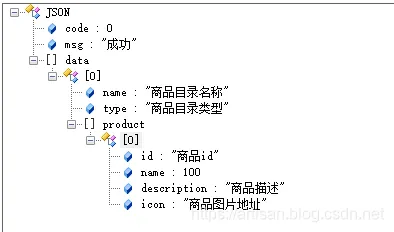
约定查询 只查询上架的商品。
分析上述格式,结合我们的数据模型,可知会涉及到商品目录及商品两个表。
pom.xml引入依赖
- 持久层使用 spring-data-jpa
- 数据库使用mysql
- 为了简化代码,引入了lombok (IDEA记得安装lombok插件)
  <dependency>
            <groupId>org.springframework.boot</groupId>
            <artifactId>spring-boot-starter-data-jpa</artifactId>
        </dependency>
        <dependency>
            <groupId>mysql</groupId>
            <artifactId>mysql-connector-java</artifactId>
        </dependency>
        <dependency>
            <groupId>org.projectlombok</groupId>
            <artifactId>lombok</artifactId>
        </dependency>
配置文件增加数据库配置
server:
  port: 8080
spring:
  application:
    name: artisan-product
# datasource
  datasource:
    driver-class-name: com.mysql.jdbc.Driver
    url: jdbc:mysql://localhost:3306/o2o?serverTimezone=UTC&useUnicode=true&characterEncoding=utf8&useSSL=false
    username: root
    password: root
  # jpa 输出sql
  jpa:
    show-sql: true
# Eureka
eureka:
  client:
    service-url:
      defaultZone: http://localhost:8761/eureka/
实体类 Product
库表建好了,那接下来就要建立和库表对应的实体类了
package com.artisan.product.domain;
import lombok.Data;
import javax.persistence.*;
import java.math.BigDecimal;
import java.util.Date;
// lombok
@Data
// @Table指定这个实体对应数据库的表名
// product_info ProductInfo这种格式的可以省略不写 ,如果 实体类叫product , 表名叫t_product 那么就要显式指定了
@Table(name = "product")
// @Entity表示这个类是一个实体类
@Entity
public class Product {
    // @Id标识主键 及主键生成策略
    @Id
    @GeneratedValue(strategy = GenerationType.IDENTITY)
    private String productId;
    private String productName;
    private Integer productStock;
    private BigDecimal productPrice;
    private String productDescription;
    private String productIcon;
    private Integer productStatus;
    private Integer categoryType;
    private Date createTime;
    private Date updateTime;
}
Dao层 ProductRepository
接口, 继承 JpaRepository<T, ID>
package com.artisan.product.repository;
import com.artisan.product.domain.Product;
import org.springframework.data.jpa.repository.JpaRepository;
import java.util.List;
/**
 * JpaRepository<Product, String>  第一个参数为具体的domain对象,第二个参数为主键类型
 */
public interface ProductRepository  extends JpaRepository<Product, String> {
    // 根据产品状态查询产品
    List<Product>  findByProductStatus(Integer productStatus);
}
单元测试
在ProductRepository 中 右键 – Go To --Test --Create New Test 新建个单元测试
Spring Boot的单元测试别忘了这俩注解
@RunWith(SpringRunner.class)
@SpringBootTest
或者继承ArtisanProductApplicationTests ,加上@Component注解
@Component
public class ProductCategoryServiceImplTest extends ArtisanProductApplicationTests
package com.artisan.product.repository;
import com.artisan.product.domain.Product;
import org.junit.Assert;
import org.junit.Test;
import org.junit.runner.RunWith;
import org.springframework.beans.factory.annotation.Autowired;
import org.springframework.boot.test.context.SpringBootTest;
import org.springframework.test.context.junit4.SpringRunner;
import java.util.List;
import static org.junit.Assert.*;
@RunWith(SpringRunner.class)
@SpringBootTest
public class ProductRepositoryTest {
    @Autowired
    ProductRepository productRepository;
    @Test
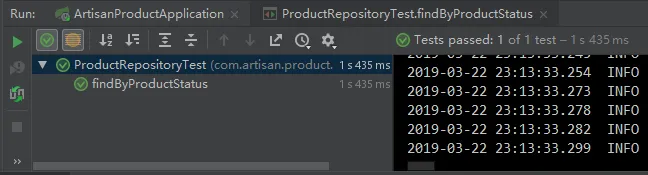
    public void findByProductStatus() {
       List<Product> list =  productRepository.findByProductStatus(0);
        Assert.assertEquals(3,list.size());
    }
}
结合数据库中的数据