概述
前面几篇博文介绍了 Redis主从 、 Redis哨兵模式 , 现在我们来了解下更加牛逼的Redis集群模式。
集群的主要目的是解决可扩展性。
Redis集群通过Hash槽、查询路由、节点互联的混合模式、保证线性可扩展性、可用性、数据一致性
Redis集群实现的核心思想 通过消息的交互(Gossip【也称“病毒感染算法”、“谣言传播算法”】)实现去中心化(指的是集群自身的实现,不是指数据),通过Hash槽分配,实现集群线性可拓展。
官方文档
英文: https://redis.io/topics/cluster-tutorial
中文翻译: http://www.redis.cn/topics/cluster-tutorial.html
Redis集原理
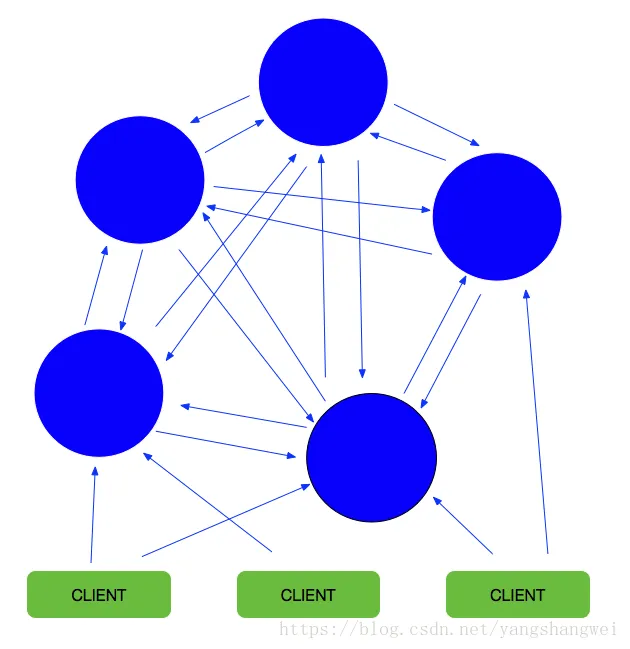
蓝色圆圈表示redis服务节点,它们都是两两相连,所以只要客户端能连上一条redis服务器就可以对其他的redis服务进行读写操作。
Redis集群(redis-cluster)是在3.0及其之后的版本开始支持的。
Redis 集群中内置了 16384个哈希槽,当需要在 Redis 集群中放置一个 key-value 时,redis 先对 key 使用 crc16 算法算出一个结果,然后把结果对 16384 求余数,这样每个 key 都会对应一个编号在 0-16383 之间的哈希槽,redis 会根据节点数量大致均等的将哈希槽映射到不同的节点。
Redis集群服务器之间通过互相的ping-pong判断是否节点可以连接上。如果有一半以上的节点去ping一个节点的时候没有回应,集群就认为这个节点宕机了。
假设集群包含 A 、 B 、 C 、 A1 、 B1 、 C1 六个节点, 其中 A 、B 、C 为主节点, A1 、B1 、C1 为A,B,C的从节点。 如果节点 B 和 B1 都下线的话, Redis 集群还是会停止运作。
只要集群中大多数Master可达、且失效的Master至少有一个Slave可达,即集群非Fail状态,集群都是可用的。
集群中每个Master node负责存储数据、集群状态,包括slots与nodes对应关系。Master nodes能够自动发现其他nodes,检测failure节点,当某个Master节点失效时,集群能将核实的Slave提升为Master
环境介绍
- 3台主机部署在vmware中:
192.168.31.56192.168.31.66192.168.31.176 - 操作系统 Centos6.5
- Redis版本 4.0.11
- 防火墙为了方便测试已经关闭
- Redis以及Redis Cluster依赖的运行环境已经安装完成
安装Redis
安装Redis需要c语言的编译环境,所以需要安装gcc.
如何安装Redis请参考 Redis-02Redis在linux下的安装及常见问题
为了演示集群的搭建,方便起见,把安装在了root用户下,如果是商用环境,不建议装在root用户下
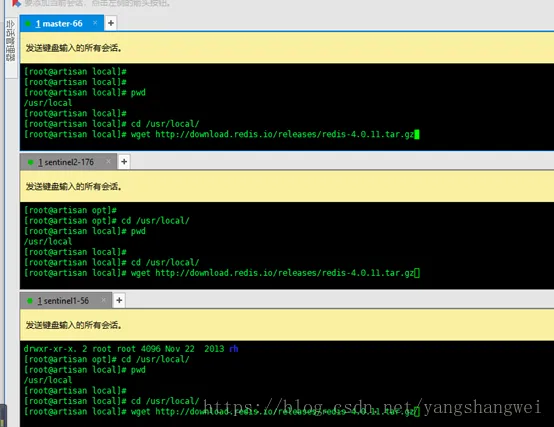
192.168.31.56 192.168.31.66 192.168.31.176 三台主机均需要安装Redis, 执行相同的命令 ,均将redis安装在了/usr/local/目录下。 不能访问外网的话,下载后上传到该目录下即可。
[root@artisan local]# cd /usr/local/
[root@artisan local]# wget http://download.redis.io/releases/redis-4.0.11.tar.gz
解压 安装
[root@artisan local]# tar -xvzf redis-4.0.11.tar.gz
 [root@artisan local]# cd redis-4.0.11
 [root@artisan redis-4.0.11]# make
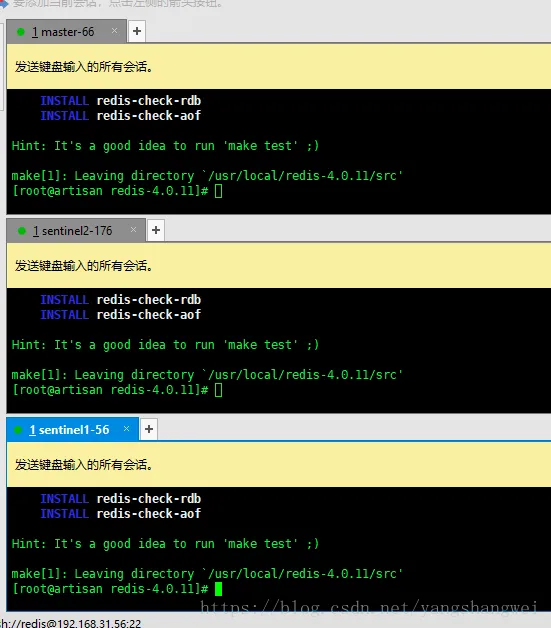
台主机上的redis分别整理目录
[root@artisan redis-4.0.11]# mkdir etc bin
[root@artisan redis-4.0.11]# mv redis.conf etc/
[root@artisan redis-4.0.11]# cd src
[root@artisan src]# mv mkreleasehdr.sh  redis-benchmark  redis-check-aof  redis-check-rdb  redis-cli  redis-sentinel  redis-server  redis-trib.rb ../bin
端口规划
| ip | 端口 |
| 192.168.31.66 | 7000 / 7001 |
| 192.168.31.56 | 7002 / 7003 |
| 192.168.31.176 | 7004 / 7005 |
端口任意,只要没有被占用即可。
三台主机上分别创建对应的目录
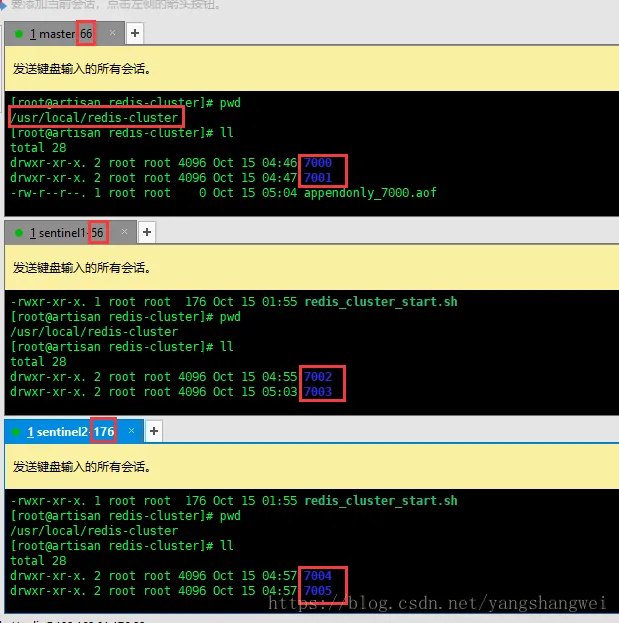
复制和修改配置文件
现在将刚才安装的redis目录下的配置文件redis.conf复制到每台主机对应端口目录下
66主机
[root@artisan ~]# cp /usr/local/redis-4.0.11/etc/redis.conf  /usr/local/redis-cluster/7000
[root@artisan ~]# cp /usr/local/redis-4.0.11/etc/redis.conf  /usr/local/redis-cluster/7001
56主机
[root@artisan ~]# cp /usr/local/redis-4.0.11/etc/redis.conf  /usr/local/redis-cluster/7002
[root@artisan ~]# cp /usr/local/redis-4.0.11/etc/redis.conf  /usr/local/redis-cluster/7003
176主机
[root@artisan ~]# cp /usr/local/redis-4.0.11/etc/redis.conf  /usr/local/redis-cluster/7004
[root@artisan ~]# cp /usr/local/redis-4.0.11/etc/redis.conf  /usr/local/redis-cluster/7005
然后对6个配置文件redis.conf注意修改,注意区分端口
# 端口号
port 7000
# 修改为本地ip,需要改为其他节点机器可访问的ip,否则创建集群时无法访问对应的端口,无法创建集群
bind  本地ip
# 后台启动
daemonize yes
# 开启集群,特别要注意开启集群,把注释#去掉
cluster-enabled yes
#集群节点配置文件,首次启动时自动生成
cluster-config-file nodes-7000.conf
# 集群连接超时时间,默认15秒
cluster-node-timeout 5000
# 进程pid的文件位置
pidfile /var/run/redis-7000.pid
# 开启aof
appendonly yes
# aof文件路径
appendfilename "appendonly-7000.aof"
# rdb文件路径
dbfilename dump-7000.rdb
这里列出一个7000端口的配置文件 ,过滤了空行和注释行
[root@artisan 7000]# grep -Ev "^$|^[#;]" redis.conf
bind 192.168.31.66
protected-mode yes
port 7000
tcp-backlog 511
timeout 0
tcp-keepalive 300
daemonize yes
supervised no
pidfile /var/run/redis_7000.pid
loglevel notice
logfile ""
databases 16
always-show-logo yes
save 900 1
save 300 10
save 60 10000
stop-writes-on-bgsave-error yes
rdbcompression yes
rdbchecksum yes
dbfilename dump_7000.rdb
dir ./
slave-serve-stale-data yes
slave-read-only yes
repl-diskless-sync no
repl-diskless-sync-delay 5
repl-disable-tcp-nodelay no
slave-priority 100
lazyfree-lazy-eviction no
lazyfree-lazy-expire no
lazyfree-lazy-server-del no
slave-lazy-flush no
appendonly yes
appendfilename "appendonly_7000.aof"
appendfsync everysec
no-appendfsync-on-rewrite no
auto-aof-rewrite-percentage 100
auto-aof-rewrite-min-size 64mb
aof-load-truncated yes
aof-use-rdb-preamble no
lua-time-limit 5000
cluster-enabled yes
cluster-config-file nodes-7000.conf
cluster-node-timeout 5000
slowlog-log-slower-than 10000
slowlog-max-len 128
latency-monitor-threshold 0
notify-keyspace-events ""
hash-max-ziplist-entries 512
hash-max-ziplist-value 64
list-max-ziplist-size -2
list-compress-depth 0
set-max-intset-entries 512
zset-max-ziplist-entries 128
zset-max-ziplist-value 64
hll-sparse-max-bytes 3000
activerehashing yes
client-output-buffer-limit normal 0 0 0
client-output-buffer-limit slave 256mb 64mb 60
client-output-buffer-limit pubsub 32mb 8mb 60
hz 10
aof-rewrite-incremental-fsync yes
[root@artisan 7000]#
再列一个192.168.31.176上7005的配置文件
[root@artisan 7005]# grep -Ev "^$|^[#;]" redis.conf
bind 192.168.31.176
protected-mode yes
port 7005
tcp-backlog 511
timeout 0
tcp-keepalive 300
daemonize yes
supervised no
pidfile /var/run/redis_7005.pid
loglevel notice
logfile ""
databases 16
always-show-logo yes
save 900 1
save 300 10
save 60 10000
stop-writes-on-bgsave-error yes
rdbcompression yes
rdbchecksum yes
dbfilename dump_7005.rdb
dir ./
slave-serve-stale-data yes
slave-read-only yes
repl-diskless-sync no
repl-diskless-sync-delay 5
repl-disable-tcp-nodelay no
slave-priority 100
lazyfree-lazy-eviction no
lazyfree-lazy-expire no
lazyfree-lazy-server-del no
slave-lazy-flush no
appendonly yes
appendfilename "appendonly_7005.aof"
appendfsync everysec
no-appendfsync-on-rewrite no
auto-aof-rewrite-percentage 100
auto-aof-rewrite-min-size 64mb
aof-load-truncated yes
aof-use-rdb-preamble no
lua-time-limit 5000
cluster-enabled yes
cluster-config-file nodes-7005.conf
cluster-node-timeout 5000
slowlog-log-slower-than 10000
slowlog-max-len 128
latency-monitor-threshold 0
notify-keyspace-events ""
hash-max-ziplist-entries 512
hash-max-ziplist-value 64
list-max-ziplist-size -2
list-compress-depth 0
set-max-intset-entries 512
zset-max-ziplist-entries 128
zset-max-ziplist-value 64
hll-sparse-max-bytes 3000
activerehashing yes
client-output-buffer-limit normal 0 0 0
client-output-buffer-limit slave 256mb 64mb 60
client-output-buffer-limit pubsub 32mb 8mb 60
hz 10
aof-rewrite-incremental-fsync yes
[root@artisan 7005]#
启动6个Redis进程
为方便启动,随便写个脚本把每台主机上的连个redis启动起来
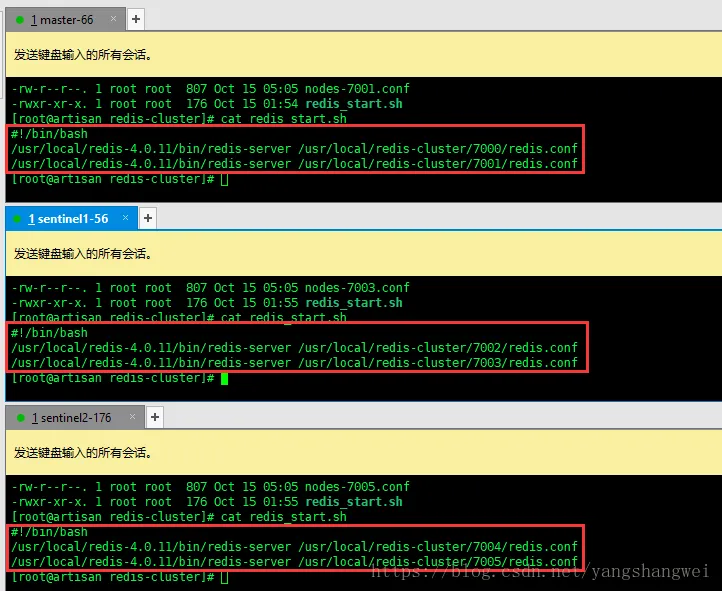
查看状态
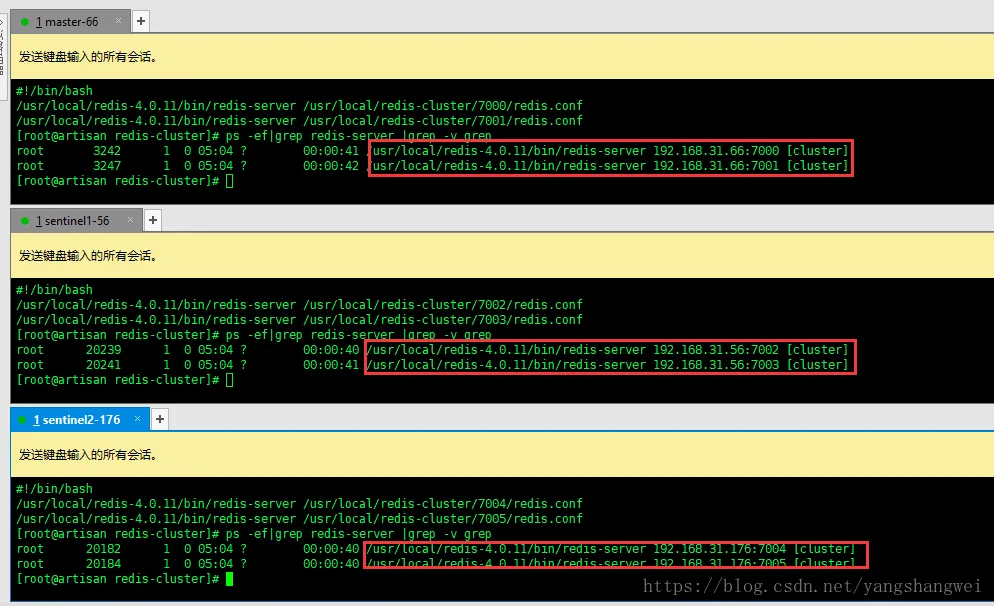
停掉全部的redis的话,简单的话直接用pkill
pkill redis-server
集群准备
官方提供的命令行工具redis-trib是使用ruby开发的,所以需要安装Ruby的运行环境。 同时python、ruby、rubygems、lua、tcl都要安装。
[root@artisan redis-cluster]#yum install ruby rubygems -y
[root@artisan redis-cluster]#gem install redis
安装的话,ruby的版本大于2.2.2。 期间会碰到些问题,网上也有很多参考答案,就不赘述了。
使用redis-trib.rb创建集群
刚才仅仅是启动了6个redis进程,和集群并没有什么关系。。。
上面的执行命令是三台主机都需要执行的,而下面创建集群的脚本仅需要在一台主机上运行即可。
命令如下
[root@artisan bin]# pwd
/usr/local/redis-4.0.11/bin
[root@artisan bin]# ./redis-trib.rb create --replicas 1 192.168.31.66:7000  192.168.31.66:7001   192.168.31.56:7002  192.168.31.56:7003 192.168.31.176:7004  192.168.31.176:7005>>> Creating cluster
>>> Performing hash slots allocation on 6 nodes...
Using 3 masters:
192.168.31.66:7000
192.168.31.56:7002
192.168.31.176:7004
Adding replica 192.168.31.56:7003 to 192.168.31.66:7000
Adding replica 192.168.31.176:7005 to 192.168.31.56:7002
Adding replica 192.168.31.66:7001 to 192.168.31.176:7004
M: e22926a5b6707d0c6279f51efeb397d6e312e756 192.168.31.66:7000
   slots:0-5460 (5461 slots) master
S: e00e923a523c3ca446b756de98dc8ab03b3cbbd1 192.168.31.66:7001
   replicates cee4aa629375ccc3417a37d8df7f454f93947510
M: 504d010ead65a4a0b628725be47b717ff26806fa 192.168.31.56:7002
   slots:5461-10922 (5462 slots) master
S: e0dfd0e65710ca487452d3b6e893267439d03f3a 192.168.31.56:7003
   replicates e22926a5b6707d0c6279f51efeb397d6e312e756
M: cee4aa629375ccc3417a37d8df7f454f93947510 192.168.31.176:7004
   slots:10923-16383 (5461 slots) master
S: 75c4cedc4822e64c45cedec8f5190de77fa3858c 192.168.31.176:7005
   replicates 504d010ead65a4a0b628725be47b717ff26806fa
Can I set the above configuration? (type 'yes' to accept): yes
>>> Nodes configuration updated
>>> Assign a different config epoch to each node
>>> Sending CLUSTER MEET messages to join the cluster
Waiting for the cluster to join...
>>> Performing Cluster Check (using node 192.168.31.66:7000)
M: e22926a5b6707d0c6279f51efeb397d6e312e756 192.168.31.66:7000
   slots:0-5460 (5461 slots) master
   1 additional replica(s)
M: cee4aa629375ccc3417a37d8df7f454f93947510 192.168.31.176:7004
   slots:10923-16383 (5461 slots) master
   1 additional replica(s)
S: e0dfd0e65710ca487452d3b6e893267439d03f3a 192.168.31.56:7003
   slots: (0 slots) slave
   replicates e22926a5b6707d0c6279f51efeb397d6e312e756
S: e00e923a523c3ca446b756de98dc8ab03b3cbbd1 192.168.31.66:7001
   slots: (0 slots) slave
   replicates cee4aa629375ccc3417a37d8df7f454f93947510
M: 504d010ead65a4a0b628725be47b717ff26806fa 192.168.31.56:7002
   slots:5461-10922 (5462 slots) master
   1 additional replica(s)
S: 75c4cedc4822e64c45cedec8f5190de77fa3858c 192.168.31.176:7005
   slots: (0 slots) slave
   replicates 504d010ead65a4a0b628725be47b717ff26806fa
[OK] All nodes agree about slots configuration.
>>> Check for open slots...
>>> Check slots coverage...
[OK] All 16384 slots covered.
[root@artisan bin]#
redis-trib.rb create,创建一个新的集群
选项 --replicas 1 表示为集群中的每个主节点创建一个从节点。 之后的参数是实例的地址列表, 使用这些地址所对应的实例来创建新集群。
这样redis-trib程序就会创建三个主节点和三个从节点的集群。
接着, redis-trib 会输出一份配置信息, 确认无误后,输入yes , redis-trib 会将配置应用到各个节点,并连接起(join)各个节点,让各个节点开始通讯。
访问集群
参数 -c 可连接到集群,因为 redis.conf 将 bind 改为了ip地址,所以 -h 参数不能省略,-p 参数为端口号
示例:
访问192.168.31.66的7000端口对应的redis节点
[root@artisan bin]# ./redis-cli -c -h 192.168.31.66 -p 7000
192.168.31.66:7000>
[root@artisan bin]# ./redis-cli -c -h 192.168.31.66 -p 7000
192.168.31.66:7000>
写入数据,进行集群的验证
192.168.31.66:7000> set mykey artisan_redis_cluster
-> Redirected to slot [14687] located at 192.168.31.176:7004
OK
192.168.31.176:7004>
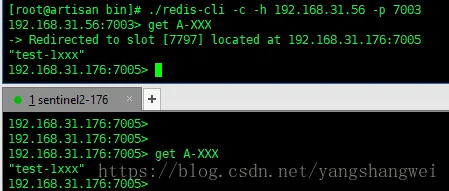
发现redis set mykey 之后重定向到 192.168.31.176机器 redis 7004这个节点
我们在这个集群中任意一个节点去获取该key的值,假设在192.168.31.56的7002端口对应的redis节点上去获取
[root@artisan bin]# ./redis-cli -c -h 192.168.31.56 -p 7002
192.168.31.56:7002> get mykey
-> Redirected to slot [14687] located at 192.168.31.176:7004
"artisan_redis_cluster"
192.168.31.176:7004>
再试几个
[root@artisan bin]# ./redis-cli -c -h 192.168.31.56 -p 7003
192.168.31.56:7003> get mykey
-> Redirected to slot [14687] located at 192.168.31.176:7004
"artisan_redis_cluster"
192.168.31.176:7004>
[root@artisan bin]# ./redis-cli -c -h 192.168.31.66 -p 7000
192.168.31.66:7000> get mykey
-> Redirected to slot [14687] located at 192.168.31.176:7004
"artisan_redis_cluster"
192.168.31.176:7004> exit
[root@artisan bin]# ./redis-cli -c -h 192.168.31.66 -p 7001
192.168.31.66:7001> get mykey
-> Redirected to slot [14687] located at 192.168.31.176:7004
"artisan_redis_cluster"
192.168.31.176:7004>
[root@artisan bin]#  ./redis-cli -c -h 192.168.31.176 -p 7005
192.168.31.176:7005> get mykey
-> Redirected to slot [14687] located at 192.168.31.176:7004
"artisan_redis_cluster"
192.168.31.176:7004>
说明集群的搭建是OK的。
Java API 访问集群
package com.artisan.redis.cluster;
import java.io.IOException;
import java.util.LinkedHashSet;
import java.util.Set;
import redis.clients.jedis.HostAndPort;
import redis.clients.jedis.JedisCluster;
import redis.clients.jedis.JedisPoolConfig;
public class JavaJedisCluster {
  public static void main(String[] args) {
    JedisPoolConfig poolConfig = new JedisPoolConfig();
    // 最大连接数
    poolConfig.setMaxTotal(1);
    // 最大空闲数
    poolConfig.setMaxIdle(1);
    // 最大允许等待时间
    poolConfig.setMaxWaitMillis(1000);
    // 集群地址
    Set<HostAndPort> nodes = new LinkedHashSet<HostAndPort>();
    nodes.add(new HostAndPort("192.168.31.66", 7000));
    nodes.add(new HostAndPort("192.168.31.66", 7001));
    nodes.add(new HostAndPort("192.168.31.56", 7002));
    nodes.add(new HostAndPort("192.168.31.56", 7003));
    nodes.add(new HostAndPort("192.168.31.176", 7004));
    nodes.add(new HostAndPort("192.168.31.176", 7005));
    // 实例化jedisCluster
    JedisCluster jedisCluster = new JedisCluster(nodes, poolConfig);
    // 搭建完成后手工set了一个key,这里直接获取
    String name = jedisCluster.get("mykey");
    System.out.println(name);
    // 通过api去set,然后get
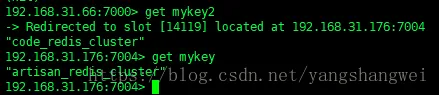
    jedisCluster.set("mykey2", "code_redis_cluster");
    System.out.println(jedisCluster.get("mykey2"));
    try {
      // 关闭
      jedisCluster.close();
    } catch (IOException e) {
      e.printStackTrace();
    }
  }
}
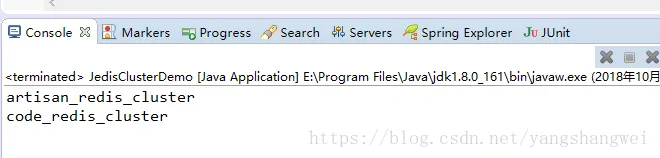
输出:
Spring 访问Redis Cluster
spring-redis-cluster.xml
<?xml version="1.0" encoding="UTF-8"?>
<beans xmlns="http://www.springframework.org/schema/beans"
  xmlns:xsi="http://www.w3.org/2001/XMLSchema-instance"
  xmlns:context="http://www.springframework.org/schema/context"
  xmlns:p="http://www.springframework.org/schema/p"
  xsi:schemaLocation="http://www.springframework.org/schema/beans
    http://www.springframework.org/schema/beans/spring-beans.xsd
    http://www.springframework.org/schema/context
    http://www.springframework.org/schema/context/spring-context.xsd">
    <context:property-placeholder location="classpath:redis/redis.properties" />
    <!--2,注意新版本2.3以后,JedisPoolConfig的property name,不是maxActive而是maxTotal,而且没有maxWait属性,建议看一下Jedis源码或百度。 -->
    <!-- redis连接池配置 -->
    <bean id="jedisPoolConfig" class="redis.clients.jedis.JedisPoolConfig">
        <!--最大空闲数 -->
        <property name="maxIdle" value="${redis.maxIdle}" />
        <!--连接池的最大数据库连接数 -->
        <property name="maxTotal" value="${redis.maxTotal}" />
        <!--最大建立连接等待时间 -->
        <property name="maxWaitMillis" value="${redis.maxWaitMillis}" />
        <!--逐出连接的最小空闲时间 默认1800000毫秒(30分钟) -->
        <property name="minEvictableIdleTimeMillis" value="${redis.minEvictableIdleTimeMillis}" />
        <!--每次逐出检查时 逐出的最大数目 如果为负数就是 : 1/abs(n), 默认3 -->
        <property name="numTestsPerEvictionRun" value="${redis.numTestsPerEvictionRun}" />
        <!--逐出扫描的时间间隔(毫秒) 如果为负数,则不运行逐出线程, 默认-1 -->
        <property name="timeBetweenEvictionRunsMillis" value="${redis.timeBetweenEvictionRunsMillis}" />
      <property name="testOnBorrow" value="true"></property>
    <property name="testOnReturn" value="true"></property>
    <property name="testWhileIdle" value="true"></property>
    </bean>
  <!--配置文件加载-->
    <bean id="resourcePropertySource" class="org.springframework.core.io.support.ResourcePropertySource">
        <!-- 自定义name  名称任意 -->
        <constructor-arg name="name" value="redis.properties"/>
         <!-- 指定配置文件的路径 -->
        <constructor-arg name="resource" value="classpath:redis/redis.properties"/>
    </bean>
  <!--redisCluster配置-->
    <bean id="redisClusterConfiguration" class="org.springframework.data.redis.connection.RedisClusterConfiguration">
        <constructor-arg name="propertySource" ref="resourcePropertySource"/>
    </bean>
  <!--redis连接工厂 -->
    <bean id="jedisConnectionFactory"
        class="org.springframework.data.redis.connection.jedis.JedisConnectionFactory"
        destroy-method="destroy">
        <constructor-arg name="clusterConfig" ref="redisClusterConfiguration"/>
        <constructor-arg name="poolConfig" ref="jedisPoolConfig"/>
        <!-- 集群没设置密码
        <property name="password" value="artisan"/> -->
    </bean>
  <!-- 键值序列化器设置为String 类型 -->
  <bean id="stringRedisSerializer" class="org.springframework.data.redis.serializer.StringRedisSerializer"/>
  <bean id="jdkSerializationRedisSerializer" class="org.springframework.data.redis.serializer.JdkSerializationRedisSerializer"/>
  <!-- redis template definition -->
  <bean id="redisTemplate" class="org.springframework.data.redis.core.RedisTemplate"
    p:connection-factory-ref="jedisConnectionFactory"
    p:defaultSerializer-ref="stringRedisSerializer"
    p:keySerializer-ref="stringRedisSerializer"
    p:valueSerializer-ref="stringRedisSerializer">
  </bean>
</beans>
SpringRedisCluster.java
package com.artisan.redis.cluster;
import org.springframework.context.ApplicationContext;
import org.springframework.context.support.ClassPathXmlApplicationContext;
import org.springframework.data.redis.core.RedisTemplate;
public class SpringRedisCluster {
  @SuppressWarnings({ "rawtypes", "unchecked", "resource" })
  public static void main(String[] args) {
    ApplicationContext ctx = new ClassPathXmlApplicationContext("classpath:spring/spring-redis-cluster.xml");
    RedisTemplate redisTemplate = (RedisTemplate) ctx.getBean(RedisTemplate.class);
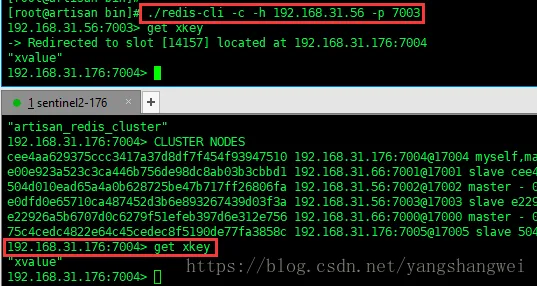
    System.out.println("mykey的value是:" + redisTemplate.opsForValue().get("mykey"));
    redisTemplate.boundValueOps("xkey").set("xvalue");
    System.out.println(redisTemplate.opsForValue().get("xkey"));
  }
}

redis.properties
......
......
#rediscluster
spring.redis.cluster.nodes=192.168.31.66:7000,192.168.31.66:7001,192.168.31.56:7002,192.168.31.56:7003,192.168.31.176:7004,192.168.31.176:7005
#\u5728\u7FA4\u96C6\u4E2D\u6267\u884C\u547D\u4EE4\u65F6\u8981\u9075\u5FAA\u7684\u6700\u5927\u91CD\u5B9A\u5411\u6570\u76EE
spring.redis.cluster.max-redirects=3
代码托管在了 https://github.com/yangshangwei/redis_learn
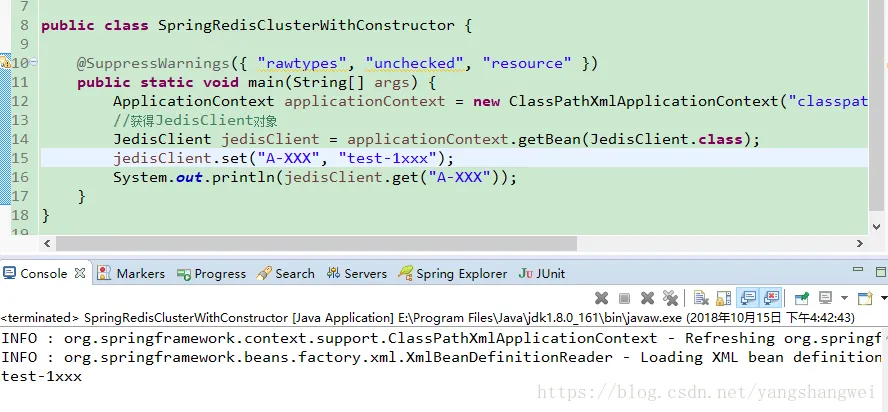
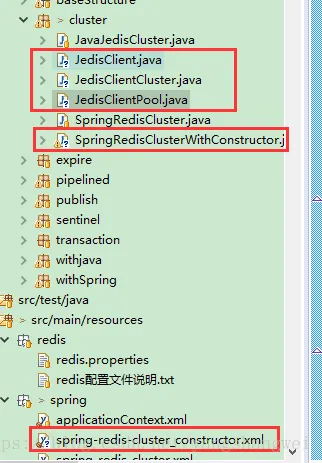
上述是通过Resource的方式来实现的,也可以通过构造函数来实现,如下:
测试: