

前言
动态数据导出是一般项目都会涉及到的功能。它的基本实现逻辑就是从mysql查询数据,加载到内存,然后从内存创建excel或者csv,以流的形式响应给前端。
SpringBoot下载excel基本都是这么干。
虽然这是个可行的方案,然而一旦mysql数据量太大,达到十万级,百万级,千万级,大规模数据加载到内存必然会引起OutofMemoryError。
要考虑如何避免OOM,一般有两个方面的思路。
一方面就是尽量不做呗,先怼产品下面几个问题啊:
- 我们为什么要导出这么多数据呢?谁傻到去看这么大的数据啊,这个设计是不是合理的呢?
- 怎么做好权限控制?百万级数据导出你确定不会泄露商业机密?
- 如果要导出百万级数据,那为什么不直接找大数据或者DBA来干呢?然后以邮件形式传递不行吗?
- 为什么要通过后端的逻辑来实现,不考虑时间成本,流量成本吗?
- 如果通过分页导出,每次点击按钮只导2万条,分批导出难道不能满足业务需求吗?
如果产品说 “甲方是爸爸,你去和甲方说啊”,“客户说这个做出来,才考虑付尾款!”,如果客户的确缺根筋要让你这样搞, 那就只能从技术上考虑如何实现了。
从技术上讲,为了避免OOM,我们一定要注意一个原则:
不能将全量数据一次性加载到内存之中。
全量加载不可行,那我们的目标就是如何实现数据的分批加载了。实事上,Mysql本身支持Stream查询,我们可以通过Stream流获取数据,然后将数据逐条刷入到文件中,每次刷入文件后再从内存中移除这条数据,从而避免OOM。
由于采用了数据逐条刷入文件,而且数据量达到百万级,所以文件格式就不要采用excel了,excel2007最大才支持104万行的数据。这里推荐:
以csv代替excel。
考虑到当前SpringBoot持久层框架通常为JPA和mybatis,我们可以分别从这两个框架实现百万级数据导出的方案。
基于 Spring Boot + MyBatis Plus + Vue & Element 实现的后台管理系统 + 用户小程序,支持 RBAC 动态权限、多租户、数据权限、工作流、三方登录、支付、短信、商城等功能
JPA实现百万级数据导出
实现项目对应:
核心注解如下,需要加入到具体的Repository之上。方法的返回类型定义成Stream。Integer.MIN_VALUE告诉jdbc driver逐条返回数据。
@QueryHints(value = @QueryHint(name = HINT_FETCH_SIZE, value = "" + Integer.MIN_VALUE))
@Query(value = "select t from Todo t")
Stream<Todo> streamAll();
此外还需要在Stream处理数据的方法之上添加@Transactional(readOnly = true),保证事物是只读的。
同时需要注入javax.persistence.EntityManager,通过detach从内存中移除已经使用后的对象。
@RequestMapping(value = "/todos.csv", method = RequestMethod.GET)
@Transactional(readOnly = true)
public void exportTodosCSV(HttpServletResponse response) {
 response.addHeader("Content-Type", "application/csv");
 response.addHeader("Content-Disposition", "attachment; filename=todos.csv");
 response.setCharacterEncoding("UTF-8");
 try(Stream<Todo> todoStream = todoRepository.streamAll()) {
  PrintWriter out = response.getWriter();
  todoStream.forEach(rethrowConsumer(todo -> {
   String line = todoToCSV(todo);
   out.write(line);
   out.write("\n");
   entityManager.detach(todo);
  }));
  out.flush();
 } catch (IOException e) {
  log.info("Exception occurred " + e.getMessage(), e);
  throw new RuntimeException("Exception occurred while exporting results", e);
 }
}
基于 Spring Cloud Alibaba + Gateway + Nacos + RocketMQ + Vue & Element 实现的后台管理系统 + 用户小程序,支持 RBAC 动态权限、多租户、数据权限、工作流、三方登录、支付、短信、商城等功能
MyBatis实现百万级数据导出
MyBatis实现逐条获取数据,必须要自定义ResultHandler,然后在mapper.xml文件中,对应的select语句中添加fetchSize="-2147483648"。
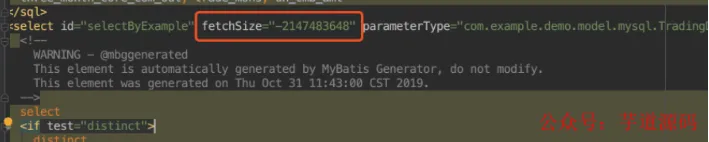
最后将自定义的ResultHandler传给SqlSession来执行查询,并将返回的结果进行处理。
MyBatis实现百万级数据导出的具体实例
以下是基于MyBatis Stream导出的完整的工程样例,我们将通过对比Stream文件导出和传统方式导出的内存占用率的差异,来验证Stream文件导出的有效性。
我们先定义一个工具类DownloadProcessor,它内部封装一个HttpServletResponse对象,用来将对象写入到csv。
public class DownloadProcessor {
    private final HttpServletResponse response;
    public DownloadProcessor(HttpServletResponse response) {
        this.response = response;
        String fileName = System.currentTimeMillis() + ".csv";
        this.response.addHeader("Content-Type", "application/csv");
        this.response.addHeader("Content-Disposition", "attachment; filename="+fileName);
        this.response.setCharacterEncoding("UTF-8");
    }
    public <E> void processData(E record) {
        try {
            response.getWriter().write(record.toString()); //如果是要写入csv,需要重写toString,属性通过","分割
            response.getWriter().write("\n");
        }catch (IOException e){
            e.printStackTrace();
        }
    }
}
然后通过实现org.apache.ibatis.session.ResultHandler,自定义我们的ResultHandler,它用于获取java对象,然后传递给上面的DownloadProcessor处理类进行写文件操作:
public class CustomResultHandler implements ResultHandler {
    private final DownloadProcessor downloadProcessor;
    public CustomResultHandler(
            DownloadProcessor downloadProcessor) {
        super();
        this.downloadProcessor = downloadProcessor;
    }
    @Override
    public void handleResult(ResultContext resultContext) {
        Authors authors = (Authors)resultContext.getResultObject();
        downloadProcessor.processData(authors);
    }
}
实体类:
public class Authors {
    private Integer id;
    private String firstName;
    private String lastName;
    private String email;
    private Date birthdate;
    private Date added;
    public Integer getId() {
        return id;
    }
    public void setId(Integer id) {
        this.id = id;
    }
    public String getFirstName() {
        return firstName;
    }
    public void setFirstName(String firstName) {
        this.firstName = firstName == null ? null : firstName.trim();
    }
    public String getLastName() {
        return lastName;
    }
    public void setLastName(String lastName) {
        this.lastName = lastName == null ? null : lastName.trim();
    }
    public String getEmail() {
        return email;
    }
    public void setEmail(String email) {
        this.email = email == null ? null : email.trim();
    }
    public Date getBirthdate() {
        return birthdate;
    }
    public void setBirthdate(Date birthdate) {
        this.birthdate = birthdate;
    }
    public Date getAdded() {
        return added;
    }
    public void setAdded(Date added) {
        this.added = added;
    }
    @Override
    public String toString() {
        return this.id + "," + this.firstName + "," + this.lastName + "," + this.email + "," + this.birthdate + "," + this.added;
    }
}
Mapper接口:
public interface AuthorsMapper {
   List<Authors> selectByExample(AuthorsExample example);
   List<Authors> streamByExample(AuthorsExample example); //以stream形式从mysql获取数据
}
Mapper xml文件核心片段,以下两条select的唯一差异就是在stream获取数据的方式中多了一条属性: fetchSize="-2147483648"
<select id="selectByExample" parameterType="com.alphathur.mysqlstreamingexport.domain.AuthorsExample" resultMap="BaseResultMap">
    select
    <if test="distinct">
      distinct
    </if>
    'false' as QUERYID,
    <include refid="Base_Column_List" />
    from authors
    <if test="_parameter != null">
      <include refid="Example_Where_Clause" />
    </if>
    <if test="orderByClause != null">
      order by ${orderByClause}
    </if>
  </select>
  <select id="streamByExample" fetchSize="-2147483648" parameterType="com.alphathur.mysqlstreamingexport.domain.AuthorsExample" resultMap="BaseResultMap">
    select
    <if test="distinct">
      distinct
    </if>
    'false' as QUERYID,
    <include refid="Base_Column_List" />
    from authors
    <if test="_parameter != null">
      <include refid="Example_Where_Clause" />
    </if>
    <if test="orderByClause != null">
      order by ${orderByClause}
    </if>
  </select>
获取数据的核心service如下,由于只做个简单演示,就懒得写成接口了。其中 streamDownload 方法即为stream取数据写文件的实现,它将以很低的内存占用从MySQL获取数据;此外还提供traditionDownload方法,它是一种传统的下载方式,批量获取全部数据,然后将每个对象写入文件。
@Service
public class AuthorsService {
    private final SqlSessionTemplate sqlSessionTemplate;
    private final AuthorsMapper authorsMapper;
    public AuthorsService(SqlSessionTemplate sqlSessionTemplate, AuthorsMapper authorsMapper) {
        this.sqlSessionTemplate = sqlSessionTemplate;
        this.authorsMapper = authorsMapper;
    }
    /**
     * stream读数据写文件方式
     * @param httpServletResponse
     * @throws IOException
     */
    public void streamDownload(HttpServletResponse httpServletResponse)
            throws IOException {
        AuthorsExample authorsExample = new AuthorsExample();
        authorsExample.createCriteria();
        HashMap<String, Object> param = new HashMap<>();
        param.put("oredCriteria", authorsExample.getOredCriteria());
        param.put("orderByClause", authorsExample.getOrderByClause());
        CustomResultHandler customResultHandler = new CustomResultHandler(new DownloadProcessor (httpServletResponse));
        sqlSessionTemplate.select(
                "com.alphathur.mysqlstreamingexport.mapper.AuthorsMapper.streamByExample", param, customResultHandler);
        httpServletResponse.getWriter().flush();
        httpServletResponse.getWriter().close();
    }
    /**
     * 传统下载方式
     * @param httpServletResponse
     * @throws IOException
     */
    public void traditionDownload(HttpServletResponse httpServletResponse)
            throws IOException {
        AuthorsExample authorsExample = new AuthorsExample();
        authorsExample.createCriteria();
        List<Authors> authors = authorsMapper.selectByExample (authorsExample);
        DownloadProcessor downloadProcessor = new DownloadProcessor (httpServletResponse);
        authors.forEach (downloadProcessor::processData);
        httpServletResponse.getWriter().flush();
        httpServletResponse.getWriter().close();
    }
}
下载的入口controller:
@RestController
@RequestMapping("download")
public class HelloController {
    private final AuthorsService authorsService;
    public HelloController(AuthorsService authorsService) {
        this.authorsService = authorsService;
    }
    @GetMapping("streamDownload")
    public void streamDownload(HttpServletResponse response)
            throws IOException {
        authorsService.streamDownload(response);
    }
    @GetMapping("traditionDownload")
    public void traditionDownload(HttpServletResponse response)
            throws IOException {
        authorsService.traditionDownload (response);
    }
}
实体类对应的表结构创建语句:
CREATE TABLE `authors` (
  `id` int(11) NOT NULL AUTO_INCREMENT,
  `first_name` varchar(50) CHARACTER SET utf8 COLLATE utf8_unicode_ci NOT NULL,
  `last_name` varchar(50) CHARACTER SET utf8 COLLATE utf8_unicode_ci NOT NULL,
  `email` varchar(100) CHARACTER SET utf8 COLLATE utf8_unicode_ci NOT NULL,
  `birthdate` date NOT NULL,
  `added` timestamp NOT NULL DEFAULT CURRENT_TIMESTAMP,
  PRIMARY KEY (`id`)
) ENGINE=InnoDB AUTO_INCREMENT=10095 DEFAULT CHARSET=utf8 COLLATE=utf8_unicode_ci;
这里有个问题:如何短时间内创建大批量测试数据到MySQL呢?一种方式是使用存储过程 + 大杀器 select insert 语句!不太懂?
没关系,且看我另一篇文章 MySQL如何生成大批量测试数据 你就会明白了。如果你懒得看,我这里已经将生成的270多万条测试数据上传到网盘,你直接下载然后通过navicat导入就好了。
- 链接:https://pan.baidu.com/s/1hqnWU2JKlL4Tb9nWtJl4sw
- 提取码:nrp0
有了测试数据,我们就可以直接测试了。先启动项目,然后打开jdk bin目录下的 jconsole.exe
首先我们测试传统方式下载文件的内存占用,直接浏览器访问:http://localhost:8080/download/traditionDownload。
可以看出,下载开始前内存占用大概为几十M,下载开始后内存占用急速上升,峰值达到接近2.5G,即使是下载完成,堆内存也维持一个较高的占用,这实在是太可怕了,如果生产环境敢这么搞,不出意外肯定内存溢出。

接着我们测试stream方式文件下载的内存占用,浏览器访问:http://localhost:8080/download/streamDownload,当下载开始后,内存占用也会有一个明显的上升,但是峰值才到500M。对比于上面的方式,内存占用率足足降低了80%!怎么样,兴奋了吗!
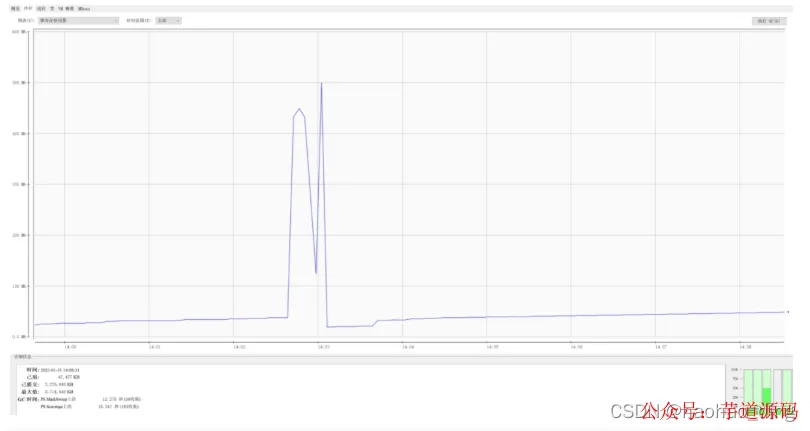
我们再通过记事本打开下载后的两个文件,发现内容没有缺斤少两,都是2727127行,完美!
