目录
一、序言
二、如何自定义过期时间
三、解决方案
1、CacheManger的作用
2、CacheResolver的作用
四、代码示例
1、自定义缓存相关注解
(1) @TTLCacheable注解
(2) @TTLCachePut注解
2、自定义CacheResolver
3、自定义CacheManager
4、开启声明式缓存配置类
五、测试用例
1、 测试服务类
2、 带过期时间的缓存操作
3、 带过期时间的更新操作
六、结语
一、序言
在上一节 Spring声明式基于注解的缓存(2-实践篇)中给出了一些声明式基于注解的缓存实际使用案例。在这一节中,我们会通过自定义CacheResolver、RedisCacheManager还有Cache相关注解来实现带过期时间的缓存方案。
二、如何自定义过期时间
在实例化RedisCacheManager时,我们可以指定key过期的entryTtl属性,如下:
@EnableCaching
@Configuration
public class RedisCacheConfig {
  private static final String KEY_SEPERATOR = ":";
  /**
   * 自定义CacheManager,具体配置参考{@link org.springframework.boot.autoconfigure.cache.RedisCacheConfiguration}
   * @param redisConnectionFactory 自动配置会注入
   * @return
   */
  @Bean(name = "redisCacheManager")
  public RedisCacheManager redisCacheManager(RedisConnectionFactory redisConnectionFactory) {
    RedisSerializer<String> keySerializer = new StringRedisSerializer();
    RedisSerializer<Object> valueSerializer = new GenericJackson2JsonRedisSerializer();
    RedisCacheConfiguration cacheConfig = RedisCacheConfiguration.defaultCacheConfig()
      .serializeKeysWith(SerializationPair.fromSerializer(keySerializer))
      .serializeValuesWith(SerializationPair.fromSerializer(valueSerializer))
      .computePrefixWith(key -> key.concat(KEY_SEPERATOR))
      .entryTtl(Duration.ofSeconds(1));
    return RedisCacheManager.builder(redisConnectionFactory).cacheDefaults(cacheConfig).build();
  }
}
备注:这种方式有一个很明显的缺点,所有key都会共享配置,比如这里会设置所有key的过期时间都为1秒。
三、解决方案
1、CacheManger的作用
在Spring声明式基于注解的缓存(1-理论篇)中我们了解到CacheManager主要有两个方法。一个是根据指定缓存名获取Cache实例,还有一个是获取所有缓存名称的。
、
public interface CacheManager {
  /**
   * Get the cache associated with the given name.
   * <p>Note that the cache may be lazily created at runtime if the
   * native provider supports it.
   * @param name the cache identifier (must not be {@code null})
   * @return the associated cache, or {@code null} if such a cache
   * does not exist or could be not created
   */
  @Nullable
  Cache getCache(String name);
  /**
   * Get a collection of the cache names known by this manager.
   * @return the names of all caches known by the cache manager
   */
  Collection<String> getCacheNames();
}
让我们看看RedisCacheManager对CacheManager的实现,实际上中间还继承了两个抽象类,如下: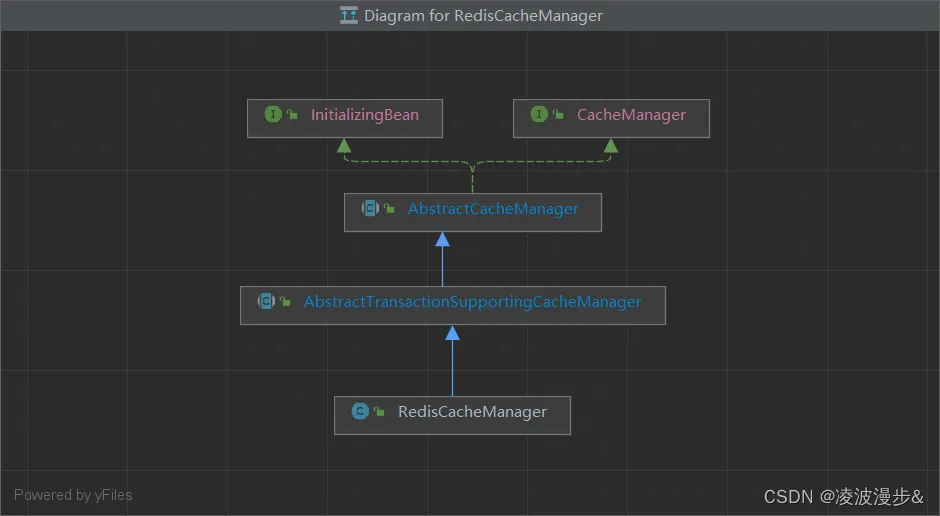 其中
其中getCache()方法的实现逻辑主要在AbstractCacheManager中,如下:
@Override
@Nullable
public Cache getCache(String name) {
  // Quick check for existing cache...
  Cache cache = this.cacheMap.get(name);
  if (cache != null) {
    return cache;
  }
  // The provider may support on-demand cache creation...
  Cache missingCache = getMissingCache(name);
  if (missingCache != null) {
    // Fully synchronize now for missing cache registration
    synchronized (this.cacheMap) {
      cache = this.cacheMap.get(name);
      if (cache == null) {
        cache = decorateCache(missingCache);
        this.cacheMap.put(name, cache);
        updateCacheNames(name);
      }
    }
  }
  return cache;
}
有经验的同学在看到decorateCache方法时绝对会眼前一亮,见名知意,这个方法就是用来装饰根据指定缓存名称获取到的缓存实例的,这个方法也正是交给子类来实现。(Ps:这里用到的是模板方法模式)
而decorateCache方法实际上是由AbstractTransactionSupportingCacheManager来实现的,该抽象类在装饰缓存时会附加事务的支持,比如在事务提交之后缓存,如下:
@Override
protected Cache decorateCache(Cache cache) {
  return (isTransactionAware() ? new TransactionAwareCacheDecorator(cache) : cache);
}
2、CacheResolver的作用
@FunctionalInterface
public interface CacheResolver {
  /**
   * Return the cache(s) to use for the specified invocation.
   * @param context the context of the particular invocation
   * @return the cache(s) to use (never {@code null})
   * @throws IllegalStateException if cache resolution failed
   */
  Collection<? extends Cache> resolveCaches(CacheOperationInvocationContext<?> context);
}
该接口有个抽象类实现AbstractCacheResolver,对resolveCaches的实现如下:
@Override
public Collection<? extends Cache> resolveCaches(CacheOperationInvocationContext<?> context) {
  Collection<String> cacheNames = getCacheNames(context);
  if (cacheNames == null) {
    return Collections.emptyList();
  }
  Collection<Cache> result = new ArrayList<>(cacheNames.size());
  for (String cacheName : cacheNames) {
    Cache cache = getCacheManager().getCache(cacheName);
    if (cache == null) {
      throw new IllegalArgumentException("Cannot find cache named '" +
          cacheName + "' for " + context.getOperation());
    }
    result.add(cache);
  }
  return result;
}
四、代码示例
1、自定义缓存相关注解
Spring中缓存相关注解同样可以作为元注解,这里我们自定义了@TTLCacheable和@TTLCachePut两个注解,并且指定了名为ttlCacheResolver的缓存解析器实例。
(1) @TTLCacheable注解
@Target(ElementType.METHOD)
@Retention(RetentionPolicy.RUNTIME)
@Cacheable(cacheResolver = "ttlCacheResolver")
public @interface TTLCacheable {
  @AliasFor(annotation = Cacheable.class)
  String[] value() default {};
  @AliasFor(annotation = Cacheable.class)
  String[] cacheNames() default {};
  @AliasFor(annotation = Cacheable.class)
  String key() default "";
  @AliasFor(annotation = Cacheable.class)
  String keyGenerator() default "";
  @AliasFor(annotation = Cacheable.class)
  String cacheManager() default "";
  @AliasFor(annotation = Cacheable.class)
  String condition() default "";
  @AliasFor(annotation = Cacheable.class)
  String unless() default "";
  @AliasFor(annotation = Cacheable.class)
  boolean sync() default false;
  /**
   * time to live
   */
  long ttl() default 0L;
  /**
   * 时间单位
   * @return
   */
  TimeUnit timeUnit() default TimeUnit.MILLISECONDS;
}
(2) @TTLCachePut注解
@Target({ ElementType.TYPE, ElementType.METHOD })
@Retention(RetentionPolicy.RUNTIME)
@CachePut(cacheResolver = "ttlCacheResolver")
public @interface TTLCachePut {
  @AliasFor(annotation = CachePut.class)
  String[] value() default {};
  @AliasFor(annotation = CachePut.class)
  String[] cacheNames() default {};
  @AliasFor(annotation = CachePut.class)
  String key() default "";
  @AliasFor(annotation = CachePut.class)
  String keyGenerator() default "";
  @AliasFor(annotation = CachePut.class)
  String cacheManager() default "";
  @AliasFor(annotation = CachePut.class)
  String condition() default "";
  @AliasFor(annotation = CachePut.class)
  String unless() default "";
  /**
   * time to live
   */
  long ttl() default 0L;
  /**
   * 时间单位
   * @return
   */
  TimeUnit timeUnit() default TimeUnit.MILLISECONDS;
}
2、自定义CacheResolver
这里我们直接继承SimpleCacheResolver,在解析缓存时根据注解中的过期时间配置动态给CacheManager传值,然后再调用AbstractCacheResolver的resolveCaches方法进行实际的缓存解析操作。
public class TTLCacheResolver extends SimpleCacheResolver {
  public TTLCacheResolver() {
  }
  public TTLCacheResolver(CacheManager cacheManager) {
    super(cacheManager);
  }
  @Override
  public Collection<? extends Cache> resolveCaches(CacheOperationInvocationContext<?> context) {
    TTLCacheable ttlCacheable = context.getMethod().getAnnotation(TTLCacheable.class);
    TTLCachePut ttlCachePut = context.getMethod().getAnnotation(TTLCachePut.class);
    CacheManager cacheManager = super.getCacheManager();
    if (cacheManager instanceof TTLRedisCacheManager) {
      TTLRedisCacheManager ttlRedisCacheManager = (TTLRedisCacheManager) cacheManager;
      Optional.ofNullable(ttlCacheable).ifPresent(cacheable -> {
        ttlRedisCacheManager.setTtl(cacheable.ttl());
        ttlRedisCacheManager.setTimeUnit(cacheable.timeUnit());
      });
      Optional.ofNullable(ttlCachePut).ifPresent(cachePut -> {
        ttlRedisCacheManager.setTtl(cachePut.ttl());
        ttlRedisCacheManager.setTimeUnit(cachePut.timeUnit());
      });
    }
    return super.resolveCaches(context);
  }
}
3、自定义CacheManager
这里我们直接重写了RedisCacheManager的
public class TTLRedisCacheManager extends RedisCacheManager {
  /**
   * 过期时间,具体见{@link com.netease.cache.distrubuted.redis.integration.custom.annotation.TTLCacheable}
   * 中的ttl说明
   */
  private long ttl;
  /**
   * 时间单位
   */
  private TimeUnit timeUnit;
  public TTLRedisCacheManager(RedisCacheWriter cacheWriter, RedisCacheConfiguration defaultCacheConfiguration) {
    super(cacheWriter, defaultCacheConfiguration);
  }
  public TTLRedisCacheManager(RedisCacheWriter cacheWriter, RedisCacheConfiguration defaultCacheConfiguration,
    String... initialCacheNames) {
    super(cacheWriter, defaultCacheConfiguration, initialCacheNames);
  }
  public TTLRedisCacheManager(RedisCacheWriter cacheWriter, RedisCacheConfiguration defaultCacheConfiguration,
    boolean allowInFlightCacheCreation, String... initialCacheNames) {
    super(cacheWriter, defaultCacheConfiguration, allowInFlightCacheCreation, initialCacheNames);
  }
  public TTLRedisCacheManager(RedisCacheWriter cacheWriter, RedisCacheConfiguration defaultCacheConfiguration,
    Map<String, RedisCacheConfiguration> initialCacheConfigurations) {
    super(cacheWriter, defaultCacheConfiguration, initialCacheConfigurations);
  }
  public TTLRedisCacheManager(RedisCacheWriter cacheWriter, RedisCacheConfiguration defaultCacheConfiguration,
    Map<String, RedisCacheConfiguration> initialCacheConfigurations, boolean allowInFlightCacheCreation) {
    super(cacheWriter, defaultCacheConfiguration, initialCacheConfigurations, allowInFlightCacheCreation);
  }
  public void setTtl(long ttl) {
    this.ttl = ttl;
  }
  public void setTimeUnit(TimeUnit timeUnit) {
    this.timeUnit = timeUnit;
  }
  /**
   * CacheResolver调用CacheManager的getCache方法后会调用该方法进行装饰,这里我们可以给Cache加上过期时间
   * @param cache
   * @return
   */
  @Override
  protected Cache decorateCache(Cache cache) {
    RedisCache redisCache = (RedisCache) cache;
    RedisCacheConfiguration config = redisCache.getCacheConfiguration().entryTtl(resolveExpiryTime(ttl, timeUnit));
    return super.decorateCache(super.createRedisCache(redisCache.getName(), config));
  }
  private Duration resolveExpiryTime(long timeToLive, TimeUnit timeUnit) {
    return Duration.ofMillis(timeUnit.toMillis(timeToLive));
  }
}
4、开启声明式缓存配置类
@EnableCaching
@Configuration
public class TTLRedisCacheConfig {
  private static final String KEY_SEPERATOR = ":";
  @Bean(name = "ttlRedisCacheManager")
  public TTLRedisCacheManager ttlRedisCacheManager(RedisConnectionFactory redisConnectionFactory) {
    RedisSerializer<String> keySerializer = new StringRedisSerializer();
    RedisSerializer<Object> valueSerializer = new GenericJackson2JsonRedisSerializer();
    RedisCacheConfiguration cacheConfig = RedisCacheConfiguration.defaultCacheConfig();
    cacheConfig = cacheConfig.serializeKeysWith(SerializationPair.fromSerializer(keySerializer));
    cacheConfig = cacheConfig.serializeValuesWith(SerializationPair.fromSerializer(valueSerializer));
    cacheConfig = cacheConfig.computePrefixWith(key -> "ttl" + KEY_SEPERATOR + key + KEY_SEPERATOR);
    RedisCacheWriter redisCacheWriter = RedisCacheWriter.nonLockingRedisCacheWriter(redisConnectionFactory);
    return new TTLRedisCacheManager(redisCacheWriter, cacheConfig);
  }
  @Bean(name = "ttlCacheResolver")
  public TTLCacheResolver ttlCacheResolver(TTLRedisCacheManager ttlRedisCacheManager) {
    return new TTLCacheResolver(ttlRedisCacheManager);
  }
}
备注:这里我们用自定义的TTLCacheManager和TTLCacheResolver初始化配置即可,缓存key的名称指定了前缀ttl:。
五、测试用例
1、 测试服务类
@Service
public class TTLSpringCacheService {
  @TTLCacheable(cacheNames = "student-cache", key = "#stuNo", ttl = 200, timeUnit = TimeUnit.SECONDS)
  public StudentDO getStudentWithTTL(int stuNo, String stuName) {
    StudentDO student = new StudentDO(stuNo, stuName);
    System.out.println("模拟从数据库中读取...");
    return student;
  }
  @TTLCachePut(cacheNames = "student-cache", key = "#student.stuNo", ttl = 1, timeUnit = TimeUnit.MINUTES)
  public StudentDO updateStudent(StudentDO student) {
    System.out.println("数据库进行了更新,检查缓存是否一致");
    return student;
  }
}
@RunWith(SpringRunner.class)
@SpringBootTest(classes = Application.class)
public class TTLSpringCacheIntegrationTest {
  @Autowired
  private TTLSpringCacheService ttlSpringCacheService;
  @Test
  public void getStudentWithTTLTest() {
    StudentDO studentDO = ttlSpringCacheService.getStudentWithTTL(1, "Nick");
    System.out.println(studentDO);
  }
  @Test
  public void updateStudentWithTTLTest() {
    StudentDO studentDO = ttlSpringCacheService.updateStudent(new StudentDO(1, "Licky"));
    System.out.println(studentDO);
  }
}
2、 带过期时间的缓存操作
调用getStudentWithTTLTest方法,这里我们指定了缓存的过期时间为200秒,查看Redis中key对应的值,如下: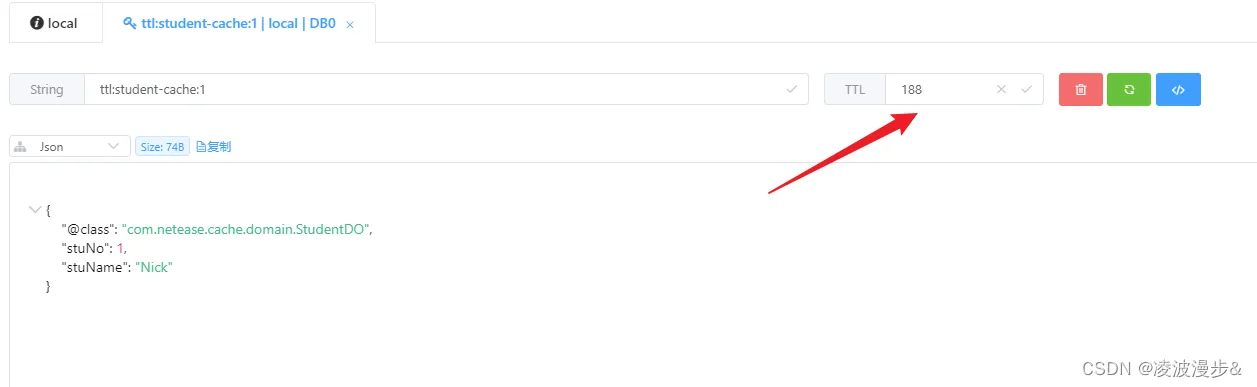
3、 带过期时间的更新操作
调用updateStudentWithTTLTest方法,更新时我们指定了缓存的过期时间为1分钟,查看Redis中key对应的值,如下: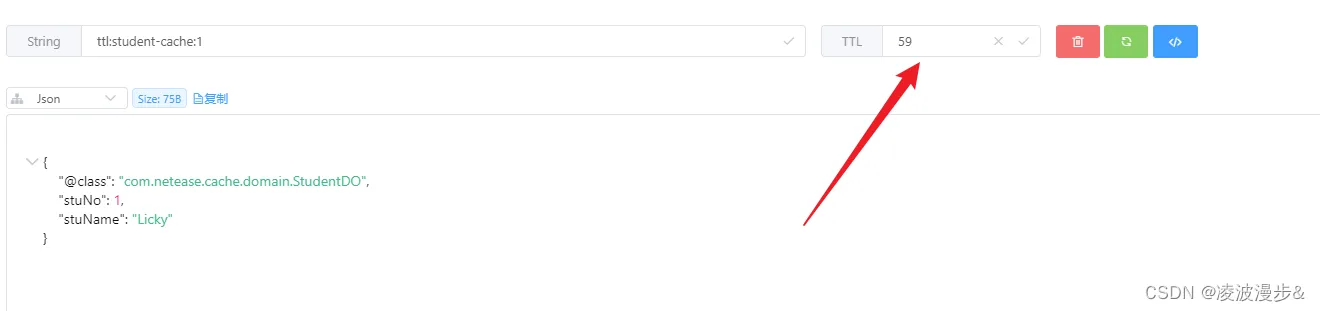
六、结语
Spring基于注解的缓存抽象就到这里啦,Spring源码还是比较清晰易懂的,见名知意。除了自定义方案,阿里爸爸也有一个缓存抽象解决方案,叫做 jetcache。
它是Spring缓存抽象的增强版,提供的特性有带过期时间的缓存、二级缓存、自动缓存更新、代码操作缓存实例等,有兴趣的同学可以去体验一下。