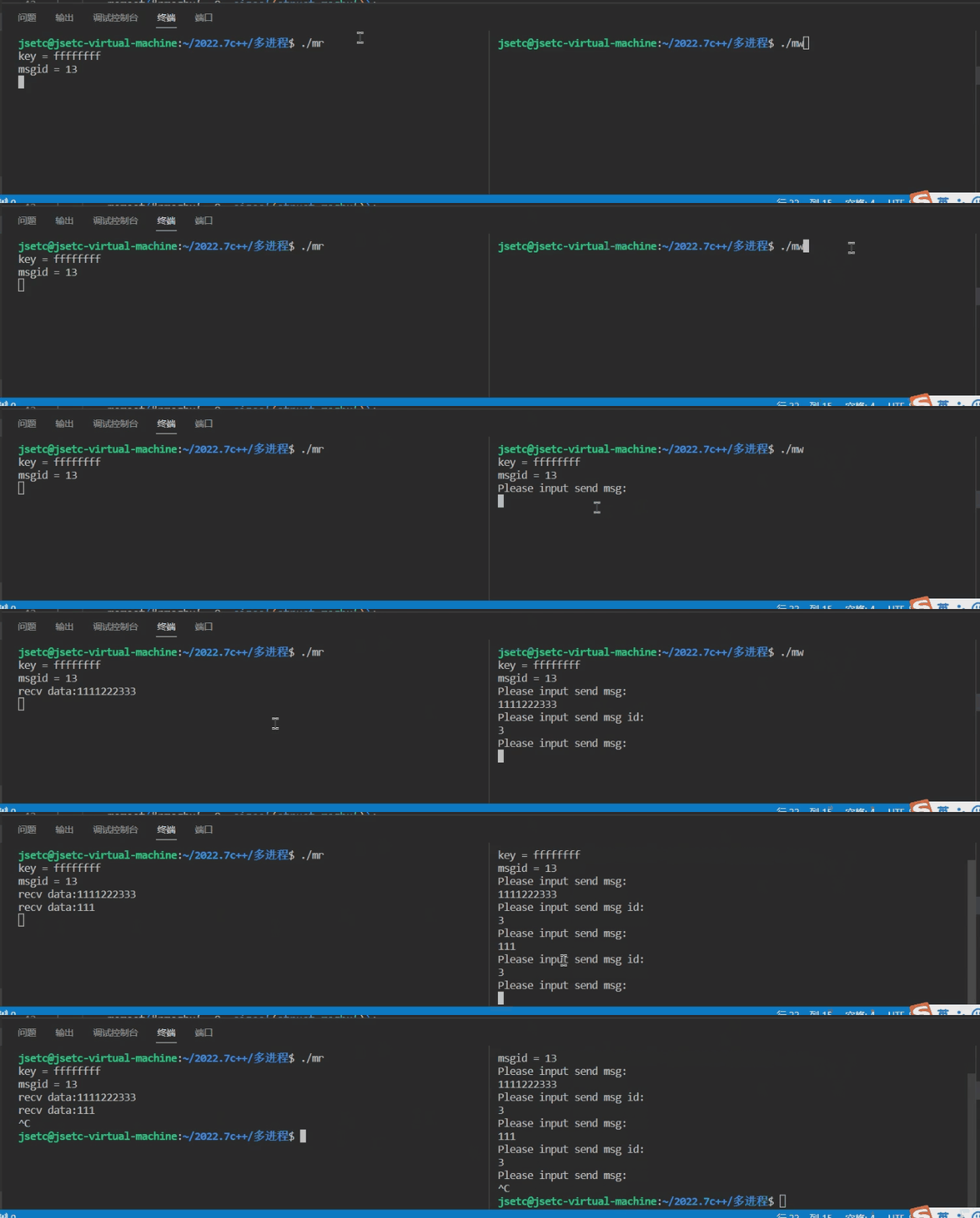
前述
System V IPC
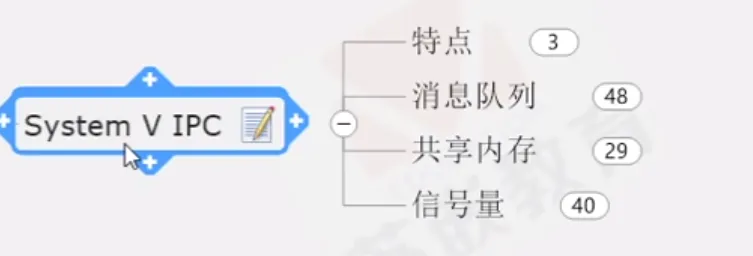
特点:
与管道有所不同,它完全使用了不同的实现机制,与文件没任何的关系,也就是说内核不再以文件的形式来管理System V IPC
System V IPC不再以文件的形式存在,因此没有文件描述符这个东西,但是它有类似的“标识符”
任何进程之间通信时,都可以使用System V IPC来通信
POSIX也可以支持消息队列、共享内存、信号量能在unix下运行
一、消息队列的创建和删除
消息队列的本质就是由内核创建的用于存放消息的链表,由于是存放消息的,所以我们就把这个链表称为消息队列。
1.1 消息的组成
1.消息编号:识别信息用
2.消息正文:真正的信息内容
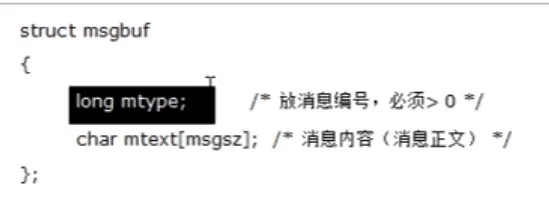
1.2 创建
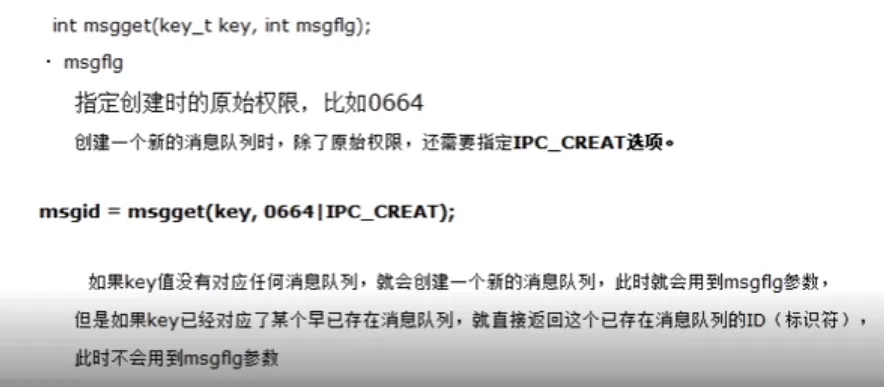
int msgget(key_t key, int msgflg);
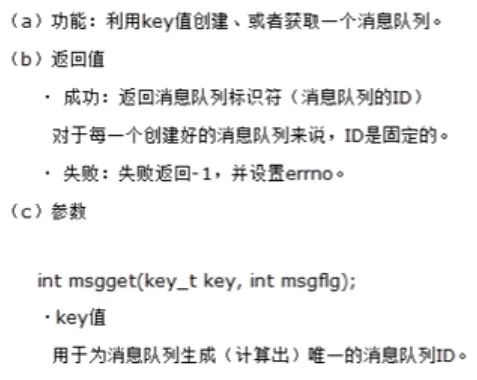
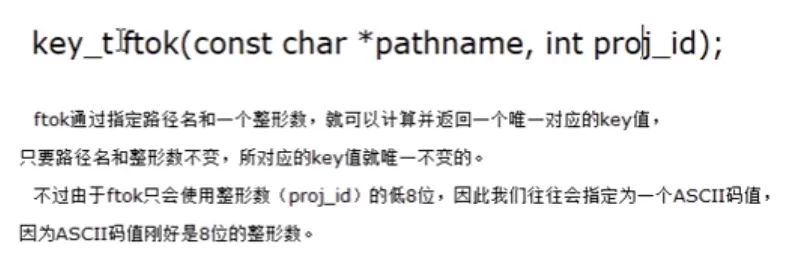
使用ftok生成key值
1.2 查看系统的消息队列

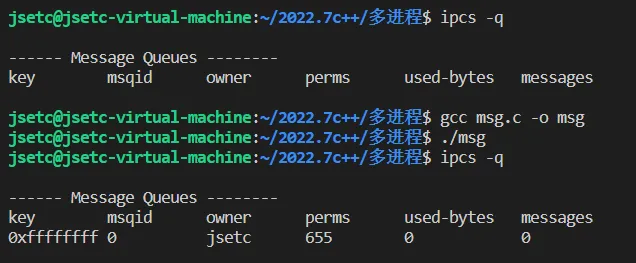
1.3 消息队列的创建
#include <stdio.h>
#include <sys/types.h>
#include <sys/ipc.h>
#include <sys/msg.h>
#include <stdlib.h>
#include <errno.h>
#define MSGNAME "./msg_file"
int main(int argc, char const *argv[])
{
    key_t key;
    int msgid;
    key = ftok(MSGNAME, 'k');
    msgid = msgget(key, IPC_CREAT | 0655);
    if (msgid < 0)
    {
        perror("msgid error!");
        exit(1);
    }
    printf("msgid = %d\n",msgid);
    return 0;
}
1.4 获取属性及删除
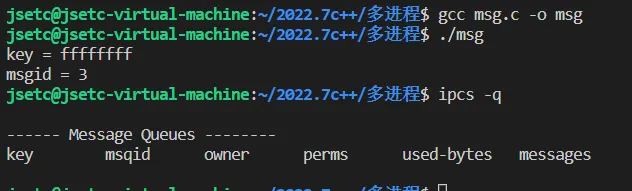
进程结束时,system v ipc不会自动删除,进程结束后,使用ipcs依然能够查看到
长方形
重启OS
使用ipcrm命令删除
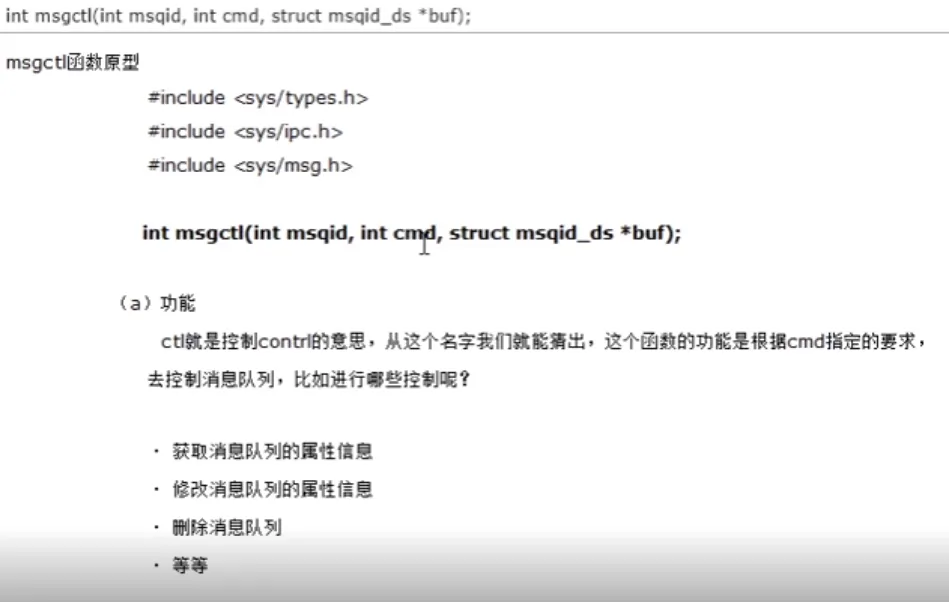
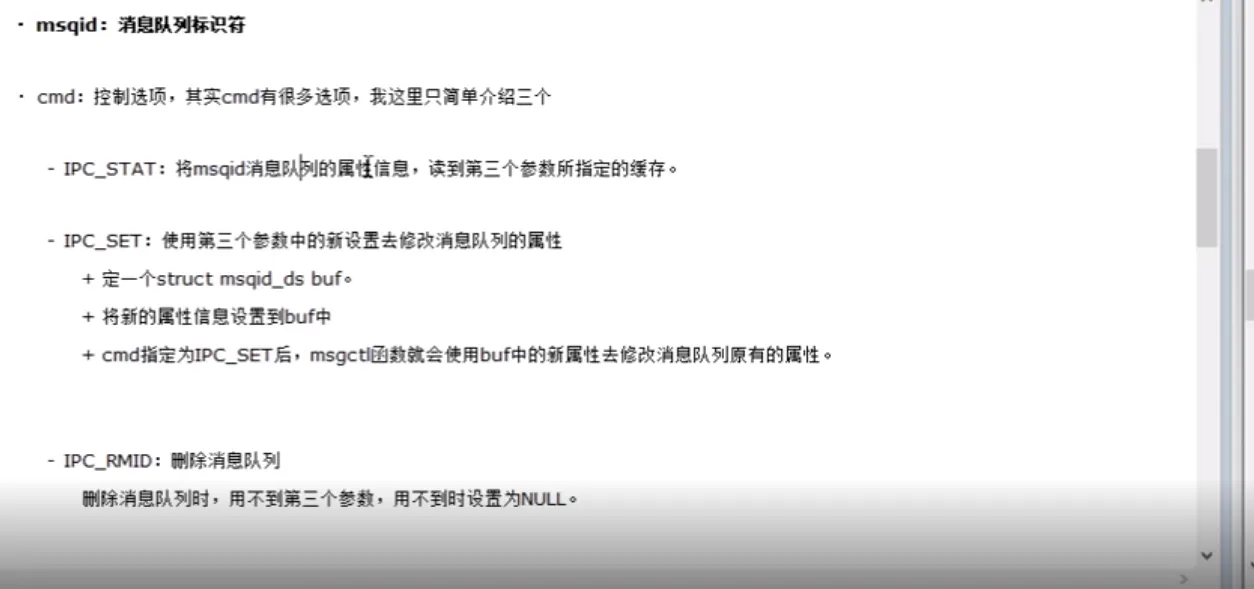
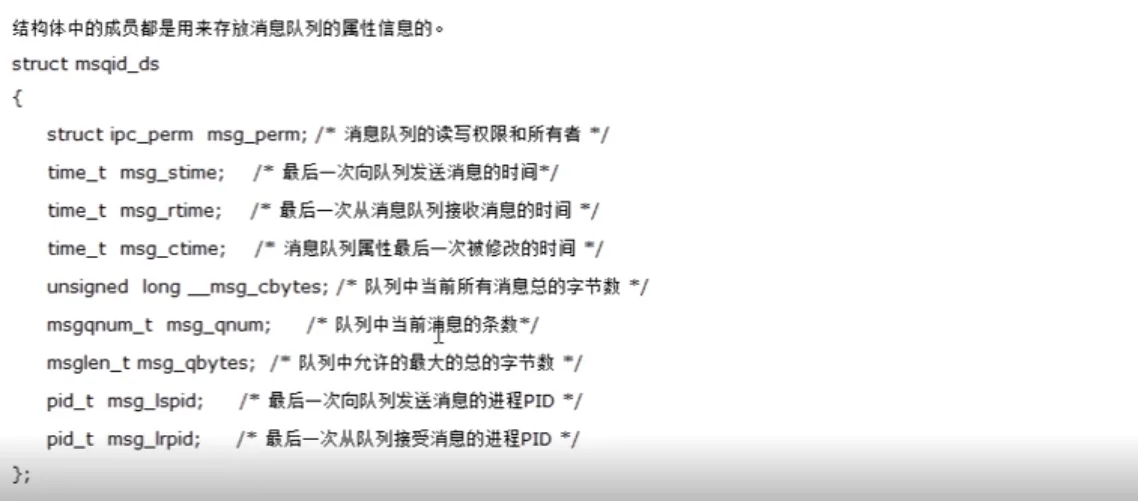
int msgctl 参数:int mspid,int cmd,struct mspid_ds *buf
ipcrm -Q msgkey移除用msqkey创建的消息队列
ipcrm -q msqid移除用msqid标识的消息队列
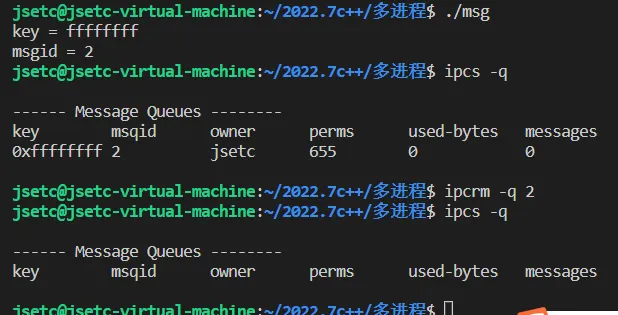
msgctl

#include <stdio.h>
#include <sys/types.h>
#include <sys/ipc.h>
#include <sys/msg.h>
#include <stdlib.h>
#include <errno.h>
#define MSGNAME "./msg_file"
int main(int argc, char const *argv[])
{
    key_t key;
    int msgid;
    key = ftok(MSGNAME, 'k');
    msgid = msgget(key, IPC_CREAT | 0655);
    if (msgid < 0)
    {
        perror("msgid error!");
        exit(1);
    }
    printf("key = %x\n", key);
    printf("msgid = %d\n", msgid);
    msgctl(msgid,IPC_RMID,NULL);
    return 0;
}
二、消息队列的发送和接收
2.1 发送
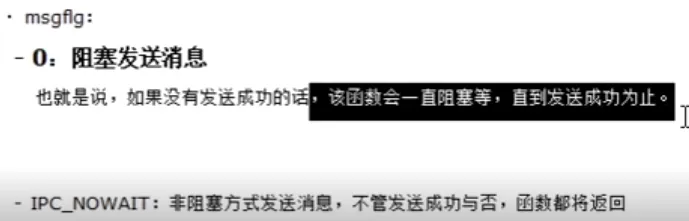
int msgsnd(int msqid,const void *msgp, size_t msgsz,int msgflg);
2.2 接收
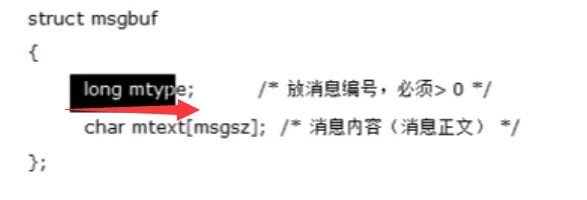
ssize_ t msgrcv(int msqid, void *msgp, size_ t msgsz, long msgtyp, int msgflg);
#include <stdio.h>
#include <sys/types.h>
#include <sys/ipc.h>
#include <sys/msg.h>
#include <stdlib.h>
#include <errno.h>
#include <unistd.h>
#include <string.h>
#include <signal.h>
#define MSGNAME "./msg_file"
int msgid;
struct msgbuf
{
    long mtype;
    char mtext[1024];
};
void my_exit(int msg)
{
    msgctl(msgid,IPC_RMID,NULL);
}
int main(int argc, char const *argv[])
{
    key_t key;
    pid_t pid;
    signal(SIGINT, my_exit);
    key = ftok(MSGNAME, 'k');
    msgid = msgget(key, IPC_CREAT | 0655);
    if (msgid < 0)
    {
        perror("msgid error!");
        exit(1);
    }
    printf("key = %x\n", key);
    printf("msgid = %d\n", msgid);
    pid = fork();
    if (pid < 0)
    {
        perror("fork perror!\n");
        exit(1);
    }
    if (pid == 0)
    {
        long mtype;
        char buffer[1024];
        struct msgbuf pmsgbuf;
        while (1)
        {
            memset(buffer, 0, sizeof(buffer));
            memset(&pmsgbuf, 0, sizeof(struct msgbuf));
            printf("Please input send msg:\n");
            scanf("%s", buffer);
            strcpy(pmsgbuf.mtext, buffer);
            printf("Please input send msg id:\n");
            scanf("%ld", &mtype);
            pmsgbuf.mtype = mtype;
            if(msgsnd(msgid,(void *)&pmsgbuf,sizeof(pmsgbuf),IPC_NOWAIT) < 0)
            {
                perror("msg snd error!");
                exit(1);
            }
        }
    }
    else if(pid > 0)
    {
        size_t size;
        long mtype;
        char buffer[1024];
        struct msgbuf pmsgbuf;
        while (1)
        {
            memset(buffer, 0, sizeof(buffer));
            memset(&pmsgbuf, 0, sizeof(struct msgbuf));
            size = msgrcv(msgid, &pmsgbuf,sizeof(pmsgbuf),3,0);
            if (size < 0)
            {
                perror("msg rcv error!");
                exit(1);
            }
            printf("recv data:%s\n", pmsgbuf.mtext);
            sleep(1);
        }
    }
    return 0;
}
三、任意进程通信及特点
多个进程是如何共享到同一个消息队列?
1.fork前创建
2.创建者把ID保存到某文件,共享进程读出ID即可+
3.使用ftok函数,利用与创建者相同的“路径名”和8位整形数,生成相同的key值
消息队列的特点
1.传送有格式的消息流
2.多进程网状旁叉通信时,消息队列是上上之选
3.能实现大规模数据的通信
3.1 msg_read.c
#include <stdio.h>
#include <sys/types.h>
#include <sys/ipc.h>
#include <sys/msg.h>
#include <stdlib.h>
#include <errno.h>
#include <unistd.h>
#include <string.h>
#include <signal.h>
#define MSGNAME "./msg_file"
struct msgbuf
{
    long mtype;
    char mtext[1024];
};
int main(int argc, char const *argv[])
{
    key_t key;
    key = ftok(MSGNAME, 'k');
    int msgid = msgget(key, IPC_CREAT | 0777);
    if (msgid < 0)
    {
        perror("msgid error!");
        exit(1);
    }
    printf("key = %x\n", key);
    printf("msgid = %d\n", msgid);
    size_t size;
    long mtype;
    char buffer[1024];
    struct msgbuf pmsgbuf;
    while (1)
    {
        memset(buffer, 0, sizeof(buffer));
        memset(&pmsgbuf, 0, sizeof(struct msgbuf));
        size = msgrcv(msgid, &pmsgbuf,sizeof(pmsgbuf),3,0);
        if (size < 0)
        {
            perror("msg rcv error!");
            exit(1);
        }
        printf("recv data:%s\n", pmsgbuf.mtext);
        sleep(1);
    }
}
3.2 msg_write.c
#include <stdio.h>
#include <sys/types.h>
#include <sys/ipc.h>
#include <sys/msg.h>
#include <stdlib.h>
#include <errno.h>
#include <unistd.h>
#include <string.h>
#include <signal.h>
#define MSGNAME "./msg_file"
struct msgbuf
{
    long mtype;
    char mtext[1024];
};
int main(int argc, char const *argv[])
{
    key_t key;
    key = ftok(MSGNAME, 'k');
    int msgid = msgget(key, 0777 | IPC_CREAT);
    if (msgid < 0)
    {
        perror("msgid error!");
        exit(1);
    }
    printf("key = %x\n", key);
    printf("msgid = %d\n", msgid);
    size_t size;
    long mtype;
    char buffer[1024];
    struct msgbuf pmsgbuf;
    while (1)
    {
        memset(buffer, 0, sizeof(buffer));
        memset(&pmsgbuf, 0, sizeof(struct msgbuf));
        printf("Please input send msg:\n");
        scanf("%s", buffer);
        strcpy(pmsgbuf.mtext, buffer);
        printf("Please input send msg id:\n");
        scanf("%ld", &mtype);
        pmsgbuf.mtype = mtype;
        if(msgsnd(msgid,(void *)&pmsgbuf,sizeof(pmsgbuf),IPC_NOWAIT) < 0)
        {
            perror("msg snd error!");
            exit(1);
        }
    }
}
3.3 成果展示