1.执行docker命令
docker run --network=host -e MONGODB_URI='mongodb://admin:123456@10.0.42.211:27017/?authSource=admin' bitnami/mongodb-exporter:latest --collect-all --web.listen-address=":9216"
原理
我们在运行 docker 镜像时希望能用下面的命令向容器传递命令行参数

形式一:

docker run <image-name> <command> arg1 arg2
形式二:

docker run <image-name> arg1 arg2
2.验证
http://10.6.8.197:9216/metrics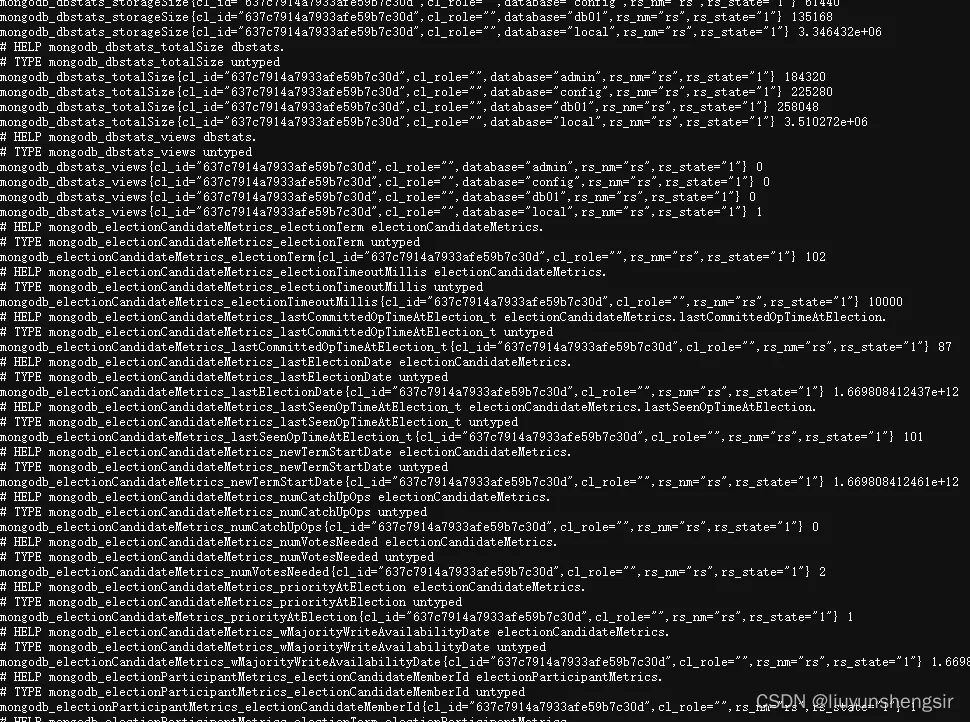
3.参考命令
MongoDB Prometheus exporter

Flags:
  -h, --help                     Show context-sensitive help.
      --mongodb.collstats-colls=db1,db2.col2
                                 List of comma separared databases.collections
                                 to get $collStats
      --mongodb.indexstats-colls=db1.col1,db2.col2
                                 List of comma separared databases.collections
                                 to get $indexStats
      --mongodb.uri=mongodb://user:pass@127.0.0.1:27017/admin?ssl=true
                                 MongoDB connection URI ($MONGODB_URI)
      --[no-]mongodb.global-conn-pool
                                 Use global connection pool instead of creating
                                 new pool for each http request.
      --[no-]mongodb.direct-connect
                                 Whether or not a direct connect should be made.
                                 Direct connections are not valid if multiple
                                 hosts are specified or an SRV URI is used.
      --web.listen-address=":9216"
                                 Address to listen on for web interface and
                                 telemetry
      --web.telemetry-path="/metrics"
                                 Metrics expose path
      --web.config=STRING        Path to the file having Prometheus TLS config
                                 for basic auth
      --log.level="error"        Only log messages with the given severity or
                                 above. Valid levels: [debug, info, warn, error,
                                 fatal]
      --collector.diagnosticdata
                                 Enable collecting metrics from
                                 getDiagnosticData
      --collector.replicasetstatus
                                 Enable collecting metrics from replSetGetStatus
      --collector.dbstats        Enable collecting metrics from dbStats
      --collector.topmetrics     Enable collecting metrics from top admin
                                 command
      --collector.indexstats     Enable collecting metrics from $indexStats
      --collector.collstats      Enable collecting metrics from $collStats
      --metrics.overridedescendingindex
                                 Enable descending index name override to
                                 replace -1 with _DESC
      --collect-all              Enable all collectors. Same as specifying all
                                 --collector.<name>
      --collector.collstats-limit=0
                                 Disable collstats, dbstats, topmetrics and
                                 indexstats collector if there are more than <n>
                                 collections. 0=No limit
      --[no-]discovering-mode    Enable autodiscover collections
      --[no-]compatible-mode     Enable old mongodb-exporter compatible metrics
      --version                  Show version and exit