前置知识
- 有Android开发基础
- 了解 View 体系
- 了解 View 的
Measure方法
前言
在上文中,我们讲述了 View 里面的 Measure 方法,Measure 方法是页面绘制的三大方法中最为复杂的一个方法。它的 View 流程和 ViewGroup 的流程不尽相同,前者只需根据不同模式测量自身,而后者测量完自身后还需遍历测量子元素。并且他们在调用获取自身的 MeasureSpec 时候又会根据 DecorView 和普通 View 做不同的要求。
而 Layout 方法并没有如此复杂,相对来说较为简单。本篇文章就带大家学习 View 绘制三大方法的第二个方法——Layout 方法。
Layout 方法的作用和入口
Layout 一词翻译为:布局、布置。从这个英文翻译可以看出,Layout 方法与位置有关,事实的确如此,Layout 方法用于确定元素的位置所在。
那么,Layout 方法的入口在哪里呢?在什么时候由什么方法调用呢?
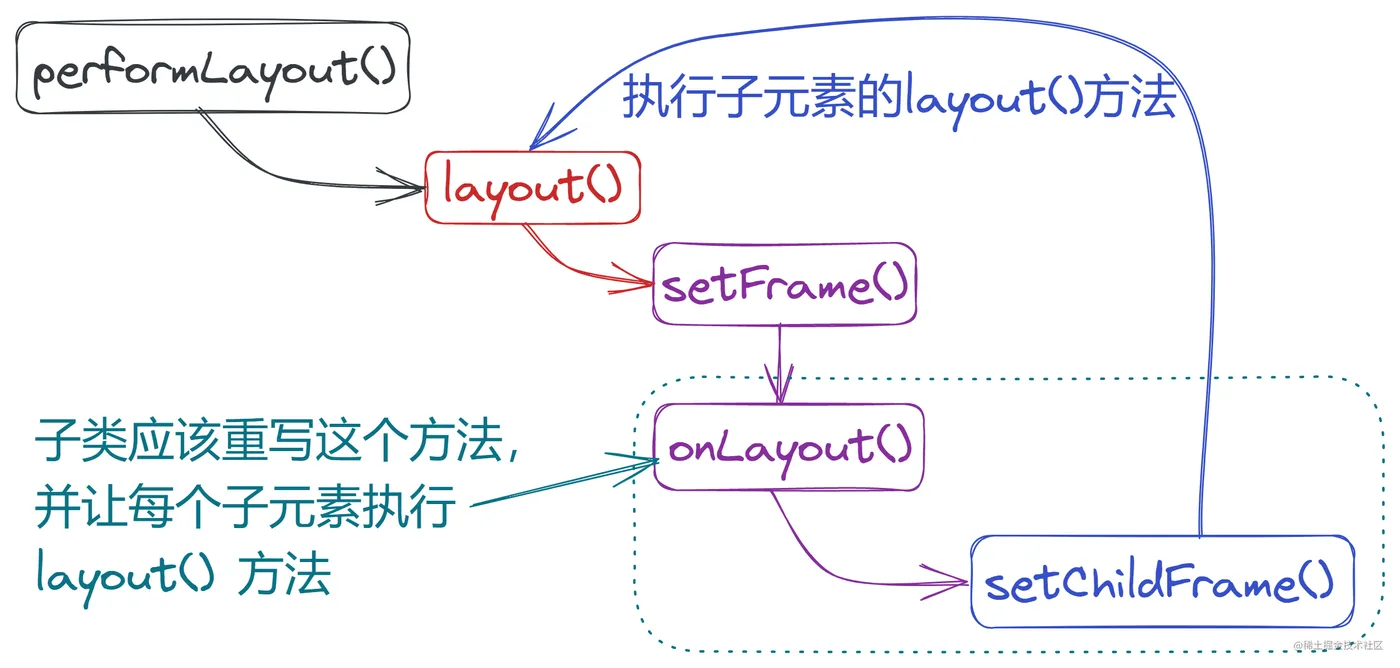
这个问题在上一篇文章中也有提到,感兴趣的同学可以点击查阅。Layout 方法的入口与 Measure 方法类似,它是由 performLayout() 方法调用的,它的调用链是这种样子:performTraversals() -> performLayout() -> layout() 。我们可以在下方的代码中的注释1和2处看到 performLayout() 方法调用了 layout() 方法。
private void performLayout(WindowManager.LayoutParams lp, int desiredWindowWidth,
                           int desiredWindowHeight) {
    ...
    try {
        host.layout(0, 0, host.getMeasuredWidth(), host.getMeasuredHeight());//1
        ...
        if (numViewsRequestingLayout > 0) {
            ...
            if (validLayoutRequesters != null) {
                ...
                host.layout(0, 0, host.getMeasuredWidth(), host.getMeasuredHeight());//2
                ...
            }
        }
    } finally {
        Trace.traceEnd(Trace.TRACE_TAG_VIEW);
    }
    mInLayout = false;
}
复制代码
Layout 流程
源码分析
下面,我们来看一下 View 中 layout 的源码,为了保留可读性,我把一些不讲解的代码注释掉了,且保留了源码的代码注释,感兴趣的同学可以阅读它的注释,会对它有更深的理解。
layout() 方法中,需要传入的 l t r b,其实分别对应着 left、top、right、bottom。即为从 左、上、右、下,View 相对于父布局的距离。对位置的确定的方法,主要在下面的注释1和2处。
/**
 * Assign a size and position to a view and all of its
 * descendants
 *
 * <p>This is the second phase of the layout mechanism.
 * (The first is measuring). In this phase, each parent calls
 * layout on all of its children to position them.
 * This is typically done using the child measurements
 * that were stored in the measure pass().</p>
 *
 * <p>Derived classes should not override this method.
 * Derived classes with children should override
 * onLayout. In that method, they should
 * call layout on each of their children.</p>
 *
 * @param l Left position, relative to parent
 * @param t Top position, relative to parent
 * @param r Right position, relative to parent
 * @param b Bottom position, relative to parent
 */
@SuppressWarnings({"unchecked"})
public void layout(int l, int t, int r, int b) {
    if ((mPrivateFlags3 & PFLAG3_MEASURE_NEEDED_BEFORE_LAYOUT) != 0) {
        onMeasure(mOldWidthMeasureSpec, mOldHeightMeasureSpec);
        mPrivateFlags3 &= ~PFLAG3_MEASURE_NEEDED_BEFORE_LAYOUT;
    }
    int oldL = mLeft;
    int oldT = mTop;
    int oldB = mBottom;
    int oldR = mRight;
    boolean changed = isLayoutModeOptical(mParent) ?
        setOpticalFrame(l, t, r, b) : setFrame(l, t, r, b);//1
    if (changed || (mPrivateFlags & PFLAG_LAYOUT_REQUIRED) == PFLAG_LAYOUT_REQUIRED) {
        onLayout(changed, l, t, r, b);//2
        ...
    }
    ...
}
复制代码
接着我们看一下上面代码中注释1的代码。setFrame() 方法做了什么。我们从下面的代码逻辑以及注释中可以看到,这个方法是设置 View 的四个点的位置,并且会返回告知是否位置与之前有变更。执行完这段代码后,layout 就会执行 onLayout() 方法了,我也在下面给出代码。但是我们发现它是一个空方法,改方法的注释里面写道,我们要使用的时候需要重写这个方法。这是为什么呢?这是因为不同的控件有不同的实现,所以该方法就设定让子类去自行设计了。
/**
 * Assign a size and position to this view.
 *
 * This is called from layout.
 *
 * @param ...
 * @return true if the new size and position are different than the
 *         previous ones
 * {@hide}
 */
@UnsupportedAppUsage(maxTargetSdk = Build.VERSION_CODES.P)
protected boolean setFrame(int left, int top, int right, int bottom) {
    boolean changed = false;
    ...
    if (mLeft != left || mRight != right || mTop != top || mBottom != bottom) {
        changed = true;
        // Remember our drawn bit
        int drawn = mPrivateFlags & PFLAG_DRAWN;
        int oldWidth = mRight - mLeft;
        int oldHeight = mBottom - mTop;
        int newWidth = right - left;
        int newHeight = bottom - top;
        boolean sizeChanged = (newWidth != oldWidth) || (newHeight != oldHeight);
        // Invalidate our old position
        invalidate(sizeChanged);
        mLeft = left;
        mTop = top;
        mRight = right;
        mBottom = bottom;
        mRenderNode.setLeftTopRightBottom(mLeft, mTop, mRight, mBottom);
        ...
        notifySubtreeAccessibilityStateChangedIfNeeded();
    }
    return changed;
}
/**
 * Called from layout when this view should
 * assign a size and position to each of its children.
 *
 * Derived classes with children should override
 * this method and call layout on each of
 * their children.
 * @param ...
 */
protected void onLayout(boolean changed, int left, int top, int right, int bottom) {
}
复制代码
而由于 ViewGroup 是继承 View 后对 layout()layout() 进行了简单的重写,这里便不再赘述。下面我们继续去看看 ViewGroup 的子类,看看 LinearLayout 是如何实现 onLayout() 方法的。我们可以看到,它是对该方法进行了重写,然后分别对两种不同的列表方向进行 layout 位置确定。
@Override
protected void onLayout(boolean changed, int l, int t, int r, int b) {
    if (mOrientation == VERTICAL) {
        layoutVertical(l, t, r, b);
    } else {
        layoutHorizontal(l, t, r, b);
    }
}
复制代码
我们继续查看垂直的 layoutVertical() 方法,我们依旧是做了代码省略。从注释1和注释2处,我们可以看到 childTop 是不断在增大的,其实就是是实现了从上到下排序,后来的元素被排在原本元素的下面,而不会重叠。
注释3处的详细代码也已给出,setChildFrame() 方法其实就是调用子元素的 layout() 方法测量子寻找子元素的位置。这样子设计就可以层层传递,把整个 View 树的位置都寻找出来。
void layoutVertical(int left, int top, int right, int bottom) {
    ...
    for (int i = 0; i < count; i++) {
        final View child = getVirtualChildAt(i);
        if (child == null) {
            childTop += measureNullChild(i);//1
        } else if (child.getVisibility() != GONE) {
            final int childWidth = child.getMeasuredWidth();
            final int childHeight = child.getMeasuredHeight();
            final LinearLayout.LayoutParams lp =
                (LinearLayout.LayoutParams) child.getLayoutParams();
            ...
            if (hasDividerBeforeChildAt(i)) {
                childTop += mDividerHeight;//2
            }
            childTop += lp.topMargin;
            setChildFrame(child, childLeft, childTop + getLocationOffset(child),
                          childWidth, childHeight);//3
            childTop += childHeight + lp.bottomMargin + getNextLocationOffset(child);
            i += getChildrenSkipCount(child, i);
        }
    }
}
//注释3的详细代码
private void setChildFrame(View child, int left, int top, int width, int height) {
    child.layout(left, top, left + width, top + height);
}
复制代码
layout 的流程到此就讲完了。这里提一个小问题,layout 流程是找出 View 的位置,那么 getWidth() 方法获得的位置是 layout 流程得出的位置吗?
一般来说,是同一个位置。layout 流程的位置是称为最终位置(或最终宽高),而 measure 流程的称为测量位置(或测量宽高) 。两者只是赋值时机不同。阅读这两篇文章后,我们分析流程,你会发现,getWidth() 和 getMeasuredWidth() 两者得到的结果是一样的,我们也可认为测量宽高就是最终宽高。当然,如果对此重写了,就会不一致了。
public final int getWidth(){
    return mRight - mLeft;
}
复制代码
流程图
在此展示绘制的 layout 过程的流程图,希望能帮助理解该过程。