一、Nginx介绍
Nginx (engine x) 是一个高性能的HTTP和反向代理web服务器,同时也提供了IMAP/POP3/SMTP服务。Nginx是由伊戈尔·赛索耶夫为俄罗斯访问量第二的Rambler.ru站点(俄文:Рамблер)开发的,第一个公开版本0.1.0发布于2004年10月4日。
从2004年发布至今,凭借开源的力量,已经接近成熟与完善。
Nginx功能丰富,可作为HTTP服务器,也可作为反向代理服务器,邮件服务器。支持FastCGI、SSL、Virtual Host、URL Rewrite、Gzip等功能。并且支持很多第三方的模块扩展。Nginx的稳定性、功能集、示例配置文件和低系统资源的消耗让他后来居上,在全球活跃的网站中有12.18%的使用比率,大约为2220万个网站。
二、Nginx源码下载
1.打开Nginx官网
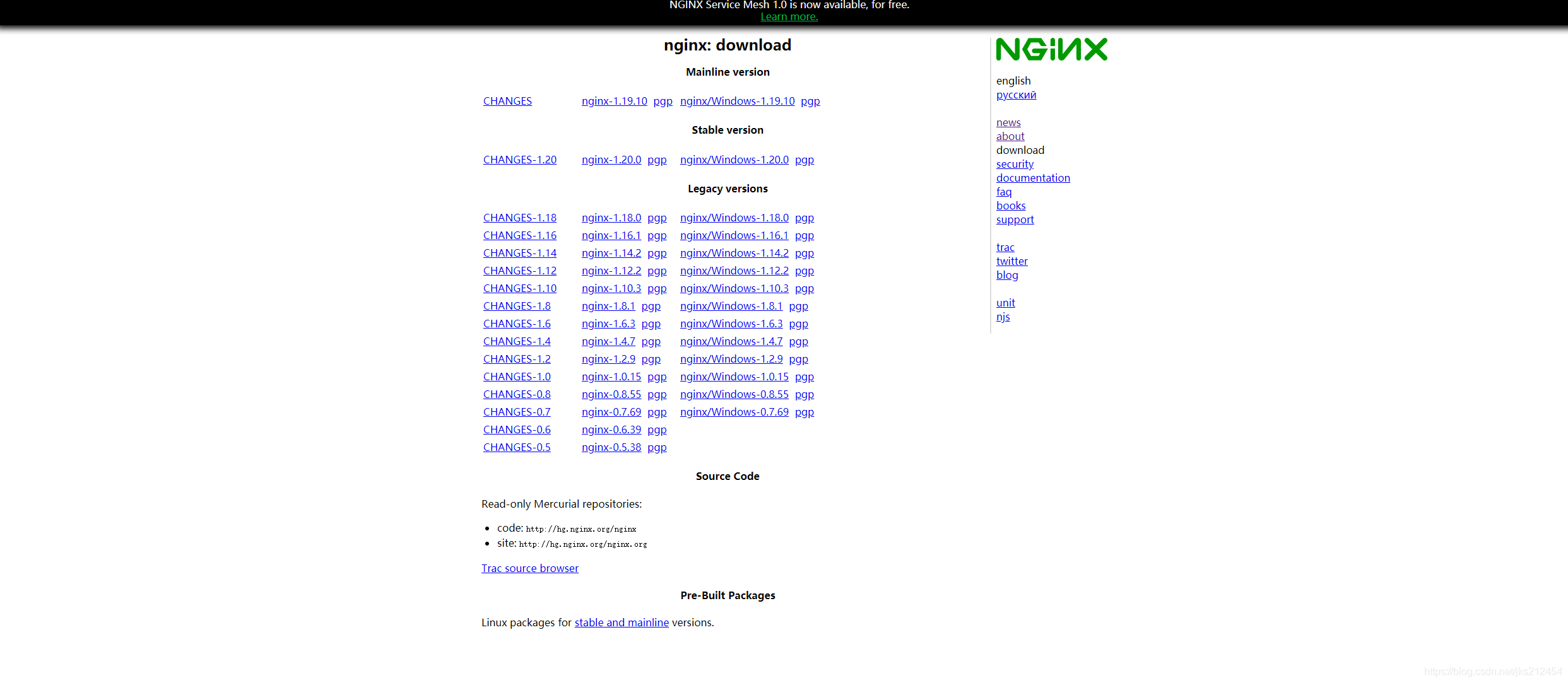
2.下载官网的源码包
# 下载文件为nginx-1.18.0 .tar Nginx的源码包版本为1.18.0三、Nginx源码安装
1.解压源码包
[root@node1 ~]# ll
total 1028
-rw-------. 1 root root    1608 Mar 19 22:27 anaconda-ks.cfg
drwxr-xr-x. 2 root root       6 Mar 19 22:33 Desktop
drwxr-xr-x. 2 root root       6 Mar 19 22:33 Documents
drwxr-xr-x. 2 root root       6 Mar 19 22:33 Downloads
-rw-r--r--. 1 root root     378 May  2 20:57 dvd.repo
-rw-r--r--. 1 root root       0 May  5 12:47 file
-rw-r--r--. 1 root root    1763 Mar 19 22:32 initial-setup-ks.cfg
drwxr-xr-x. 2 root root       6 Mar 19 22:33 Music
-rw-r--r--. 1 root root 1039530 May  8 13:19 nginx-1.18.0.tar.gz
drwxr-xr-x. 2 root root       6 Mar 19 22:33 Pictures
drwxr-xr-x. 2 root root       6 Mar 19 22:33 Public
drwxr-xr-x. 2 root root       6 Mar 19 22:33 Templates
drwxr-xr-x. 2 root root       6 Mar 19 22:33 Videos
[root@node1 ~]# tar -xf nginx-1.18.0.tar.gz
[root@node1 ~]# ll
total 1028
-rw-------. 1 root    root       1608 Mar 19 22:27 anaconda-ks.cfg
drwxr-xr-x. 2 root    root          6 Mar 19 22:33 Desktop
drwxr-xr-x. 2 root    root          6 Mar 19 22:33 Documents
drwxr-xr-x. 2 root    root          6 Mar 19 22:33 Downloads
-rw-r--r--. 1 root    root        378 May  2 20:57 dvd.repo
-rw-r--r--. 1 root    root          0 May  5 12:47 file
-rw-r--r--. 1 root    root       1763 Mar 19 22:32 initial-setup-ks.cfg
drwxr-xr-x. 2 root    root          6 Mar 19 22:33 Music
drwxr-xr-x. 8 ansible ansible     158 Apr 21  2020 nginx-1.18.0
-rw-r--r--. 1 root    root    1039530 May  8 13:19 nginx-1.18.0.tar.gz
drwxr-xr-x. 2 root    root          6 Mar 19 22:33 Pictures
drwxr-xr-x. 2 root    root          6 Mar 19 22:33 Public
drwxr-xr-x. 2 root    root          6 Mar 19 22:33 Templates
drwxr-xr-x. 2 root    root          6 Mar 19 22:33 Videos
2.安装开发包组及环境
yum -y groupinstall "Development Tools"[root@node1 ~]# yum -y install pcre-devel zlib-devel make
Updating Subscription Management repositories.
Unable to read consumer identity
This system is not registered to Red Hat Subscription Management. You can use subscription-manager to register.
Repository AppStream is listed more than once in the configuration
Repository BaseOS is listed more than once in the configuration
ansiable 0.0 B/s | 0 B 00:00
Failed to synchronize cache for repo 'ansiable', ignoring this repo.
Last metadata expiration check: 0:03:40 ago on Sat 08 May 2021 01:33:26 PM CST.
Package make-1:4.2.1-9.el8.x86_64 is already installed.
Dependencies resolved.
====================================================================================================================================================================
Package Arch Version Repository Size
====================================================================================================================================================================
Installing:
pcre-devel x86_64 8.42-4.el8 BaseOS 551 k
zlib-devel x86_64 1.2.11-10.el8 BaseOS 56 k
Installing dependencies:
pcre-cpp x86_64 8.42-4.el8 BaseOS 47 k
pcre-utf16 x86_64 8.42-4.el8 BaseOS 195 k
pcre-utf32 x86_64 8.42-4.el8 BaseOS 186 k
Transaction Summary
====================================================================================================================================================================
Install 5 Packages
Total size: 1.0 M
Installed size: 2.7 M
Downloading Packages:
Running transaction check
Transaction check succeeded.
Running transaction test
Transaction test succeeded.
Running transaction
Preparing : 1/1
Installing : pcre-utf32-8.42-4.el8.x86_64 1/5
Installing : pcre-utf16-8.42-4.el8.x86_64 2/5
Installing : pcre-cpp-8.42-4.el8.x86_64 3/5
Installing : pcre-devel-8.42-4.el8.x86_64 4/5
Installing : zlib-devel-1.2.11-10.el8.x86_64 5/5
Running scriptlet: zlib-devel-1.2.11-10.el8.x86_64 5/5
Verifying : pcre-cpp-8.42-4.el8.x86_64 1/5
Verifying : pcre-devel-8.42-4.el8.x86_64 2/5
Verifying : pcre-utf16-8.42-4.el8.x86_64 3/5
Verifying : pcre-utf32-8.42-4.el8.x86_64 4/5
Verifying : zlib-devel-1.2.11-10.el8.x86_64 5/5
Installed products updated.
Installed:
pcre-devel-8.42-4.el8.x86_64 zlib-devel-1.2.11-10.el8.x86_64 pcre-cpp-8.42-4.el8.x86_64 pcre-utf16-8.42-4.el8.x86_64 pcre-utf32-8.42-4.el8.x86_64
Complete!
3.编译Nginx源码
 ./configure
checking for OS
 + Linux 4.18.0-80.el8.x86_64 x86_64
checking for C compiler ... found
 + using GNU C compiler
 + gcc version: 8.2.1 20180905 (Red Hat 8.2.1-3) (GCC)
checking for gcc -pipe switch ... found
checking for -Wl,-E switch ... found
checking for gcc builtin atomic operations ... found
checking for C99 variadic macros ... found
checking for gcc variadic macros ... found
checking for gcc builtin 64 bit byteswap ... found
checking for unistd.h ... found
checking for inttypes.h ... found
checking for limits.h ... found
checking for sys/filio.h ... not found
checking for sys/param.h ... found
checking for sys/mount.h ... found
checking for sys/statvfs.h ... found
checking for crypt.h ... found
checking for Linux specific features
checking for epoll ... found
checking for EPOLLRDHUP ... found
checking for EPOLLEXCLUSIVE ... found
checking for O_PATH ... found
checking for sendfile() ... found
checking for sendfile64() ... found
checking for sys/prctl.h ... found
checking for prctl(PR_SET_DUMPABLE) ... found
checking for prctl(PR_SET_KEEPCAPS) ... found
checking for capabilities ... found
checking for crypt_r() ... found
checking for sys/vfs.h ... found
checking for nobody group ... found
checking for poll() ... found
checking for /dev/poll ... not found
checking for kqueue ... not found
checking for crypt() ... not found
checking for crypt() in libcrypt ... found
checking for F_READAHEAD ... not found
checking for posix_fadvise() ... found
checking for O_DIRECT ... found
checking for F_NOCACHE ... not found
checking for directio() ... not found
checking for statfs() ... found
checking for statvfs() ... found
checking for dlopen() ... not found
checking for dlopen() in libdl ... found
checking for sched_yield() ... found
checking for sched_setaffinity() ... found
checking for SO_SETFIB ... not found
checking for SO_REUSEPORT ... found
checking for SO_ACCEPTFILTER ... not found
checking for SO_BINDANY ... not found
checking for IP_TRANSPARENT ... found
checking for IP_BINDANY ... not found
checking for IP_BIND_ADDRESS_NO_PORT ... found
checking for IP_RECVDSTADDR ... not found
checking for IP_SENDSRCADDR ... not found
checking for IP_PKTINFO ... found
checking for IPV6_RECVPKTINFO ... found
checking for TCP_DEFER_ACCEPT ... found
checking for TCP_KEEPIDLE ... found
checking for TCP_FASTOPEN ... found
checking for TCP_INFO ... found
checking for accept4() ... found
checking for eventfd() ... found
checking for int size ... 4 bytes
checking for long size ... 8 bytes
checking for long long size ... 8 bytes
checking for void * size ... 8 bytes
checking for uint32_t ... found
checking for uint64_t ... found
checking for sig_atomic_t ... found
checking for sig_atomic_t size ... 4 bytes
checking for socklen_t ... found
checking for in_addr_t ... found
checking for in_port_t ... found
checking for rlim_t ... found
checking for uintptr_t ... uintptr_t found
checking for system byte ordering ... little endian
checking for size_t size ... 8 bytes
checking for off_t size ... 8 bytes
checking for time_t size ... 8 bytes
checking for AF_INET6 ... found
checking for setproctitle() ... not found
checking for pread() ... found
checking for pwrite() ... found
checking for pwritev() ... found
checking for sys_nerr ... found
checking for localtime_r() ... found
checking for clock_gettime(CLOCK_MONOTONIC) ... found
checking for posix_memalign() ... found
checking for memalign() ... found
checking for mmap(MAP_ANON|MAP_SHARED) ... found
checking for mmap("/dev/zero", MAP_SHARED) ... found
checking for System V shared memory ... found
checking for POSIX semaphores ... not found
checking for POSIX semaphores in libpthread ... found
checking for struct msghdr.msg_control ... found
checking for ioctl(FIONBIO) ... found
checking for ioctl(FIONREAD) ... found
checking for struct tm.tm_gmtoff ... found
checking for struct dirent.d_namlen ... not found
checking for struct dirent.d_type ... found
checking for sysconf(_SC_NPROCESSORS_ONLN) ... found
checking for sysconf(_SC_LEVEL1_DCACHE_LINESIZE) ... found
checking for openat(), fstatat() ... found
checking for getaddrinfo() ... found
checking for PCRE library ... found
checking for PCRE JIT support ... found
checking for zlib library ... found
creating objs/Makefile

Configuration summary
  + using system PCRE library
  + OpenSSL library is not used
  + using system zlib library

  nginx path prefix: "/usr/local/nginx"
  nginx binary file: "/usr/local/nginx/sbin/nginx"
  nginx modules path: "/usr/local/nginx/modules"
  nginx configuration prefix: "/usr/local/nginx/conf"
  nginx configuration file: "/usr/local/nginx/conf/nginx.conf"
  nginx pid file: "/usr/local/nginx/logs/nginx.pid"
  nginx error log file: "/usr/local/nginx/logs/error.log"
  nginx http access log file: "/usr/local/nginx/logs/access.log"
  nginx http client request body temporary files: "client_body_temp"
  nginx http proxy temporary files: "proxy_temp"
  nginx http fastcgi temporary files: "fastcgi_temp"
  nginx http uwsgi temporary files: "uwsgi_temp"
  nginx http scgi temporary files: "scgi_temp"
make && make install四、Nginx启动与检查
[root@node1 sbin]# ./nginx -t
nginx: the configuration file /usr/local/nginx/conf/nginx.conf syntax is ok
nginx: configuration file /usr/local/nginx/conf/nginx.conf test is successful


[root@node1 sbin]# netstat -tunlp |grep 80
tcp        0      0 0.0.0.0:80              0.0.0.0:*               LISTEN      39424/nginx: master
[root@node1 sbin]# ps -ef |grep nginx
root      39424      1  0 14:01 ?        00:00:00 nginx: master process ./nginx
nobody    39425  39424  0 14:01 ?        00:00:00 nginx: worker process
root      39462   1884  0 14:02 pts/0    00:00:00 grep --color=auto nginx