目录
🚗VGG介绍
VGG 在2014年由牛津大学著名研究组 VGG(Visual Geometry Group)提出,
(论文地址:https://arxiv.org/abs/1409.1556)
获得该年 ImageNet 竞赛中 Localization Task(定位任务)第一名和Classification Task(分类任务)第二名。(可以说是非常的厉害)
🚓那VGG它到底厉害在哪里呢?
通过堆叠多个小卷积核来替代大尺度卷积核,可以减少训练参数,同时能保证相同的感受野
🚓那什么是感受野呢?
决定某一层输出结果中一个元素所对应的输入层的区域大小,被称作感受野(receptive field)
(简单来说就是输出feature map上的一个单元 对应 输入层(上层)上的区域大小)
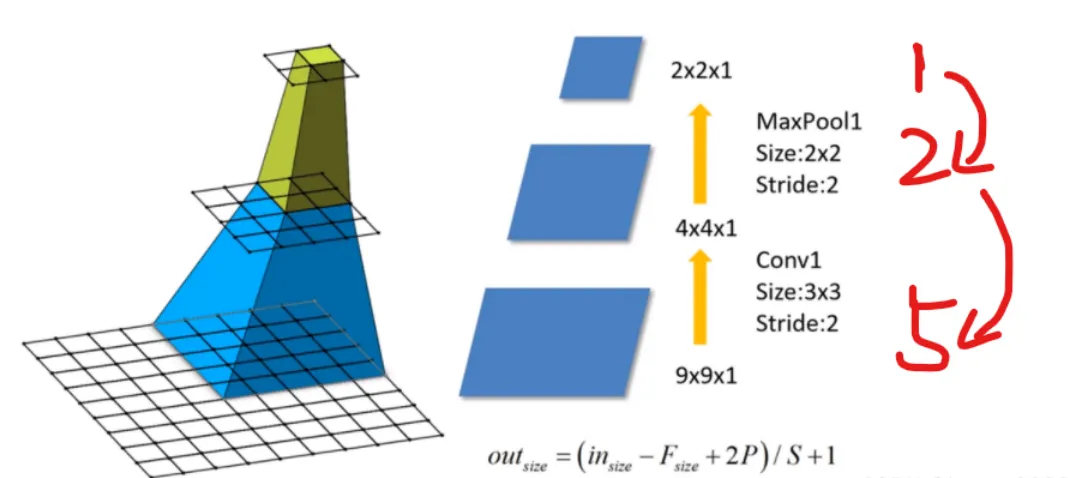
🚗例如上图:maxpool1 感受野为2 (意思是上一层1格 对应 下一层2格)
conv1 感受野为5
🚓计算公式
我们的感受野的计算公式为:
F ( i + 1) 为第 i +1 层感受野
Stride 为第 i 层的步距
Ksize 为 卷积核 或 池化核 尺寸

🚓问题一:
堆叠两个3×3的卷积核替代5x5的卷积核,堆叠三个3×3的卷积核替代7x7的卷积核。
(VGG网络中卷积的Stride默认为1)
替代前后感受野是否相同呢?
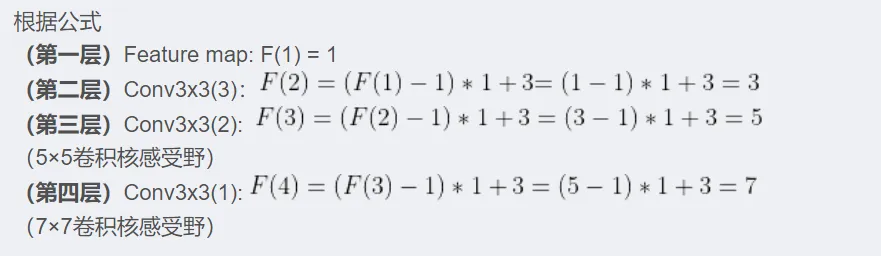
2个3×3的卷积核和一个5x5的卷积核感受野相同
证明可以通过堆叠两个3×3的卷积核替代5x5的卷积核,堆叠三个3×3的卷积核替代7x7的卷积核
🚓问题二:
堆叠3×3卷积核后训练参数是否真的减少了?
注:CNN参数个数 = 卷积核尺寸×卷积核深度 × 卷积核组数 = 卷积核尺寸 × 输入特征矩阵深度 × 输出特征矩阵深度
现假设 输入特征矩阵深度 = 输出特征矩阵深度 = C
使用7×7卷积核所需参数个数:
堆叠三个3×3的卷积核所需参数个数:
很明显27小于49


🚓网络图
VGG网络有多个版本,
我们一般采用VGG16 (16的意思是16层=12层卷积层+4层全连接层)
其网络结构如下如所示:
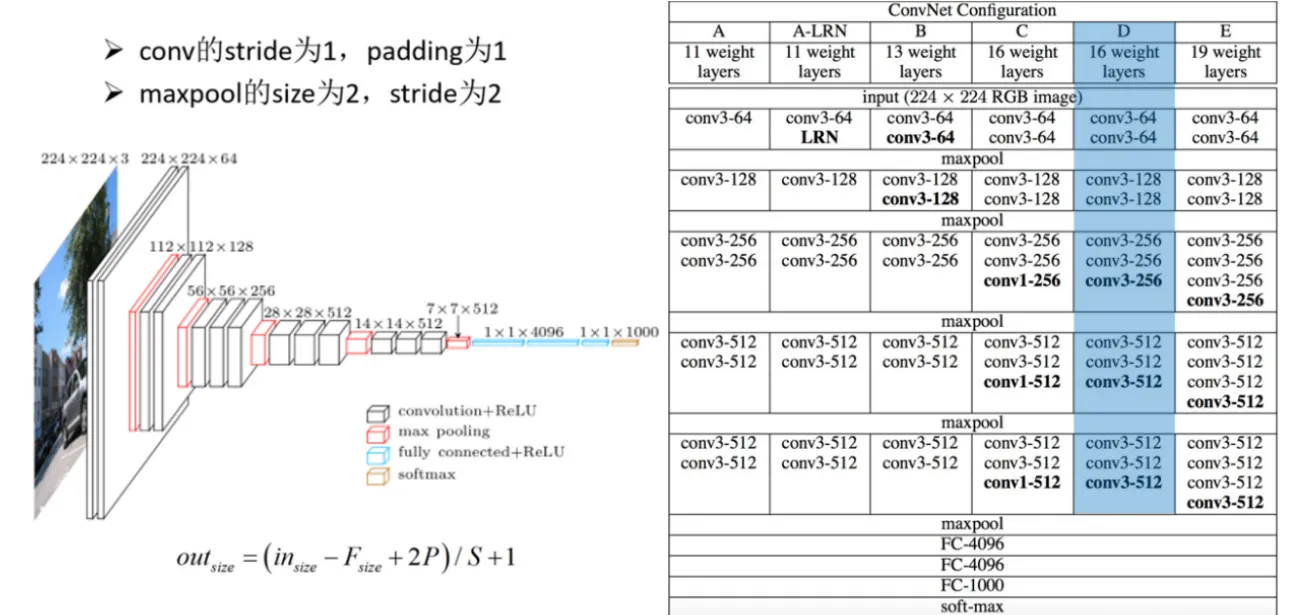
看图和计算我们可以知道,经3×3卷积的特征矩阵的尺寸是不改变的:
out =(in −F+2P)/S+1=(in −3+2)/1+1= in
out = in 大小一样
🚗pytorch搭建VGG网络
VGG网络分为 卷积层提取特征 和 全连接层进行分类 这两个模块
🚓1. model.py
import torch.nn as nn
import torch
class VGG(nn.Module):
    def __init__(self, features, num_classes=1000, init_weights=False):
        super(VGG, self).__init__()
        self.features = features      # 卷积层提取特征
        self.classifier = nn.Sequential(  # 全连接层进行分类
            nn.Dropout(p=0.5),
            nn.Linear(512*7*7, 2048),
            nn.ReLU(True),
            nn.Dropout(p=0.5),
            nn.Linear(2048, 2048),
            nn.ReLU(True),
            nn.Linear(2048, num_classes)
        )
        if init_weights:
            self._initialize_weights()  #初始化权重
    def forward(self, x):
        # N x 3 x 224 x 224
        x = self.features(x)
        # N x 512 x 7 x 7
        x = torch.flatten(x, start_dim=1)
        # N x 512*7*7
        x = self.classifier(x)
        return x
    def _initialize_weights(self):
        for m in self.modules():
            if isinstance(m, nn.Conv2d):
                # nn.init.kaiming_normal_(m.weight, mode='fan_out', nonlinearity='relu')
                nn.init.xavier_uniform_(m.weight)
                if m.bias is not None:
                    nn.init.constant_(m.bias, 0)
            elif isinstance(m, nn.Linear):
                nn.init.xavier_uniform_(m.weight)
                # nn.init.normal_(m.weight, 0, 0.01)
                nn.init.constant_(m.bias, 0)

🚕神奇处理之处
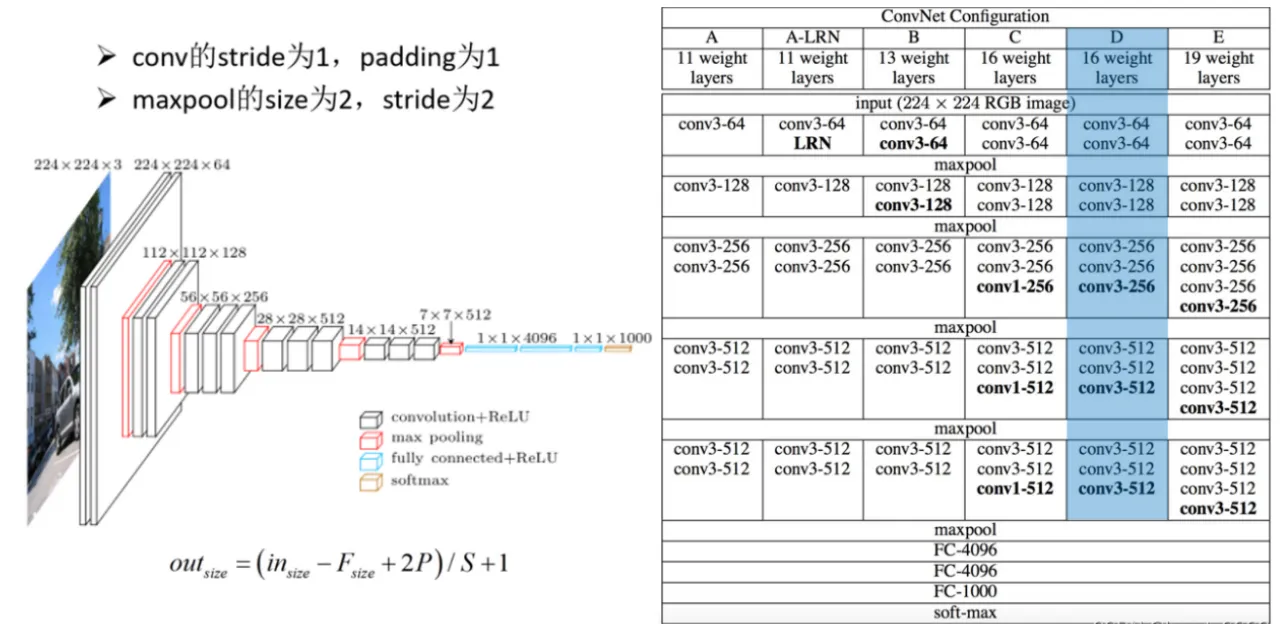
# vgg网络模型配置列表,数字表示卷积核个数,'M'表示最大池化层
cfgs = {
    'vgg11': [64, 'M', 128, 'M', 256, 256, 'M', 512, 512, 'M', 512, 512, 'M'],                      # 模型A
    'vgg13': [64, 64, 'M', 128, 128, 'M', 256, 256, 'M', 512, 512, 'M', 512, 512, 'M'],                 # 模型B
    'vgg16': [64, 64, 'M', 128, 128, 'M', 256, 256, 256, 'M', 512, 512, 512, 'M', 512, 512, 512, 'M'],          # 模型D
    'vgg19': [64, 64, 'M', 128, 128, 'M', 256, 256, 256, 256, 'M', 512, 512, 512, 512, 'M', 512, 512, 512, 512, 'M'],   # 模型E
}
# 卷积层提取特征
def make_features(cfg: list): # 传入的是具体某个模型的参数列表
    layers = []
    in_channels = 3   # 输入的原始图像(rgb三通道)
    for v in cfg:
        # 如果是最大池化层,就进行池化
        if v == "M":
            layers += [nn.MaxPool2d(kernel_size=2, stride=2)]
        # 不然就是卷积层
        else:
            conv2d = nn.Conv2d(in_channels, v, kernel_size=3, padding=1)
            layers += [conv2d, nn.ReLU(True)]
            in_channels = v
    return nn.Sequential(*layers)  # 单星号(*)将参数以元组(tuple)的形式导入
def vgg(model_name="vgg16", **kwargs):  # 双星号(**)将参数以字典的形式导入
    try:
        cfg = cfgs[model_name]
    except:
        print("Warning: model number {} not in cfgs dict!".format(model_name))
        exit(-1)
    model = VGG(make_features(cfg), **kwargs) #**kwargs是你传入的字典数据
    return model

🚓2. train.py
和pytorch——AlexNet——训练花分类数据集_heart_6662的博客-CSDN博客的一样(数据还是花的数据)
import os
import json
import torch
import torch.nn as nn
from torchvision import transforms, datasets
import torch.optim as optim
from tqdm import tqdm
from model import vgg
def main():
    device = torch.device("cuda:0" if torch.cuda.is_available() else "cpu")
    print("using {} device.".format(device))
    data_transform = {
        "train": transforms.Compose([transforms.RandomResizedCrop(224),
                                     transforms.RandomHorizontalFlip(),
                                     transforms.ToTensor(),
                                     transforms.Normalize((0.5, 0.5, 0.5), (0.5, 0.5, 0.5))]),
        "val": transforms.Compose([transforms.Resize((224, 224)),
                                   transforms.ToTensor(),
                                   transforms.Normalize((0.5, 0.5, 0.5), (0.5, 0.5, 0.5))])}
    data_root = os.path.abspath(os.path.join(os.getcwd(), "../.."))  # get data root path
    image_path = os.path.join(data_root, "data_set", "flower_data")  # flower data set path
    assert os.path.exists(image_path), "{} path does not exist.".format(image_path)
    train_dataset = datasets.ImageFolder(root=os.path.join(image_path, "train"),
                                         transform=data_transform["train"])
    train_num = len(train_dataset)
    # {'daisy':0, 'dandelion':1, 'roses':2, 'sunflower':3, 'tulips':4}
    flower_list = train_dataset.class_to_idx
    cla_dict = dict((val, key) for key, val in flower_list.items())
    # write dict into json file
    json_str = json.dumps(cla_dict, indent=4)
    with open('class_indices.json', 'w') as json_file:
        json_file.write(json_str)
    batch_size =32
    nw = min([os.cpu_count(), batch_size if batch_size > 1 else 0, 8])  # number of workers
    print('Using {} dataloader workers every process'.format(nw))
    train_loader = torch.utils.data.DataLoader(train_dataset,
                                               batch_size=batch_size, shuffle=True,
                                               num_workers=0)
    validate_dataset = datasets.ImageFolder(root=os.path.join(image_path, "val"),
                                            transform=data_transform["val"])
    val_num = len(validate_dataset)
    validate_loader = torch.utils.data.DataLoader(validate_dataset,
                                                  batch_size=batch_size, shuffle=False,
                                                  num_workers=0)
    print("using {} images for training, {} images for validation.".format(train_num,
                                                                           val_num))
    # test_data_iter = iter(validate_loader)
    # test_image, test_label = test_data_iter.next()
    model_name = "vgg16"
    net = vgg(model_name=model_name, num_classes=5, init_weights=True)
    net.to(device)
    loss_function = nn.CrossEntropyLoss()
    optimizer = optim.Adam(net.parameters(), lr=0.0001)
    epochs = 30
    best_acc = 0.0
    save_path = './{}Net.pth'.format(model_name)
    train_steps = len(train_loader)
    for epoch in range(epochs):
        # train
        net.train()
        running_loss = 0.0
        train_bar = tqdm(train_loader)
        for step, data in enumerate(train_bar):
            images, labels = data
            optimizer.zero_grad()
            outputs = net(images.to(device))
            loss = loss_function(outputs, labels.to(device))
            loss.backward()
            optimizer.step()
            # print statistics
            running_loss += loss.item()
            train_bar.desc = "train epoch[{}/{}] loss:{:.3f}".format(epoch + 1,
                                                                     epochs,
                                                                     loss)
        # validate
        net.eval()
        acc = 0.0  # accumulate accurate number / epoch
        with torch.no_grad():
            val_bar = tqdm(validate_loader)
            for val_data in val_bar:
                val_images, val_labels = val_data
                outputs = net(val_images.to(device))
                predict_y = torch.max(outputs, dim=1)[1]
                acc += torch.eq(predict_y, val_labels.to(device)).sum().item()
        val_accurate = acc / val_num
        print('[epoch %d] train_loss: %.3f  val_accuracy: %.3f' %
              (epoch + 1, running_loss / train_steps, val_accurate))
        if val_accurate > best_acc:
            best_acc = val_accurate
            torch.save(net.state_dict(), save_path)
    print('Finished Training')
if __name__ == '__main__':
    main()

3. predict.py
pytorch——AlexNet——训练花分类数据集_heart_6662的博客-CSDN博客与之前一样
import os
import json
import torch
from PIL import Image
from torchvision import transforms
import matplotlib.pyplot as plt
from model import vgg
def main():
    device = torch.device("cuda:0" if torch.cuda.is_available() else "cpu")
    data_transform = transforms.Compose(
        [transforms.Resize((224, 224)),
         transforms.ToTensor(),
         transforms.Normalize((0.5, 0.5, 0.5), (0.5, 0.5, 0.5))])
    # load image
    img_path = "../tulip.jpg"
    assert os.path.exists(img_path), "file: '{}' dose not exist.".format(img_path)
    img = Image.open(img_path)
    plt.imshow(img)
    # [N, C, H, W]
    img = data_transform(img)
    # expand batch dimension
    img = torch.unsqueeze(img, dim=0)
    # read class_indict
    json_path = './class_indices.json'
    assert os.path.exists(json_path), "file: '{}' dose not exist.".format(json_path)
    json_file = open(json_path, "r")
    class_indict = json.load(json_file)
    # create model
    model = vgg(model_name="vgg16", num_classes=5).to(device)
    # load model weights
    weights_path = "./vgg16Net.pth"
    assert os.path.exists(weights_path), "file: '{}' dose not exist.".format(weights_path)
    model.load_state_dict(torch.load(weights_path, map_location=device))
    model.eval()
    with torch.no_grad():
        # predict class
        output = torch.squeeze(model(img.to(device))).cpu()
        predict = torch.softmax(output, dim=0)
        predict_cla = torch.argmax(predict).numpy()
    print_res = "class: {}   prob: {:.3}".format(class_indict[str(predict_cla)],
                                                 predict[predict_cla].numpy())
    plt.title(print_res)
    for i in range(len(predict)):
        print("class: {:10}   prob: {:.3}".format(class_indict[str(i)],
                                                  predict[i].numpy()))
    plt.show()
if __name__ == '__main__':
    main()

🚗注意
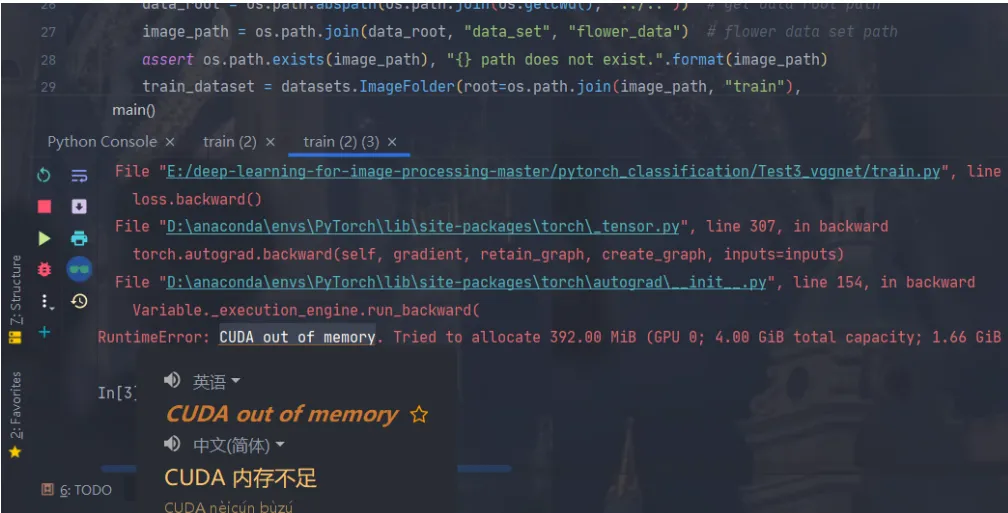
VGG网络模型深度较深,需要使用算力强大GPU进行训练(而且要内存大一点的GPU,我3050跑不动,pytorch会报错GPU内存不足)
你也可以试试改小batch_size