1、ResNet-D架构
ResNetRS是在ResNet-D架构上面的改进,ResNet-D架构的结构如下:
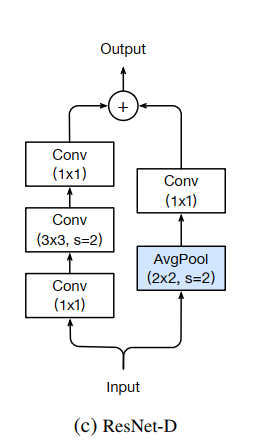
注意,残差边上多了个池化操作。
2、ResNetRS架构
我们提供了有关 ResNet-RS 架构更改的更多详细信息。我们重申 ResNet-RS 是:改进的缩放策略、改进的训练方法、ResNet-D 修改(He 等人,2018 年)和 SqueezeExcitation 模块(Hu 等人,2018 年)的组合。
表 11 显示了我们工作中使用的所有 ResNet 深度的块布局。 ResNet-50 到 ResNet-200 使用 He 等人的标准块配置。 (2015 年)。 ResNet-270 及更高版本主要扩展 c3 和 c4 中的块数,我们尝试保持它们的比例大致恒定。我们凭经验发现,在较低阶段添加块会限制过度拟合,因为较低层中的块具有显着较少的参数,即使所有块具有相同数量的 FLOP。图 6 显示了我们的 ResNet-RS 模型中使用的 ResNet-D 架构更改。

图 6. ResNet-RS 架构图。输出大小假定输入图像分辨率为 224×224。
在卷积布局中,x2 是指第一个 3×3 卷积,步长为 2。
ResNet-RS 架构是 Squeeze-and-Excitation 和 ResNet-D 的简单组合。
× 符号表示块在 ResNet-101 架构中重复的次数。这些值根据表 11 中的块布局随深度变化。
3、手动搭建模型(Tensorflow)
这里只是介绍网络的搭建方法,训练的时候我们直接使用迁移学习去做,用这个从头训练太慢了。
import tensorflow as tf
from tensorflow.keras import layers
from tensorflow.keras.models import Model
from typing import Callable, Dict, List, Union
3.1 模型配置项
DEPTH_TO_WEIGHT_VARIANTS = {
    50: [160],
    101: [160, 192],
    152: [192, 224, 256],
    200: [256],
    270: [256],
    350: [256, 320],
    420: [320],
}
BLOCK_ARGS = {
    50: [
        {
            "input_filters": 64,
            "num_repeats": 3
        },
        {
            "input_filters": 128,
            "num_repeats": 4
        },
        {
            "input_filters": 256,
            "num_repeats": 6
        },
        {
            "input_filters": 512,
            "num_repeats": 3
        },
    ],
    101: [
        {
            "input_filters": 64,
            "num_repeats": 3
        },
        {
            "input_filters": 128,
            "num_repeats": 4
        },
        {
            "input_filters": 256,
            "num_repeats": 23
        },
        {
            "input_filters": 512,
            "num_repeats": 3
        },
    ],
    152: [
        {
            "input_filters": 64,
            "num_repeats": 3
        },
        {
            "input_filters": 128,
            "num_repeats": 8
        },
        {
            "input_filters": 256,
            "num_repeats": 36
        },
        {
            "input_filters": 512,
            "num_repeats": 3
        },
    ],
    200: [
        {
            "input_filters": 64,
            "num_repeats": 3
        },
        {
            "input_filters": 128,
            "num_repeats": 24
        },
        {
            "input_filters": 256,
            "num_repeats": 36
        },
        {
            "input_filters": 512,
            "num_repeats": 3
        },
    ],
    270: [
        {
            "input_filters": 64,
            "num_repeats": 4
        },
        {
            "input_filters": 128,
            "num_repeats": 29
        },
        {
            "input_filters": 256,
            "num_repeats": 53
        },
        {
            "input_filters": 512,
            "num_repeats": 4
        },
    ],
    350: [
        {
            "input_filters": 64,
            "num_repeats": 4
        },
        {
            "input_filters": 128,
            "num_repeats": 36
        },
        {
            "input_filters": 256,
            "num_repeats": 72
        },
        {
            "input_filters": 512,
            "num_repeats": 4
        },
    ],
    420: [
        {
            "input_filters": 64,
            "num_repeats": 4
        },
        {
            "input_filters": 128,
            "num_repeats": 44
        },
        {
            "input_filters": 256,
            "num_repeats": 87
        },
        {
            "input_filters": 512,
            "num_repeats": 4
        },
    ],
}
CONV_KERNEL_INITIALIZER = {
    "class_name": "VarianceScaling",
    "config": {
        "scale": 2.0,
        "mode": "fan_out",
        "distribution": "truncated_normal"
    },
}
这里只搭建ResNet-RS101架构
3.2 get_survival_probability
根据区块数和初始速率获取生存概率
def get_survival_probability(init_rate, block_num, total_blocks):
    return init_rate * float(block_num) / total_blocks
3.3 fixed_padding
def fixed_padding(inputs, kernel_size):
    """沿空间维度填充输入,与输入大小无关"""
    pad_total = kernel_size - 1
    pad_beg = pad_total // 2
    pad_end = pad_total - pad_beg

    # 使用 ZeroPadding 来避免 TFOpLambda 层
    padded_inputs = layers.ZeroPadding2D(
        padding=((pad_beg, pad_end), (pad_beg, pad_end)))(inputs)

    return padded_inputs
3.4 Conv2DFixedPadding
Conv2D block with fixed padding
def Conv2DFixedPadding(filters, kernel_size, strides, name=None):
def apply(inputs):
    if strides > 1:
        inputs = fixed_padding(inputs, kernel_size)
    return layers.Conv2D(filters=filters,
                         kernel_size=kernel_size,
                         strides=strides,
                         padding='same' if strides == 1 else 'valid',
                         use_bias=False,
                         kernel_initializer=CONV_KERNEL_INITIALIZER,
                         name=name)(inputs)

return apply
3.5 STEM块
# ResNet-D型STEM块
def STEM(inputs,
         bn_momentum: float = 0.0,
         bn_epsilon: float = 1e-5,
         activation: str = 'relu',
         name=None):
    # first stem block
    x = Conv2DFixedPadding(filters=32,
                           kernel_size=3,
                           strides=2,
                           name=name + '_stem_conv_1')(inputs)
    x = layers.BatchNormalization(momentum=bn_momentum,
                                  epsilon=bn_epsilon,
                                  name=name + '_stem_batch_norm_1')(x)
    x = layers.Activation(activation, name=name + '_stem_act_1')(x)

    # second stem block
    x = Conv2DFixedPadding(filters=32,
                           kernel_size=3,
                           strides=1,
                           name=name + '_stem_conv_2')(x)
    x = layers.BatchNormalization(momentum=bn_momentum,
                                  epsilon=bn_epsilon,
                                  name=name + '_stem_batch_norm_2')(x)
    x = layers.Activation(activation, name=name + '_stem_act_2')(x)

    # final stem block
    x = Conv2DFixedPadding(filters=64,
                           kernel_size=3,
                           strides=1,
                           name=name + '_stem_conv_3')(x)
    x = layers.BatchNormalization(momentum=bn_momentum,
                                  epsilon=bn_epsilon,
                                  name=name + '_stem_batch_norm_3')(x)
    x = layers.Activation(activation, name=name + '_stem_act_3')(x)

    # Replace stem max pool:
    x = Conv2DFixedPadding(filters=64,
                           kernel_size=3,
                           strides=2,
                           name=name + '_stem_conv_4')(x)
    x = layers.BatchNormalization(momentum=bn_momentum,
                                  epsilon=bn_epsilon,
                                  name=name + 'stem_batch_norm_4')(x)
    x = layers.Activation(activation, name=name + '_stem_act_4')(x)

    return x
3.6 SE注意力机制模块
def SE(inputs,
       in_filters: int,
       se_ratio: float = 0.25,
       expand_ratio: int = 1,
       name=None):
    x = layers.GlobalAveragePooling2D(name=name + '_se_squeeze')(inputs)

    se_shape = (1, 1, x.shape[-1])
    x = layers.Reshape(se_shape, name=name + '_se_reshape')(x)

    num_reduced_filters = max(1, int(in_filters * 4 * se_ratio))

    x = layers.Conv2D(filters=num_reduced_filters,
                      kernel_size=(1, 1),
                      strides=[1, 1],
                      kernel_initializer=CONV_KERNEL_INITIALIZER,
                      padding='same',
                      use_bias=False,
                      activation='relu',
                      name=name + '_se_reduce')(x)
    x = layers.Conv2D(filters=4 * in_filters * expand_ratio,  # Expand ratio is 1 by default
                      kernel_size=[1, 1],
                      strides=[1, 1],
                      kernel_initializer=CONV_KERNEL_INITIALIZER,
                      padding='same',
                      use_bias=False,
                      activation='sigmoid',
                      name=name + '_se_expand')(x)
    out = layers.multiply([inputs, x], name=name + '_se_excite')
    return out
3.7 Bottleneck Block
def BottleneckBlock(filters: int,
                    strides: int,
                    use_projection: bool,
                    bn_momentum: float = 0.0,
                    bn_epsilon: float = 1e-5,
                    activation: str = 'relu',
                    se_ratio: float = 0.25,
                    survival_probability: float = 0.8,
                    name=None):
    # 带有BN的残差网络的bottle block变体
    def apply(inputs):

        shortcut = inputs
        # 是否需要projection shortcut
        if use_projection:
            filters_out = filters * 4
            if strides == 2:
                shortcut = layers.AveragePooling2D(pool_size=(2, 2),
                                                   strides=(2, 2),
                                                   padding='same',
                                                   name=name + '_projection_pooling')(inputs)
                shortcut = Conv2DFixedPadding(filters=filters_out,
                                              kernel_size=1,
                                              strides=1,
                                              name=name + '_projection_conv')(shortcut)
            else:
                shortcut = Conv2DFixedPadding(filters=filters_out,
                                              kernel_size=1,
                                              strides=strides,
                                              name=name + '_projection_conv')(inputs)
                shortcut = layers.BatchNormalization(momentum=bn_momentum,
                                                     epsilon=bn_epsilon,
                                                     name=name + '_projection_batch_norm')(shortcut)

        # first conv layer:1x1 conv
        x = Conv2DFixedPadding(filters=filters,
                               kernel_size=1,
                               strides=1,
                               name=name + '_conv_1')(inputs)
        x = layers.BatchNormalization(momentum=bn_momentum,
                                      epsilon=bn_epsilon,
                                      name=name + 'batch_norm_1')(x)
        x = layers.Activation(activation, name=name + '_act_1')(x)

        # second conv layer:3x3 conv
        x = Conv2DFixedPadding(filters=filters,
                               kernel_size=3,
                               strides=strides,
                               name=name + '_conv_2')(x)
        x = layers.BatchNormalization(momentum=bn_momentum,
                                      epsilon=bn_epsilon,
                                      name=name + '_batch_norm_2')(x)
        x = layers.Activation(activation, name=name + '_act_2')(x)

        # third conv layer:1x1 conv
        x = Conv2DFixedPadding(filters=filters * 4,
                               kernel_size=1,
                               strides=1,
                               name=name + '_conv_3')(x)
        x = layers.BatchNormalization(momentum=bn_momentum,
                                      epsilon=bn_epsilon,
                                      name=name + '_batch_norm_3')(x)

        if 0 < se_ratio < 1:
            x = SE(x, filters, se_ratio=se_ratio, name=name + '_se')

        # Drop connect
        if survival_probability:
            x = layers.Dropout(survival_probability,
                               noise_shape=(None, 1, 1, 1),
                               name=name + '_drop')(x)
        x = layers.Add()([x, shortcut])

        return layers.Activation(activation, name=name + '_output_act')(x)

    return apply
3.8 Block Group
def BlockGroup(filters,
               strides,
               num_repeats,  # Block重复次数
               se_ratio: float = 0.25,
               bn_epsilon: float = 1e-5,
               bn_momentum: float = 0.0,
               activation: str = "relu",
               survival_probability: float = 0.8,
               name=None):
    """Create one group of blocks for the ResNet model."""

    def apply(inputs):
        # 只有每个block_group的第一个block块使用projection shortcut和strides
        x = BottleneckBlock(
            filters=filters,
            strides=strides,
            use_projection=True,
            se_ratio=se_ratio,
            bn_epsilon=bn_epsilon,
            bn_momentum=bn_momentum,
            activation=activation,
            survival_probability=survival_probability,
            name=name + "_block_0_",
        )(inputs)

        for i in range(1, num_repeats):
            x = BottleneckBlock(
                filters=filters,
                strides=1,
                use_projection=False,
                se_ratio=se_ratio,
                activation=activation,
                bn_epsilon=bn_epsilon,
                bn_momentum=bn_momentum,
                survival_probability=survival_probability,
                name=name + f"_block_{i}_",
            )(x)
        return x

    return apply
3.9 ResNetRS
# 构建ResNet-RS模型:这里复现ResNet-RS101
def ResNetRS(depth: int,  # ResNet网络的深度,101:[160,192]
             input_shape=None,
             bn_momentum=0.0,  # BN层的动量参数
             bn_epsilon=1e-5,  # BN层的Epsilon参数
             activation: str = 'relu',  # 激活函数
             se_ratio=0.25,  # 挤压和激发曾的比例
             dropout_rate=0.25,  # 最终分类曾之前的dropout
             drop_connect_rate=0.2,  # skip connection的丢失率
             include_top=True,  # 是否在网络顶部包含全连接层
             block_args: List[Dict[str, int]] = None,  # 字典列表,构造块模块的参数
             model_name='resnet-rs',  # 模型的名称
             pooling=None,  # 可选的池化模式
             weights='imagenet',
             input_tensor=None,
             classes=1000,  # 分类数
             classifier_activation: Union[str, Callable] = 'softmax',  # 分类器激活
             include_preprocessing=True):  # 是否包含预处理层(对输入图像通过ImageNet均值和标准差进行归一化):

    img_input = layers.Input(shape=input_shape)
    x = img_input
    inputs = img_input

    # 这里本来有个预处理判断,tensorflow版本太低。
    # if include_preprocessing:
    #     num_channels=input_shape[-1]
    #     if num_channels==3:
    #         # 预处理

    # Build stem
    x = STEM(x, bn_momentum=bn_momentum, bn_epsilon=bn_epsilon, activation=activation, name='stem')

    # Build blocks
    if block_args is None:
        block_args = BLOCK_ARGS[depth]

    for i, args in enumerate(block_args):
        # print(i,args)
        survival_probability = get_survival_probability(init_rate=drop_connect_rate,
                                                        block_num=i + 2,
                                                        total_blocks=len(block_args) + 1)
        # args['input_filters']=[64,128,256,512]
        # 只有第一个BlockGroup的stride=1,后面三个都是stride=2
        x = BlockGroup(filters=args['input_filters'],
                       activation=activation,
                       strides=(1 if i == 0 else 2),
                       num_repeats=args['num_repeats'],
                       se_ratio=se_ratio,
                       bn_momentum=bn_momentum,
                       bn_epsilon=bn_epsilon,
                       survival_probability=survival_probability,
                       name=f"BlockGroup{i + 2}_")(x)
    # Build head:
    if include_top:
        x = layers.GlobalAveragePooling2D(name='avg_pool')(x)
        if dropout_rate > 0:
            x = layers.Dropout(dropout_rate, name='top_dropout')(x)
        x = layers.Dense(classes, activation=classifier_activation, name='predictions')(x)
    else:
        if pooling == 'avg':
            x = layers.GlobalAveragePooling2D(name='avg_pool')(x)
        elif pooling == 'max':
            x = layers.GlobalMaxPooling2D(name='max_pool')(x)

    # Create model
    model = Model(inputs, x, name=model_name)

    return model
3.10 ResNetRS101架构
# build ResNet-RS101 model
def ResNetRS101(include_top=True,
                weights='imagenet',
                classes=1000,
                input_shape=None,
                input_tensor=None,
                pooling=None,
                classifier_activation='softmax',
                include_preprocessing=True):
    return ResNetRS(depth=101,
                    include_top=include_top,
                    drop_connect_rate=0.0,
                    dropout_rate=0.25,
                    weights=weights,
                    classes=classes,
                    input_shape=input_shape,
                    input_tensor=input_tensor,
                    pooling=pooling,
                    classifier_activation=classifier_activation,
                    model_name='resnet-rs-101',
                    include_preprocessing=include_preprocessing)
if __name__ == '__main__':
    model = ResNetRS101(input_shape=(224, 224, 3), classes=1000)
    model.summary()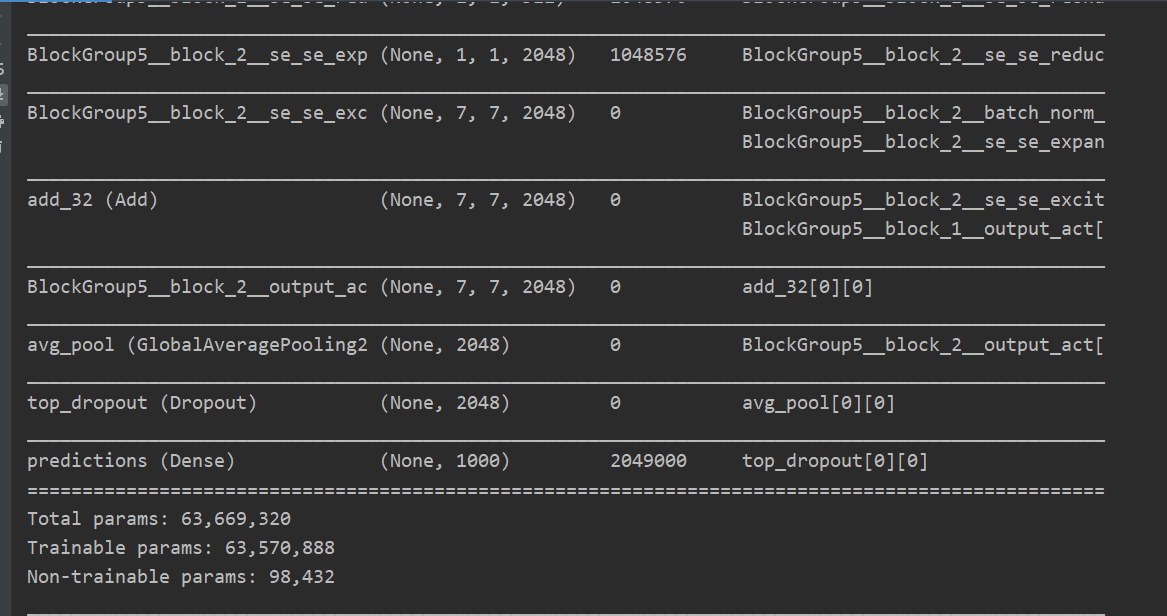
4、宝可梦数据集
部分数据展示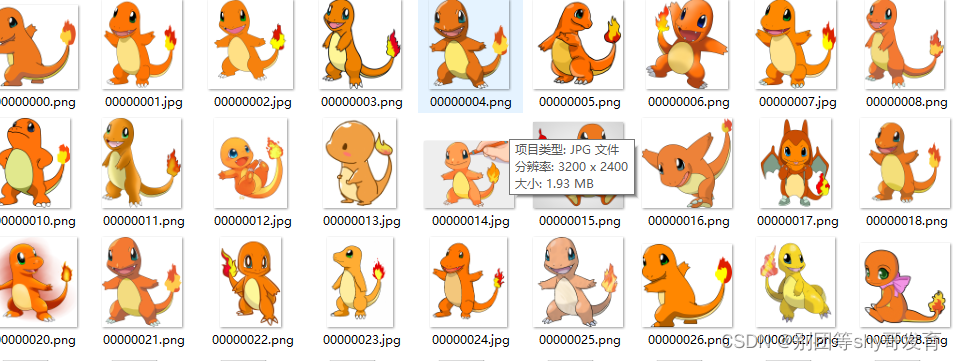
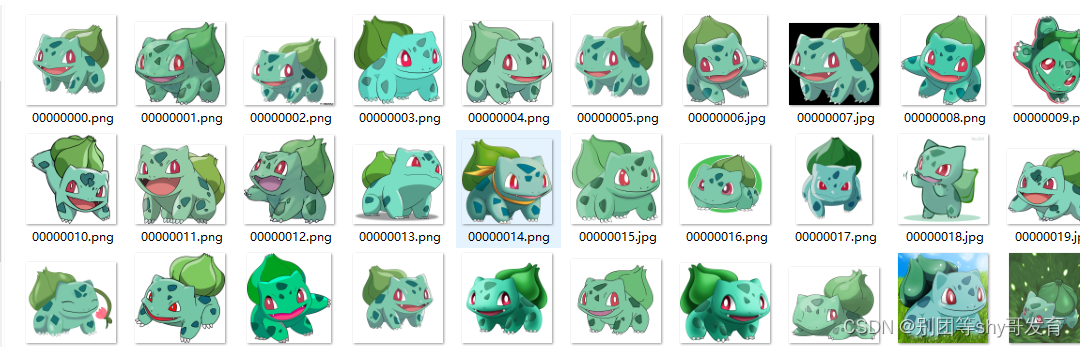
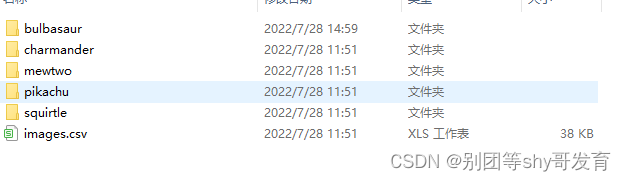
都按照文件夹分好了,那么我们对数据集进行切分就可以了。
按照8:2切分数据集。
import os
import random
import shutil
import numpy as np

# 数据集路径
DATASET_DIR = "pokeman"
# DATASET_DIR = "../第13章-验证码识别项目/captcha"
# 数据切分后存放路径
NEW_DIR = "data"
# 测试集占比
num_test = 0.2

# 打乱所有种类数据,并分割训练集和测试集
def shuffle_all_files(dataset_dir, new_dir, num_test):
    # 先删除已有new_dir文件夹
    if not os.path.exists(new_dir):
        pass
    else:
        # 递归删除文件夹
        shutil.rmtree(new_dir)
    # 重新创建new_dir文件夹
    os.makedirs(new_dir)
    # 在new_dir文件夹目录下创建train文件夹
    train_dir = os.path.join(new_dir, 'train')
    os.makedirs(train_dir)
    # 在new_dir文件夹目录下创建test文件夹
    test_dir = os.path.join(new_dir, 'test')
    os.makedirs(test_dir)
    # 原始数据类别列表
    directories = []
    # 新训练集类别列表
    train_directories = []
    # 新测试集类别列表
    test_directories = []
    # 类别名称列表
    class_names = []
    # 循环所有类别
    for filename in os.listdir(dataset_dir):
        # 原始数据类别路径
        path = os.path.join(dataset_dir, filename)
        # 新训练集类别路径
        train_path = os.path.join(train_dir, filename)
        # 新测试集类别路径
        test_path = os.path.join(test_dir, filename)
        # 判断该路径是否为文件夹
        if os.path.isdir(path):
            # 加入原始数据类别列表
            directories.append(path)
            # 加入新训练集类别列表
            train_directories.append(train_path)
            # 新建类别文件夹
            os.makedirs(train_path)
            # 加入新测试集类别列表
            test_directories.append(test_path)
            # 新建类别文件夹
            os.makedirs(test_path)
            # 加入类别名称列表
            class_names.append(filename)
    print('类别列表:', class_names)

    # 循环每个分类的文件夹
    for i in range(len(directories)):
        # 保存原始图片路径
        photo_filenames = []
        # 保存新训练集图片路径
        train_photo_filenames = []
        # 保存新测试集图片路径
        test_photo_filenames = []
        # 得到所有图片的路径
        for filename in os.listdir(directories[i]):
            # 原始图片路径
            path = os.path.join(directories[i], filename)
            # 训练图片路径
            train_path = os.path.join(train_directories[i], filename)
            # 测试集图片路径
            test_path = os.path.join(test_directories[i], filename)
            # 保存图片路径
            photo_filenames.append(path)
            train_photo_filenames.append(train_path)
            test_photo_filenames.append(test_path)
        # list转array
        photo_filenames = np.array(photo_filenames)
        train_photo_filenames = np.array(train_photo_filenames)
        test_photo_filenames = np.array(test_photo_filenames)
        # 打乱索引
        index = [i for i in range(len(photo_filenames))]
        random.shuffle(index)
        # 对3个list进行相同的打乱,保证在3个list中索引一致
        photo_filenames = photo_filenames[index]
        train_photo_filenames = train_photo_filenames[index]
        test_photo_filenames = test_photo_filenames[index]
        # 计算测试集数据个数
        test_sample_index = int((1 - num_test) * float(len(photo_filenames)))
        # 复制测试集图片
        for j in range(test_sample_index, len(photo_filenames)):
            # 复制图片
            shutil.copyfile(photo_filenames[j], test_photo_filenames[j])
        # 复制训练集图片
        for j in range(0, test_sample_index):
            # 复制图片
            shutil.copyfile(photo_filenames[j], train_photo_filenames[j])

# 打乱并切分数据集
shuffle_all_files(DATASET_DIR, NEW_DIR, num_test)
切分之后:
5、ResNetRS50架构实现宝可梦图像识别
import tensorflow as tf
import numpy as np
from tensorflow.keras import layers
from tensorflow.keras.models import Model
from tensorflow.keras.applications import ResNetRS50
import math
import os
from tensorflow.keras.preprocessing.image import ImageDataGenerator
from tensorflow.keras.utils import to_categorical
from tensorflow.keras.models import Sequential
from tensorflow.keras.optimizers import Adam
import matplotlib.pyplot as plt
from tensorflow.keras.callbacks import LearningRateScheduler
from tensorflow.keras.models import Model
5.1 ResNetRS50架构
这里去掉顶部的全连接层。
model=ResNetRS50(include_top=False,input_shape=(224,224,3))
model.summary()
5.2 超参数与模型结构
# 类别数
num_classes = 5
# 批次大小
batch_size = 32
# 周期数
epochs=100
# 图片大小
image_size = 224

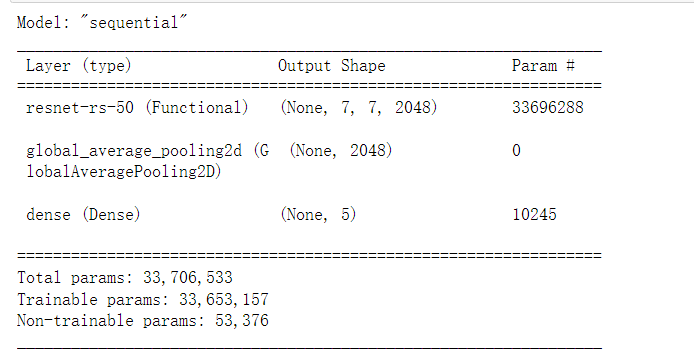
model=tf.keras.Sequential([
    model,
    layers.GlobalAveragePooling2D(),
    layers.Dense(num_classes,activation='softmax')
])
model.summary()
5.3 数据增强
# 训练集数据进行数据增强
train_datagen = ImageDataGenerator(
    rotation_range=20,  # 随机旋转度数
    width_shift_range=0.1,  # 随机水平平移
    height_shift_range=0.1,  # 随机竖直平移
    rescale=1 / 255,  # 数据归一化
    shear_range=10,  # 随机错切变换
    zoom_range=0.1,  # 随机放大
    horizontal_flip=True,  # 水平翻转
    brightness_range=(0.7, 1.3),  # 亮度变化
    fill_mode='nearest',  # 填充方式
)
# 测试集数据只需要归一化就可以
test_datagen = ImageDataGenerator(
    rescale=1 / 255,  # 数据归一化
)
5.4 数据生成器
# 训练集数据生成器,可以在训练时自动产生数据进行训练
# 从'data/train'获得训练集数据
# 获得数据后会把图片resize为image_size×image_size的大小
# generator每次会产生batch_size个数据
train_generator = train_datagen.flow_from_directory(
    '../data/pokeman-dataset/train',
    target_size=(image_size, image_size), # 调整图像尺寸
    batch_size=batch_size,
)

# 测试集数据生成器
test_generator = test_datagen.flow_from_directory(
    '../data/pokeman-dataset/test',
    target_size=(image_size, image_size),
    batch_size=batch_size,
)
# 字典的键为17个文件夹的名字,值为对应的分类编号
print(train_generator.class_indices)
5.5 callbacks
# 学习率调节函数,逐渐减小学习率
def adjust_learning_rate(epoch):
    # 前40周期
    if epoch<=30:
        lr = 1e-4
    # 前40到80周期
    elif 30 < epoch <= 80:
        lr = 1e-5
    # 80到100周期
    else:
        lr = 1e-6
    return lr

# 定义优化器
adam = Adam(learning_rate=1e-4)

# 读取模型
checkpoint_save_path = "./checkpoint/ResNetRS50-pokeman.ckpt"
if os.path.exists(checkpoint_save_path + '.index'):
    print('-------------load the model-----------------')
    model.load_weights(checkpoint_save_path)
# 保存模型
cp_callback = tf.keras.callbacks.ModelCheckpoint(filepath=checkpoint_save_path,
                                                 save_weights_only=True,
                                                 save_best_only=True)
# 早停
early_stop=tf.keras.callbacks.EarlyStopping(monitor='val_loss',patience=3,verbose=0)

# 定义学习率衰减策略
callbacks = []
callbacks.append(LearningRateScheduler(adjust_learning_rate))
# callbacks.append(early_stop)
callbacks.append(cp_callback)
5.6 compile&fit
# 定义优化器,loss function,训练过程中计算准确率
model.compile(optimizer=adam,loss='categorical_crossentropy',metrics=['accuracy'])

# Tensorflow2.1版本(包括2.1)之后可以直接使用fit训练模型
history = model.fit(x=train_generator,epochs=epochs,validation_data=test_generator,callbacks=callbacks)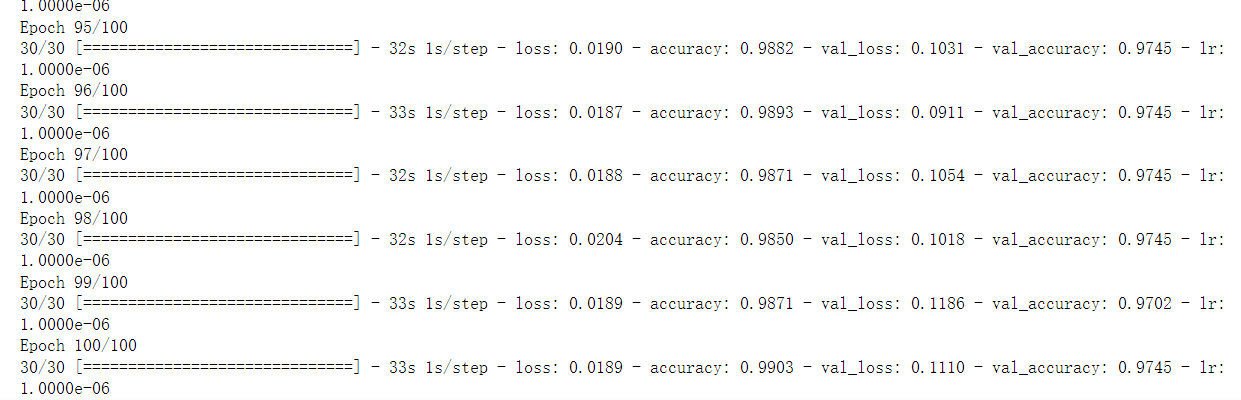
5.7 保存模型
# 保存模型
model.save('model/ResNetRS50-pokeman.h5')
5.8 acc和loss可视化
# 画出训练集准确率曲线图
plt.plot(np.arange(epochs),history.history['accuracy'],c='b',label='train_accuracy')
# 画出验证集准确率曲线图
plt.plot(np.arange(epochs),history.history['val_accuracy'],c='y',label='val_accuracy')
# 图例
plt.legend()
# x坐标描述
plt.xlabel('epochs')
# y坐标描述
plt.ylabel('accuracy')
# 显示图像
plt.show()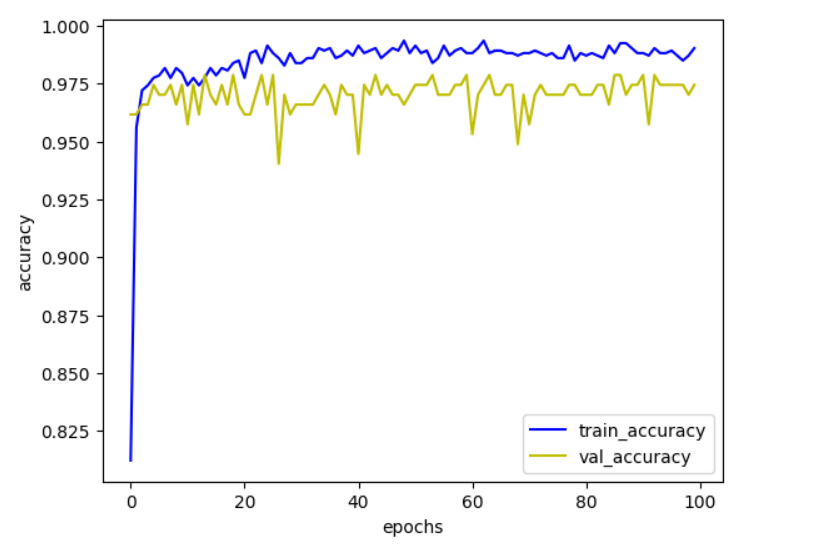
# 画出训练集loss曲线图
plt.plot(np.arange(epochs),history.history['loss'],c='b',label='train_loss')
# 画出验证集loss曲线图
plt.plot(np.arange(epochs),history.history['val_loss'],c='y',label='val_loss')
# 图例
plt.legend()
# x坐标描述
plt.xlabel('epochs')
# y坐标描述
plt.ylabel('loss')
# 显示图像
plt.show()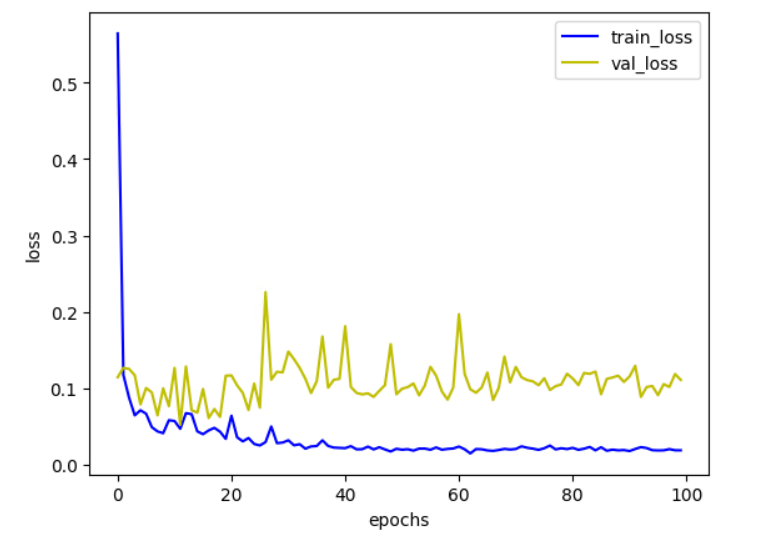
5.9 test
这里随便用一些图片测试下这个模型
import tensorflow as tf
import numpy as np
import os
import matplotlib.pyplot as plt
from tensorflow.keras import layers
from tensorflow.keras.models import load_model

# from PIL import Image

model = load_model('model/ResNetRS50-pokeman.h5')
model.summary()

# 类别总数
dataset_dir = 'data/train'
classes = []
for filename in os.listdir(dataset_dir):
    classes.append(filename)
# print('classes:',classes)

# 预测单张图片
def predict_single_image(img_path):
    # string类型的tensor
    img = tf.io.read_file(img_path)
    # 将jpg格式转换为tensor
    img = tf.image.decode_jpeg(img, channels=3)
    # 数据归一化
    img = tf.image.convert_image_dtype(img, dtype=tf.float32)
    # resize
    img = tf.image.resize(img, size=[224, 224])
    # 扩充一个维度
    img = np.expand_dims(img, axis=0)

    # 预测:结果是二维的
    test_result = model.predict(img)
    # print('test_result:', test_result)
    # 转化为一维
    result = np.squeeze(test_result)
    # print('转化后result:', result)

    # 找到概率值最大的索引
    predict_class = np.argmax(result)
    # print('概率值最大的索引:', predict_class)

    # 返回类别和所属类别的概率
    return classes[int(predict_class)], result[predict_class]

# 对整个文件夹的图片进行预测
def predict_directory(file_path):
    classes_pred=[]
    classes_true=[]
    probs=[]
    for file in os.listdir(file_path):
        # 测试图片完整路径
        file_dir=os.path.join(file_path,file)
        # 打印文件路径
        print(file_dir)
        # 传入文件路径进行预测
        preds,prob=predict_single_image(file_dir)

        # 取出图片的真实标签(这里直接将文件夹名称作为真实标签值了)
        # label_true=file.split('_')[0].title()
        label_true = file_dir.split('\\')[0].split('/')[-1]
        # 保存真实值和预测值结果
        classes_true.append(label_true)
        classes_pred.append(preds)
        probs.append(prob)
    return classes_pred,classes_true,probs

# img_path = 'Gemstones/train/Almandine/almandine_0.jpg'
# classes, prob = predict_single_image(img_path)
# print(classes, prob)

file_path= 'data/test/bulbasaur'
classes_pred,classes_true,probs=predict_directory(file_path)
print(classes_pred)
print(classes_true)
print(probs)
效果还是不错的。