android studio 离线配置 gradle和依赖
配置本地gradle
gradle下载地址
修改gradle/gradle-wrapper.properties 文件的 distributionUrl
//本地文件存储路径
distributionUrl=file:///D:/gradle/gradle-6.7.1-all.zip
找到缓存的依赖:C:\Users\Administrator\.gradle\caches\modules-2\files-2.1
复制到一个空文件夹下:然后把下面代码复制到IDEA或者Eclipse中修改 path 和lastName;
开始执行
import java.io.File;
import java.io.FileInputStream;
import java.io.FileNotFoundException;
import java.io.FileOutputStream;
import java.io.IOException;
import java.util.ArrayList;
import java.util.LinkedList;
import java.io.BufferedInputStream;
import java.io.BufferedOutputStream;
import java.io.DataInputStream;
import java.io.DataOutputStream;
//将Android中使用的gradle缓存目录中的jar包重新处理路径,用于内网离线构建
public class CopyOfflinGradle {
     static String lastName= "files-2.1";
     //存储路径
    static String path = "D:\\maven\\"+lastName;
    public static void main(String[] args) {
        System.out.println("Begin to copy");
        processDotForld();
        copyToLastForld();
        System.out.println("Copy finished");
    }
    /**
    * 处理文件夹中带点好的。;例:com.alibaba 会处理成 com/alibaba
    */
    public static void processDotForld(){
        File file = new File(path);
        if(file.exists()){
            LinkedList<File> list = new LinkedList<>();
            File[] files = file.listFiles();
            for(int i=0;i<files.length;i++){
                File file2 = files[i];
                if(file2.isDirectory()){
                    //文件夹
                    File desFile = creatforld(file2);
                    copyFileToDes(file2,desFile);
                }else{
                    //文件//目前不存在
                }
            }
        }
    }
    /**
    * 文件夹拷贝
    * @param source
    * @param des
    */
    public static void copyFileToDes(File source,File des){
        try{
            copyDir(source.getPath(),des.getPath());
        }catch (Exception e) {
            // TODO: handle exception
        }
    }
    /**
    * 文件夹拷贝
    * @param sourcePath
    * @param newPath
    * @throws IOException
    */
    public static void copyDir(String sourcePath, String newPath) throws IOException {
        File file = new File(sourcePath);
        String[] filePath = file.list();
        if (!(new File(newPath)).exists()) {
            (new File(newPath)).mkdir();
        }
        for (int i = 0; i < filePath.length; i++) {
            if ((new File(sourcePath + file.separator + filePath[i])).isDirectory()) {
                copyDir(sourcePath  + file.separator  + filePath[i], newPath  + file.separator + filePath[i]);
            }
            if (new File(sourcePath  + file.separator + filePath[i]).isFile()) {
                copyFile(sourcePath + file.separator + filePath[i], newPath + file.separator + filePath[i]);
            }
        }
    }
    public static void copyFile(String oldPath, String newPath) throws IOException {
        File oldFile = new File(oldPath);
        File file = new File(newPath);
        FileInputStream in = new FileInputStream(oldFile);
        FileOutputStream out = new FileOutputStream(file);
        byte[] buffer=new byte[2097152];
        //while((in.read(buffer)) != -1){
        //    out.write(buffer);
        //}
        DataInputStream dis = new DataInputStream(new BufferedInputStream(in));
        DataOutputStream dos = new DataOutputStream(new BufferedOutputStream(out));
        int length;
        while ((length = dis.read(buffer)) != -1) {
            dos.write(buffer, 0, length);
        }
        dos.flush();
        dos.close();
        dis.close();
    }
    /**
     * 创建文件夹
     * @param file
     */
    public static File creatforld(File file){
        String path = file.getAbsolutePath();
        if(path!=null){
            String temp = "files-2.1";
            temp = stopName;
            String temS[] = path.split(temp);
        if(temS!=null && temS.length==2){
        String firstName = temS[0];
        String dotName = temS[1];
        if(dotName!=null){
            String[] lasts = dotName.split("\\.");
            int count = lasts.length;
            if(count<2){
                return null;
            }
            String pathNew = firstName+temp;
            for(int i=0;i<count;i++){
                if(i == 0){
                    pathNew= pathNew+lasts[i];
                }else{
                    pathNew= pathNew+"\\"+lasts[i];
                }
            }
            if(pathNew!=null && !pathNew.equals("")){
                File fileForld = new File(pathNew);
            if(!fileForld.exists()){
                fileForld.mkdirs();
            }
            return fileForld;
        }
        }
        }
        }
        return null;
    }
    public static ArrayList<File> getFile(File file){
        ArrayList<File> list = new ArrayList<>();
        if(file.isDirectory()){
            File[] filesTemp = file.listFiles();
            for(int i=0;i<filesTemp.length;i++){
                ArrayList<File> result = getFile(filesTemp[i]);
                list.addAll(result);
            }
        }else{
        list.add(file);
        }
        return list;
    }
// 创建目录
public static boolean createDir(String destDirName) {
File dir = new File(destDirName);
if (dir.exists()) {// 判断目录是否存在
System.out.println("创建目录失败,目标目录已存在!");
return false;
}
if (!destDirName.endsWith(File.separator)) {// 结尾是否以"/"结束
destDirName = destDirName + File.separator;
}
if (dir.mkdirs()) {
// 创建目标目录
System.out.println("创建目录成功!" + destDirName);
return true;
} else {
System.out.println("创建目录失败!");
return false;
}
}
public static void copyToLastForld(){
File file = new File(path);
if(file.exists()){
LinkedList<File> list = new LinkedList<>();
File[] files = file.listFiles();
for(int i=0;i<files.length;i++){
File file2 = files[i];
if(file2.isDirectory()){
//文件夹
proceessForld(file2);
}else{
//文件//目前不存在
}
}
}
}
private static void proceessForld(File file){
File[] files = file.listFiles();
for(int i=0;i<files.length;i++){
File file2 = files[i];
if(file2.isDirectory()){
//文件夹
proceessForld(file2);
}else{
//文件//目前不存在//判断是否进行拷贝
try {
proceessFile(file2);
} catch (FileNotFoundException e) {
// TODO Auto-generated catch block
e.printStackTrace();
}
}
}
}
private static void proceessFile(File file) throws FileNotFoundException{
if(file!=null){
String path = file.getAbsolutePath();
if(path!=null){
String[] lasts = splitString(path);
if(lasts!=null && lasts.length>0){
int count = lasts.length;
String last = lasts[count-1];
String last2 = lasts[count-2];
if(last2!=null && last2.length()>20){
//拷贝到上一级目录
String des = null;
if(count<2){
return;
}
for(int i=0;i<count-2;i++){
if(i == 0){
des= lasts[i];
}else{
des= des+"\\\\"+lasts[i];
}
}
des= des+"\\\\"+last;
String strParentDirectory = file.getParent();
File parentFile = new File(strParentDirectory);
strParentDirectory = parentFile.getParent()+"\\"+last;
copy(file,path,strParentDirectory);
}else{
 System.out.println("source = "+path);
}
}
}
}
}
private static String[] splitString(String path){
String[] lasts = null;
lasts = path.split("\\\\");
int count = lasts.length;
boolean isFirst = true;
for(int i=0;i<count;i++){
String str = lasts[i];
if(str!=null && str.contains(".")){
if(isFirst){
isFirst = false;
System.out.println("\n\n\n\n");
System.out.println("path="+path+"");
}
System.out.println("str="+str+"");
}
}
return lasts;
}
/**
* copy
* @param file
* @param source
* @param des
* @throws FileNotFoundException
*/
private static void copy(File file,String source,String des) throws FileNotFoundException{
if(file!=null){
FileInputStream fis = null;
FileOutputStream fot = null;
byte[] bytes = new byte[1024];
int temp = 0;
File desFile = new File(des);
if(desFile.exists()){
return;
}
try{
fis = new FileInputStream(file);
fot = new FileOutputStream(desFile);
while ((temp = fis.read(bytes)) != -1) {
fot.write(bytes,0,temp);
fot.flush();
}
}catch(IOException e){
e.printStackTrace();
}
finally{
if(fis!=null){
try {
fis.close();
} catch (IOException e) {
// TODO Auto-generated catch block
e.printStackTrace();
}
}
if(fot!=null){
try {
fot.close();
} catch (IOException e) {
// TODO Auto-generated catch block
e.printStackTrace();
}
}
}
}
}
    private static String getContent(String content){
        String str = content;
        if(content!=null && content.length()>4){
            str = content.substring(0,4);
        }
        return str;
    }
}
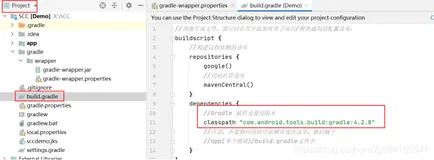
修改根目录的build.gradle
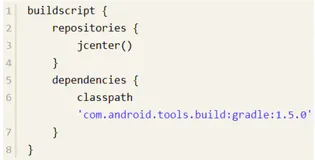
注释掉 google()、jcenter()、mavenCentral()...等 maven仓库
修改为本地仓库
repositories {
//这是本地文件路径
       maven {
          url 'D:\\maven\files-2.1'
      }
}
注意 :
离线环境在与 DataBinding 使用过程中会报错 ,目前还没有解决