主页:写程序的小王叔叔的博客欢迎来访👀
支持:点赞
收藏
关注

1、效果
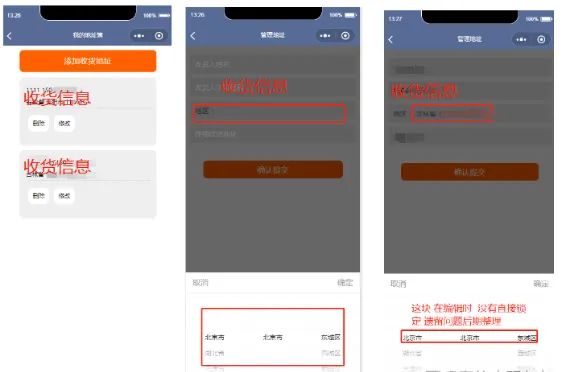
2、获取省市县联动
2.1)所有城市json数组文件参照,文件我已上传我的资源
2.2)开始写组件代码
添加收货地址页面的js文件
3、wxml
添加收货地址的wxml文件
<view class="body" wx:if="{{loaded}}"><view class="ipt"><input bindinput="changeName" placeholder="收货人姓名" value="{{consigee}}"/></view><view class="ipt"><input bindinput="changePhone" placeholder="收货人手机号码" value="{{phone}}"/></view><view class="section"><view class="picker" bindtap="translate" style="padding-left:10px;color:#666;" placeholder="请选择"> 地区: {{province}}{{city}}{{county}}</view></view><view class="ipt"><input bindinput="changeAddress" placeholder="详细收货地址" value="{{address}}"/></view><view class="btn" bindtap="submit"> 确认提交 </view><!--地区选择器--><view class="animation-element-wrapper" animation="{{animation}}" style="visibility:{{show ? 'visible':'hidden'}}" bindtap="hiddenFloatView" data-id="444"><view class="animation-element" catchtap="nono"><text class="left-bt" catchtap="hiddenFloatView" data-id="555">取消</text><text class="right-bt" catchtap="hiddenFloatView" data-id="666">确定</text><view class="line"></view><picker-view indicator-style ="height: 50rpx;" value="{{value}}" bindchange="bindChange" catchtap="nono"><!--省--><picker-view-column><view wx:for="{{provinces}}" wx:key="">{{item.name}}</view></picker-view-column><!--地级市--><picker-view-column><view wx:for="{{citys}}" wx:key="">{{item.name}}</view></picker-view-column><!--区县--><picker-view-column><view wx:for="{{countys}}" wx:key="">{{item.name}}</view></picker-view-column></picker-view></view></view></view>
4、js
添加收货地址 嵌入保存 + 编辑的回显方法
onLoad: function (options) {
varthat=this;
//获取省市区县数据    areaInfo=area.getAreaInfo();
getProvinceData(that);
if (wx.getStorageSync('toEdit') ==true){
wx.request({
      })
    }
  },
//提交按钮事件submit: function () {
var_this=this;
if (_this.valid()) {
varaddr= {
name: _this.data.consigee,
phone: _this.data.phone,
address: _this.data.address ,
      };
wx.request({
      })
    }
  },
5、wxss
收货列表页的css效果
.body {
margin: 10px0;
background-color: #fff;
box-shadow: 5px0#f7f7f7;
font-size: 13px;
font-family: 'microsoft yahei',Verdana,Arial,Helvetica,sans-serif;
}
.shdz {
display: block;
height: 2.777em;
line-height: 2.777em;
margin: 10pxauto;
width: 80%;
text-align: center;
background: #ff6000;
color: #fff;
border-radius: 8px;
border: none;
font-size: 1.333em;
}
.m_box {
width: 80%;
margin: 12pxauto;
background: #eee;
border-radius: 10px;
box-shadow: 03px#f7f7f7;
}
.m_box.m_address_list {
padding: 1.1111em;
line-height: 2em;
}
.m_address_list.m_control {
display: flex;padding:  10px0 ;
}
.m_address_list.m_control.m_box_control  {
padding: 5px10px ;
margin:5px5px;
background:#fff;
border-radius: 10px;
}
.m_address_list.m_control.m_box_control_select  {
padding: 5px10px ;
margin:5px5px;
background:#fff3e8;
color:#ff6000;
border-radius: 10px;
}
添加收获地址的css
.body {
margin: 20px0;
background-color: #fff;
box-shadow: 5px0#f7f7f7;
font-size: 15px;
font-family: 'microsoft yahei',Verdana,Arial,Helvetica,sans-serif;
}
.ipt{background: #eee; margin: 10px;width:95%;}
.iptinput{height:40px;padding-left:10px; }
.section{line-height:40px;background: #eee; margin: 10px;height:40px;width:95%;}
.btn {
display: block;
height: 2.277em;
line-height: 2.277em;
margin: 10%auto;
width: 80%;
text-align: center;
background: #ff6000;
color: #fff;
border-radius: 8px;
border: none;
font-size: 1.133em;
}
.infoText{
margin-top: 20rpx;
text-align: center;
width: 100%;
justify-content: center;
}
picker-view{
background-color: white;
padding: 0;
width: 100%;
height: 380rpx;
bottom: 0;
position: fixed;
}
picker-view-columnview{
vertical-align:middle;
font-size: 28rpx;
line-height: 28rpx;
height: 100%;
display: flex;
align-items: center;
justify-content: center;
}
/* ----------------------------------------- */.animation-element-wrapper {
display: flex;
position: fixed;
left: 0;
top:0;
height: 100%;
width: 100%;
background-color: rgba(0, 0, 0, 0.6);
}
.animation-element {
display: flex;
position: fixed;
width: 100%;
height: 470rpx;
bottom: 0;
background-color: rgba(255, 255, 255, 1);
}
.animation-button {
top:20rpx;
width: 290rpx;
height: 100rpx;
align-items:center;
}
text{
color: #999999;
display: inline-flex;
position: fixed;
margin-top: 20rpx;
height: 50rpx;
text-align: center;
line-height: 50rpx;
font-size: 34rpx;
font-family: Arial, Helvetica, sans-serif;
}
.left-bt{
left: 30rpx;
}
.right-bt {
right: 30rpx;
}
.line{
display: block;
position: fixed;
height: 1rpx;
width: 100%;
margin-top: 89rpx;
background-color: #eeeeee;
}
转载声明:本文为博主原创文章,未经博主允许不得转载
⚠️注意 ~
💯本期内容就结束了,如果内容有误,麻烦大家评论区指出!
如有疑问❓可以在评论区💬或私信💬,尽我最大能力🏃♀️帮大家解决👨🏫!
如果我的文章有帮助到您,欢迎点赞+关注✔️鼓励博主🏃,您的鼓励是我分享的动力🏃🏃🏃~