<!DOCTYPE html>
<html>
  <head>
    <meta charset="utf-8">
    <title>w3cschool (www.w3cschool.cn) </title>
    <!-- 引入 echarts.js -->
    <script src="https://cdn.bootcdn.net/ajax/libs/echarts/4.8.0/echarts-en.common.js" rel="external nofollow">
    </script>
  </head>
  <body>
    <!-- 为ECharts准备一个具备大小(宽高)的Dom -->
    <div id="main" style="width: 600px;height:400px;"></div>
    <script type="text/javascript">
      // 基于准备好的dom,初始化echarts实例
      var myChart = echarts.init(document.getElementById('main'));
      // 指定图表的配置项和数据
      var option = {
        title: {
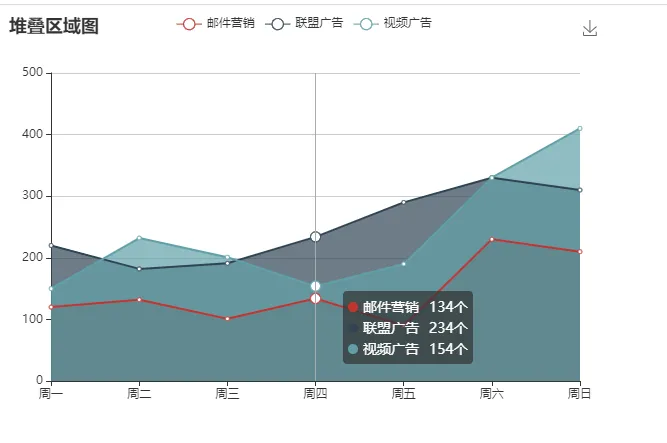
          text: '堆叠区域图'
        },
        tooltip: {
          trigger: 'axis',
          formatter: function(c) {
            console.log( c )
            let str = '';
            let temp  = {
              bgcricle:'',//颜色
              seriesName:"", //学校名
              valueData:'',//数值
              spacespan:'',
            };
            c.forEach((item) => {
              // 做的事情
              temp.bgcricle=item.marker;
              temp.seriesName=item.seriesName;
              temp.valueData=item.value+"个";
              temp.spacespan='<span style="display:inline-block;width:10px;height:10px;"></span>';
              str+=temp.bgcricle+temp.seriesName+temp.spacespan+temp.valueData+'<br />'
            })
            return str
          }
        },
        legend: {
          data: ['邮件营销', '联盟广告', '视频广告']
        },
        toolbox: {
          feature: {
            saveAsImage: {}
          }
        },
        grid: {
          left: '3%',
          right: '4%',
          bottom: '3%',
          containLabel: true
        },
        xAxis: [{
          type: 'category',
          boundaryGap: false,
          data: ['周一', '周二', '周三', '周四', '周五', '周六', '周日']
        }],
        yAxis: [{
          type: 'value'
        }],
        series: [{
            name: '邮件营销',
            type: 'line',
            areaStyle: {},
            data: [120, 132, 101, 134, 90, 230, 210]
          },
          {
            name: '联盟广告',
            type: 'line',
            areaStyle: {},
            data: [220, 182, 191, 234, 290, 330, 310]
          },
          {
            name: '视频广告',
            type: 'line',
            areaStyle: {},
            data: [150, 232, 201, 154, 190, 330, 410]
          }
        ]
      };
      // 使用刚指定的配置项和数据显示图表。
      myChart.setOption(option);
    </script>
  </body>
</html>