2. controller层编写(分为api-controller)
api
package com.example.demo.api;
import com.example.demo.common.dto.RestControllerResult;
import org.springframework.web.bind.annotation.PostMapping;
import org.springframework.web.bind.annotation.RequestMapping;
import org.springframework.web.bind.annotation.RequestParam;
import org.springframework.web.bind.annotation.RestController;
import org.springframework.web.multipart.MultipartFile;
/**
 * 小程序请求后端系统Api.
 *
 * @author : 小隐乐乐
 * @since : 2020/6/9 15:37
 */
@RestController
@RequestMapping("/api/vehicle")
public interface AppVehicleMiniApi {
  /**
   * 上传行驶证照片.
   *
   * @param img 图片
   * @return result
   */
  @PostMapping("upload-vehicle")
  RestControllerResult uploadVehicle(@RequestParam("file") MultipartFile img);
}
controller
package com.example.demo.controller;
import com.alibaba.fastjson.JSONObject;
import com.example.demo.api.AppVehicleMiniApi;
import com.example.demo.common.dto.RestControllerResult;
import com.example.demo.service.AppVehicleService;
import javax.annotation.Resource;
import org.slf4j.Logger;
import org.slf4j.LoggerFactory;
import org.springframework.web.bind.annotation.RestController;
import org.springframework.web.multipart.MultipartFile;
/**
 1. 小程序请求后端系统完成功能Controller.
 2.
 3. @author : 小隐乐乐
 4. @since : 2020/6/9
 */
@RestController
public class AppVehicleMiniApiController implements AppVehicleMiniApi {
  private static final Logger logger = LoggerFactory.getLogger(AppVehicleMiniApiController.class);
  private static final String IMG_EMPTY = "上传照片为空";
  @Resource
  private AppVehicleService appVehicleService;
  @Override
  public RestControllerResult uploadVehicle(MultipartFile img) {
    logger.info("=======>行驶证上传<=======");
    RestControllerResult resultsDtoRestControllerResult = new RestControllerResult<>();
    if (img.isEmpty()) {
      logger.error(IMG_EMPTY);
      resultsDtoRestControllerResult.setSuccess(false);
      resultsDtoRestControllerResult.setCode(400);
      resultsDtoRestControllerResult.setErrorMsg(IMG_EMPTY);
      return resultsDtoRestControllerResult;
    }
    System.out.println(JSONObject.toJSONString(appVehicleService.ocrVehilce(img)));
    resultsDtoRestControllerResult.setSuccess(true);
    resultsDtoRestControllerResult.setCode(200);
    resultsDtoRestControllerResult.setData(appVehicleService.ocrVehilce(img));
    return resultsDtoRestControllerResult;
  }
}
3.service实现
package com.example.demo.service;
import org.springframework.web.multipart.MultipartFile;
/**
 * 行驶证图片上传服务接口.
 *
 * @author : 小隐乐乐
 * @since : 2020/6/9 15:50
 */
public interface AppVehicleService {
  /**
   * 识别行驶证.
   *
   * @param img 上传图片
   * @return 识别结果
   */
  Object ocrVehilce(MultipartFile img);
}
package com.example.demo.service.impl;
import com.alibaba.fastjson.JSONObject;
import com.example.demo.feign.AppVehicleFeign;
import com.example.demo.service.AppVehicleService;
import java.util.Map;
import javax.annotation.Resource;
import org.slf4j.Logger;
import org.slf4j.LoggerFactory;
import org.springframework.stereotype.Service;
import org.springframework.web.multipart.MultipartFile;
/**
 * 行驶证照片服务.
 *
 * @author : 小隐乐乐
 * @since : 2020/6/9 1
package com.example.demo.service.impl;
import com.alibaba.fastjson.JSONObject;
import com.example.demo.feign.AppVehicleFeign;
import com.example.demo.service.AppVehicleService;
import java.util.Map;
import javax.annotation.Resource;
import org.slf4j.Logger;
import org.slf4j.LoggerFactory;
import org.springframework.stereotype.Service;
import org.springframework.web.multipart.MultipartFile;
/**
 * 行驶证照片服务.
 *
 * @author : 小隐乐乐
 * @since : 2020/6/9 18:11
 */
@Service
public class AppVehicleServiceImpl implements AppVehicleService {
  private static final Logger logger = LoggerFactory.getLogger(AppVehicleServiceImpl.class);
  @Resource
  private AppVehicleFeign appVehicleFeign;
  @Override
  public Object ocrVehilce(MultipartFile img) {
    Object value = appVehicleFeign.getWeiXinToken();
    String s = JSONObject.toJSONString(value);
    Map<String, Object> map = (Map<String, Object>)JSONObject.parse(s);
    Object token = "";
    if (map.get("access_token") != null) {
      logger.info("最终token为" + map.get("access_token"));
      token = map.get("access_token");
    } else {
      //返回失败结果
      logger.error("微信接口服务获取token发生错误,错误代码 " + map.get("errcode"));
      logger.error("微信接口服务获取token发生错误,错误信息 " + map.get("errmsg"));
    }
    return appVehicleFeign.ocrVehicle(img,token.toString());
  }
}
4.重点戏:Feign调用实现
package com.example.demo.feign;
import org.springframework.cloud.openfeign.FeignClient;
import org.springframework.http.MediaType;
import org.springframework.web.bind.annotation.GetMapping;
import org.springframework.web.bind.annotation.PathVariable;
import org.springframework.web.bind.annotation.PostMapping;
import org.springframework.web.bind.annotation.RequestPart;
import org.springframework.web.multipart.MultipartFile;
/**
 * 行驶证处理feign.
 *
 * @author : 小隐乐乐
 * @since : 2020/6/9 17:03
 */
@FeignClient(value = "vehicle", fallbackFactory = AppVehicleFeignFactory.class, url = "${app.vehicle}")
public interface AppVehicleFeign {
  /**
   * 获取微信token.
   *
   * @return token
   */
  @GetMapping("/cgi-bin/token?grant_type=client_credential&appid=[小程序开发id]&secret=[微信密钥]")
  Object getWeiXinToken();
  /**
   * 识别行驶证.
   *
   * @param img 照片
   * @param token token
   * @return 识别结果
   */
  @PostMapping(value = "/cv/ocr/driving?type=photo&access_token={token}",consumes = MediaType.MULTIPART_FORM_DATA_VALUE)
  Object ocrVehicle(@RequestPart(value = "file") MultipartFile img,
      @PathVariable(name = "token") String token);
}
package com.example.demo.feign;
import feign.hystrix.FallbackFactory;
/**
 * 行驶证feign工厂.
 *
 * @author : 小隐乐乐
 * @since : 2020/6/9 17:10
 */
public class AppVehicleFeignFactory implements FallbackFactory<AppVehicleFeign> {
  @Override
  public AppVehicleFeign create(Throwable throwable) {
    return null;
  }
}
终于可以愉快地测试了!!!!!
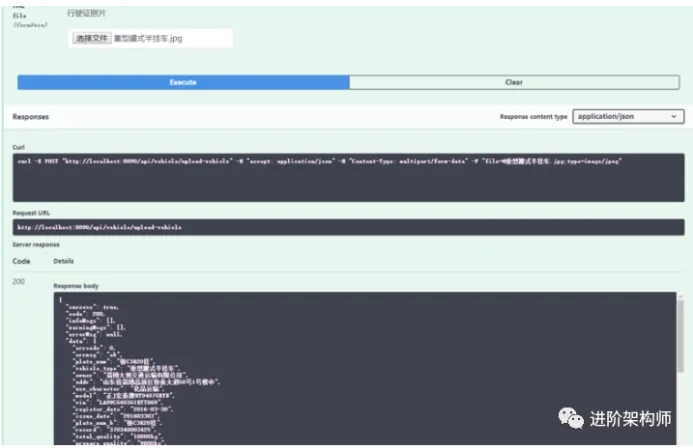
启动应用,访问地址 http://localhost:8890/swagger3/index.html
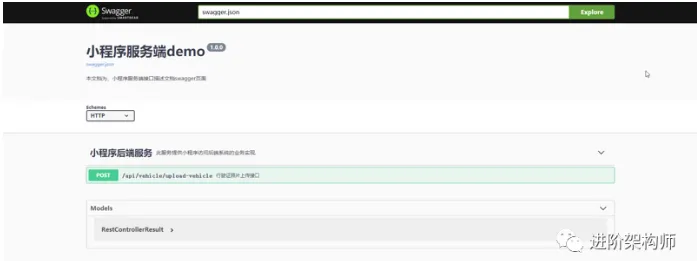
干净、简洁、明了
点击上传接口,try it out,选择行驶证照片,执行