eclipse 中 maven的pom.xml文件发生错误:CoreException: Could not get the value for parameter compilerId for plugin execution default-compile: PluginResolutionException: Plugin org.apache.maven...

简介: eclipse 中 maven的pom.xml文件发生错误:CoreException: Could not get the value for parameter compilerId for plugin execution default-compile: PluginResolutionException: Plugin org.apache.maven...

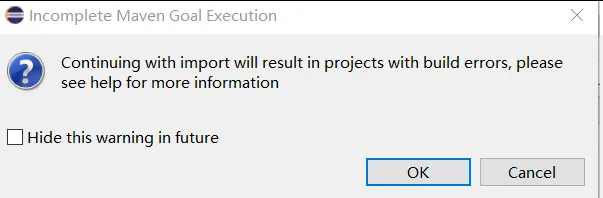
1、 报错信息如下:

Description Resource  Path  Location  Type
CoreException: Could not get the value for parameter compilerId for plugin execution default-compile: PluginResolutionException: Plugin org.apache.maven.plugins:maven-compiler-plugin:3.1 or one of its dependencies could not be resolved: Failed to collect dependencies at org.apache.maven.plugins:maven-compiler-plugin:jar:3.1 -> org.apache.maven.shared:maven-shared-incremental:jar:1.1 -> org.apache.maven:maven-core:jar:2.2.1 -> org.apache.maven:maven-profile:jar:2.2.1: ArtifactDescriptorException: Failed to read artifact descriptor for org.apache.maven:maven-profile:jar:2.2.1: ArtifactResolutionException: org.apache.maven:maven-profile:pom:2.2.1 failed to transfer from http://maven.aliyun.com/nexus/content/groups/public during a previous attempt. This failure was cached in the local repository and resolution is not reattempted until the update interval of nexus-aliyun has elapsed or updates are forced. Original error: Could not transfer artifact org.apache.maven:maven-profile:pom:2.2.1 from/to nexus-aliyun (http://maven.aliyun.com/nexus/content/groups/public): The operation was cancelled. pom.xml /ssm-xml-demo line 6  Maven Project Build Lifecycle Mapping Problem
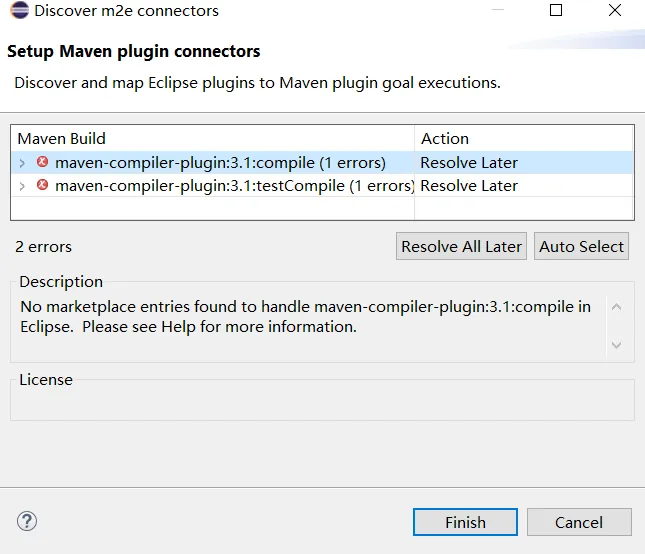
78.png


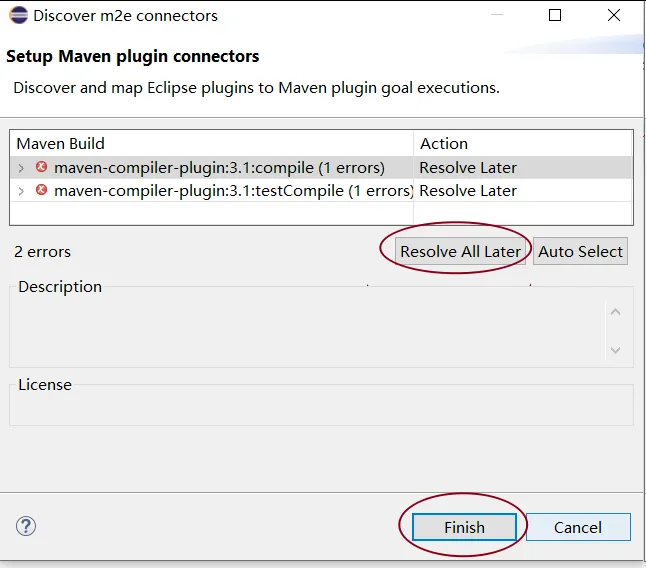
79.pngimage.png


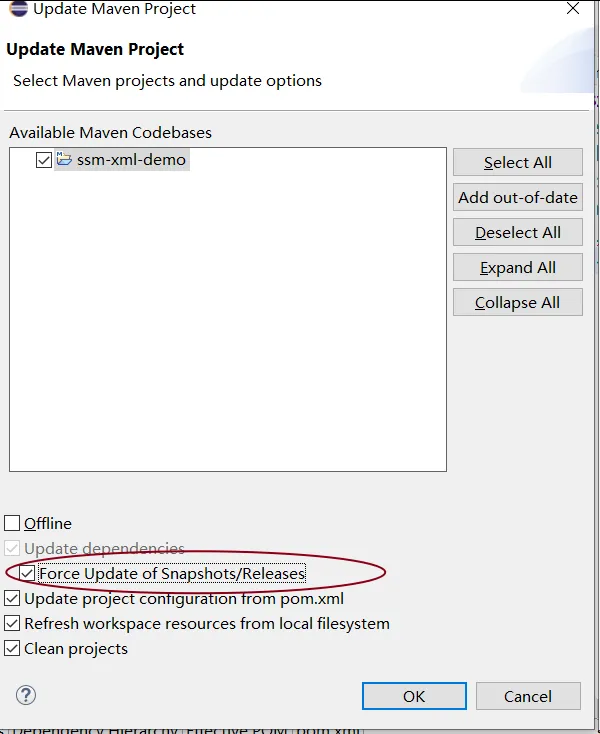
2、解决:在eclipse中强制更新maven的项目:快捷键 alt+f5,然后勾选 Force Update of Snapshots/Releases

81.png


✿ 补充一下 maven的环境搭建


Maven 环境搭建

一、准备工作:

1、maven下载:官网:https://maven.apache.org/download.cgi

  • 下载完成后解压出来

2、配置环境变量

  • 细节:为什么要单独配置一个M2_HOME 的变量:方便后续学习
  • 后续使用的自动依赖的系统,比如SpringBoot、SpringCloud,它会引用M2_HOME 这个地址。

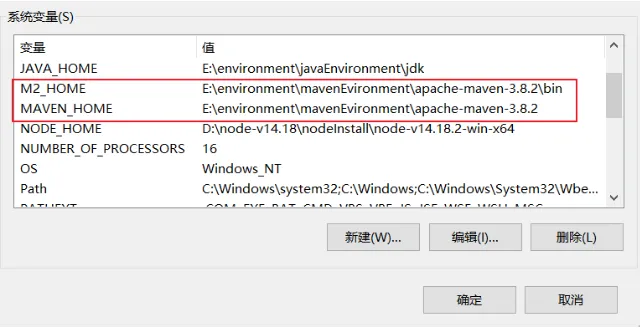
■ 添加系统变量:

□ M2_HOME maven目录下的bin目录

□ MAVEN_HOME maven的目录

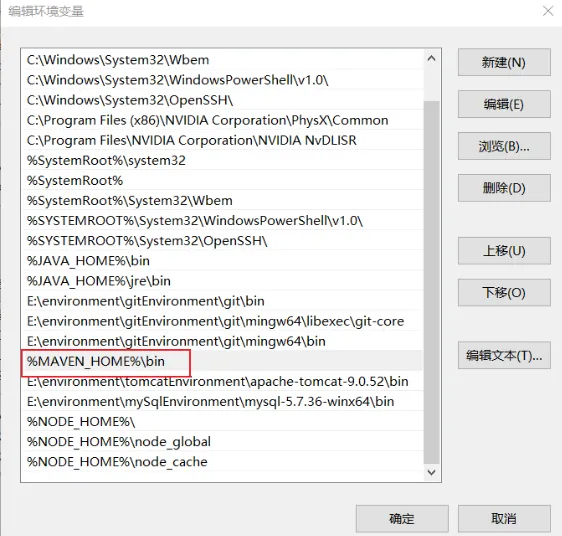
□ 在系统的path中配置 %MAVEN_HOME%\bin

82.png83.png


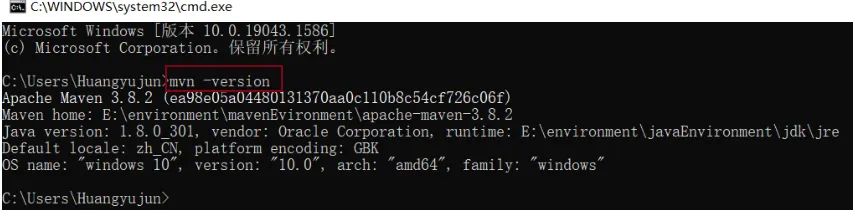
■ 验证maven是否配置成功:查看maven版本的命令 mvn -version

84.png


3、修改maven 配置文件的镜像为 阿里云镜像

  • 配置文件位置:maven根目录/conf/settings.xml 找到镜像元素mirrors
  • 镜像:mirrors:
  • 作用:加速下载
  • 默认是使用国外的镜像,国内建议使用阿里云镜像加速下载
<!-- 添加之前,先把原来的镜像全注释掉 -->
  <!-- 配置方式1 -->
   <mirror>
        <id>nexus-aliyun</id>
     <mirrorOf>*,!jeecg,!jeecg-snapshots</mirrorOf>
        <name>Nexus aliyun</name>
        <url>http://maven.aliyun.com/nexus/content/groups/public</url>
    </mirror>
<!-- 配置方式2 -->
  <mirror>
        <id>nexus-aliyun</id>
     <mirrorOf>central</mirrorOf>
        <name>Nexus aliyun</name>
        <url>http://maven.aliyun.com/nexus/content/groups/public</url>
    </mirror>

4、修改maven 配置文件的本地仓库位置

  • 修改本地仓库位置为:maven 根目录下 自己手动建立的 maven-repo
  • 配置文件位置:maven根目录/conf/settings.xml 找到 localRepository元素
<localRepository>E:\environment\mavenEvironment\apache-maven-3.8.2\maven-repo</localRepository>

目录
相关文章
|
Java Maven
Maven编译报错:Failed to execute goal org.apache.maven.plugins:maven-compiler-plugin:3.13.0:compile 解决方案
在执行Maven项目中的`install`命令时,遇到编译插件版本不匹配的错误。具体报错为:`maven-compiler-plugin:3.13.0`要求Maven版本至少为3.6.3。解决方案是将Maven版本升级到3.6.3或降低插件版本。本文详细介绍了如何下载、解压并配置Maven 3.6.3,包括环境变量设置和IDEA中的Maven配置,确保项目顺利编译。
16691 5
Maven编译报错:Failed to execute goal org.apache.maven.plugins:maven-compiler-plugin:3.13.0:compile 解决方案
|
Java Maven Spring
SpringBoot 系列之 Failed to execute goal org.apache.maven.plugins:maven-resources-plugin:3.2.0:resource
这篇文章描述了在使用Maven构建Spring Boot项目时遇到的`maven-resources-plugin`插件版本问题导致的编译失败,并提供了通过修改插件版本至3.1.0来解决这个问题的方法。
SpringBoot 系列之 Failed to execute goal org.apache.maven.plugins:maven-resources-plugin:3.2.0:resource
Cannot resolve plugin org.apache.maven.plugins:maven-site-plugin:3.3
|
Java 应用服务中间件 API
如何安装与使用Java EE 8、Servlet 3.0及Apache Maven进行高效开发
【7月更文第1天】搭建高效Java EE 8开发环境,包括安装JDK、选择WildFly或Payara Server作为应用服务器,以及安装Apache Maven。使用Maven创建Servlet 3.0 Web项目,编写 HelloWorldServlet,打包部署到服务器,通过访问特定URL测试应用。这一流程助力开发者实现快速原型和大型项目开发。
707 0
|
11月前
|
Android开发 开发者
Android自定义View之不得不知道的文件attrs.xml(自定义属性)
本文详细介绍了如何通过自定义 `attrs.xml` 文件实现 Android 自定义 View 的属性配置。以一个包含 TextView 和 ImageView 的 DemoView 为例,讲解了如何使用自定义属性动态改变文字内容和控制图片显示隐藏。同时,通过设置布尔值和点击事件,实现了图片状态的切换功能。代码中展示了如何在构造函数中解析自定义属性,并通过方法 `setSetting0n` 和 `setbackeguang` 实现功能逻辑的优化与封装。此示例帮助开发者更好地理解自定义 View 的开发流程与 attrs.xml 的实际应用。
324 2
Android自定义View之不得不知道的文件attrs.xml(自定义属性)
|
XML 前端开发 Java
讲解SSM的xml文件
本文详细介绍了SSM框架中的xml配置文件,包括springMVC.xml和applicationContext.xml,涉及组件扫描、数据源配置、事务管理、MyBatis集成以及Spring MVC的视图解析器配置。
350 1
|
XML Java 数据格式
Spring5入门到实战------7、IOC容器-Bean管理XML方式(外部属性文件)
这篇文章是Spring5框架的实战教程,主要介绍了如何在Spring的IOC容器中通过XML配置方式使用外部属性文件来管理Bean,特别是数据库连接池的配置。文章详细讲解了创建属性文件、引入属性文件到Spring配置、以及如何使用属性占位符来引用属性文件中的值。
Spring5入门到实战------7、IOC容器-Bean管理XML方式(外部属性文件)
|
Java Maven
maven项目的pom.xml文件常用标签使用介绍
第四届人文,智慧教育与服务管理国际学术会议(HWESM 2025) 2025 4th International Conference on Humanities, Wisdom Education and Service Management
1248 8