日积月累,水滴石穿 😄
前言
在 Spring Boot中,默认加载的配置文件名称为 application.properties 或者为 application.yml。会将属性文件的值加载到 Spring 的 Environment中。可以使用 @Value 和@ConfigurationProperties 进行取值。
application.properties 、 application.yml我们可以称为主配置文件,但是在实际开发中,我们不可能将所有的配置放在主配置文件中,日积月累,主配置文件就会越来越庞大,难以维护。所以需要进行拆分,比如数据库配置、redis配置、微信配置,我们可以分别拆分为:datasource.properties(yml) 、redis.properties 、wx.properties。
可惜我们自定义的配置文件并不会被自动加载,我们需要使用 Spring 提供的 @PropertySource 注解,去加载指定的配置文件。
依赖
<dependency>
    <groupId>org.springframework.boot</groupId>
    <artifactId>spring-boot-starter-web</artifactId>
    <version>2.2.1.RELEASE</version>
</dependency>
未使用注解
配置文件
小杰提供了两个配置文件,application.properties和 juejin.properties,文件内容如下:
- application.properties
blog.name = cxyxj- juejin.properties
juejin.home = https://juejin.cn/user/2164257578290398测试
@SpringBootApplication(scanBasePackages = "com.cxyxj.propertysource")
public class AppMain {

    public static void main(String[] args) {
        ConfigurableApplicationContext application = SpringApplication.run(AppMain.class);
        //获得容器的 Environment
        Environment env = application.getEnvironment();
        //根据key获取
        String blog = env.getProperty("blog.name");
        String juejin = env.getProperty("juejin.home");
        System.out.println(blog);
        System.out.println(juejin);
    }
}
结果:
cxyxj
null看到juejin.home并没有被加载到 Environment对象中。
使用注解加载指定properties
- 启动类加上如上注解,并指定配置文件地址
@PropertySource("juejin.properties")- 启动结果
cxyxj
https://juejin.cn/user/2164257578290398
@PropertySource注解定义
@Target({ElementType.TYPE})
@Retention(RetentionPolicy.RUNTIME)
@Documented
@Repeatable(PropertySources.class)
public @interface PropertySource {
    String name() default "";

    String[] value();

    boolean ignoreResourceNotFound() default false;

    String encoding() default "";

    Class<? extends PropertySourceFactory> factory() default PropertySourceFactory.class;
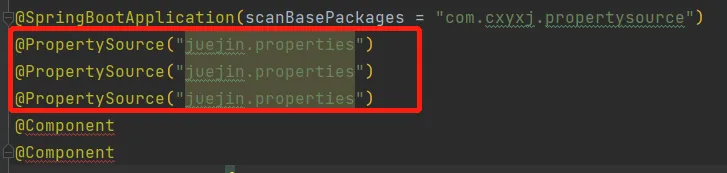
}先来看一下PropertySource类上的注解,一共有四个, @Target、@Retention、@Documented这三个是元注解,不过多介绍。还有一个是 @Repeatable,它有什么作用呢?如果我们希望一个注解在一个类上重复标注,可以在注解上加 @Repeatable。效果如下:
接下来看看注解中的属性。
name:指明此属性源的名称。 如果省略,将根据属性源生成一个名称。
- value:要加载的属性文件的资源位置。支持
properties和XML的属性文件格式 ,例如:classpath:/cn/cxyxj/xx.properties或file:/path/xxx.xml。注意:不允许使用资源位置通配符(例如 **/*.properties);
- value:要加载的属性文件的资源位置。支持
- ignoreResourceNotFound:指定的属性文件如果不存在,是否要忽略错误。默认为 false,也就是属性文件不存在,则会抛出异常。该属性是 Spring4.0 新增的。
- encoding:指定资源文件的编码格式。不指定则使用文件默认的编码格式。该属性是 Spring4.3 新增的。
- factory:指定自定义
PropertySourceFactory,默认使用DefaultPropertySourceFactory。
加载指定xml文件
- 先创建一个名为
juejin.xml的xml 文件,内容如下:
<?xml version="1.0" encoding="UTF-8" ?>
<!DOCTYPE properties SYSTEM "http://java.sun.com/dtd/properties.dtd">
<properties>
    <entry key="juejin.home">https://juejin.cn/user/2164257578290398</entry>
</properties>@PropertySource注解修改如下:
@PropertySource(name = "juejin", value = {"juejin.xml"})- 启动结果
cxyxj
https://juejin.cn/user/2164257578290398
加载 yml
上面说过,@PropertySource只支持 properties 和 XML 的属性文件格式,这肯定是不行的,现在yml越来越流行了。那如何让@PropertySource支持 yml文件格式呢?这时候就需要使用到 factory属性了,指定 PropertySourceFactory 进行加载。
- 创建名为
juejin.yml的文件
juejin:
home: https://juejin.cn/user/2164257578290398- 创建
YmlPropertyResourceFactory类,并实现PropertySourceFactory,重写createPropertySource方法。
import org.springframework.boot.env.YamlPropertySourceLoader;
import org.springframework.core.env.PropertySource;
import org.springframework.core.io.support.DefaultPropertySourceFactory;
import org.springframework.core.io.support.EncodedResource;
import org.springframework.core.io.support.PropertySourceFactory;

import java.io.IOException;
import java.util.List;
import java.util.Optional;

/**
 * 在 @PropertySource 注解的 factory属性指定 YmlPropertyResourceFactory 类,则可以支持读取 yml
 * @author: cxyxj
 * @create: 2022-01-21 15:35
 */
public class YmlPropertyResourceFactory implements PropertySourceFactory {

    private static String YML = ".yml";
    private static String YAML = ".yaml";
    /**
     *
     * @param name:@PropertySource 注解 name 的值
     * @param resource:资源
     */
    @Override
    public PropertySource<?> createPropertySource(String name, EncodedResource resource) throws IOException {
        // 文件名称
        String filename = resource.getResource().getFilename();
        // 属性源的名称
        String resourceName = Optional.ofNullable(name).orElse(filename);
        if (filename.endsWith(YML) || filename.endsWith(YAML)) {
            List<PropertySource<?>> yamlSources = new YamlPropertySourceLoader().load(resourceName, resource.getResource());
            return yamlSources.get(0);
        } else {
            // 其他文件后缀
            return new DefaultPropertySourceFactory().createPropertySource(name, resource);
        }
    }
}- 修改
@PropertySource
@PropertySource(name = "juejin", value = {"juejin.yml"},factory = YmlPropertyResourceFactory.class)- 启动效果
cxyxj
https://juejin.cn/user/2164257578290398- 如你对本文有疑问或本文有错误之处,欢迎评论留言指出。如觉得本文对你有所帮助,欢迎点赞和关注。