一、分布数据可视化 - 散点图
jointplot() / pairplot()
加载模块
import numpy as np
import pandas as pd
import matplotlib.pyplot as plt
import seaborn as sns
import scipy.stats as sci
1、综合散点图 - jointplot()
1.1散点图 + 分布图
示例1:
#创建数据
rs = np.random.RandomState(2)
df = pd.DataFrame(rs.randn(200,2), columns = ['A','B'])
sns.jointplot(x=df['A'], y=df['B'], #设置xy轴,显示columns名称
              data = df,  #设置数据
              color = 'b', #设置颜色
              s = 50, edgecolor = 'w', linewidth = 1,#设置散点大小、边缘颜色及宽度(只针对scatter)
              stat_func=sci.pearsonr,
              kind = 'scatter',#设置类型:'scatter','reg','resid','kde','hex'
              #stat_func=<function pearsonr>,
              space = 0.1, #设置散点图和布局图的间距
              size = 8, #图表大小(自动调整为正方形))
              ratio = 5, #散点图与布局图高度比,整型
              marginal_kws = dict(bins=15, rug =True), #设置柱状图箱数,是否设置rug
              )
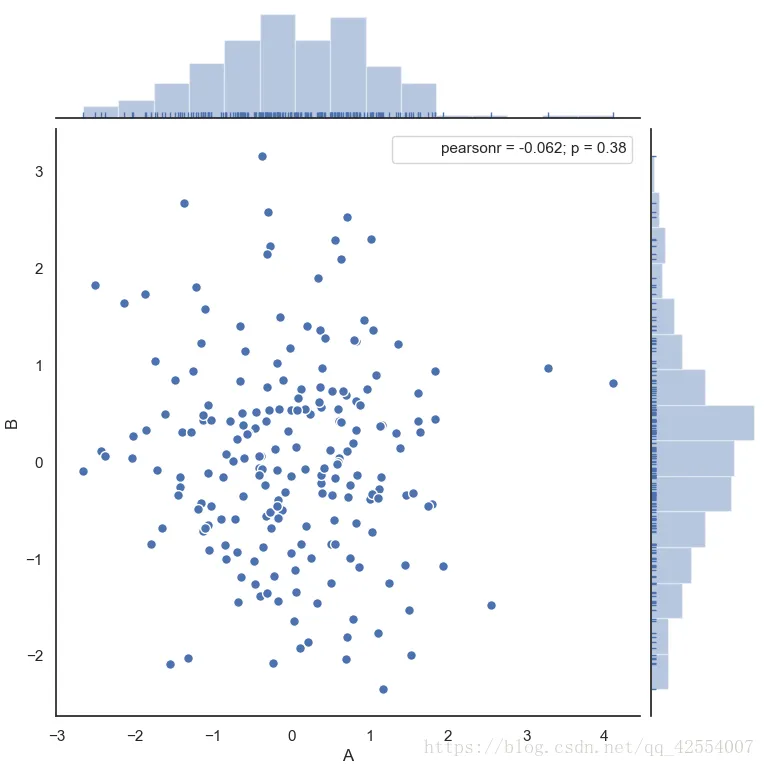
图1.散点分布图
注意:如果不显示r值(pearsonr),可以在参数中添加stat_func=sci.pearsonr,有就不用添加了
示例2:六边形图
sns.jointplot(x=df['A'], y=df['B'], #设置xy轴,显示columns名称
              data = df,  #设置数据
              color = 'b', #设置颜色
              #s = 50, edgecolor = 'w', linewidth = 1,#设置散点大小、边缘颜色及宽度(只针对scatter)
              stat_func=sci.pearsonr,
              kind = 'hex',#设置类型:'scatter','reg','resid','kde','hex'
              space = 0.1, #设置散点图和布局图的间距
              size = 8, #图表大小(自动调整为正方形))
              ratio = 5, #散点图与布局图高度比,整型
             # marginal_kws = dict(bins=15, rug =True) #设置柱状图箱数,是否设置rug
              )
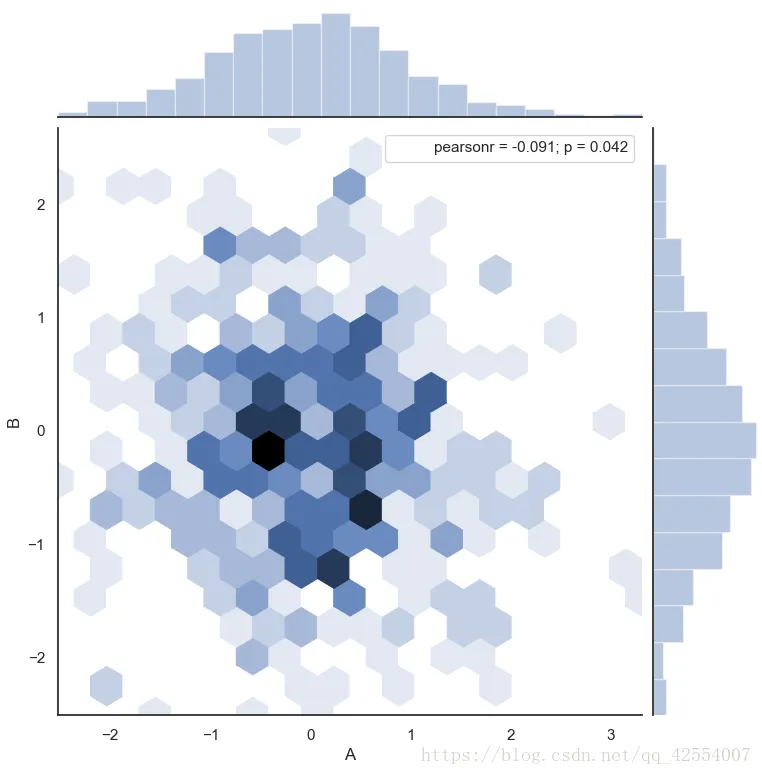
六边形图也可以叫做蜂巢图
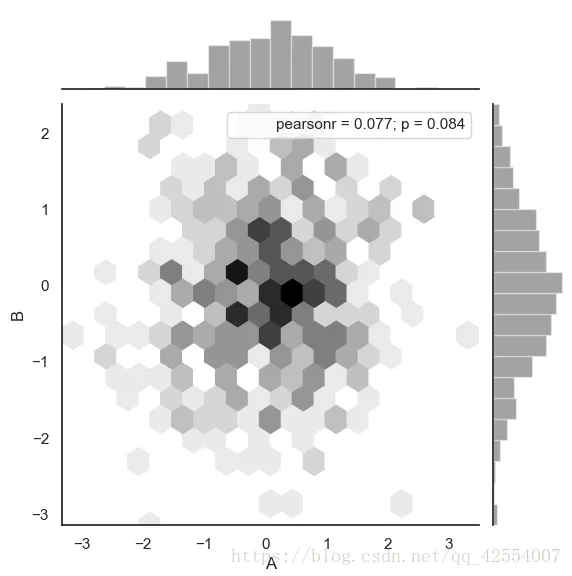
示例3:六边形图
#创建数据
df = pd.DataFrame(rs.randn(500,2), columns = ['A', 'B'])
with sns.axes_style('white'):
    sns.jointplot(x=df['A'], y=df['B'], data = df, kind = 'hex',
                  color = 'k',stat_func=sci.pearsonr,
                  marginal_kws = dict(bins = 20))
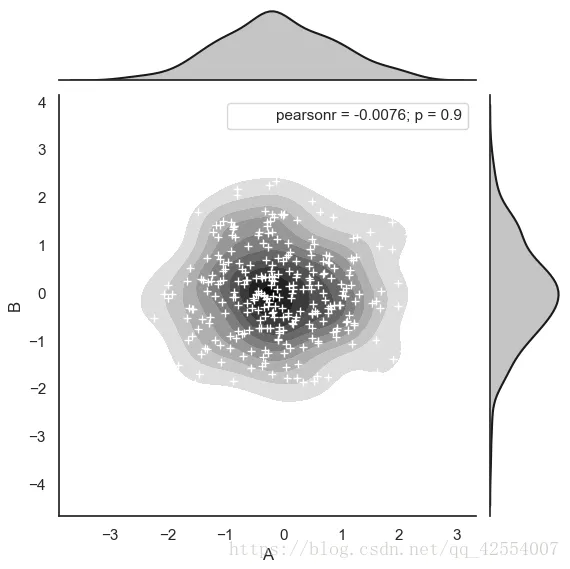
示例4: 密度图
#创建数据
rs = np.random.RandomState(15)
df = pd.DataFrame(rs.randn(300,2), columns = ['A', 'B'])
#创建密度图
g = sns.jointplot(x = df['A'], y = df['B'], data = df,
                  kind = 'kde', color = 'k', stat_func= sci.pearsonr,
                  shade_lowest = False)
#添加散点图
g.plot_joint(plt.scatter, c = 'w', s = 30, linewidth = 1, marker='+')
1.2可拆分绘制的散点图
#plot_joint() + ax_marg_x.hist() + ax_marg_y.hist()
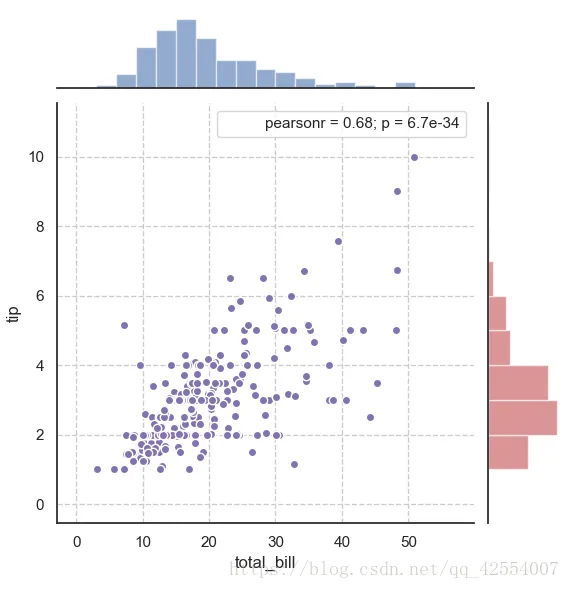
示例1:拆分图
#设置风格
sns.set_style('white')
#导入数据
tips = sns.load_dataset('tips')
print(tips.head())
#创建一个绘图表格区域,设置好x,y对应数据
g = sns.JointGrid(x = 'total_bill', y = 'tip', data = tips)
g.plot_joint(plt.scatter, color = 'm', edgecolor = 'white') #设置框内图表,scatter
g.ax_marg_x.hist(tips['total_bill'], color='b', alpha = .6,
                 bins = np.arange(0,60,3))                  #设置x轴为直方图,注意bins是数组
g.ax_marg_y.hist(tips['tip'], color = 'r', alpha = .6,
                 orientation = 'horizontal',
                 bins = np.arange(0,12,1)) #设置x轴直方图,注意需要orientation参数
from scipy import stats
g.annotate(stats.pearsonr)
#设置标注,可以为pearsonar, spearmanr
plt.grid(linestyle = '--')
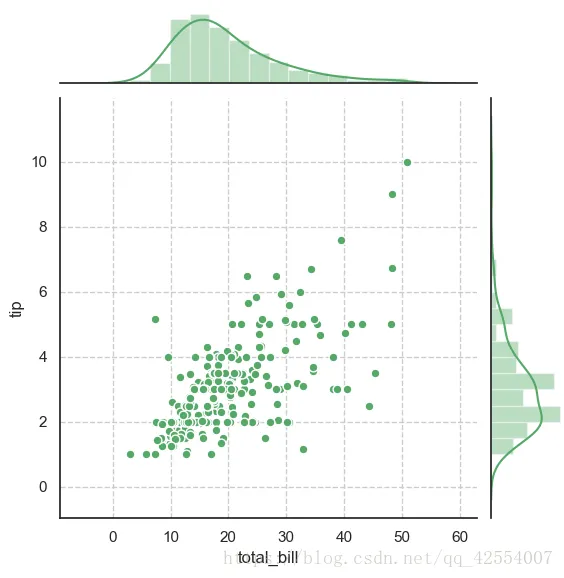
示例2:两个条形图在一个函数里进行设置
#创建一个绘图表格区域,设置好x,y对应数据
g = sns.JointGrid(x = 'total_bill', y = 'tip', data = tips)
g = g.plot_joint(plt.scatter, color = 'g', s = 40, edgecolor = 'white') #绘制散点图
plt.grid(linestyle = '--')
g.plot_marginals(sns.distplot, kde = True, color = 'g')   #绘制x,y直方图
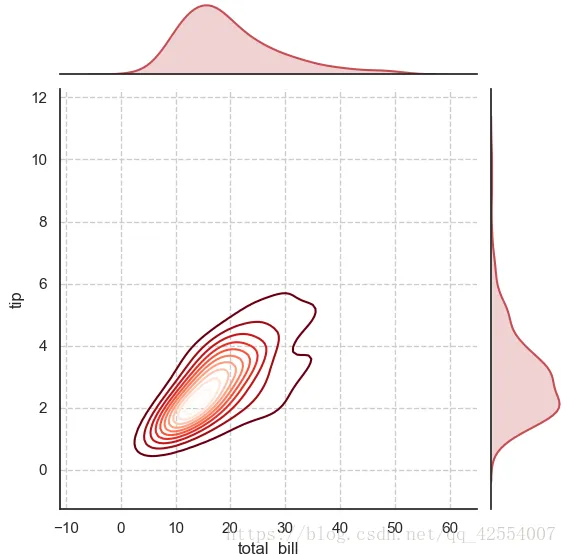
示例3:kde - 密度图
#创建一个绘图表格区域,设置好x,y对应数据
g = sns.JointGrid(x = 'total_bill', y = 'tip', data = tips)
g = g.plot_joint(sns.kdeplot, cmap = 'Reds_r')     #绘制密度图
plt.grid(linestyle = '--')
g.plot_marginals(sns.kdeplot, shade = True, color = 'r') #绘制x,y轴密度图
2.矩阵散点图 - pairplot()
示例1:普通矩阵图示意
#设置风格
sns.set_style('white')
#读取数据
iris = sns.load_dataset('iris')
print(iris.head())
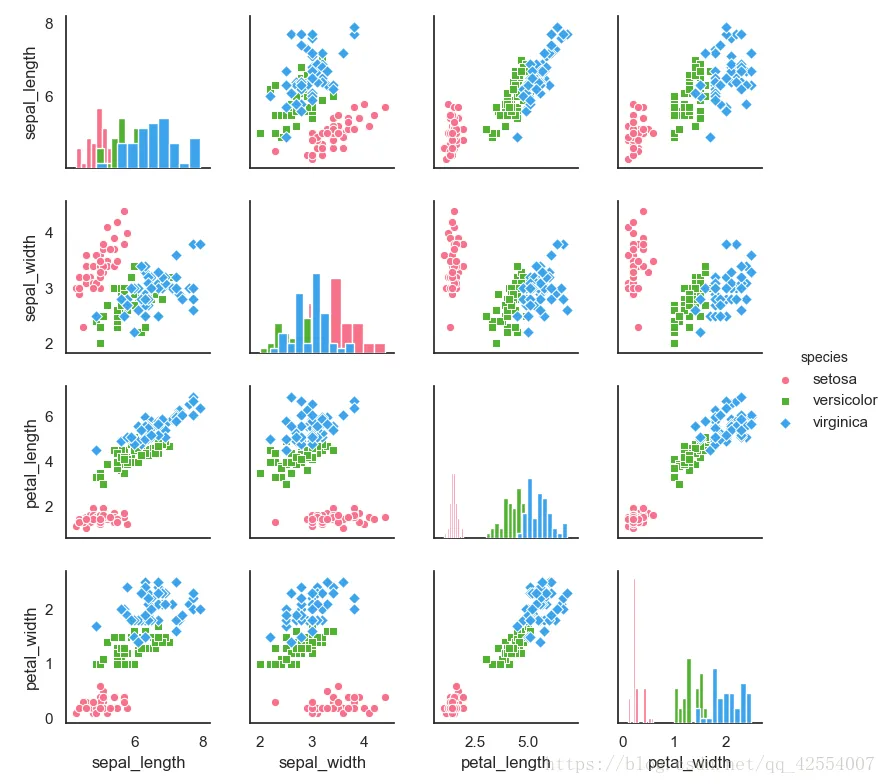
sns.pairplot(iris,
             kind = 'scatter', #散点图/回归分布图{'scatter', 'reg'})
             diag_kind = 'hist', #直方图/密度图{'hist', 'kde'}
             hue = 'species',   #按照某一字段进行分类
             palette = 'husl',  #设置调色板
             markers = ['o', 's', 'D'], #设置不同系列的点样式(这里根据参考分类个数)
             size = 2  #图标大小
             )
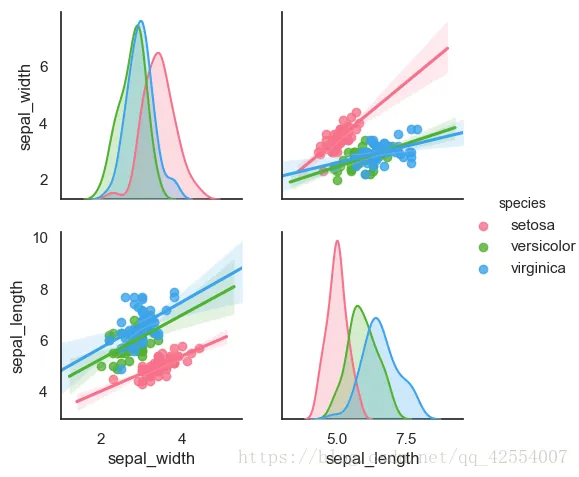
示例2:只提取局部变量进行对比
g = sns.pairplot(iris, vars = ['sepal_width', 'sepal_length'],
             kind = 'reg', diag_kind = 'kde',
             hue = 'species', palette = 'husl')
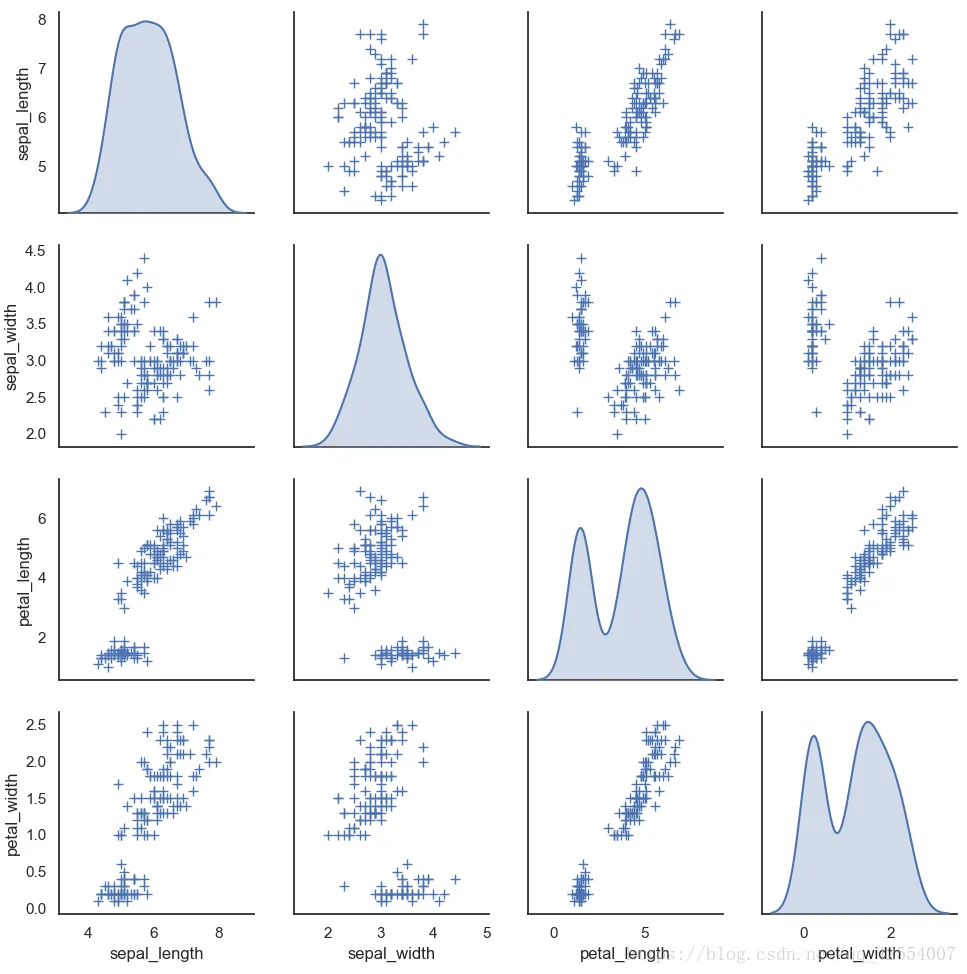
示例3:其它参数设置
#其它参数设置
sns.pairplot(iris, diag_kind = 'kde', markers = '+',
             plot_kws = dict(s = 50, edgecolor = 'b', linewidth = 1),
             #设置点样式
             diag_kws = dict(shade = True)
             )#设置密度图样式
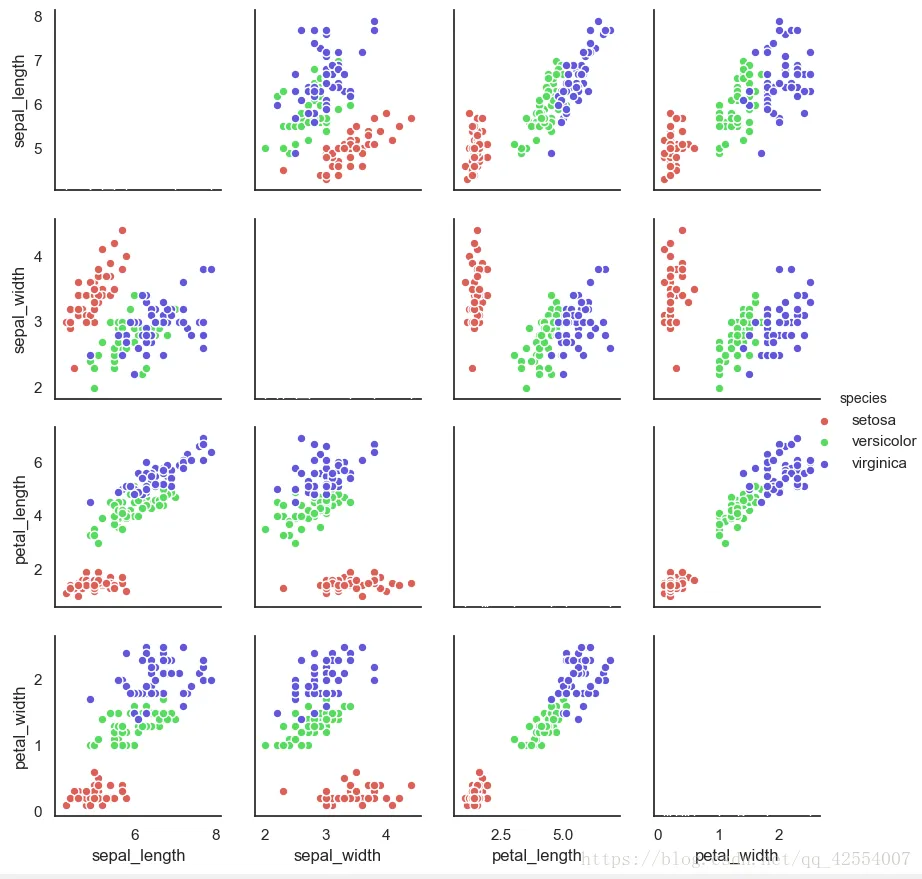
示例4:可拆分绘制的散点图
# map_diag() + map_offdiag()
g = sns.PairGrid(iris, hue= 'species', palette = 'hls',
                 vars = ['sepal_length', 'sepal_width', 'petal_length', 'petal_width'])
                #可筛选创建一个绘图表格区域,设置好x,y对应的数据,按照species分类
#对角线图表,plt.hist/sns.kdeplot
g.map_diag(plt.hist,
           histtype = 'step', #可选:'bar','barstacked', 'step', 'stepfilled'
           linewidth = 1, edgecolor = 'w')
#其它图表:plt.scatter/plt.bar...
g.map_offdiag(plt.scatter, edgecolor = 'w', s = 40, linewidth = 1)
#设置点颜色、大小、描边宽度
g.add_legend() #添加图例()
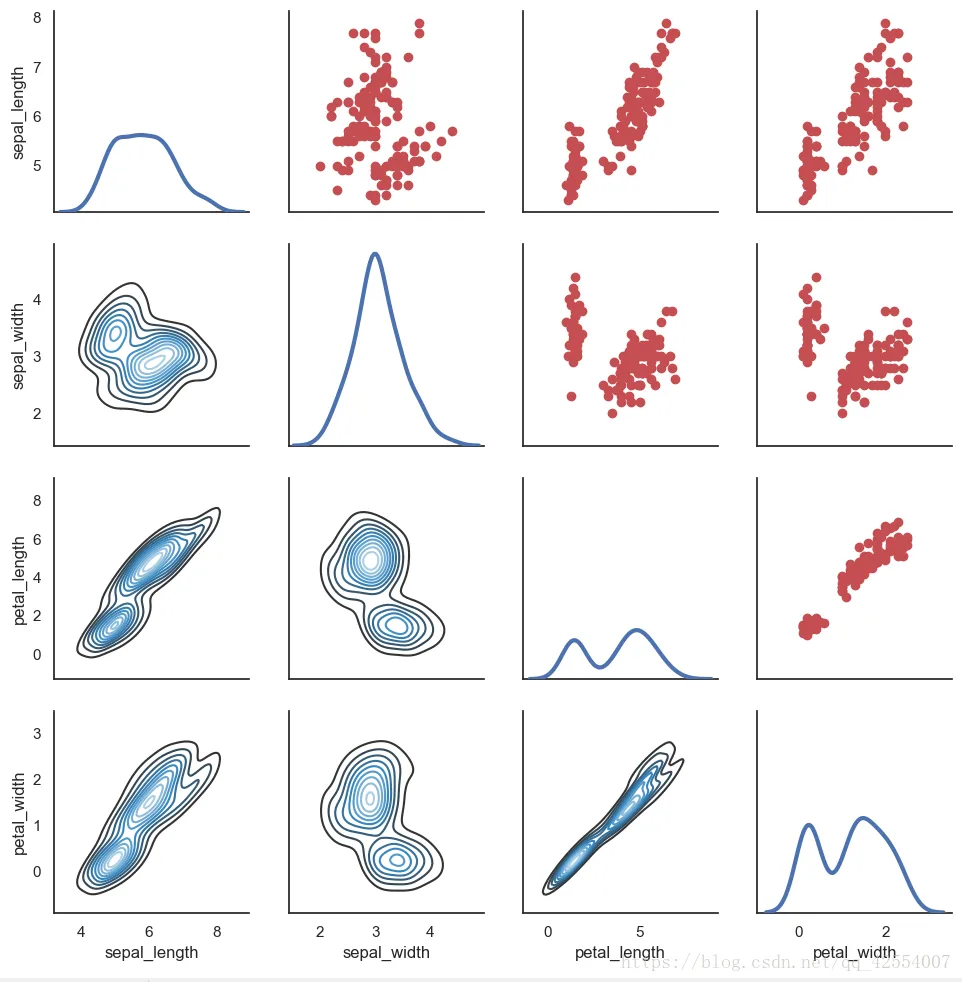
示例5:上三角和下三角#map_diag() + map_lower() + map_upper()
g = sns.PairGrid(iris)
g.map_diag(sns.kdeplot, lw=3) #设置对角线图表
g.map_upper(plt.scatter, color = 'r')  #设置对角线上端图表
g.map_lower(sns.kdeplot, cmap='Blues_d') #设置对角线下端图表