Example Program
编程的风格和spark很类似,
ExecutionEnvironment -- SparkContext
DataSet – RDD
Transformations
这里用Java的接口,所以传入function需要用FlatMapFunction类对象

public class WordCountExample {
    public static void main(String[] args) throws Exception {
        final ExecutionEnvironment env = ExecutionEnvironment.getExecutionEnvironment();

        DataSet<String> text = env.fromElements(
            "Who's there?",
            "I think I hear them. Stand, ho! Who's there?");

        DataSet<Tuple2<String, Integer>> wordCounts = text
            .flatMap(new LineSplitter())
            .groupBy(0)
            .sum(1);

        wordCounts.print();
    }

    public static class LineSplitter implements FlatMapFunction<String, Tuple2<String, Integer>> {
        @Override
        public void flatMap(String line, Collector<Tuple2<String, Integer>> out) {
            for (String word : line.split(" ")) {
                out.collect(new Tuple2<String, Integer>(word, 1));
            }
        }
    }
}
Specifying Keys
如何定义key,
1. 用tuple的index,如下用tuple的第一个和第二个做联合key
DataSet<Tuple3<Integer,String,Long>> input = // [...]
DataSet<Tuple3<Integer,String,Long> grouped = input
    .groupBy(0,1)
    .reduce(/*do something*/);
2. 对于POJO对象,使用Field Expressions
// some ordinary POJO (Plain old Java Object)
public class WC {
  public String word;
  public int count;
}
DataSet<WC> words = // [...]
DataSet<WC> wordCounts = words.groupBy("word").reduce(/*do something*/);
3. 使用Key Selector Functions
// some ordinary POJO
public class WC {public String word; public int count;}
DataSet<WC> words = // [...]
DataSet<WC> wordCounts = words
                         .groupBy(
                           new KeySelector<WC, String>() {
                             public String getKey(WC wc) { return wc.word; }
                           })
                         .reduce(/*do something*/);
Passing Functions to Flink
1. 实现function interface
class MyMapFunction implements MapFunction<String, Integer> {
  public Integer map(String value) { return Integer.parseInt(value); }
});
data.map (new MyMapFunction());
或使用匿名类,
data.map(new MapFunction<String, Integer> () {
  public Integer map(String value) { return Integer.parseInt(value); }
});
2. 使用Rich functions
Rich functions provide, in addition to the user-defined function (map, reduce, etc), four methods: open, close,getRuntimeContext, and setRuntimeContext.
These are useful for parameterizing the function (see Passing Parameters to Functions), creating and finalizing local state, accessing broadcast variables (see Broadcast Variables, and for accessing runtime information such as accumulators and counters (seeAccumulators and Counters, and information on iterations (see Iterations).
Rich functions的使用和普通的function是一样的,不同的就是,多4个接口函数,可以用于一些特殊的场景,比如给function传参,或访问broadcast变量,accumulators和counter,因为这些场景你需要先getRuntimeContext
class MyMapFunction extends RichMapFunction<String, Integer> {
  public Integer map(String value) { return Integer.parseInt(value); }
});
Execution Configuration
ExecutionEnvironment env = ExecutionEnvironment.getExecutionEnvironment();
ExecutionConfig executionConfig = env.getConfig();
enableClosureCleaner()/disableClosureCleaner(). The closure cleaner is enabled by default. The closure cleaner removes unneeded references to the surrounding class of anonymous functions inside Flink programs. With the closure cleaner disabled, it might happen that an anonymous user function is referencing the surrounding class, which is usually not Serializable. This will lead to exceptions by the serializer.
对于Java,比如传入function也要生成function对象,这样里面的function是会reference这个对象的,其实这种情况,你需要的只是function逻辑,所以closureCleaner会去掉这个reference
这样的好处是,传输类对象时候,是要求对象可序列化的,如果每个去实现序列号接口很麻烦,不实现又会报错,所以这里干脆clean掉这个referencegetParallelism()/setParallelism(int parallelism)Set the default parallelism for the job.
设置Job的全局的parallelismgetExecutionRetryDelay()/setExecutionRetryDelay(long executionRetryDelay)Sets the delay in milliseconds that the system waits after a job has failed, before re-executing it. The delay starts after all tasks have been successfully been stopped on the TaskManagers, and once the delay is past, the tasks are re-started. This parameter is useful to delay re-execution in order to let certain time-out related failures surface fully (like broken connections that have not fully timed out), before attempting a re-execution and immediately failing again due to the same problem. This parameter only has an effect if the number of execution re-tries is one or more.
getExecutionMode()/setExecutionMode(). The default execution mode is PIPELINED. Sets the execution mode to execute the program. The execution mode defines whether data exchanges are performed in a batch or on a pipelined manner.
和失败重试相关的配置enableObjectReuse()/disableObjectReuse()By default, objects are not reused in Flink. Enabling the object reuse mode will instruct the runtime to reuse user objects for better performance. Keep in mind that this can lead to bugs when the user-code function of an operation is not aware of this behavior.
这个由于Java什么都要生成对象,比如function,所以会生成大量重复对象,这个可以打开object重用,提高性能enableSysoutLogging()/disableSysoutLogging()JobManager status updates are printed toSystem.outby default. This setting allows to disable this behavior.
打开和关闭系统日志
getGlobalJobParameters()/setGlobalJobParameters()This method allows users to set custom objects as a global configuration for the job. Since theExecutionConfigis accessible in all user defined functions, this is an easy method for making configuration globally available in a job.
可以设置Job全局参数其他的参数都是序列化相关的,不列了
Data Sinks
Data sinks consume DataSets and are used to store or return them. Data sink operations are described using anOutputFormat.
可以custom output format: 比如写数据库,
DataSet<Tuple3<String, Integer, Double>> myResult = [...]

// write Tuple DataSet to a relational database
myResult.output(
    // build and configure OutputFormat
    JDBCOutputFormat.buildJDBCOutputFormat()
                    .setDrivername("org.apache.derby.jdbc.EmbeddedDriver")
                    .setDBUrl("jdbc:derby:memory:persons")
                    .setQuery("insert into persons (name, age, height) values (?,?,?)")
                    .finish()
    );
还有个功能,可以做locally的排序,
DataSet<Tuple3<Integer, String, Double>> tData = // [...]
DataSet<Tuple2<BookPojo, Double>> pData = // [...]
DataSet<String> sData = // [...]

// sort output on String field in ascending order
tData.print().sortLocalOutput(1, Order.ASCENDING);

// sort output on Double field in descending and Integer field in ascending order
tData.print().sortLocalOutput(2, Order.DESCENDING).sortLocalOutput(0, Order.ASCENDING);
Debugging
本地执行,LocalEnvironement
final ExecutionEnvironment env = ExecutionEnvironment.createLocalEnvironment();

DataSet<String> lines = env.readTextFile(pathToTextFile);
// build your program

env.execute();
便于调式的datasouce,
final ExecutionEnvironment env = ExecutionEnvironment.createLocalEnvironment();

// Create a DataSet from a list of elements
DataSet<Integer> myInts = env.fromElements(1, 2, 3, 4, 5);

// Create a DataSet from any Java collection
List<Tuple2<String, Integer>> data = ...
DataSet<Tuple2<String, Integer>> myTuples = env.fromCollection(data);

// Create a DataSet from an Iterator
Iterator<Long> longIt = ...
DataSet<Long> myLongs = env.fromCollection(longIt, Long.class);
便于输出的datasink,
DataSet<Tuple2<String, Integer>> myResult = ...

List<Tuple2<String, Integer>> outData = new ArrayList<Tuple2<String, Integer>>();
myResult.output(new LocalCollectionOutputFormat(outData));
Iteration Operators
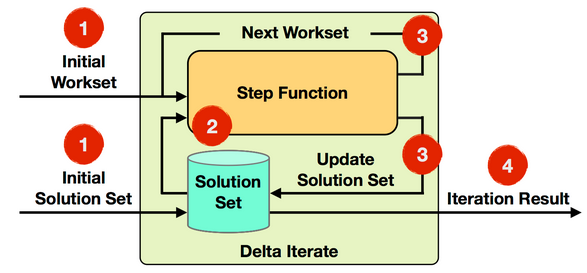
Iterations implement loops in Flink programs. The iteration operators encapsulate a part of the program and execute it repeatedly, feeding back the result of one iteration (the partial solution) into the next iteration. There are two types of iterations in Flink: BulkIteration and DeltaIteration.
参考, https://ci.apache.org/projects/flink/flink-docs-release-0.10/apis/iterations.html
BulkIteration就是正常的Iteration,每次都处理全量数据

DeltaIteration,就是每次都只处理部分数据并delta更新,效率更高
Semantic Annotations
Semantic annotations can be used to give Flink hints about the behavior of a function.
目的是做性能优化,优化器在明确知道function读参数的使用情况,比如如果知道某些field只是做forward,就可以保留它的sorting or partitioning信息
有3种语义annotation,
Forwarded Fields Annotation
表示,输入的某个field会原封不动的copy到输出的某个field
下面的例子,表示输入的第一个field会copy到输出的第3个field
可以看到,输出tuple的第三个field是val.f0
@ForwardedFields("f0->f2")
public class MyMap implements
              MapFunction<Tuple2<Integer, Integer>, Tuple3<String, Integer, Integer>> {
  @Override
  public Tuple3<String, Integer, Integer> map(Tuple2<Integer, Integer> val) {
    return new Tuple3<String, Integer, Integer>("foo", val.f1 / 2, val.f0);
  }
}
Non-Forwarded Fields
和上面相反,除指定的fields,其他fields都是原位置copy
例子,除输入的第二个field,其他都是原位置copy
@NonForwardedFields("f1") // second field is not forwarded
public class MyMap implements
              MapFunction<Tuple2<Integer, Integer>, Tuple2<Integer, Integer>> {
  @Override
  public Tuple2<Integer, Integer> map(Tuple2<Integer, Integer> val) {
    return new Tuple2<Integer, Integer>(val.f0, val.f1 / 2);
  }
}
Read Fields
表明这个fields会在function被读到或用到,
表明,输入的第一个field和第4个field会被读到或用到
@ReadFields("f0; f3") // f0 and f3 are read and evaluated by the function.
public class MyMap implements
              MapFunction<Tuple4<Integer, Integer, Integer, Integer>,
                          Tuple2<Integer, Integer>> {
  @Override
  public Tuple2<Integer, Integer> map(Tuple4<Integer, Integer, Integer, Integer> val) {
    if(val.f0 == 42) {
      return new Tuple2<Integer, Integer>(val.f0, val.f1);
    } else {
      return new Tuple2<Integer, Integer>(val.f3+10, val.f1);
    }
  }
}
Broadcast Variables
Broadcast variables allow you to make a data set available to all parallel instances of an operation, in addition to the regular input of the operation. This is useful for auxiliary data sets, or data-dependent parameterization. The data set will then be accessible at the operator as a Collection.
- Broadcast: broadcast sets are registered by name via
withBroadcastSet(DataSet, String), and - Access: accessible via
getRuntimeContext().getBroadcastVariable(String)at the target operator.
// 1. The DataSet to be broadcasted
DataSet<Integer> toBroadcast = env.fromElements(1, 2, 3);

DataSet<String> data = env.fromElements("a", "b");

data.map(new RichMapFunction<String, String>() {
    @Override
    public void open(Configuration parameters) throws Exception {
      // 3. Access the broadcasted DataSet as a Collection
      Collection<Integer> broadcastSet = getRuntimeContext().getBroadcastVariable("broadcastSetName");
    }


    @Override
    public String map(String value) throws Exception {
        ...
    }
}).withBroadcastSet(toBroadcast, "broadcastSetName"); // 2. Broadcast the DataSet
这个场景,就是有些不大的公共数据,是要被所有的实例访问到的,比如一些查询表
上面的例子,会将toBroadcast设置为广播变量broadcastSetName,这样在运行时,可以用getRuntimeContext().getBroadcastVariable获取该变量使用
Passing Parameters to Functions
应该是如果将参数传递给function类,这个完全由java冗余导致的
首先,当然可以用类构造函数来传参数,
ataSet<Integer> toFilter = env.fromElements(1, 2, 3);

toFilter.filter(new MyFilter(2));

private static class MyFilter implements FilterFunction<Integer> {

  private final int limit;

  public MyFilter(int limit) {
    this.limit = limit;
  }

  @Override
  public boolean filter(Integer value) throws Exception {
    return value > limit;
  }
}
自定义MyFilter,构造函数可以传入limit
也可以使用withParameters(Configuration)
DataSet<Integer> toFilter = env.fromElements(1, 2, 3);

Configuration config = new Configuration();
config.setInteger("limit", 2);

toFilter.filter(new RichFilterFunction<Integer>() {
    private int limit;

    @Override
    public void open(Configuration parameters) throws Exception {
      limit = parameters.getInteger("limit", 0);
    }

    @Override
    public boolean filter(Integer value) throws Exception {
      return value > limit;
    }
}).withParameters(config);
可以用withParameters将定义好的config传入function
然后用RichFunction的Open接口,将参数解析出来使用
这样和上面的比有啥好处,我怎么觉得上面那个看着更方便些?可以用匿名类?
当然你也可以用全局参数,这个和广播变量有什么区别?相同点就是都是全局可见,全局参数只能用于参数形式,广播变量可以是任意dataset
Setting a custom global configuration
Configuration conf = new Configuration();
conf.setString("mykey","myvalue");
final ExecutionEnvironment env = ExecutionEnvironment.getExecutionEnvironment();
env.getConfig().setGlobalJobParameters(conf);
Accessing values from the global configuration
public static final class Tokenizer extends RichFlatMapFunction<String, Tuple2<String, Integer>> {

    private String mykey;
    @Override
    public void open(Configuration parameters) throws Exception {
      super.open(parameters);
      ExecutionConfig.GlobalJobParameters globalParams = getRuntimeContext().getExecutionConfig().getGlobalJobParameters();
      Configuration globConf = (Configuration) globalParams;
      mykey = globConf.getString("mykey", null);
    }
    // ... more here ...
Accumulators & Counters
用于分布式计数,job结束的时候,会全部汇总
Flink currently has the following built-in accumulators. Each of them implements the Accumulator interface.
- IntCounter, LongCounter and DoubleCounter: See below for an example using a counter.
- Histogram: A histogram implementation for a discrete number of bins. Internally it is just a map from Integer to Integer. You can use this to compute distributions of values, e.g. the distribution of words-per-line for a word count program.
//定义和注册counter
private IntCounter numLines = new IntCounter();
getRuntimeContext().addAccumulator("num-lines", this.numLines);

//在任意地方进行计数
this.numLines.add(1);

//最终取得结果
myJobExecutionResult.getAccumulatorResult("num-lines")
Execution Plans
首先可以打印出执行plan,json格式,
final ExecutionEnvironment env = ExecutionEnvironment.getExecutionEnvironment();

...

System.out.println(env.getExecutionPlan());
打开这个网页,
The HTML document containing the visualizer is located undertools/planVisualizer.html.
将Json贴入,就可以看到执行计划,
Web Interface
Flink offers a web interface for submitting and executing jobs. If you choose to use this interface to submit your packaged program, you have the option to also see the plan visualization.
The script to start the webinterface is located under bin/start-webclient.sh. After starting the webclient (per default onport 8080), your program can be uploaded and will be added to the list of available programs on the left side of the interface.
也可以通过web interface来提交job和查看执行计划