Netty是由JBOSS提供的一个java开源框架。Netty提供异步的、事件驱动的网络应用程序框架和工具,用以快速开发高性能、高可靠性的网络服务器和客户端程序。也就是说,Netty 是一个基于NIO的客户、服务器端编程框架,使用Netty 可以确保你快速和简单的开发出一个网络应用,例如实现了某种协议的客户、服务端应用。Netty相当于简化和流线化了网络应用的编程开发过程,例如:基于TCP和UDP的socket服务开发。“快速”和“简单”并不用产生维护性或性能上的问题。Netty 是一个吸收了多种协议(包括FTP、SMTP、HTTP等各种二进制文本协议)的实现经验,并经过相当精心设计的项目。最终,Netty 成功的找到了一种方式,在保证易于开发的同时还保证了其应用的性能,稳定性和伸缩性
本文将带领大家学习如何在SpringBoot项目中集成Netty
一、Netty服务端
由于是SpringBoot项目,因此这里不展示SpringBoot相关的依赖
1、导入依赖
<dependency>
    <groupId>org.projectlombok</groupId>
    <artifactId>lombok</artifactId>
</dependency>
<dependency>
    <groupId>io.netty</groupId>
    <artifactId>netty-all</artifactId>
    <version>4.1.36.Final</version>
</dependency>
2、编写netty处理器
/**
 * Socket拦截器,用于处理客户端的行为
 *
 * @author Gjing
 **/
@Slf4j
public class SocketHandler extends ChannelInboundHandlerAdapter {
    public static final ChannelGroup clients = new DefaultChannelGroup(GlobalEventExecutor.INSTANCE);

    /**
     * 读取到客户端发来的消息
     *
     * @param ctx ChannelHandlerContext
     * @param msg msg
     * @throws Exception e
     */
    @Override
    public void channelRead(ChannelHandlerContext ctx, Object msg) throws Exception {
        // 由于我们配置的是 字节数组 编解码器,所以这里取到的用户发来的数据是 byte数组
        byte[] data = (byte[]) msg;
        log.info("收到消息: " + new String(data));
        // 给其他人转发消息
        for (Channel client : clients) {
            if (!client.equals(ctx.channel())) {
                client.writeAndFlush(data);
            }
        }
    }

    @Override
    public void handlerAdded(ChannelHandlerContext ctx) throws Exception {
        log.info("新的客户端链接:" + ctx.channel().id().asShortText());
        clients.add(ctx.channel());
    }

    @Override
    public void handlerRemoved(ChannelHandlerContext ctx) throws Exception {
        clients.remove(ctx.channel());
    }

    @Override
    public void exceptionCaught(ChannelHandlerContext ctx, Throwable cause) throws Exception {
        cause.printStackTrace();
        ctx.channel().close();
        clients.remove(ctx.channel());
    }
}
3、编写netty初始化器
/**
 * Socket 初始化器,每一个Channel进来都会调用这里的 InitChannel 方法
 * @author Gjing
 **/
@Component
public class SocketInitializer extends ChannelInitializer<SocketChannel> {
    @Override
    protected void initChannel(SocketChannel socketChannel) throws Exception {
        ChannelPipeline pipeline = socketChannel.pipeline();
        // 添加对byte数组的编解码,netty提供了很多编解码器,你们可以根据需要选择
        pipeline.addLast(new ByteArrayDecoder());
        pipeline.addLast(new ByteArrayEncoder());
        // 添加上自己的处理器
        pipeline.addLast(new SocketHandler());
    }
}
4、编写netty服务
/**
 * @author Gjing
 **/
@Slf4j
@Component
public class SocketServer {
    @Resource
    private SocketInitializer socketInitializer;

    @Getter
    private ServerBootstrap serverBootstrap;

    /**
     * netty服务监听端口
     */
    @Value("${netty.port:8088}")
    private int port;
    /**
     * 主线程组数量
     */
    @Value("${netty.bossThread:1}")
    private int bossThread;

    /**
     * 启动netty服务器
     */
    public void start() {
        this.init();
        this.serverBootstrap.bind(this.port);
        log.info("Netty started on port: {} (TCP) with boss thread {}", this.port, this.bossThread);
    }

    /**
     * 初始化netty配置
     */
    private void init() {
        // 创建两个线程组,bossGroup为接收请求的线程组,一般1-2个就行
        NioEventLoopGroup bossGroup = new NioEventLoopGroup(this.bossThread);
        // 实际工作的线程组
        NioEventLoopGroup workerGroup = new NioEventLoopGroup();
        this.serverBootstrap = new ServerBootstrap();
        this.serverBootstrap.group(bossGroup, workerGroup) // 两个线程组加入进来
                .channel(NioServerSocketChannel.class)  // 配置为nio类型
                .childHandler(this.socketInitializer); // 加入自己的初始化器
    }
}
5、启动netty
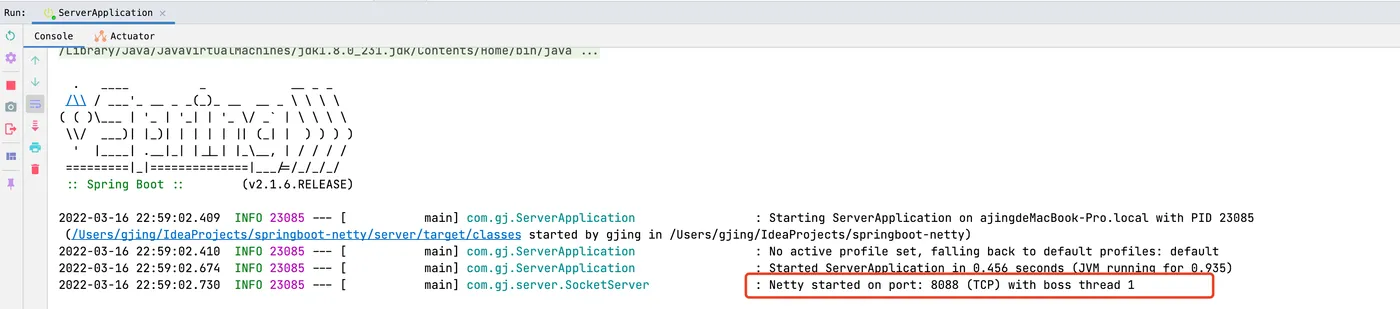
由于使用SpringBoot,因此我们可以监听项目启动成功后触发启动Netty服务器,这时候只要SpringBoot启动就行了
/**
 * 监听Spring容器启动完成,完成后启动Netty服务器
 * @author Gjing
 **/
@Component
public class NettyStartListener implements ApplicationRunner {
    @Resource
    private SocketServer socketServer;

    @Override
    public void run(ApplicationArguments args) throws Exception {
        this.socketServer.start();
    }
}- 效果图
二、Netty客户端
客户端这里以NIO来编写,就不写Netty了,在实际工作中,其实也都是Netty服务端,客户端可能是 WebSocket 或者 Socket,我们这里就以 Socket 为例,由于 NIO 是Java提供的,所以我们不需要引入什么依赖
1、编写客户端线程
因为我们不能阻塞 主线程,因此需要开启子线程来作为客户端
/**
 * @author Gjing
 **/
public class ClientThread implements Runnable{
    private final Selector selector;

    public ClientThread(Selector selector) {
        this.selector = selector;
    }

    @Override
    public void run() {
        try {
            for (; ; ) {
                int channels = selector.select();
                if (channels == 0) {
                    continue;
                }
                Set<SelectionKey> selectionKeySet = selector.selectedKeys();
                Iterator<SelectionKey> keyIterator = selectionKeySet.iterator();
                while (keyIterator.hasNext()) {
                    SelectionKey selectionKey = keyIterator.next();

                    // 移除集合当前得selectionKey,避免重复处理
                    keyIterator.remove();
                    if (selectionKey.isReadable()) {
                        this.handleRead(selector, selectionKey);
                    }
                }
            }
        } catch (IOException e) {
            e.printStackTrace();
        }
    }

    // 处理可读状态
    private void handleRead(Selector selector, SelectionKey selectionKey) throws IOException {
        SocketChannel channel = (SocketChannel) selectionKey.channel();
        ByteBuffer byteBuffer = ByteBuffer.allocate(1024);
        StringBuilder message = new StringBuilder();
        if (channel.read(byteBuffer) > 0) {
            byteBuffer.flip();
            message.append(StandardCharsets.UTF_8.decode(byteBuffer));
        }
        // 再次注册到选择器上,继续监听可读状态
        channel.register(selector, SelectionKey.OP_READ);
        System.out.println(message);
    }
}
2、客户端逻辑
/**
 * 聊天客户端
 *
 * @author Gjing
 **/
public class ChatClient {

    public void start(String name) throws IOException {
        SocketChannel socketChannel = SocketChannel.open(new InetSocketAddress("127.0.0.1", 8088));
        socketChannel.configureBlocking(false);
        Selector selector = Selector.open();
        socketChannel.register(selector, SelectionKey.OP_READ);

        // 监听服务端发来得消息
        new Thread(new ClientThread(selector)).start();
        // 监听用户输入
        Scanner scanner = new Scanner(System.in);
        while (scanner.hasNextLine()) {
            String message = scanner.nextLine();
            if (StringUtils.hasText(message)) {
                socketChannel.write(StandardCharsets.UTF_8.encode(name + ": " + message));
            }
        }
    }
}
3、客户端1
/**
 * @author Gjing
 **/
public class Client1 {
    public static void main(String[] args) throws IOException {
        new ChatClient().start("李四");
    }
}
4、客户端2
/**
 * @author Gjing
 **/
public class Client2 {
    public static void main(String[] args) throws IOException {
        new ChatClient().start("张三");
    }
}
5、启动这两个客户端
服务端也触发了日志打印,监听到客户端加入

rip%7CimageView2/2/w/1240)
现在我们通过客户端2,发一条消息看看
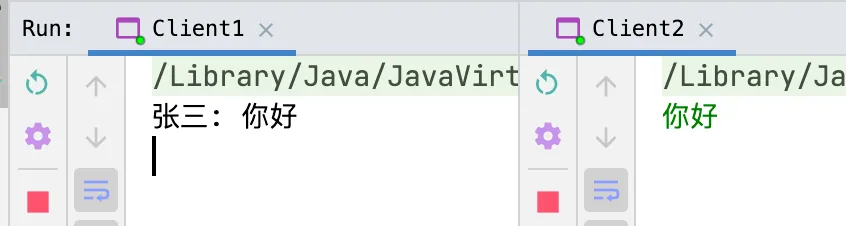
客户端1 成功收到了 客户端2的消息,同理我们通过客户端1 发送

服务端也输出了消息日志

文章到此结束啦,这就是一个普通的小案例哦,更多知识大家可以通过官网进行学习,Demo源代码地址:SpringBoot-Netty