如何在Linux和Windows双引导之间同步时间

简介: 如何在Linux和Windows双引导之间同步时间双引导在尝试不同Linux发行版的同时仍然保留其Windows系统的人中变得非常普遍。这已经变得非常流行,因为它很容易做到。但是,双启动的一个大问题是  时间。

如何在Linux和Windows双引导之间同步时间

_Linux_Windows_

双引导在尝试不同Linux发行版的同时仍然保留其Windows系统的人中变得非常普遍。这已经变得非常流行,因为它很容易做到。但是,双启动的一个大问题是  时间。

是的,你没有看错。当您仅使用一个操作系统时,您的系统可以毫不费力地同步。但是在Windows和Linux的双启动时,可能会出现时间同步错误。Linux使用GMT,而Windows使用您的本地时间。当您在使用Linux后花时间登录Windows时,反之亦然,可能会显示错误的时间。

不用担心,因为我们有一个简单的解决方案。

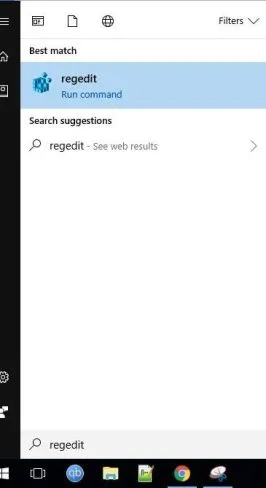
只需单击Windows系统中的开始菜单,然后搜索regedit即可。
_Linux_Windows_1

单击Enter,现在您将看到如下所示的屏幕。这是注册表编辑器。

_Linux_Windows_2

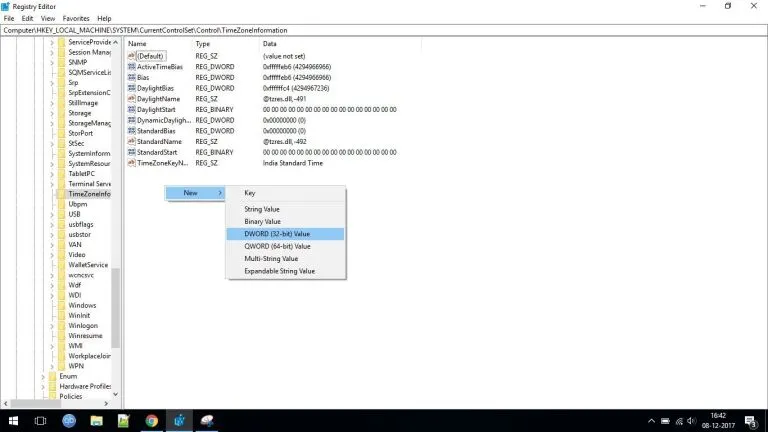
从左侧导航菜单中,导航至 -

HKEY_LOCAL_MACHINESYSTEMCurrentControlSetControlTimeZoneInformation

在窗口的右侧,右键单击任何空白区域并选择New >> DWORD(32 bit) Value。
_Linux_Windows_3

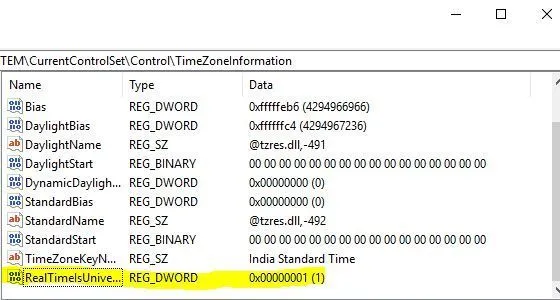
完成此操作后,默认情况下将突出显示您创建的新条目。将其重命名为RealTimeIsUniversal并赋值为1。
_Linux_Windows_4

我们完成了所有配置,下次重新启动时,您将不会遇到时间同步问题。

相关文章
|
8月前
|
安全 Linux 生物认证
Nexpose 8.25.0 for Linux & Windows - 漏洞扫描
335 0
Nexpose 8.25.0 for Linux & Windows - 漏洞扫描
|
8月前
|
安全 Linux iOS开发
Binary Ninja 5.1.8104 (macOS, Linux, Windows) - 反编译器、反汇编器、调试器和二进制分析平台
731 53
Binary Ninja 5.1.8104 (macOS, Linux, Windows) - 反编译器、反汇编器、调试器和二进制分析平台
|
8月前
|
安全 Linux 生物认证
Nexpose 8.24.0 for Linux & Windows - 漏洞扫描
392 17
Nexpose 8.24.0 for Linux & Windows - 漏洞扫描
|
8月前
|
SQL 安全 Linux
Metasploit Pro 4.22.8-20251014 (Linux, Windows) - 专业渗透测试框架
413 1
Metasploit Pro 4.22.8-20251014 (Linux, Windows) - 专业渗透测试框架
|
8月前
|
Linux 网络安全 iOS开发
Metasploit Framework 6.4.95 (macOS, Linux, Windows) - 开源渗透测试框架
843 1
Metasploit Framework 6.4.95 (macOS, Linux, Windows) - 开源渗透测试框架
|
8月前
|
Linux 虚拟化 iOS开发
VMware Remote Console 13.0.1 for macOS, Linux, Windows - vSphere 虚拟机控制台的桌面客户端
1791 0
VMware Remote Console 13.0.1 for macOS, Linux, Windows - vSphere 虚拟机控制台的桌面客户端
|
8月前
|
Linux iOS开发 计算机视觉
GIMP 3.0.6 (Linux, macOS, Windows) 发布 - 免费开源图像编辑器
581 0
|
8月前
|
安全 数据安全/隐私保护 虚拟化
Windows Server 2022 中文版、英文版下载 (2025 年 10 月更新)
2008 2
Windows Server 2022 中文版、英文版下载 (2025 年 10 月更新)
|
8月前
|
安全 Unix 物联网
Windows 7 & Windows Server 2008 R2 简体中文版下载 (2025 年 10 月更新)
866 0
Windows 7 & Windows Server 2008 R2 简体中文版下载 (2025 年 10 月更新)
|
9月前
|
运维 安全 网络安全
Windows Server 2019拨号“找不到设备”?Error 1058解决指南
Windows Server 2019拨号报错1058?别急!这不是硬件故障,而是关键服务被禁用。通过“服务依存关系”排查,依次启动“安全套接字隧道协议”“远程接入连接管理”和“路由与远程访问”服务,仅需4步即可恢复PPPoE或VPN拨号功能,轻松解决网络中断问题。
626 1