
原文:ASP.NET Core 设置和初始化数据库 - ASP.NET Core 基础教程 - 简单教程,简单编程
ASP.NET Core 设置和初始化数据库
上一章节中我们已经设置和配置好了 EF 框架服务,本章节我们就来学习如何使用 EF 框架设置和初始化数据库
初始化数据库
初始化数据库的方法之一是使用 EF 框架来创建数据库,仅仅需要两步就能完成
-
第一步,给我们的
HelloWorld项目添加迁移 ( migration ) 代码迁移代码是 C# 代码,用来在数据库系统中创建数据库
当然了,EF 框架可以自动帮我们生成迁移代码
EF 框架通过对比数据库和我们的模型,并计算出所需的数据库表的更改
当我们添加其它的模型或对现有模型进行更改 ( 如
Employee类 )时,我们可以使用 EF 框架创建新的迁移来保持我们的数据库表同步 -
第二步,执行迁移代码,更新数据库,也就是说,我们需要明确地应用这些迁移来更新数据库
这两步任务都可以通过在 控制台窗口 ( 终端或 Power Shell 或 命令提示符 ) 中使用一些简单的命令来实现
好吧,开始吧
-
首先打开 控制台窗口 ( 终端或 Power Shell 或 命令提示符 ),定位到我们的
HelloWorld项目下$ cd ~/Developer/aspnetcore/HelloWorld/HelloWorld我用的是 macOS,且我的 HelloWorld 保存在
~/Developer/aspnetcore/HelloWorld/HelloWorld然后使用
ls命名就可以列出当前目录下的所有文件和子目录$ ls AppSettings.json Controllers HelloWorld.csproj Models Program.cs Properties Startup.cs Views bin obj wwwroot
如果你使用的是 Windows,且使用的不是 Power Shell,那么你应该使用
dir命令而不是ls命令如果能看到
HelloWorld.csproj则说明处于正确的目录,否则你应该继续cd到该目录下 -
然后可以运行下列命令创建迁移代码
dotnet ef migrations add InitialCreate -v
参数 说明 dotnet 是 .NET 框架所有命令的开始标识 ef 是指使用 Entity Framework 提供的命令 migrations 是指使用迁移命令 add 是指添加迁移 InitialCreate 是本次迁移的说明,你可以改成任意文本,但我们推荐最好是能清楚的描述本次迁移的意图 -v 参数用于输出创建迁移代码时的运行日志,方便出错时我们可以查看错在哪里 运行失败... 你知道有多坑吗,我写这个教程的时候才 2.1.0,写到一半变成了 2.1.1 了
运行结果如下
$ dotnet ef migrations add InitialCreate -v
Using project '/Users/yufei/Developer/aspnetcore/HelloWorld/HelloWorld/HelloWorld.csproj'.
Using startup project '/Users/yufei/Developer/aspnetcore/HelloWorld/HelloWorld/HelloWorld.csproj'.
Writing '/Users/yufei/Developer/aspnetcore/HelloWorld/HelloWorld/obj/HelloWorld.csproj.EntityFrameworkCore.targets'...
dotnet msbuild /target:GetEFProjectMetadata /property:EFProjectMetadataFile=/var/folders/yk/2446sljj6hn82nvzkdgxltmw0000gn/T/tmp9Zm0P4.tmp /verbosity:quiet /nologo /Users/yufei/Developer/aspnetcore/HelloWorld/HelloWorld/HelloWorld.csproj
Writing '/Users/yufei/Developer/aspnetcore/HelloWorld/HelloWorld/obj/HelloWorld.csproj.EntityFrameworkCore.targets'...
dotnet msbuild /target:GetEFProjectMetadata /property:EFProjectMetadataFile=/var/folders/yk/2446sljj6hn82nvzkdgxltmw0000gn/T/tmpQa9wxL.tmp /verbosity:quiet /nologo /Users/yufei/Developer/aspnetcore/HelloWorld/HelloWorld/HelloWorld.csproj dotnet build /Users/yufei/Developer/aspnetcore/HelloWorld/HelloWorld/HelloWorld.csproj /verbosity:quiet /nologo Build succeeded. 0 Warning(s) 0 Error(s) Time Elapsed 00:00:05.31 dotnet exec --depsfile /Users/yufei/Developer/aspnetcore/HelloWorld/HelloWorld/bin/Debug/netcoreapp2.1/HelloWorld.deps.json --additionalprobingpath /Users/yufei/.nuget/packages --additionalprobingpath /usr/local/share/dotnet/sdk/NuGetFallbackFolder --runtimeconfig /Users/yufei/Developer/aspnetcore/HelloWorld/HelloWorld/bin/Debug/netcoreapp2.1/HelloWorld.runtimeconfig.json /usr/local/share/dotnet/sdk/2.1.301/DotnetTools/dotnet-ef/2.1.1/tools/netcoreapp2.1/any/tools/netcoreapp2.0/any/ef.dll migrations add InitialCreate --assembly /Users/yufei/Developer/aspnetcore/HelloWorld/HelloWorld/bin/Debug/netcoreapp2.1/HelloWorld.dll --startup-assembly /Users/yufei/Developer/aspnetcore/HelloWorld/HelloWorld/bin/Debug/netcoreapp2.1/HelloWorld.dll --project-dir /Users/yufei/Developer/aspnetcore/HelloWorld/HelloWorld/ --language C# --working-dir /Users/yufei/Developer/aspnetcore/HelloWorld/HelloWorld --verbose --root-namespace HelloWorld Using assembly 'HelloWorld'. Using startup assembly 'HelloWorld'. Using application base '/Users/yufei/Developer/aspnetcore/HelloWorld/HelloWorld/bin/Debug/netcoreapp2.1'. Using working directory '/Users/yufei/Developer/aspnetcore/HelloWorld/HelloWorld'. Using root namespace 'HelloWorld'. Using project directory '/Users/yufei/Developer/aspnetcore/HelloWorld/HelloWorld/'. Finding DbContext classes... Finding IDesignTimeDbContextFactory implementations... Finding application service provider... Finding IWebHost accessor... Using environment 'Development'. Using application service provider from IWebHost accessor on 'Program'. Found DbContext 'HelloWorldDBContext'. Finding DbContext classes in the project... Using context 'HelloWorldDBContext'. info: Microsoft.EntityFrameworkCore.Infrastructure[10403] Entity Framework Core 2.1.1-rtm-30846 initialized 'HelloWorldDBContext' using provider 'Microsoft.EntityFrameworkCore.Sqlite' with options: None Finding design-time services for provider 'Microsoft.EntityFrameworkCore.Sqlite'... Using design-time services from provider 'Microsoft.EntityFrameworkCore.Sqlite'. Finding design-time services referenced by assembly 'HelloWorld'. No referenced design-time services were found. Finding IDesignTimeServices implementations in assembly 'HelloWorld'... No design-time services were found. Writing migration to '/Users/yufei/Developer/aspnetcore/HelloWorld/HelloWorld/Migrations/20180623011047_InitialCreate.cs'. Writing model snapshot to '/Users/yufei/Developer/aspnetcore/HelloWorld/HelloWorld/Migrations/HelloWorldDBContextModelSnapshot.cs'. Done. To undo this action, use 'ef migrations remove'
大概意思就是经过漫长的岁月,成功创建了迁移代码
这一步非常容易出错,如果你有任何错误,欢迎你在讨论区留下你包括的意见
-
创建迁移成功后,我们就可以使用下面的命令查看当前有多少迁移代码和它们的状态
$ dotnet ef migrations list
运行结果如下
$ dotnet ef migrations list
info: Microsoft.EntityFrameworkCore.Infrastructure[10403]
Entity Framework Core 2.1.1-rtm-30846 initialized 'HelloWorldDBContext' using provider 'Microsoft.EntityFrameworkCore.Sqlite' with options: None 20180623011249_InitialCreate
可以看到总共有一个迁移代码,那就是
20180623011249_InitialCreate在解决方案管理器中我们还可以看到多出了一个目录
Migrations和多个文件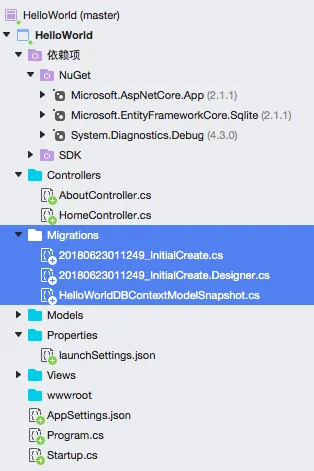
-
接下来我们就要开始应用这些迁移来更新数据库,执行下面的命令来应用迁移代码
$ dotnet ef database update -v
参数 说明 dotnet 是 .NET 框架所有命令的开始标识 ef 是指使用 Entity Framework 提供的命令 database 是指使用数据库相关命令 update 是指更新数据库 -v 参数用于输出创建迁移代码时的运行日志,方便出错时我们可以查看错在哪里 执行以上命令,输出结果如下
$ dotnet ef database update -v
Using project '/Users/yufei/Developer/aspnetcore/HelloWorld/HelloWorld/HelloWorld.csproj'.
Using startup project '/Users/yufei/Developer/aspnetcore/HelloWorld/HelloWorld/HelloWorld.csproj'.
Writing '/Users/yufei/Developer/aspnetcore/HelloWorld/HelloWorld/obj/HelloWorld.csproj.EntityFrameworkCore.targets'...
dotnet msbuild /target:GetEFProjectMetadata /property:EFProjectMetadataFile=/var/folders/yk/2446sljj6hn82nvzkdgxltmw0000gn/T/tmpDJ7JJ2.tmp /verbosity:quiet /nologo /Users/yufei/Developer/aspnetcore/HelloWorld/HelloWorld/HelloWorld.csproj
Writing '/Users/yufei/Developer/aspnetcore/HelloWorld/HelloWorld/obj/HelloWorld.csproj.EntityFrameworkCore.targets'...
dotnet msbuild /target:GetEFProjectMetadata /property:EFProjectMetadataFile=/var/folders/yk/2446sljj6hn82nvzkdgxltmw0000gn/T/tmpjmGX4s.tmp /verbosity:quiet /nologo /Users/yufei/Developer/aspnetcore/HelloWorld/HelloWorld/HelloWorld.csproj dotnet build /Users/yufei/Developer/aspnetcore/HelloWorld/HelloWorld/HelloWorld.csproj /verbosity:quiet /nologo Build succeeded. 0 Warning(s) 0 Error(s) Time Elapsed 00:00:04.26 dotnet exec --depsfile /Users/yufei/Developer/aspnetcore/HelloWorld/HelloWorld/bin/Debug/netcoreapp2.1/HelloWorld.deps.json --additionalprobingpath /Users/yufei/.nuget/packages --additionalprobingpath /usr/local/share/dotnet/sdk/NuGetFallbackFolder --runtimeconfig /Users/yufei/Developer/aspnetcore/HelloWorld/HelloWorld/bin/Debug/netcoreapp2.1/HelloWorld.runtimeconfig.json /usr/local/share/dotnet/sdk/2.1.301/DotnetTools/dotnet-ef/2.1.1/tools/netcoreapp2.1/any/tools/netcoreapp2.0/any/ef.dll database update --assembly /Users/yufei/Developer/aspnetcore/HelloWorld/HelloWorld/bin/Debug/netcoreapp2.1/HelloWorld.dll --startup-assembly /Users/yufei/Developer/aspnetcore/HelloWorld/HelloWorld/bin/Debug/netcoreapp2.1/HelloWorld.dll --project-dir /Users/yufei/Developer/aspnetcore/HelloWorld/HelloWorld/ --language C# --working-dir /Users/yufei/Developer/aspnetcore/HelloWorld/HelloWorld --verbose --root-namespace HelloWorld Using assembly 'HelloWorld'. Using startup assembly 'HelloWorld'. Using application base '/Users/yufei/Developer/aspnetcore/HelloWorld/HelloWorld/bin/Debug/netcoreapp2.1'. Using working directory '/Users/yufei/Developer/aspnetcore/HelloWorld/HelloWorld'. Using root namespace 'HelloWorld'. Using project directory '/Users/yufei/Developer/aspnetcore/HelloWorld/HelloWorld/'. Finding DbContext classes... Finding IDesignTimeDbContextFactory implementations... Finding application service provider... Finding IWebHost accessor... Using environment 'Development'. Using application service provider from IWebHost accessor on 'Program'. Found DbContext 'HelloWorldDBContext'. Finding DbContext classes in the project... Using context 'HelloWorldDBContext'. info: Microsoft.EntityFrameworkCore.Infrastructure[10403] Entity Framework Core 2.1.1-rtm-30846 initialized 'HelloWorldDBContext' using provider 'Microsoft.EntityFrameworkCore.Sqlite' with options: None Finding design-time services for provider 'Microsoft.EntityFrameworkCore.Sqlite'... Using design-time services from provider 'Microsoft.EntityFrameworkCore.Sqlite'. Finding design-time services referenced by assembly 'HelloWorld'. No referenced design-time services were found. Finding IDesignTimeServices implementations in assembly 'HelloWorld'... No design-time services were found. info: Microsoft.EntityFrameworkCore.Database.Command[20101] Executed DbCommand (28ms) [Parameters=[], CommandType='Text', CommandTimeout='30'] PRAGMA foreign_keys=ON; Executed DbCommand (28ms) [Parameters=[], CommandType='Text', CommandTimeout='30'] PRAGMA foreign_keys=ON; info: Microsoft.EntityFrameworkCore.Database.Command[20101] Executed DbCommand (0ms) [Parameters=[], CommandType='Text', CommandTimeout='30'] PRAGMA foreign_keys=ON; Executed DbCommand (0ms) [Parameters=[], CommandType='Text', CommandTimeout='30'] PRAGMA foreign_keys=ON; info: Microsoft.EntityFrameworkCore.Database.Command[20101] Executed DbCommand (7ms) [Parameters=[], CommandType='Text', CommandTimeout='30'] CREATE TABLE "__EFMigrationsHistory" ( "MigrationId" TEXT NOT NULL CONSTRAINT "PK___EFMigrationsHistory" PRIMARY KEY, "ProductVersion" TEXT NOT NULL ); Executed DbCommand (7ms) [Parameters=[], CommandType='Text', CommandTimeout='30'] CREATE TABLE "__EFMigrationsHistory" ( "MigrationId" TEXT NOT NULL CONSTRAINT "PK___EFMigrationsHistory" PRIMARY KEY, "ProductVersion" TEXT NOT NULL ); info: Microsoft.EntityFrameworkCore.Database.Command[20101] Executed DbCommand (0ms) [Parameters=[], CommandType='Text', CommandTimeout='30'] PRAGMA foreign_keys=ON; Executed DbCommand (0ms) [Parameters=[], CommandType='Text', CommandTimeout='30'] PRAGMA foreign_keys=ON; info: Microsoft.EntityFrameworkCore.Database.Command[20101] Executed DbCommand (0ms) [Parameters=[], CommandType='Text', CommandTimeout='30'] PRAGMA foreign_keys=ON; Executed DbCommand (0ms) [Parameters=[], CommandType='Text', CommandTimeout='30'] PRAGMA foreign_keys=ON; info: Microsoft.EntityFrameworkCore.Database.Command[20101] Executed DbCommand (8ms) [Parameters=[], CommandType='Text', CommandTimeout='30'] SELECT COUNT(*) FROM "sqlite_master" WHERE "name" = '__EFMigrationsHistory' AND "type" = 'table'; Executed DbCommand (8ms) [Parameters=[], CommandType='Text', CommandTimeout=