Amazon DynamoDB is a fully-managed NoSQL database service that provides fast and predictable performance with seamless scalability. DynamoDB can dynamically scale tables as needed, without interrupting external services or compromising service performance. Its capabilities made it very popular among AWS users when the service was released.
Table Store is also a distributed NoSQL database service that is built on Alibaba Cloud's Apsara distributed file system. As a cloud-based NoSQL database service that automatically scales tables, Table Store is very similar to DynamoDB. Table Store enables seamless expansion of data size and access concurrency through an automatic load-balanced system, providing storage and real-time access to massive structured data.
Table Store lets you offload the administrative burdens of operating and scaling a distributed database, so that you don't have to worry about hardware malfunctions, setup and configuration, replication, software patching, or upgrades.
In this article, we will show you how to incrementally migrate DynamoDB data to Table Store.
Data conversion rules
Table Store supports the following data formats:
- String can be null and the primary key column can be string. For a primary key column, the maximum size is 1 KB. For an attribute column, the maximum size is 2 MB.
- For a 64 bit Integer, the maximum size of the primary key is 8 bytes.
- Binary can be null and the primary key column can be binary. For a primary key column, the maximum size is 1 KB. For an attribute column, the maximum size is 2 MB.
- For a 64-bit Double, the maximum size is 8 bytes.
- Boolean can be true or false, with a maximum size of 1 byte.
Currently, DynamoDB supports the following data formats:
- Scalar type - A scalar type can exactly express one value. The types are numbers, strings, binary, boolean, and null.
- Document type - A document type can express a complex structure with nested attributes, such as the structure you find in a JSON file. The types are lists and maps.
- Set type - A set type can express multiple scalar values. The types are string sets, number sets, and binary sets.
If you create a table, you must convert type data into type string or type binary for storage in Table Store. As reading the data, you must deserialize data into the JSON format.
When preparing for migration from DynamoDB to Table Store, perform the following data conversions:
Note: This format conversion given below is only for your reference. You need to decide how to convert the format based on your business needs.
| DynamoDB type | Data example | Corresponding Table Store type |
|---|---|---|
| number (N) | '123' | Integer |
| number (N) | '2.3' | Double, cannot be a primary key |
| null (NULL) | TRUE | String, null string |
| binary (B) | 0x12315 | binary |
| binary_set (BS) | { 0x123, 0x111 } | binary |
| bool (BOOL) | TRUE | boolean |
| bool (BOOL) | TRUE | boolean |
| list (L) | [ { "S" : "a" }, { "N" : "1" }] | string |
| map (M) | { "key1" : { "S" : "value1" }} | string |
| str (S) | This is test! | string |
| num_set (NS) | { 1, 2 } | string |
| str_set (SS) | { "a", "b" } | string |
Incremental data migration system
When you enable a stream on a table, DynamoDB captures information about every modification to data items in the table. Lambda lets you run synchronous programs without building the environment. The process is shown in the following figure:
Use the eventName field in the data stream to detect Insert, Modify, and Remove operations:
- The INSERT command Inserts data similar to
PutRow. - The MODIFY command modifies data.
- If the OldImage and NewImage have identical keys, a data update operation is performed similar to
Update. - If the OldImage has more keys than the NewImage, the difference-set keys are deleted similar to
Delete. - The REMOVE operation deletes data similar to
DeleteRow.
SPECIAL NOTE:
- According to the stream, conversion behaviors, including insert, modify, and remove, conform to the expectations.
- Table Store currently does not support secondary indexes, so only data from primary tables can be synced.
- For the consistency of primary keys in DynamoDB tables and Table Store tables, the number type primary keys must be integers.
- DynamoDB restricts the maximum size of an individual project to 400 KB. However, Table Store has no size restrictions for individual rows. Note that no more than 4 MB of data can be submitted at once. For more information, see Limits in DynamoDB and Limits in Table Store.
- If you perform full data migration first, you must enable Stream in advance. Because the DynamoDB Stream can only save data from the past 24 hours, you must complete the full data migration within 24 hours. After completing the full migration, you can enable the Lambda migration task.
- You must ensure the eventual consistency of the data. During incremental data synchronization, some of the full data may be rewritten. For example, if you enable Stream and perform a full migration at T0, which is completed at T1, DynamoDB data operations performed between T0 and T1 are synchronously written to Table Store.
Procedures
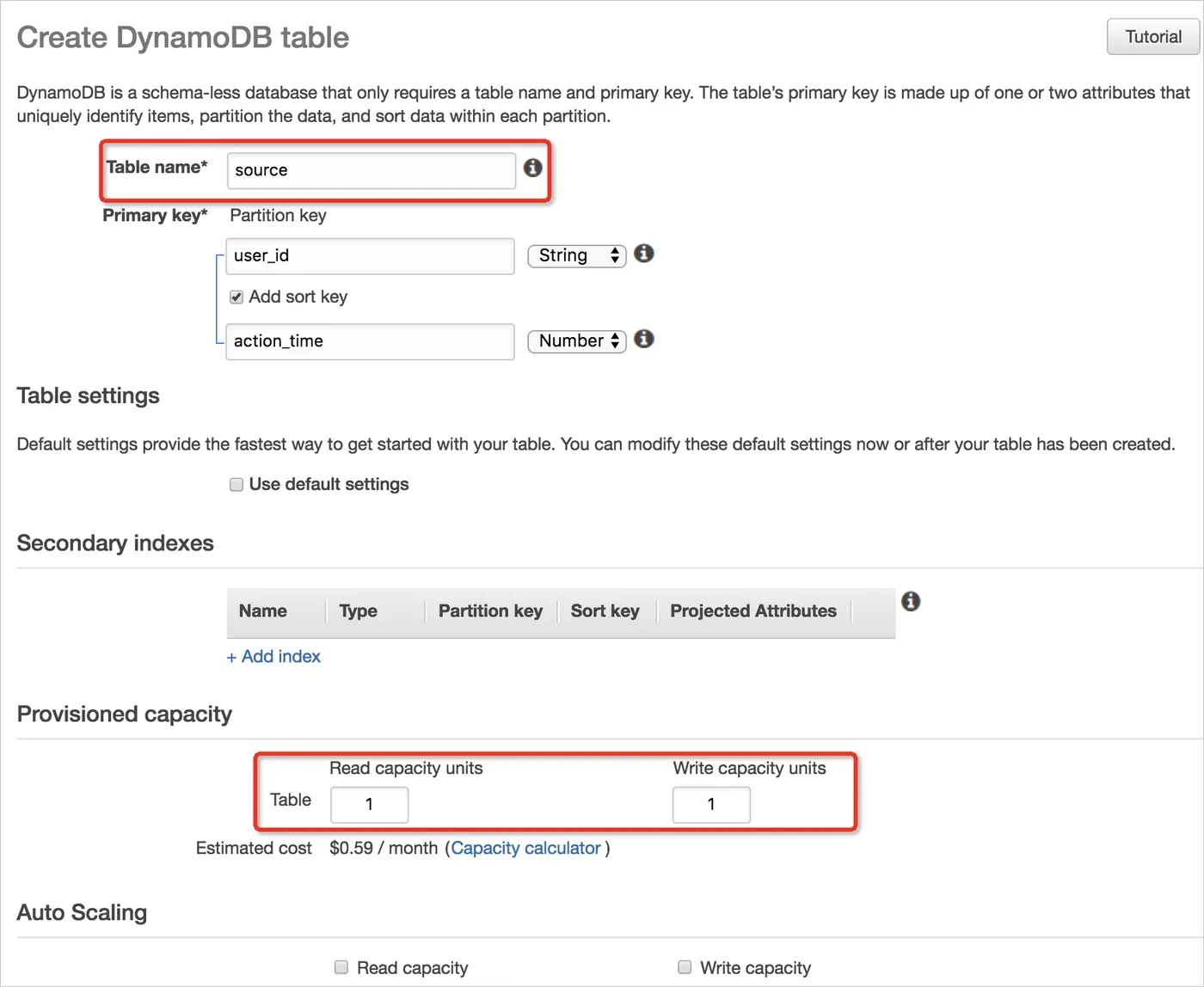
- Create a data table in DynamoDB
Here, we use the table Source as an example, with the primary key user_id (string type) and the sort key action_time (numerical). You must use the reserved settings of DynamoDB, because they impact the read/write concurrency.
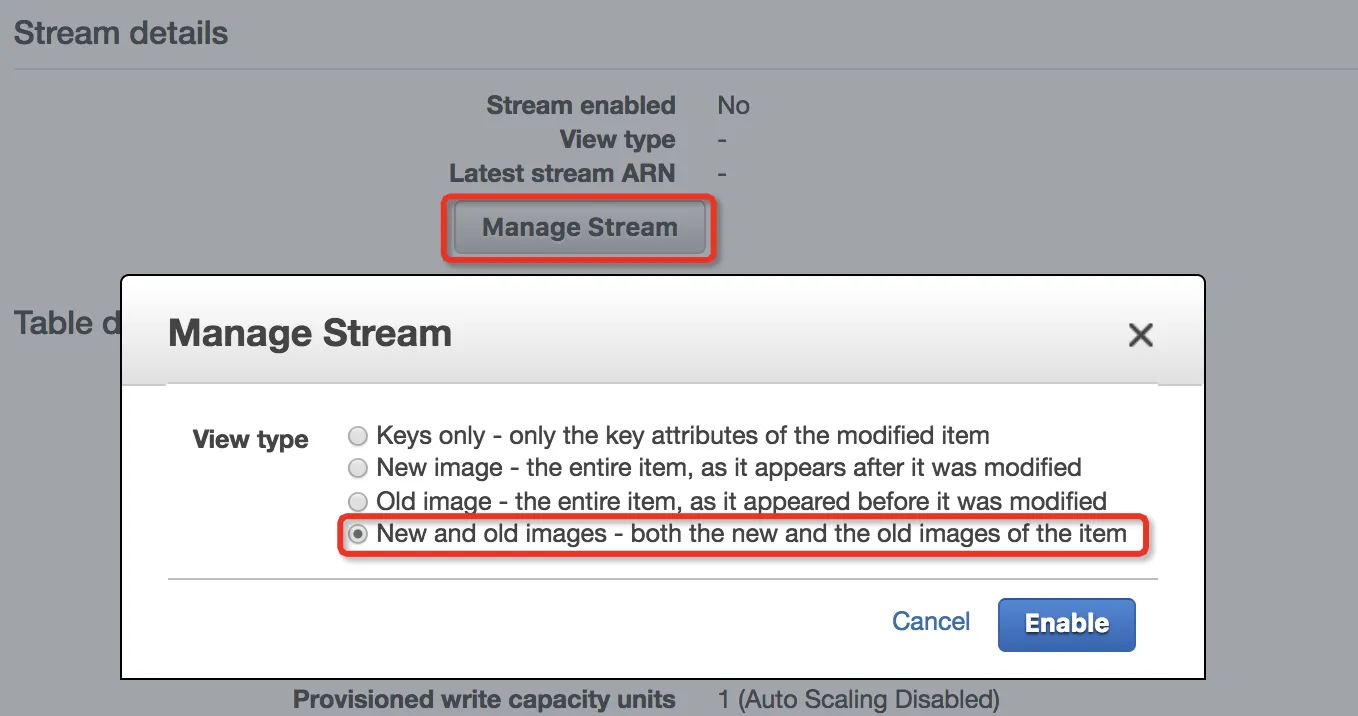
- Enable Stream for the Source table
In Stream mode, you must select New and old images-both the new and old images of the item.
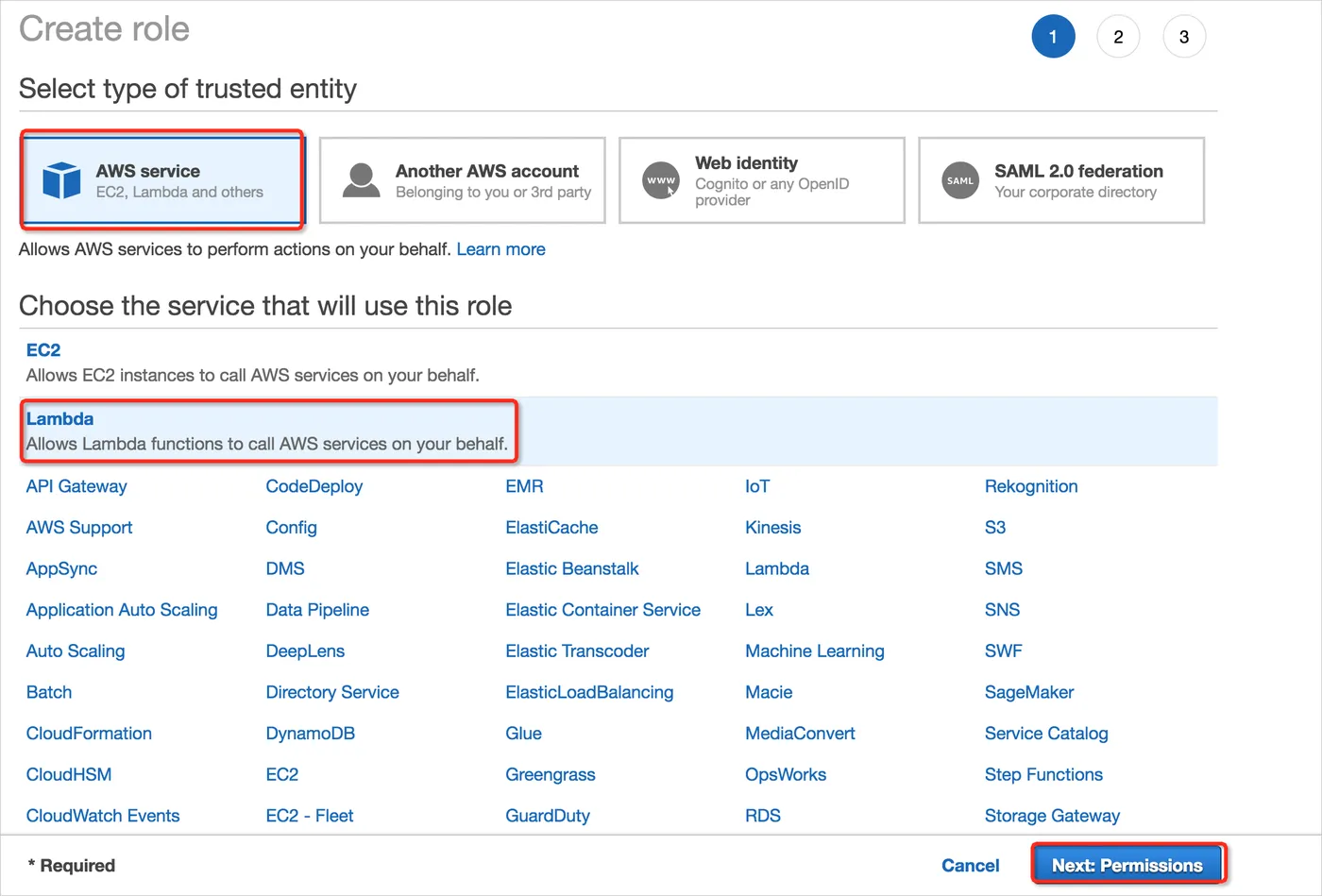
Go to the IAM console and create a role
To create an IAM role (execution role) for this exercise, do the following:- Log on to the IAM console.
- Choose Roles,and then choose Create role.
- In Select type of trusted entity, choose AWS service, and then choose Lambda.
- Choose Next: Permissions.
- In Filter: Policy type, enter AWSLambdaDynamoDBExecutionRole and choose Next: Review.
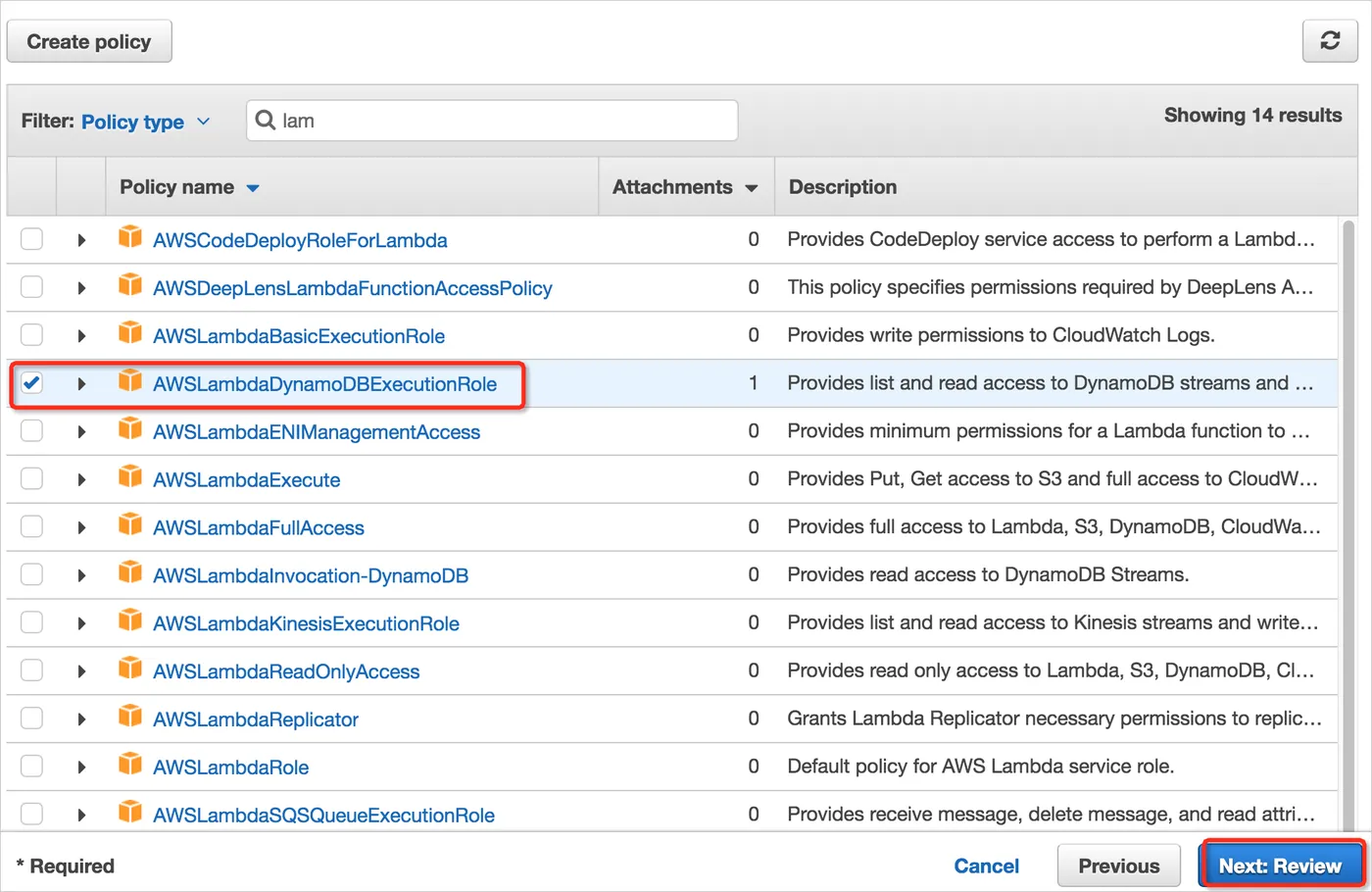
- In Role name*, enter a role name that is unique within your AWS account (for example, lambda-dynamodb-execution-role) and then choose Create role.
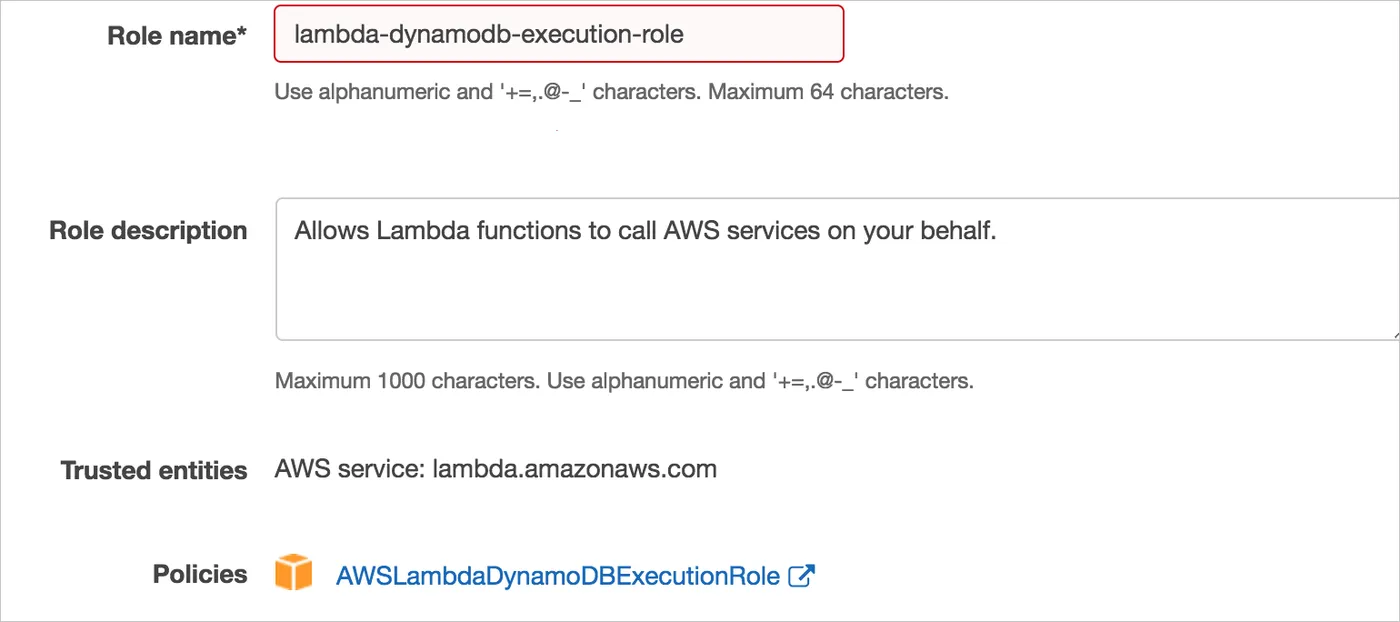
- Go to the Lambda console and create the relevant data sync function
Enter the instance function name data-to-tablestore, select Python 2.7 as the runtime language, and use the role lambda-dynamodb-execution-role.
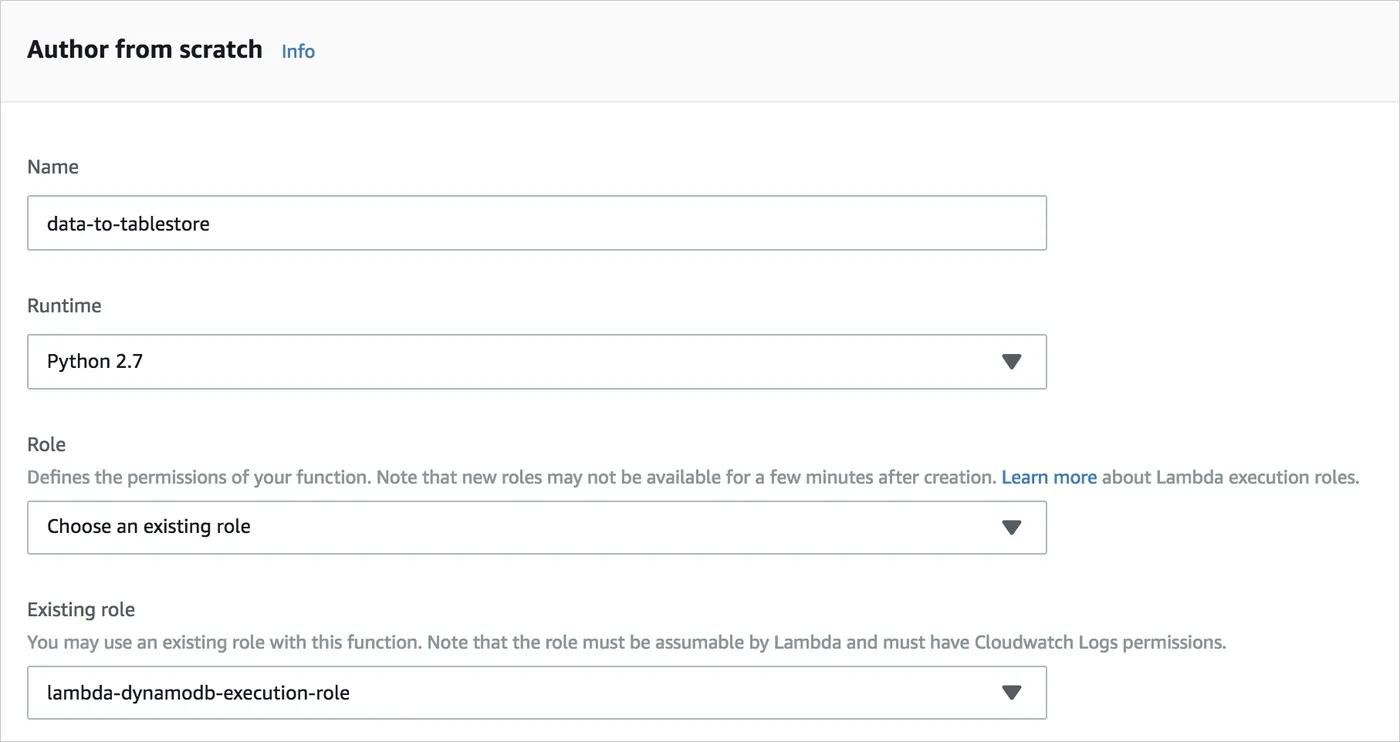
- Associate with the Lambda event source
Click the DynamoDB button to configure the event source. At this point, set the Source data table's batch processing size to 10 to test in small batches. Table Store has a batch operation limit of 200 rows of data, so the value cannot be higher than 200. In practice, we suggest setting the value to 100.
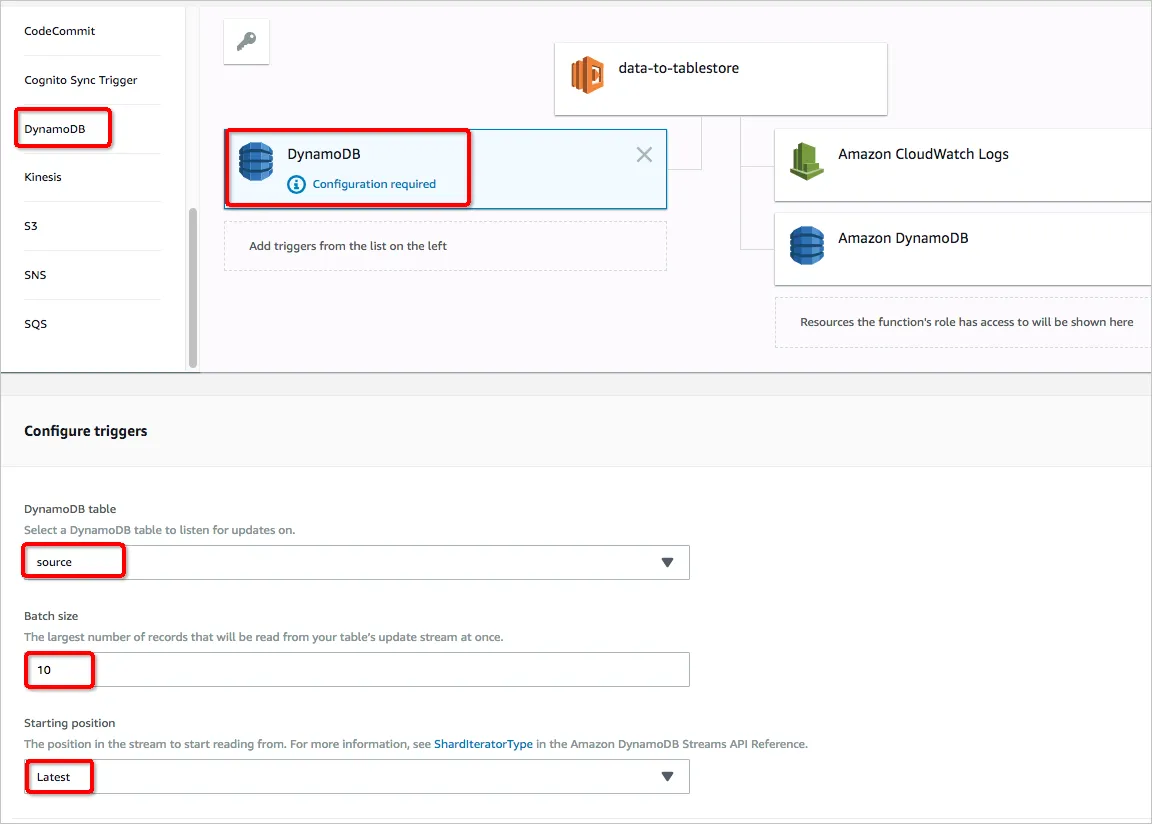
- Configure the Lambda function.
Click the Lambda function icon to configure the function.
Table Store relies on SDKs, protobuf, and other dependency packages. Therefore, you must install and package SDK dependencies in the way you create and deploy the program package (Python)").
Use the function zip package lambda_function.zip (click to download)") to directly upload from your local device. Or, you can upload to S3 first.
The default processing program portal is lambda_function.lambda_handler.
In Basic Settings, you must set the event time-out setting to at least 1 minute (in consideration of the batch submission delay and network transmission time).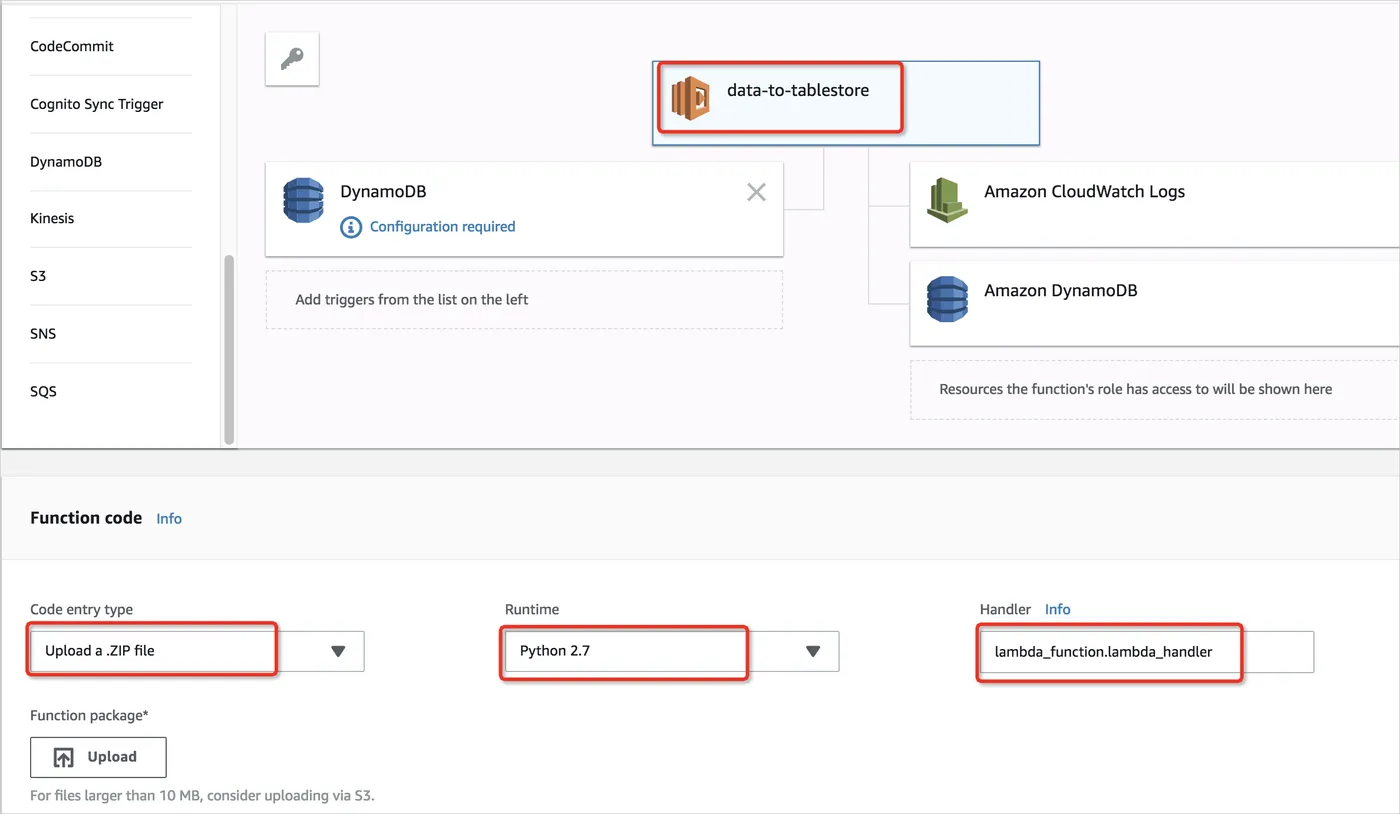
- Configure Lambda operation variables
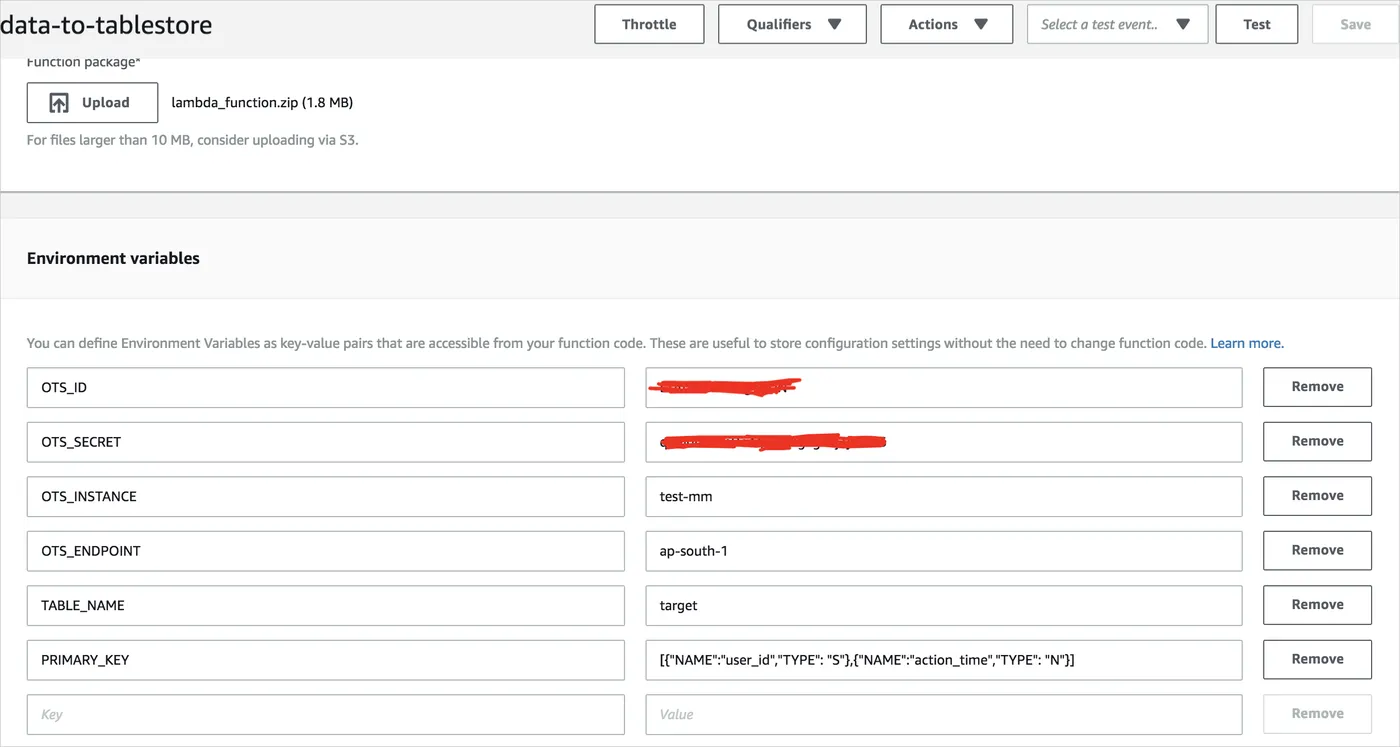
To import data, you must provide the Table Store instance name, AK, and other information. You can use the following methods:
- Method 1 (recommended): Directly configure the relevant environment variables in Lambda, as shown in the following figure.
Use the Lambda environment variables to ensure that a single function code zip package can support different data tables, so that you do not need to modify the configuration file in the code package for each data source. For more information, see Create a Lambda Function Using Environment Variables.
- Method 2: Open lambda_function.zip to modify example_config.py, then package it for upload. Or you can modify it on the console after uploading.
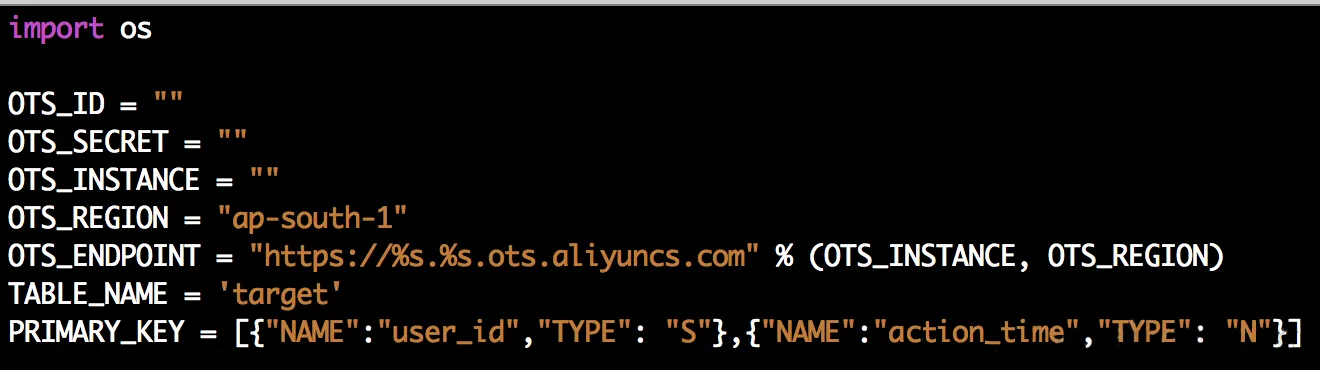
Configuration description:
Environment variable Required Description OTS_ID Yes The AccessKeyId used to access Table Store. OTS_SECRET Yes The AccessKeySecret used to access Table Store. OTS_INSTANCE Yes The instance name to import to Table Store. OTS_ID Yes The AccessKeyId used to access Table Store. OTS_ENDPOINT No The domain name to be imported to Table Store. If none exists, use the default Internet domain name of the instance. TABLE_NAME Yes The table name to be imported to Table Store. PRIMARY_KEY Yes The primary key information of the table to be imported to Table Store. You must ensure that the proper primary key sequence and the primary key names be consistent with the source table. SPECIAL NOTE:
-
- If there is the same variable name, it will be read first from Lambda's variable configuration. If it does not exist, read it from example_config.py.
- The access key indicates the access permission to the resource. We strongly recommend you only use the access key of a Table Store subaccount with write permission to the specified resource, because this reduces the risk of access key leakage. For more information, see Create a subaccount.
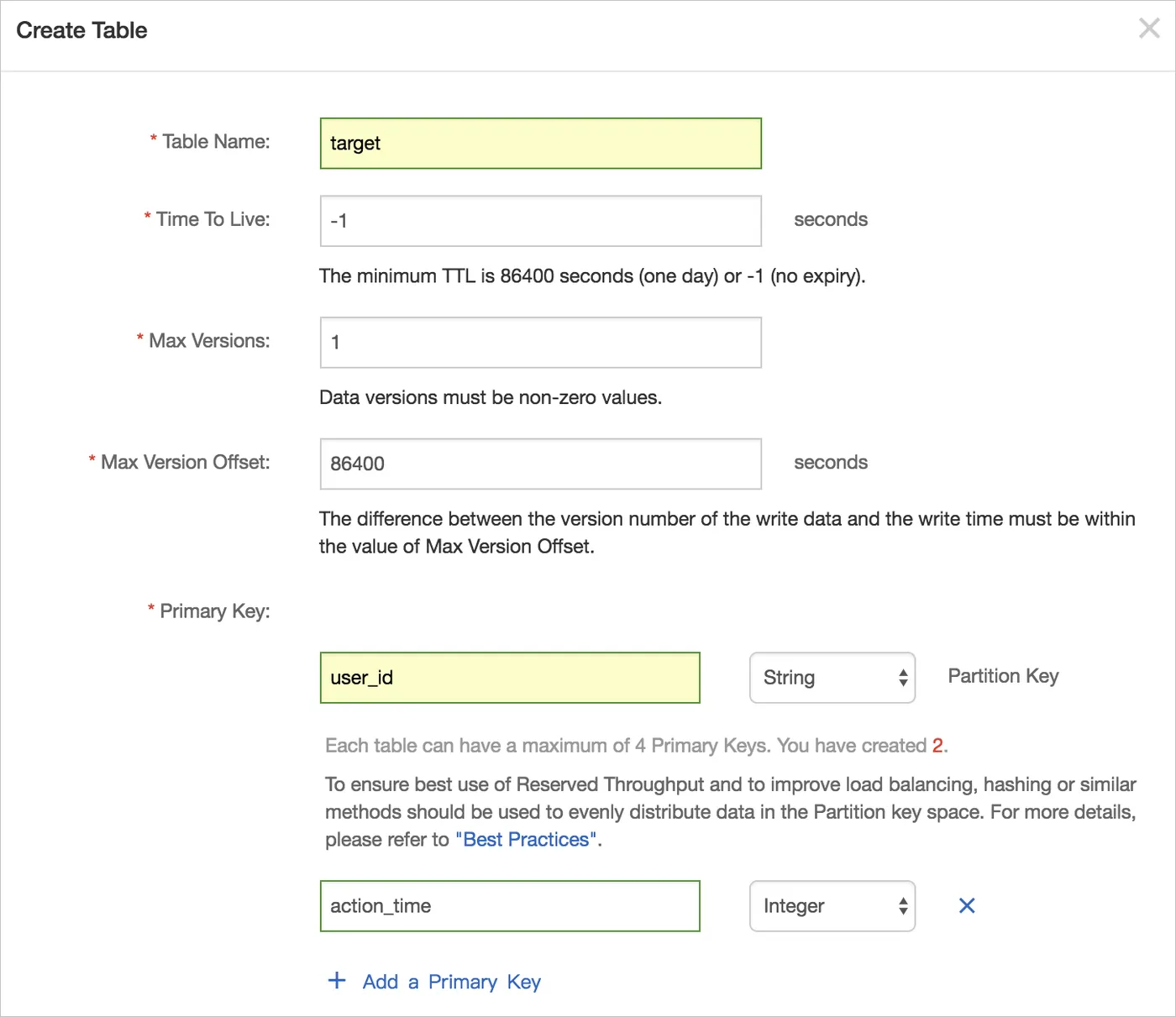
- Create a data table in Table Store.
On the Table Store console create a data table named target, with the primary keys user_id (string) and action_time (integer).
Perform testing and debugging.
Edit the event source on the Lambda console for debugging.
Click Configure Test Event in the upper-right corner and enter the JSON content for a sample event.
In this article, we have three Stream sample events:
- test_data_put.json simulates the insertion of a row of data in DynamoDB. For more information, see test_data_put.json.
- test_data_update.json simulates the update of a row of data in DynamoDB. For more information, see test_data_update.json.
- test_data_update.json simulates the deletion of a row of data in DynamoDB. For more information, see test_data_delete.json.
Save the contents of the above three events as putdata, updatedata, and deletedata.

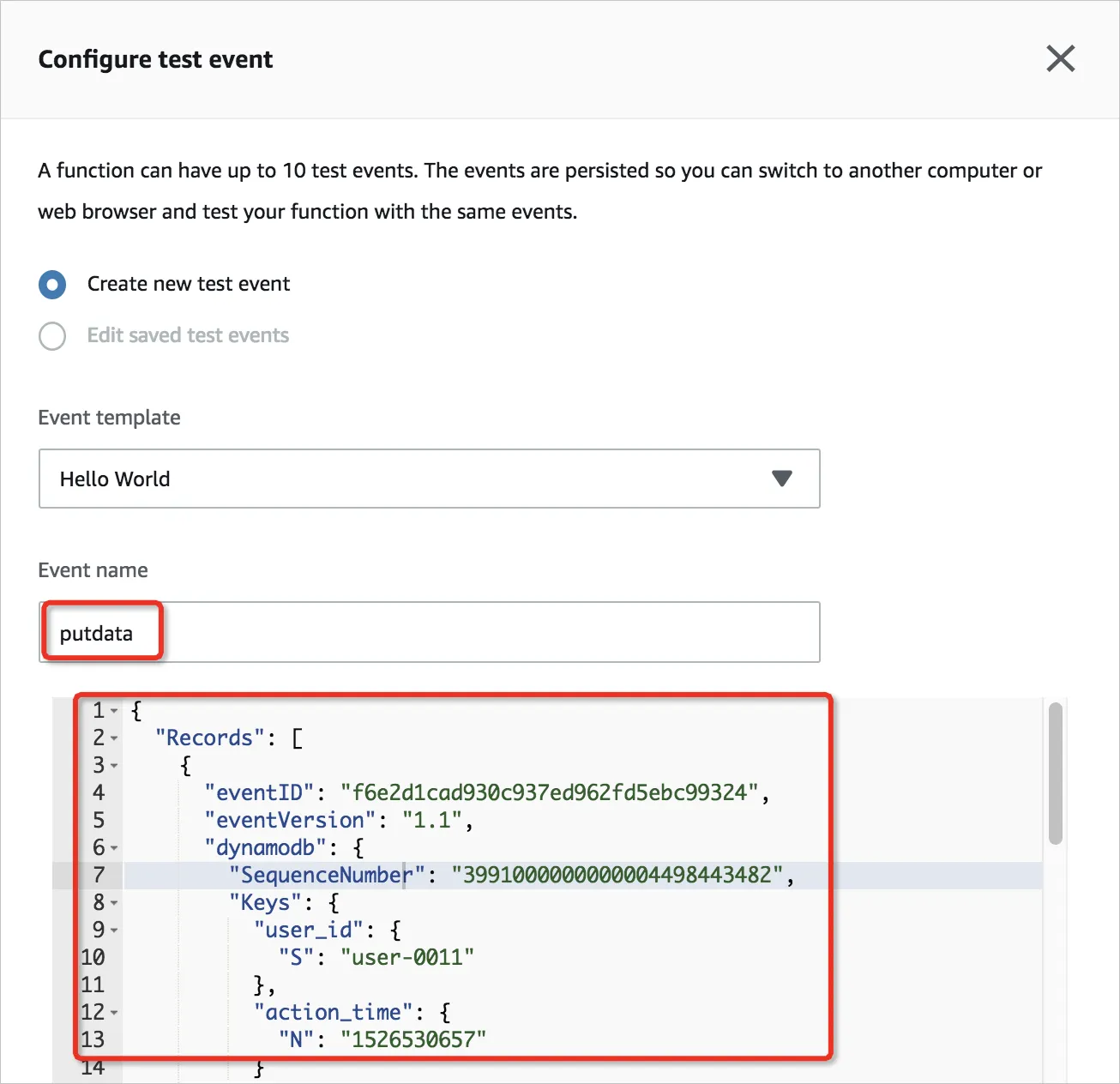
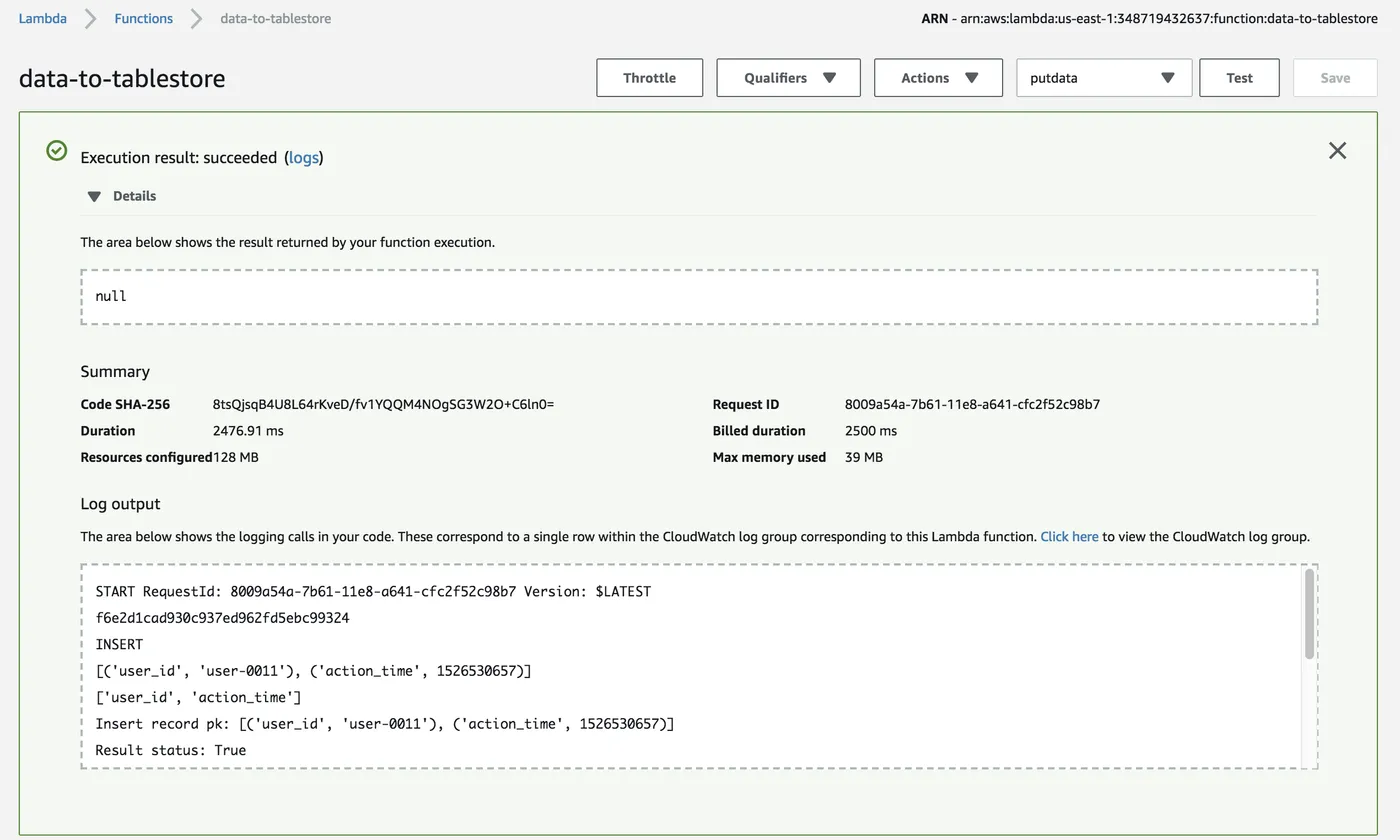
After saving, select the event you want to use and click Test:
If the execution result shows the test was successful, you can read the following test data from the Target table in Table Store.
Select putdata, updatedata, and deletedata in sequence. You will find that the data in Table Store is updated and deleted.

- In practice
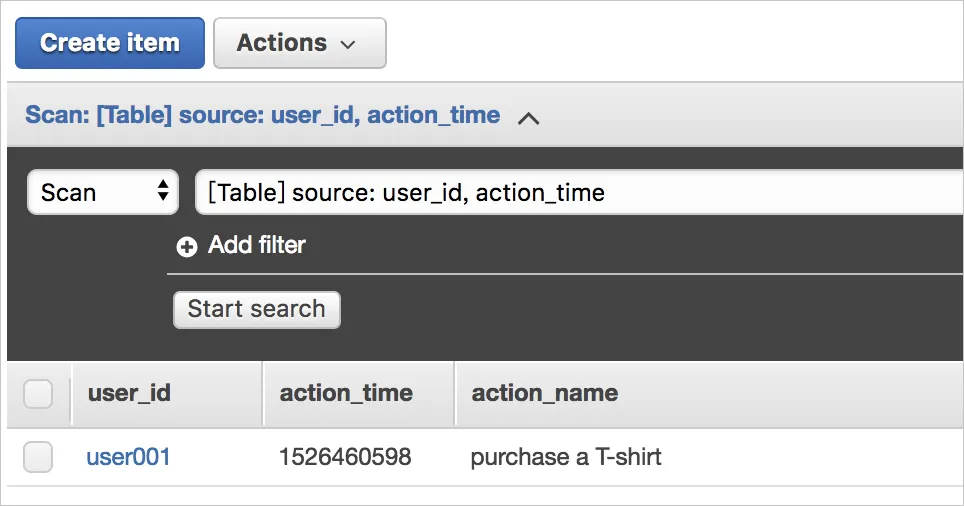
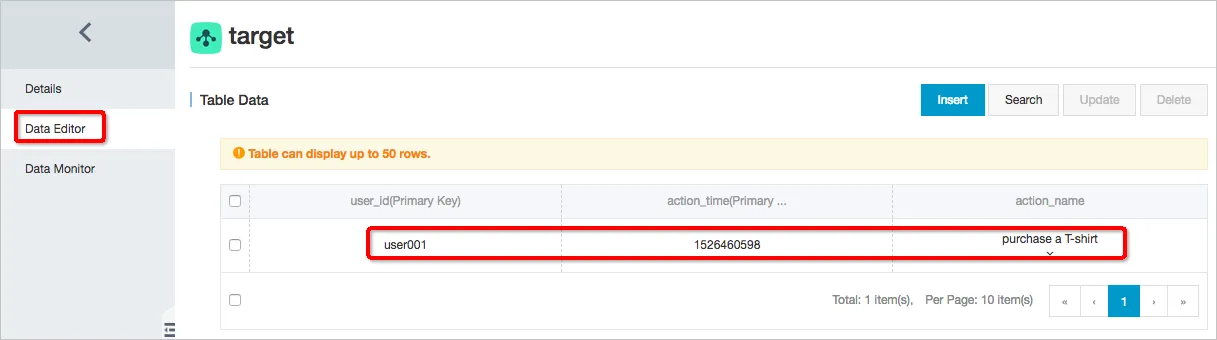
If the tests are successful, write a new row of data in DynamoDB. Then, you can read this row of data immediately in Table Store, as shown in the following figure.
- Troubleshooting
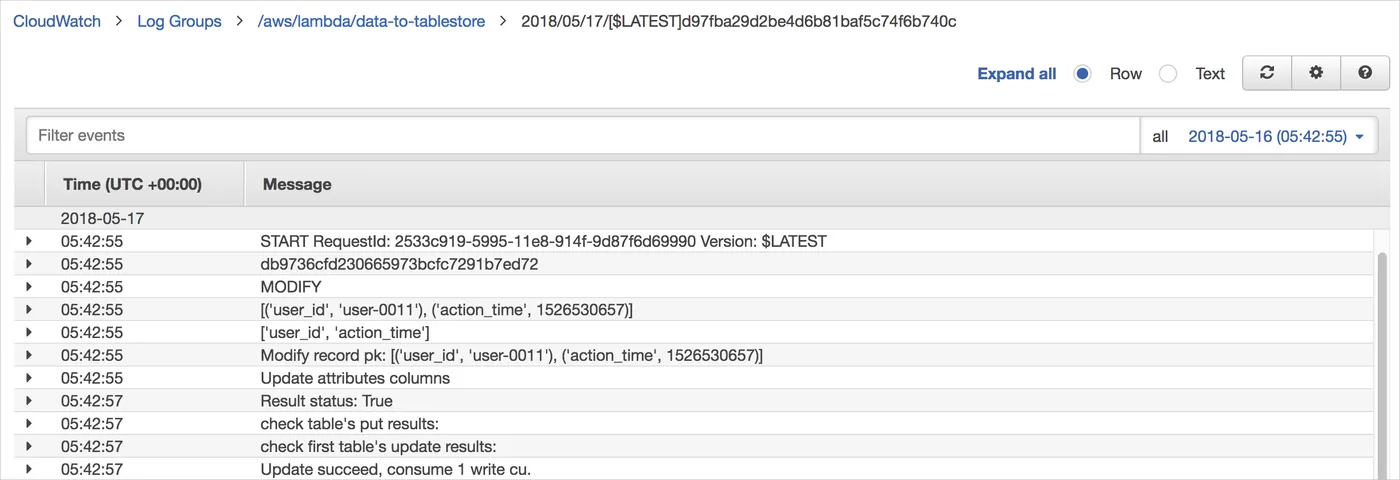
All Lambda operation logs are written to CloudWatch. In CloudWatch, select the appropriate function name to query the Lambda op
eration status in real time.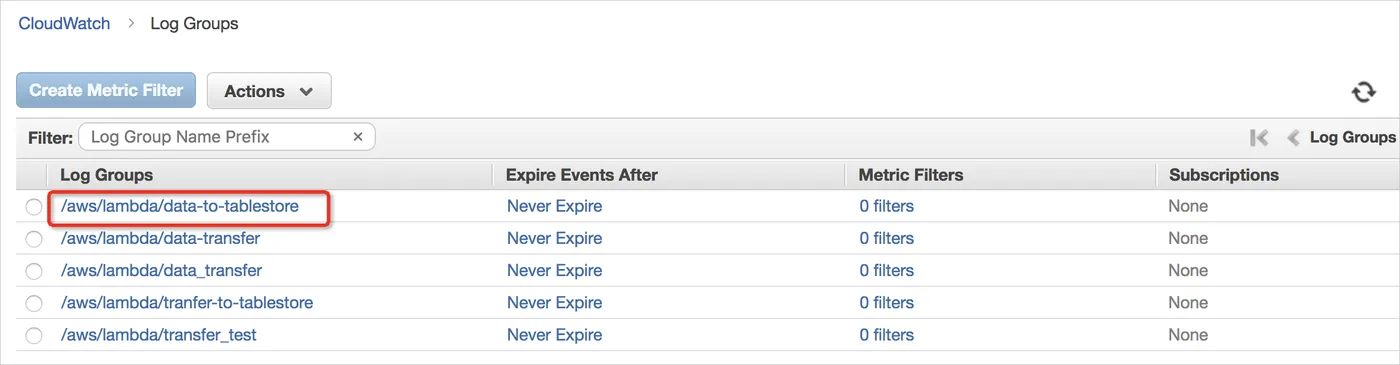
Code analysis
In the Lambda function, the main code logic is lambda_function.py. For more information about how to implement the code, see lambda_function.py. Others are SDK source codes that may be used. lambda_function.py includes the following functions:
- def batch_write_row(client, put_row_items) batch-writes grouped data items (including insert, modify, and remove) to Table Store.
- def get_primary_key(keys) gets source and target table primary key information based on the PRIMARY_KEY variable.
- def generate_update_attribute(new_image, old_image, key_list) analyzes Modify operations in the Stream to determine if some attribute columns have been updated or deleted.
- def generate_attribute(new_image, key_list) gets attributes column information inserted into a single Record.
- def get_tablestore_client() initializes the Table Store client based on the instance name, AK, and other information in the variables.
- def lambda_handler(event, context) is the Lambda portal function.
In the case of more complex synchronization logic, you can make changes based on lambda_function.py.
The status logs printed in lambda_function.py do not distinguish betweenINFO andERROR. To ensure data consistency during synchronization, you must process the logs and monitor operation statuses, or use Lambda's error handling mechanism to ensure the fault-tolerant handling of abnormalities.