
通过logstash可以将日志过滤
(即取到http_request值,如下)|
1
2
|
42.62.45.23 - - [15
/Jun/2015
:10:27:33 +0800]
"GET /www/delivery/aj.php?id=29 HTTP/1.1"
200 10309
"-"
"-"
"10.72.16.60:80"
0.111
72.62.45.23 - - [15
/Jun/2015
:10:27:33 +0800]
"GET /www/delivery/jo.php?id=29 HTTP/1.1"
200 10309
"-"
"-"
"10.72.16.60:80"
0.111
|
现在要对红色框内切分出来

不难看出,红色框内链接是以问号为分割点的,
这里我们用到logstash mutate split
官方说明如下
Synopsis
This is what it might look like in your config file:
filter {
  split {
  add_field => ... # hash (optional), default: {}
  add_tag => ... # array (optional), default: []
  field => ... # string (optional), default: "message"
   remove_field => ... # array (optional), default: []
   remove_tag => ... # array (optional), default: []
   terminator => ... # string (optional), default: "\n"
  }
}
按语法进行切分
|
1
2
3
4
5
|
mutate {
split
=> [
"http_request"
,
"?"
]
#http_request以问号为切割点
add_field => [
"request_url"
,
"%{http_request[0]}"
]
#取出数组中第一个值,同时添加request_url为新的field
}
|
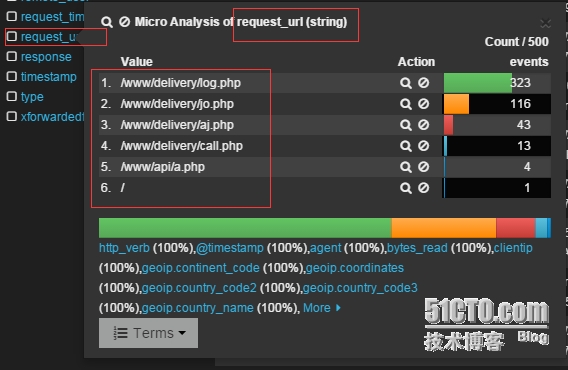
重新启动logstash,
可以看出,我们的日志已经成功切分出来了
本文转自 jackjiaxiong 51CTO博客,原文链接:http://blog.51cto.com/xiangcun168/1661944
