Android网络:HTTP之利用HttpURLConnection访问网页、获取网络图片实例 (附源码)
http://blog.csdn.net/yanzi1225627/article/details/22222735
一、提交数据
手机App向服务器提交数据原理与web页面向服务器提交数据的原理是一样的,都是依赖于Http协
议,只是使用的API不一样而已。
Android最常见的提交数据的类有3个:HttpURLConnection、HttpClient、AsyncHttpClient,它
们都分get和post两种提交方式其中HttpURLConnection是SDK自带的类;HttpClient本来是第3方开源
项目,不过被google纳入了SDK;AsyncHttpClient是一个使用起来特别简单的第3方开源项目,需要去
GitHub下载jar包。
我将6种不同的提交方式整合到了一起,App UI界面如下:
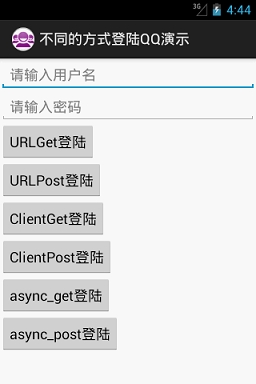
以下是6种不同方式提交数据的源代码:
1)URLGet方式
URLGet的特点就是直接将请求参数拼接到提交地址的后面
|
1
2
3
4
5
6
7
8
9
10
11
12
13
14
15
16
17
18
19
20
21
22
23
24
25
26
27
28
29
30
31
32
33
34
35
36
37
38
39
40
41
42
43
44
45
46
47
|
// 1-以URLGet方式登陆
public
void
loginByURLGet() {
new
Thread() {
public
void
run() {
// 如果用户名和账号不为空
if
(checkEmpty()) {
// 已经得到用户名密码,直接拿过来用就行了。
String servletPath =
"http://192.168.17.71/QQCenter/login"
;
// 拼接地址(*********重要步骤*************)
String urlPath = servletPath +
"?username="
+ username
+
"&password="
+ password;
try
{
// 第1步:创建URL
URL url =
new
URL(urlPath);
// 第2步:创建HttpURLConnection连接
HttpURLConnection conn = (HttpURLConnection) url
.openConnection();
// 第3步:设置请求参数
conn.setRequestMethod(
"GET"
);
conn.setConnectTimeout(
5
);
// 第4步:得到响应码
int
responseCode = conn.getResponseCode();
// 第5步:判断响应码
if
(responseCode ==
200
) {
// 获取服务器端的返回信息
InputStream in = conn.getInputStream();
String content = NetUtils.readStream(in);
showToast(content);
System.out.println(
"URLGet方式登陆"
);
}
else
{
showToast(
"服务器找不到资源"
);
}
}
catch
(Exception e) {
e.printStackTrace();
showToast(
"服务器忙!!!"
);
}
}
}
}.start();
}
|
2)URLPost方式
URLPost的特点就是将提交的参数通过流写到服务器,相比URLGet方式,要多设两个头信
息,且设置向服务器写入流的权限。
|
1
2
3
4
5
6
7
8
9
10
11
12
13
14
15
16
17
18
19
20
21
22
23
24
25
26
27
28
29
30
31
32
33
34
35
36
37
38
39
40
41
42
43
44
45
46
47
48
49
50
51
52
53
54
55
56
57
58
|
public
void
loginByURLPost() {
new
Thread() {
public
void
run() {
// 如果用户名和账号不为空
if
(checkEmpty()) {
// 已经得到用户名密码,直接拿过来用就行了。
String servletPath =
"http://192.168.17.71/QQCenter/login"
;
//要写入请求体的参数(*******关键步骤********)
String data =
"username="
+ username +
"&password="
+ password;
try
{
// 第1步:创建URL
URL url =
new
URL(servletPath);
// 第2步:创建HttpURLConnection连接
HttpURLConnection conn = (HttpURLConnection) url
.openConnection();
// 第3步:设置请求参数
conn.setRequestMethod(
"POST"
);
conn.setConnectTimeout(
5
);
// 注意设置两个请求头信息(*****关键步骤*****)
conn.setRequestProperty(
"Content-Type"
,
"application/x-www-form-urlencoded"
);
conn.setRequestProperty(
"Content-Length"
, data.length()
+
""
);
// 设置向服务器写入流的权限(****关键步骤***)
conn.setDoOutput(
true
);
//得到输出流向服务器发送请求体数据(*****关键步骤******)
OutputStream out = conn.getOutputStream();
out.write(data.getBytes());
out.close();
// 第4步:得到响应码
int
responseCode = conn.getResponseCode();
// 第5步:判断响应码
if
(responseCode ==
200
) {
// 获取服务器端的返回信息
InputStream in = conn.getInputStream();
String content = NetUtils.readStream(in);
showToast(content);
in.close();
System.out.println(
"以URLPost方式登陆"
);
}
else
{
showToast(
"服务器找不到资源"
);
}
}
catch
(Exception e) {
e.printStackTrace();
showToast(
"服务器忙!!!"
);
}
}
}
}.start();
}
|
3)ClientGet方式
HttpClient这个类,相比HttpURLConnection语法上有很多的不同。将请求和响应单独封装
成了一个类。获取服务器数据是经过多层包装的,需要先得到数据的实体HttpEntity,根据实体
再得到服务器的输出流。
http://blog.csdn.net/howlaa/article/details/17437463
|
1
2
3
4
5
6
7
8
9
10
11
12
13
14
15
16
17
18
19
20
21
22
23
24
25
26
27
28
29
30
31
32
33
34
35
36
37
38
39
40
41
42
43
44
45
46
47
|
public
void
loginByClientGet() {
new
Thread() {
public
void
run() {
// 如果用户名和账号不为空
if
(checkEmpty()) {
// 已经得到用户名密码,直接拿过来用就行了。
String servletPath =
"http://192.168.17.71/QQCenter/login"
;
// 拼接地址
String data =
"username="
+ username +
"&password="
+ password;
String url = servletPath +
"?"
+ data;
try
{
// 第1步:创建HttpClient对象
HttpClient client =
new
DefaultHttpClient();
// 第2步:创建get请求对象
HttpGet get =
new
HttpGet(url);
// 第3步:执行get请求对象,得到response对象。
HttpResponse response = client.execute(get);
// 第4步:得到响应码
int
responseCode = response.getStatusLine()
.getStatusCode();
// 第5步:判断响应码
if
(responseCode ==
200
) {
// 获取服务器端的返回信息 与 URL不同,先获取的是数据实体。
HttpEntity entity = response.getEntity();
// 从数据实体中得到服务的输出流
InputStream in = entity.getContent();
String content = NetUtils.readStream(in);
showToast(content);
in.close();
System.out.println(
"以ClientGet方式登陆"
);
}
else
{
showToast(
"服务器找不到资源"
);
}
}
catch
(Exception e) {
e.printStackTrace();
showToast(
"服务器忙!!!"
);
}
}
}
}.start();
}
|
4)ClientPost方式
相对ClientGet方式,这种方式提交数据稍微有些复杂。创建post请求的实体数据时,要经
过多层包装。
|
1
2
3
4
5
6
7
8
9
10
11
12
13
14
15
16
17
18
19
20
21
22
23
24
25
26
27
28
29
30
31
32
33
34
35
36
37
38
39
40
41
42
43
44
45
46
47
48
49
50
51
52
53
54
55
56
|
public
void
loginByClientPost() {
new
Thread() {
public
void
run() {
// 如果用户名和账号不为空
if
(checkEmpty()) {
// 已经得到用户名密码,直接拿过来用就行了。
String servletPath =
"http://192.168.17.71/QQCenter/login"
;
// 请求体数据
String data =
"username="
+ username +
"&password="
+ password;
String url = servletPath;
try
{
// 第1步:创建HttpClient对象
HttpClient client =
new
DefaultHttpClient();
// 第2步:创建post请求对象
HttpPost post =
new
HttpPost(url);
// 将请求参数封装到实体------过程稍微有点复杂
List<NameValuePair> listPairs =
new
ArrayList<NameValuePair>();
//注意name的值与服务器应统一
NameValuePair pair1 =
new
BasicNameValuePair(
"username"
, username);
NameValuePair pair2 =
new
BasicNameValuePair(
"password"
, password);
listPairs.add(pair1);
listPairs.add(pair2);
HttpEntity postDataEntity =
new
UrlEncodedFormEntity(
listPairs);
post.setEntity(postDataEntity);
// 第3步:执行post请求
HttpResponse response = client.execute(post);
// 第4步:得到状态码
int
statusCode = response.getStatusLine()
.getStatusCode();
// 第5步:判断状态码
if
(statusCode ==
200
) {
// 得到数据的实体
HttpEntity respEntity = response.getEntity();
// 从实体得到流
InputStream in = respEntity.getContent();
String content = NetUtils.readStream(in);
showToast(content);
in.close();
System.out.println(
"以ClientPost方式登陆"
);
}
else
{
showToast(
"找不到资源"
);
}
}
catch
(Exception e) {
e.printStackTrace();
showToast(
"服务器忙!!!"
);
}
}
};
}.start();
}
|
5)AsyncHttpClientGet方式
在使用这个类之前,去GitHub下载并导一下这个包com.loopj.android.http到项目的src目
录下。使用AsyncHttpClient还有一个十分爽的地方,就是这个类不需要使用在子线程中,那么
也就可以直接更新UI。请求地址就直接写servlet了,也不用拼接参数了,因为参数都写在了
RequestParams对象中去了。
|
1
2
3
4
5
6
7
8
9
10
11
12
13
14
15
16
17
18
19
20
21
22
23
24
25
26
27
28
29
30
31
32
33
34
35
36
37
38
39
40
41
42
43
44
45
46
47
|
public
void
loginByAsyncHttpClientGet() {
// 如果用户名和账号不为空
if
(checkEmpty()) {
// 已经得到用户名密码,直接拿过来用就行了。
String servletPath =
"http://192.168.1.109/QQCenter/login"
;
try
{
AsyncHttpClient asyncHttpClient =
new
AsyncHttpClient();
//创建get请求参数
RequestParams params =
new
RequestParams();
params.put(
"username"
, username);
params.put(
"password"
, password);
asyncHttpClient.get(getApplicationContext(), servletPath, params,
new
AsyncHttpResponseHandler(){
//请求成功
@Override
public
void
onSuccess(
int
statusCode, Header[] headers,
byte
[] responseBody) {
if
(statusCode ==
200
)
{
//得到服务器的返回值
String content =
new
String(responseBody);
Toast.makeText(getApplicationContext(), content,
0
).show();
System.out.println(
"AsyncHttpClientGet方式登陆"
);
}
else
{
Toast.makeText(getApplicationContext(),
"找不到资源"
,
0
).show();
}
}
@Override
public
void
onFailure(
int
statusCode, Header[] headers,
byte
[] responseBody, Throwable error) {
// TODO Auto-generated method stub
}
});
}
catch
(Exception e) {
e.printStackTrace();
showToast(
"服务器忙!!!"
);
}
}
}
|
6)AsyncHttpClientPost方式
和AsyncHttpClientGet方式相差无几,调用的是post方法。其它的一样
|
1
2
3
4
5
6
7
8
9
10
11
12
13
14
15
16
17
18
19
20
21
22
23
24
25
26
27
28
29
30
31
32
33
34
35
36
37
38
39
40
41
42
43
|
public
void
loginByAsyncHttpClientPost() {
// 如果用户名和账号不为空
if
(checkEmpty()) {
// 已经得到用户名密码,直接拿过来用就行了。
String servletPath =
"http://192.168.17.71/QQCenter/login"
;
try
{
//创建AsyncHttpClient对象
AsyncHttpClient asyncHttpClient =
new
AsyncHttpClient();
RequestParams params =
new
RequestParams();
params.put(
"username"
, username);
params.put(
"password"
, password);
asyncHttpClient.post(getApplicationContext(), servletPath, params,
new
AsyncHttpResponseHandler(){
@Override
public
void
onSuccess(
int
statusCode, Header[] headers,
byte
[] responseBody) {
if
(statusCode ==
200
)
{
//得到服务器的返回值
String content =
new
String(responseBody);
Toast.makeText(getApplicationContext(), content,
0
).show();
System.out.println(
"AsyncHttpClientPost方式登陆"
);
}
else
{
Toast.makeText(getApplicationContext(),
"找不到资源"
,
0
).show();
}
}
@Override
public
void
onFailure(
int
statusCode, Header[] headers,
byte
[] responseBody, Throwable error) {
}
});
}
catch
(Exception e) {
e.printStackTrace();
showToast(
"服务器忙!!!"
);
}
}
}
|
提交数据的方式,这么多种,怎么使用呢?
HttpClient已被AsyncHttpClient所替代,一般开发都用后者。但是遇到特殊需求时,还是需要
用到最基础的HttpURLConnection,因为它可以设置请求头的参数信息。
二、提交数据时中文乱码问题
待进一步理解
本文转自屠夫章哥 51CTO博客,原文链接:http://blog.51cto.com/4259297/1676565,如需转载请自行联系原作者