
The absolute uri: http://www.springframework.org/security/tags cannot be resolved in either web.xml or the jar files deployed with this application
需要添加spring-security-taglibs-3.0.5.RELEASE.jar包及其依赖包
对于spring security我只是初学者,原来只是想找一个用于权限验证的源码借鉴一下,结果一搜索,就搜到了spring security安全机制框架,我现在要将这个安全机制框架整合到我原来的ssh项目中去。
我现在只是在实验和学习阶段,没有深入的东西,用户名密码及其权限均是在xml文件配置的,以后有时间再学习一下如何和数据库交互,下面仅是简单的整合,将spring security的示例整合到项目中去。如果你是下载的spring security的发行包,会在其dist目录下找到一个spring-security-samples-tutorial-x.x.x.xxxxx.war的war包,我直接使用了这里的applicationContext-security.xml和jsp文件。
下面开始整合:
1.首先添加jar包依赖,我使用的maven来管理依赖包,只需添加下面依赖:

- <dependency>
- <groupId>org.springframework.security</groupId>
- <artifactId>spring-security-core</artifactId>
- <version>3.0.5.RELEASE</version>
- </dependency>
- <dependency>
- <groupId>org.springframework.security</groupId>
- <artifactId>spring-security-web</artifactId>
- <version>3.0.5.RELEASE</version>
- </dependency>
- <dependency>
- <groupId>org.springframework.security</groupId>
- <artifactId>spring-security-config</artifactId>
- <version>3.0.5.RELEASE</version>
- </dependency>
版本号自己控制,我使用的3.0.5.RELEASE版本,自己手动管理jar包依赖的,将dist目录下的除了war包和***-sources.jar外的所有jar包添加项目下。
2.在web.xml下配置spring security的过滤器和spring security的配置文件的位置,这里注意,在ssh框架整合spring security时,一定要将spring security的filter-mapping配置在struts2的filter-mapping之前,否则会出现如下错误:
- HTTP ERROR 404
- Problem accessing /Struts_Spring_Maven/spring_security_login. Reason:
- There is no Action mapped for namespace [/] and action name [spring_security_login] associated with context path [/Struts_Spring_Maven].
struts2和spring security配置如下:
- <context-param>
- <param-name>contextConfigLocation</param-name>
- <param-value>
- classpath:applicationContext.xml
- /WEB-INF/applicationContext-security.xml
- </param-value>
- </context-param>
- <!-- 配置Struts中心过滤器 -->
- <filter>
- <filter-name>struts2</filter-name>
- <filter-class>org.apache.struts2.dispatcher.ng.filter.StrutsPrepareAndExecuteFilter</filter-class>
- <init-param>
- <param-name>actionPackages</param-name>
- <param-value>zwh.struts.maven.action</param-value>
- </init-param>
- </filter>
- <!-- 配置spring security的过滤器 -->
- <filter>
- <filter-name>springSecurityFilterChain</filter-name>
- <filter-class>org.springframework.web.filter.DelegatingFilterProxy</filter-class>
- </filter>
- <!-- spring security的filter-mapping一定要配置struts的前面 -->
- <filter-mapping>
- <filter-name>springSecurityFilterChain</filter-name>
- <url-pattern>/*</url-pattern>
- </filter-mapping>
- <!-- struts的filter-mapping -->
- <filter-mapping>
- <filter-name>struts2</filter-name>
- <url-pattern>/*</url-pattern>
- </filter-mapping>
3.添加applicationContext-security.xml文件,我是直接将示例项目中的文件直接拷贝到我的项目中去的,拷贝到WEB-INF目录下。文件内容如下:
- <?xml version="1.0" encoding="UTF-8"?>
- <beans:beans xmlns="http://www.springframework.org/schema/security"
- xmlns:beans="http://www.springframework.org/schema/beans"
- xmlns:xsi="http://www.w3.org/2001/XMLSchema-instance"
- xsi:schemaLocation="http://www.springframework.org/schema/beans http://www.springframework.org/schema/beans/spring-beans-3.0.xsd
- http://www.springframework.org/schema/security http://www.springframework.org/schema/security/spring-security-3.0.xsd">
- <global-method-security pre-post-annotations="enabled">
- <!-- AspectJ pointcut expression that locates our "post" method and applies security that way
- <protect-pointcut expression="execution(* bigbank.*Service.post*(..))" access="ROLE_TELLER"/>
- -->
- </global-method-security>
- <http use-expressions="true">
- <intercept-url pattern="/secure/extreme/**" access="hasRole('ROLE_SUPERVISOR')"/>
- <intercept-url pattern="/secure/**" access="isAuthenticated()" />
- <!-- Disable web URI authorization, as we're using <global-method-security> and have @Secured the services layer instead
- <intercept-url pattern="/listAccounts.html" access="isRememberMe()" />
- <intercept-url pattern="/post.html" access="hasRole('ROLE_TELLER')" />
- -->
- <intercept-url pattern="/**" access="permitAll" />
- <form-login />
- <logout />
- <remember-me />
- <!--
- Uncomment to enable X509 client authentication support
- <x509 />
- -->
- <!-- Uncomment to limit the number of sessions a user can have -->
- <session-management invalid-session-url="/timeout.jsp">
- <concurrency-control max-sessions="1" error-if-maximum-exceeded="true" />
- </session-management>
- </http>
- <!--
- Usernames/Passwords are
- rod/koala
- dianne/emu
- scott/wombat
- peter/opal
- -->
- <authentication-manager>
- <authentication-provider>
- <password-encoder hash="md5"/>
- <user-service>
- <user name="rod" password="a564de63c2d0da68cf47586ee05984d7" authorities="ROLE_SUPERVISOR, ROLE_USER, ROLE_TELLER" />
- <user name="dianne" password="65d15fe9156f9c4bbffd98085992a44e" authorities="ROLE_USER,ROLE_TELLER" />
- <user name="scott" password="2b58af6dddbd072ed27ffc86725d7d3a" authorities="ROLE_USER" />
- <user name="peter" password="22b5c9accc6e1ba628cedc63a72d57f8" authorities="ROLE_USER" />
- </user-service>
- </authentication-provider>
- </authentication-manager>
- </beans:beans>
从该文件中可以看到/secure路径下面的所有文件的访问需要登陆才能访问,而/secure/extreme路径下的所有文件的访问必须是超级用户,即具备ROLE_SUPERVISOR的角色。rod是超级用户,密码是koala,后面登陆需要使用。
4.在项目目录下创建secure目录和secure/extreme目录,并在这些目录下放一些需要验证才能访问的页面,我为了省事,将示例中jsp页面直接拷贝到项目目录下了。
5.下面将该项目添加到tomcat中去,运行,访问http://localhost:8080/项目名称/secure/index.jsp 。这时你发现并不是展示出你访问的页面,而是出现了一个登陆页面。如下: 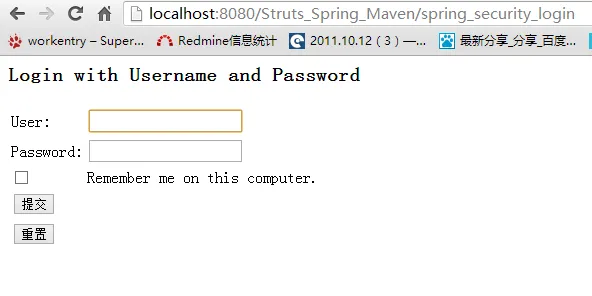
6.输入用户名rod和密码koala,提交,这时就可以看到了你想要访问的页面了。
7.如果遇到如下问题:
- The absolute uri: http://www.springframework.org/security/tags cannot be resolved in either web.xml or the jar files deployed with this application.
对于maven还需要添加如下依赖
- <dependency>
- <groupId>org.springframework.security</groupId>
- <artifactId>spring-security-taglibs</artifactId>
- <version>3.0.5.RELEASE</version>
- </dependency>
自己管理jar包需要添加spring-security-taglibs-3.0.5.RELEASE.jar包及其依赖包。
