本文参考:http://log.medcl.net/item/2010/03/wcf-extensions-under-iis7-configuration-issues/
在学习IIS服务寄宿时参考了文章:如何在IIS中承载WCF服务http://msdn.microsoft.com/zh-cn/library/ms733766.aspx,并按照上面的教程进行配置,
PS:2011-5-28
不按上面的教程进行配置也是可以的,下面我讲一下我的配置过程。
步骤1:首先创建一个解决方案叫做IISHostWCF。
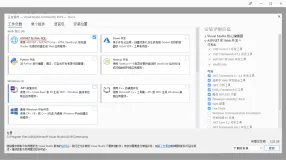
步骤2:在这个解决方案中创建一个”控制台应用程序“Client来测试我们通过IIS寄宿的服务,然后在创建一个CalcService的“WCF服务库“
步骤3:在创建好WCF服务库以后他会自动帮助我们创建契约IService1.cs(接口)以及契约实现Service1.cs
我们在WCF服务哭下创建一个文件夹叫做App_Code,然后将IService1.cs和Service1.cs都放到这个App_Code文件夹中去。
步骤4:将自动生成的配置文件App.config改名为Web.config(这一步很重要,不然会报错说找不到ServiceHost指定的路径)
步骤5:其他内容可以参照前面。
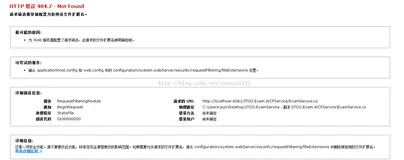
最后通过http://localhost/IISHostedCalc/Service.svc访问时报错,错误内容为:“由于扩展配置问题而无法提供您请求的页面。如果该页面是脚本,请添加处理程序。如果应下载文件,请添加 MIME 映射。”
解决方法:
以管理员运行命令:
- C:/Windows/Microsoft.NET/Framework/v3.0/Windows Communication Foundation/ServiceModelReg.exe -i
运行结果如下图所示:

再次登录 http://localhost/IISHostedCalc/Service.svc,运行经过如下图所示
表明服务没有发布成功,按照提示进行修改,修改以后的Web.config为:
- <?xml version="1.0" encoding="utf-8" ?>
- <configuration>
- <system.serviceModel>
- <behaviors>
- <serviceBehaviors>
- <behavior name="MyServiceTypeBehaviors" >
- <serviceMetadata httpGetEnabled="true" />
- </behavior>
- </serviceBehaviors>
- </behaviors>
- <services>
- <service name="Microsoft.ServiceModel.Samples.CalculatorService" behaviorConfiguration="MyServiceTypeBehaviors" >
- <!-- This endpoint is exposed at the base address provided by host: http://localhost/servicemodelsamples/service.svc -->
- <endpoint address="" binding="wsHttpBinding" contract="Microsoft.ServiceModel.Samples.ICalculator" />
- </service>
- </services>
- </system.serviceModel>
- </configuration>
再次登录http://localhost/IISHostedCalc/Service.svc,会出现如下界面
SvcUtil.exe应用
可以参考ServiceModel 元数据实用工具 (Svcutil.exe)
我们可以在C:/Program Files/Microsoft SDKs/Windows/v6.0A/bin目录下找到SvcUtil.exe,将这个程序拷贝到D盘根目录下,然后打开cmd,切换到d盘根目录下,输入命令:
- svcutil.exe http://xuwei/IISHostedCalc/service.svc?wsdl
运行完以后,在d盘根目录下就会自动生成CalculatorService.cs和output.config文件。
在CalculatorService.cs中定义了CalculatorClient这个类,我们在客户端应用程序CalculatorServiceClient中就可以直接通过Calculator这个类创建调用服务的客户端对象。
CalculatorService.cs:
- //------------------------------------------------------------------------------
- // <auto-generated>
- // 此代码由工具生成。
- // 运行时版本:2.0.50727.4952
- //
- // 对此文件的更改可能会导致不正确的行为,并且如果
- // 重新生成代码,这些更改将会丢失。
- // </auto-generated>
- //------------------------------------------------------------------------------
- [System.CodeDom.Compiler.GeneratedCodeAttribute("System.ServiceModel", "3.0.0.0")]
- [System.ServiceModel.ServiceContractAttribute(ConfigurationName="ICalculator")]
- public interface ICalculator
- {
- [System.ServiceModel.OperationContractAttribute(Action="http://tempuri.org/ICalculator/Add", ReplyAction="http://tempuri.org/ICalculator/AddResponse")]
- double Add(double n1, double n2);
- [System.ServiceModel.OperationContractAttribute(Action="http://tempuri.org/ICalculator/Subtract", ReplyAction="http://tempuri.org/ICalculator/SubtractResponse")]
- double Subtract(double n1, double n2);
- [System.ServiceModel.OperationContractAttribute(Action="http://tempuri.org/ICalculator/Multiply", ReplyAction="http://tempuri.org/ICalculator/MultiplyResponse")]
- double Multiply(double n1, double n2);
- [System.ServiceModel.OperationContractAttribute(Action="http://tempuri.org/ICalculator/Divide", ReplyAction="http://tempuri.org/ICalculator/DivideResponse")]
- double Divide(double n1, double n2);
- }
- [System.CodeDom.Compiler.GeneratedCodeAttribute("System.ServiceModel", "3.0.0.0")]
- public interface ICalculatorChannel : ICalculator, System.ServiceModel.IClientChannel
- {
- }
- [System.Diagnostics.DebuggerStepThroughAttribute()]
- [System.CodeDom.Compiler.GeneratedCodeAttribute("System.ServiceModel", "3.0.0.0")]
- public partial class CalculatorClient : System.ServiceModel.ClientBase<ICalculator>, ICalculator
- {
- public CalculatorClient()
- {
- }
- public CalculatorClient(string endpointConfigurationName) :
- base(endpointConfigurationName)
- {
- }
- public CalculatorClient(string endpointConfigurationName, string remoteAddress) :
- base(endpointConfigurationName, remoteAddress)
- {
- }
- public CalculatorClient(string endpointConfigurationName, System.ServiceModel.EndpointAddress remoteAddress) :
- base(endpointConfigurationName, remoteAddress)
- {
- }
- public CalculatorClient(System.ServiceModel.Channels.Binding binding, System.ServiceModel.EndpointAddress remoteAddress) :
- base(binding, remoteAddress)
- {
- }
- public double Add(double n1, double n2)
- {
- return base.Channel.Add(n1, n2);
- }
- public double Subtract(double n1, double n2)
- {
- return base.Channel.Subtract(n1, n2);
- }
- public double Multiply(double n1, double n2)
- {
- return base.Channel.Multiply(n1, n2);
- }
- public double Divide(double n1, double n2)
- {
- return base.Channel.Divide(n1, n2);
- }
- }
out.config
- <?xml version="1.0" encoding="utf-8"?>
- <configuration>
- <system.serviceModel>
- <bindings>
- <wsHttpBinding>
- <binding name="WSHttpBinding_ICalculator" closeTimeout="00:01:00"
- openTimeout="00:01:00" receiveTimeout="00:10:00" sendTimeout="00:01:00"
- bypassProxyOnLocal="false" transactionFlow="false" hostNameComparisonMode="StrongWildcard"
- maxBufferPoolSize="524288" maxReceivedMessageSize="65536"
- messageEncoding="Text" textEncoding="utf-8" useDefaultWebProxy="true"
- allowCookies="false">
- <readerQuotas maxDepth="32" maxStringContentLength="8192" maxArrayLength="16384"
- maxBytesPerRead="4096" maxNameTableCharCount="16384" />
- <reliableSession ordered="true" inactivityTimeout="00:10:00"
- enabled="false" />
- <security mode="Message">
- <transport clientCredentialType="Windows" proxyCredentialType="None"
- realm="">
- <extendedProtectionPolicy policyEnforcement="Never" />
- </transport>
- <message clientCredentialType="Windows" negotiateServiceCredential="true"
- algorithmSuite="Default" establishSecurityContext="true" />
- </security>
- </binding>
- </wsHttpBinding>
- </bindings>
- <client>
- <endpoint address="http://xuwei/IISHostedCalc/service.svc" binding="wsHttpBinding"
- bindingConfiguration="WSHttpBinding_ICalculator" contract="ICalculator"
- name="WSHttpBinding_ICalculator">
- <identity>
- <servicePrincipalName value="host/xuwei" />
- </identity>
- </endpoint>
- </client>
- </system.serviceModel>
- </configuration>
创建测试客户端
将CalculatorService.cs和out.config拷贝到CalculatorServiceClient项目下。然后添加现有项CalculatorService,添加完以后再添加应用程序配置文件App.config,将out.config中的内容拷贝到App.config中去,Program.cs代码如下:
- using System;
- using System.Collections.Generic;
- using System.Linq;
- using System.Text;
- namespace CalculatorServiceClient
- {
- class Program
- {
- static void Main(string[] args)
- {
- CalculatorClient client = new CalculatorClient();
- // 使用 "client" 变量在服务上调用操作。
- Console.WriteLine("x+y={2} when x={0} and y={1}", 1, 2, client.Add(1, 2));
- Console.WriteLine("x-y={2} when x={0} and y={1}", 1, 2, client.Subtract(1, 2));
- Console.WriteLine("x*y={2} when x={0} and y={1}", 1, 2, client.Multiply(1, 2));
- Console.WriteLine("x/y={2} when x={0} and y={1}", 1, 2, client.Divide(1, 2));
- Console.Read();
- // 始终关闭客户端。
- client.Close();
- }
- }
- }
运行这个CalculatorServiceClient控制台应用程序,运行结果如下:
本文转自xwdreamer博客园博客,原文链接:http://www.cnblogs.com/xwdreamer/archive/2011/04/25/2297024.html,如需转载请自行联系原作者