转载请注明出自天外归云的博客园:http://www.cnblogs.com/LanTianYou/
代码如下(保存到本地ps1文件中,右键run with PowerShell即可):
Add-PSSnapin Microsoft.SharePoint.PowerShell
function createSPWeb()
{
    $webApps = Get-SPWebApplication
    chooseWebAppAndSelectSite $webApps
}
function chooseWebAppAndSelectSite($webApps)
{
    Write-Host "Web applications in the farm:" -ForegroundColor Yellow
    for($i=0;$i -le $webApps.count-1;$i++)
    {
        $tip = "[" + $i.ToString() +"]" + $webApps[$i].name
        Write-Host  $tip -ForegroundColor Green
    }
    $choice = Read-Host "Select the web application, enter the number before"
    $siteCollections = Get-SPSite -WebApplication $webApps[$choice].url
    if($siteCollections.count -eq 0)
    {
        #Write warning tip here.
        Write-Warning "There is no site collection under the web application, you need to make an alternative choice."
        chooseWebAppAndSelectSite $webApps
    }
    else
    {
        Write-Host "Site collections under the web application:" -ForegroundColor Yellow
        for($i=0;$i -le $siteCollections.count-1;$i++)
        {
            $tip = "[" + $i.ToString() + "]" +$siteCollections[$i].url
            Write-Host $tip
        }
        $choice = Read-Host "Select the site collection, enter the number before"
        $tip = "You want to create a new web(subsite) under the site collection " + $siteCollections[$i] + "? Enter 'y' to verify"
        Write-Host $tip -ForegroundColor Cyan
        $newChoice =Read-Host
        if($newChoice -eq "y")
        {
            $name = Read-Host "Please enter the name of the web(subsite)"
            $webUrl = $siteCollections[$choice].url + "/" + $name
            write-host "The web(subsite) is creating, please wait for a moment..." -ForegroundColor DarkGreen
            New-SPWeb -Url $webUrl -Name $name -Template "STS#0"
            Write-Host "The web(subsite) has been created. The url is above." -ForegroundColor Green
        }
    }
}
createSPWeb
运行界面:
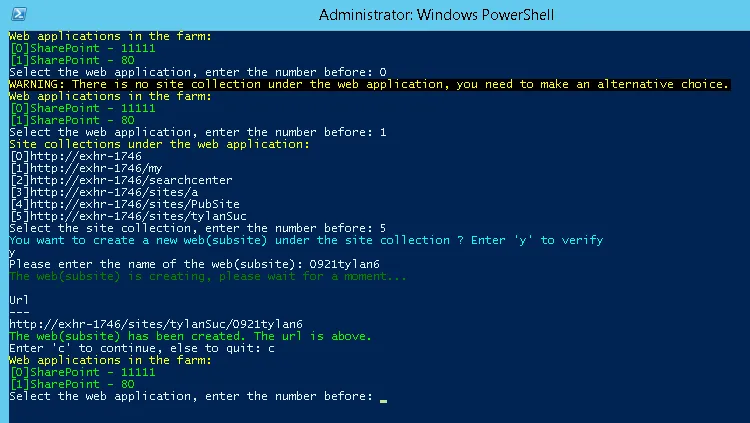
创建Site Collection的脚本,详见上一篇blog。