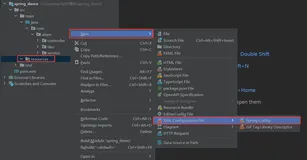
在第一讲中显示了如何使用注解配置bean,其实这是Spring3引进的特性,Spring2使用的是XML的方式来配置Bean,那时候漫天的XML文件使得Spring有着配置地狱的称号。Spring也一直在力求改变这一缺陷。Spring3引入的注解方式确实使配置精简不少,而Spring4则引入了Groovy DSL来配置,其语法比XML要简单很多,而且Groovy本身是门语言,其配置文件就相当于代码,可以用来实现复杂的配置。
废话少说,让我们来对Groovy DSL配置来个第一次亲密接触。
首先我们先实现一个XML的bean配置,沿用第一讲中的例子。
configuration.xml
1
2
3
4
5
6
7
8
9
10
11
12
13
|
<?xml version="1.0" encoding="UTF-8"?>

<beans xmlns="http://www.springframework.org/schema/beans"
       xmlns:xsi="http://www.w3.org/2001/XMLSchema-instance"
       xsi:schemaLocation="http://www.springframework.org/schema/beans
        http://www.springframework.org/schema/beans/spring-beans.xsd">

    <bean id="movieService" class="huangbowen.net.service.DefaultMovieService"/>

    <bean id="cinema" class="huangbowen.net.service.Cinema">
        <property name="movieService" ref="movieService"/>
    </bean>
</beans>
|
这个XML文件就不用我多做解释了,很清晰明了。Ok,照例写个测试来测一下。
XmlConfigurationTest.java
1
2
3
4
5
6
7
8
9
10
11
12
13
14
15
16
17
18
19
20
21
22
23
24
25
26
27
28
29
30
31
32
33
34
35
36
37
38
39
40
41
42
43
44
|
package huangbowen.net;

import huangbowen.net.service.Cinema;
import huangbowen.net.service.DefaultMovieService;
import org.junit.Test;
import org.junit.runner.RunWith;
import org.springframework.beans.factory.annotation.Autowired;
import org.springframework.context.ApplicationContext;
import org.springframework.test.context.ContextConfiguration;
import org.springframework.test.context.junit4.SpringJUnit4ClassRunner;

import static org.hamcrest.core.IsInstanceOf.instanceOf;
import static org.junit.Assert.assertNotNull;
import static org.junit.Assert.assertThat;

@RunWith(SpringJUnit4ClassRunner.class)
@ContextConfiguration(locations = {"/configuration.xml"})
public class XmlConfigurationTest {

    @Autowired
    private ApplicationContext applicationContext;

    @Autowired
    private Cinema cinema;

    @Test
    public void shouldGetCinemaInstance()  {
        Cinema cinema = applicationContext.getBean(Cinema.class);
        assertNotNull(cinema);
    }

    @Test
    public void shouldGetAutowiredCinema() {
        assertNotNull(cinema);
    }

    @Test
    public void shouldGetMovieServiceInstance() {
        assertNotNull(cinema.getMovieService());
        assertThat(cinema.getMovieService(), instanceOf(DefaultMovieService.class));
    }


}
|
这个测试与第二讲中的测试基本上一样,不过Spring配置的读取是从configuration.xml来的,在@ContextConfiguration中指定了该xml文件为Spring配置文件。
如果想使用Groovy DSL的话第一步需要引入groovy依赖。
pom.xml
1
2
3
4
5
|
<dependency>
    <groupId>org.codehaus.groovy</groupId>
    <artifactId>groovy-all</artifactId>
    <version>2.2.2</version>
</dependency>
|
然后就可以新建一个groovy文件来实现配置编写。
Configuration.groovy
1
2
3
4
5
6
7
|
beans {

   movieService huangbowen.net.service.DefaultMovieService

   cinema huangbowen.net.service.Cinema, movieService : movieService

}
|
这其实体现不出来Groovy DSL的强大灵活,因为我们的例子太简单了。
beans相当于xml中的beans标签,第一行中是 bean id + class的形式。 第二行是bean id + class + properties map的形式。第二个参数是一个map数组,分别对应property和值。
实现同样的Bean配置有很多种写法。
1
2
3
|
movieService (huangbowen.net.service.DefaultMovieService)

cinema(huangbowen.net.service.Cinema, {movieService : movieService})
|
上面这种其实是Groovy语法的一个特性,在调用方法时括号是可选的,既可以加,也可以不加。
1
2
3
4
5
|
movieService huangbowen.net.service.DefaultMovieService

cinema (huangbowen.net.service.Cinema) {
    movieService :ref movieService
}
|
上面这中使用了另一个设置属性的方法,通过一个闭包将属性设置进去。
1
2
3
4
5
|
movieService huangbowen.net.service.DefaultMovieService

cinema (huangbowen.net.service.Cinema) {
    movieService : movieService
}
|
这种更好理解了,ref方法也是可选的。
来照旧写个测试来测一下。
GroovyDSLConfigurationTest.java
1
2
3
4
5
6
7
8
9
10
11
12
13
14
15
16
17
18
19
20
21
22
23
24
25
26
27
28
29
30
31
32
33
34
35
36
37
38
39
40
41
42
43
44
45
46
47
48
49
50
51
52
53
54
55
56
57
58
59
60
61
62
63
64
65
|
package huangbowen.net;

import huangbowen.net.service.Cinema;
import huangbowen.net.service.DefaultMovieService;
import org.junit.Test;
import org.junit.runner.RunWith;
import org.springframework.beans.factory.annotation.Autowired;
import org.springframework.beans.factory.groovy.GroovyBeanDefinitionReader;
import org.springframework.beans.factory.support.BeanDefinitionReader;
import org.springframework.context.ApplicationContext;
import org.springframework.context.support.GenericApplicationContext;
import org.springframework.test.context.ContextConfiguration;
import org.springframework.test.context.junit4.SpringJUnit4ClassRunner;
import org.springframework.test.context.support.AbstractGenericContextLoader;

import static huangbowen.net.GroovyDSLConfigurationTest.*;
import static org.hamcrest.core.IsInstanceOf.instanceOf;
import static org.junit.Assert.assertNotNull;
import static org.junit.Assert.assertThat;

@RunWith(SpringJUnit4ClassRunner.class)
@ContextConfiguration(value = "classpath:Configuration.groovy", loader = GenericGroovyContextLoader.class)
public class GroovyDSLConfigurationTest {

    public static class GenericGroovyContextLoader extends
            AbstractGenericContextLoader {

        @Override
        protected BeanDefinitionReader createBeanDefinitionReader(
                GenericApplicationContext context) {
            return new GroovyBeanDefinitionReader(context);
        }

        @Override
        protected String getResourceSuffix() {
            return ".groovy";
        }

    }

    @Autowired
    private ApplicationContext applicationContext;

    @Autowired
    private Cinema cinema;

    @Test
    public void shouldGetCinemaInstance()  {
        Cinema cinema = applicationContext.getBean(Cinema.class);
        assertNotNull(cinema);
    }

    @Test
    public void shouldGetAutowiredCinema() {
        assertNotNull(cinema);
    }

    @Test
    public void shouldGetMovieServiceInstance() {
        assertNotNull(cinema.getMovieService());
        assertThat(cinema.getMovieService(), instanceOf(DefaultMovieService.class));
    }


}
|
在集成测试中如果加载xml配置文件,Spring提供了GenericXmlContextLoader类,如果加载注解方式的配置类,Spring提供了AnnotationConfigContextLoader类。但是对于Groovy配置文件Spring testContext框架还未提供相应的Loader,所以在本测试方法中需要自己实现一个Loader,其实也简单,只要实现两个方法即可。
本例中的源码请在我的GitHub上自行下载。