DynamoDB Local for Desktop Development

简介: Would you like to be able to write and test code that uses the Amazon DynamoDB API even if you have no network connection and without incurring any us...

Would you like to be able to write and test code that uses the Amazon DynamoDB API even if you have no network connection and without incurring any usage charges ?

If so, you are going to love Amazon's new DynamoDB Local test tool.

DynamoDB Local is a client-side database that supports the complete DynamoDB API, but doesn't manipulate any tables or data in DynamoDB itself.

You can write code while sitting in a tree, on the beach, or in the desert.


Installing and Running DynamoDB Local

DynamoDB Local is available as an executable Java archive (JAR) file.

It will run on Windows, Mac, and Linux systems and is compatible with version 7 of the Java Runtime Environment (JRE).

It will not work on older versions of Java.

Download the DynamoDB Local JAR, put it in the directory of your choice, and open a command prompt in that directory.

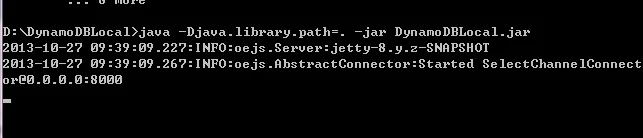
Launch DynamoDB Local like this:

$ java –Djava.library.path=. -jar DynamoDBLocal.jar

DynamoDB Local will create a local database in the same directory as the JAR.

The file name will have the form MyAccessKeyId_Region.db, where MyAccessKeyId is the AWS access key used to access DynamoDB Local

and Region is the target region.

Configure your application so that it uses the local endpoint.

DynamoDB Local listens on port 8000 by default; you can change this by specifying the --port option when you start it.

If you are using the default port, the local endpoint will be localhost:8000.


目录
相关文章
|
19天前
|
人工智能 缓存 前端开发
DeepSeek Harness 首发实测 + 入门教程,夯爆了!梁神我错了
DeepSeek Harness + DeepSeek V4 Pro 项目实战保姆级教程!手把手带你从零安装开源 AI 编程工具,开发架构图、知识讲解网站、3D 网页游戏、全栈 AI 应用 4 个项目,覆盖运行模式选择、插件安装与开发,看看能不能对标 Claude。
13091 82
DeepSeek Harness 首发实测 + 入门教程,夯爆了!梁神我错了
|
7天前
|
人工智能 自然语言处理 安全
阿里云千问办公、Qoder Teams、Qoder CN区别与选择指南:模型能力、适用场景与最新活动参考
本文聚焦阿里云2026年推出的三款自研AI办公产品,清晰拆解千问办公、Qoder Teams、Qoder CN的差异化定位与能力边界:千问办公主打职场全场景提效,支持自然语言指令一键完成PPT生成、数据分析等高频办公任务;Qoder Teams面向程序员团队,深度整合AI代码生成、团队协同与企业知识库能力;Qoder CN则专为金融、政务等强合规场景打造,实现数据不出境与VPC私有化部署。文章同步给出分场景选型指南与最新活动定价,帮助不同类型的企业按需组合产品,实现业务岗、研发岗与强合规场景的AI能力全覆盖。
阿里云千问办公、Qoder Teams、Qoder CN区别与选择指南:模型能力、适用场景与最新活动参考
|
2天前
|
缓存 人工智能 API
阿里云Qwen3.8‑Flash完整能力解析:模型特性、API调用实操与计费规则深度拆解
在AI应用快速落地的当下,开发者与企业选型大模型API,不再只单纯关注评测榜单分数,推理速度、上下文长度、多模态能力、工具调用稳定性以及实际调用成本,共同决定项目能否平稳上线。Qwen3.8‑Flash作为新一代多模态混合专家模型,主打高性能推理与低成本开销,面向编程开发、智能Agent工作流、超长文档解析、图文混合理解等高频场景,提供托管API服务,权重同时开放可供本地部署,兼容主流接口协议,能够无缝接入各类开发工具链。很多开发者在接入过程中,容易混淆普通按量Token计费、缓存计费、各类订阅计划之间的差异,造成实际账单超出预估。本文从模型底层架构、核心功能能力、适用场景、API调用实操、完
676 0
|
12天前
|
Web App开发 人工智能 API
16 个超火的 DeepSeek Harness 插件,大肥鱼已经落后 N 个版本了。。。
DeepSeek Harness 精选插件推荐合集,从图片识别、浏览器操控、多 Agent 协作到手机远程控制,一口气带你看完 DSH 社区热门的十几个插件,覆盖技能扩展、UI 界面增强、整活玩法三大类,让你的鲸鱼变得更强。
1725 4
|
13天前
|
人工智能 Java BI
【AI】DeepSeek Harness 安装、运行、管理插件
本文介绍了如何运行DeepSeek开源的Agent框架DeepSeek Harness(dsh)。主要内容包括:使用nvm安装适配的Node版本;通过代理加速克隆GitHub源码;使用pnpm安装依赖并启动项目;配置DeepSeek API Token;安装扩展功能的插件。该框架自带Web界面,支持模型适配、文件编辑等插件化功能
1901 1
|
人工智能 JavaScript 开发工具
DeepSeek Harness 本地安装与使用指南
DeepSeek Harness(DSH)是DeepSeek AI开源的Agent运行框架,支持本地文件操作、命令执行与工具调用。基于Cordis插件架构,具备高扩展性与强可控性,适合开发者搭建可控Agent环境或开展模型基准测试。当前为开发者预览版,需Node.js环境,推荐先用`npx @deepseek-ai/dsh web`快速体验。
5138 0
|
15天前
|
人工智能 JavaScript 测试技术
保姆级教程:DeepSeek Harness从安装到跑通测试,30分钟上手
DeepSeek Harness是DeepSeek开源的AI Agent运行时,主打“一行命令安装、5分钟跑通”。它让模型真正动手干活——读代码、跑测试、分析失败、生成修复方案。本文手把手教你30分钟从零上手,覆盖安装、配置、实测及避坑指南,助你快速掌握下一代AI编程范式。
|
7天前
|
人工智能 Linux iOS开发
Ollama使用教程:Ollama官网下载、Ollama本地部署大模型(2026最新)
Ollama 是一款免费开源的本地大模型运行工具,支持在 Windows/macOS/Linux 上离线运行 Qwen、DeepSeek、Llama 等主流开源模型,数据不出本机、隐私安全。提供 OpenAI 兼容 API,命令行一键拉取/运行/管理模型,无需联网,无调用限制,是开发者与 AI 爱好者部署本地 AI 助手的理想选择。(239 字)
|
14天前
|
人工智能 JavaScript 测试技术
从 0 到 1,DeepSeek Harness 保姆级安装与使用教程!
DeepSeek Harness是DeepSeek推出的开源Agent运行框架,秉持“一切皆插件”理念,支持模型、工具、技能、工作流等全模块自由替换与扩展。其核心Cordis内核实现动态插件管理,赋能Agent自进化。已成GitHub史上增速最快开源项目(15w+ Star),标志着国内大模型从拼价格转向重架构与生态的新拐点。
1339 6
从 0 到 1,DeepSeek Harness 保姆级安装与使用教程!