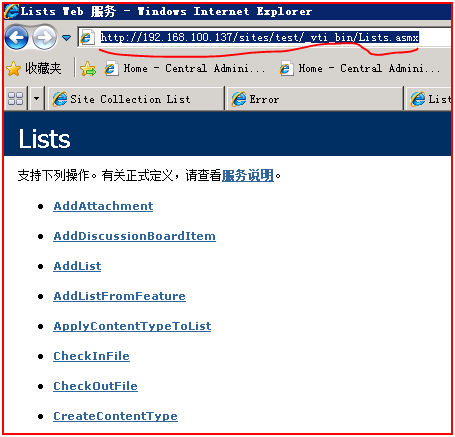
SharePoint 2010中有了全新的客户端模型,给我们在客户端操作SharePoint对象提供了很大的方便,但是在SharePoint 2007中我们可以使用的方式就比较有限,Web Service是我们最常用的一种方式,SharePoint本身提供了很多web Service,比如Lists.asmx如下图:
我们下面就接触sharepoint提供的web service来实现上传文件。
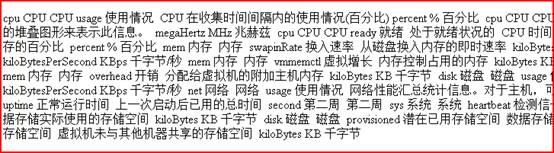
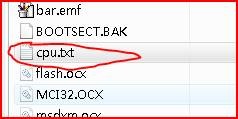
1. 我们要上传的文件如下图:

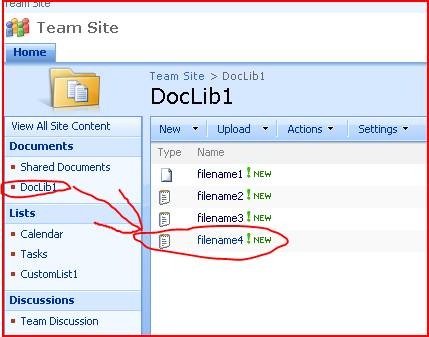
2. 下图为要上传的文档库:

3. 实现代码如下:
using
System;
using System.Collections.Generic;
using System.Linq;
using System.Text;
using MOSSUploadDemo1. ***** ;
using System.IO;
using System.Net;
namespace MOSSUploadDemo1
{
class Program
{
static void Main( string [] args)
{
string sourceFilePath = " c:\\cpu.txt " ;
string wsUrl = " http://************/_vti_bin/copy.asmx " ;
string desPath = " http://*******/DocLib1/filename4.txt " ;
string userName = " **** " ;
string password = " ***** " ;
string domain = " ***** " ;
byte [] filebyte = StreamFile(sourceFilePath);
UploadFile(filebyte,wsUrl,desPath,userName,password,domain);
}
private static void UploadFile( byte [] fileData, string wsUrl, string desPath, string userName, string password, string domain)
{
var copy = new **** .Copy
{
Url = wsUrl,
Credentials = new NetworkCredential(userName, password, domain)
};
string destinationUrl = desPath;
string [] destinationUrls = { destinationUrl };
var info1 = new FieldInformation
{
DisplayName = " Title " ,
InternalName = " Title " ,
Type = FieldType.Text,
Value = " New Title "
};
FieldInformation[] info = { info1 };
var copyResult = new CopyResult();
CopyResult[] copyResults = { copyResult };
copy.CopyIntoItems(destinationUrl, destinationUrls, info, fileData, out copyResults);
}
private static byte [] StreamFile( string filename)
{
FileStream fs = new FileStream(filename, FileMode.Open, FileAccess.Read);
byte [] ImageData = new byte [fs.Length];
fs.Read(ImageData, 0 , System.Convert.ToInt32(fs.Length));
fs.Close();
return ImageData;
}
}
}
using System.Collections.Generic;
using System.Linq;
using System.Text;
using MOSSUploadDemo1. ***** ;
using System.IO;
using System.Net;
namespace MOSSUploadDemo1
{
class Program
{
static void Main( string [] args)
{
string sourceFilePath = " c:\\cpu.txt " ;
string wsUrl = " http://************/_vti_bin/copy.asmx " ;
string desPath = " http://*******/DocLib1/filename4.txt " ;
string userName = " **** " ;
string password = " ***** " ;
string domain = " ***** " ;
byte [] filebyte = StreamFile(sourceFilePath);
UploadFile(filebyte,wsUrl,desPath,userName,password,domain);
}
private static void UploadFile( byte [] fileData, string wsUrl, string desPath, string userName, string password, string domain)
{
var copy = new **** .Copy
{
Url = wsUrl,
Credentials = new NetworkCredential(userName, password, domain)
};
string destinationUrl = desPath;
string [] destinationUrls = { destinationUrl };
var info1 = new FieldInformation
{
DisplayName = " Title " ,
InternalName = " Title " ,
Type = FieldType.Text,
Value = " New Title "
};
FieldInformation[] info = { info1 };
var copyResult = new CopyResult();
CopyResult[] copyResults = { copyResult };
copy.CopyIntoItems(destinationUrl, destinationUrls, info, fileData, out copyResults);
}
private static byte [] StreamFile( string filename)
{
FileStream fs = new FileStream(filename, FileMode.Open, FileAccess.Read);
byte [] ImageData = new byte [fs.Length];
fs.Read(ImageData, 0 , System.Convert.ToInt32(fs.Length));
fs.Close();
return ImageData;
}
}
}
4. 程序远行后,结果如下图: