转载请注明出处:http://blog.csdn.net/qq_26525215
本文源自【大学之旅_谙忆的博客】
如果你把此种纯Java方式实现AOP拦截读懂了,理解本篇博客会更容易。
【框架】[Spring]纯Java的方式实现AOP切面(拦截)技术
这篇讲解的是用xml配置文件来实现AOP拦截。
其实也挺简单的,无非是把一些对象通过xml文件配置new出来与初始化里面的一些值。
需要的包什么的就不解释了,直接给个网址:
http://repo.springsource.org/libs-release-local/org/springframework/spring/
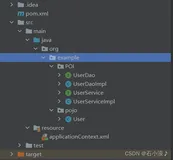
项目结构图

直接上代码
1、准备好原型对象:
package cn.hncu.xmlImpl;

public class Person {
    public void run(){
        System.out.println("我在run...");
    }

    public void run(int i){
        System.out.println("我在run"+i+"...");
    }

    public void say(){
        System.out.println("我在say...");
    }

}
2、准备好代理类
代理动作什么的都会写在这里,为了方便,只实现MethodInterceptor接口,里面的invoke是最强的。
package cn.hncu.xmlImpl;

import org.aopalliance.intercept.MethodInterceptor;
import org.aopalliance.intercept.MethodInvocation;

public class AroundAdvice implements MethodInterceptor{
    @Override
    public Object invoke(MethodInvocation invocation) throws Throwable {
        System.out.println("前面拦截....");
        Object resObj = invocation.proceed();//放行
        System.out.println("后面拦截.....");
        return resObj;
    }

}
3、配置好xml文件:
把切点和通知配置成 切面的外部bean
取名为:1.xml
<?xml version="1.0" encoding="UTF-8"?>
<beans xmlns="http://www.springframework.org/schema/beans"
        xmlns:xsi="http://www.w3.org/2001/XMLSchema-instance"
        xmlns:context="http://www.springframework.org/schema/context"
        xmlns:tx="http://www.springframework.org/schema/tx"
        xsi:schemaLocation="http://www.springframework.org/schema/beans http://www.springframework.org/schema/beans/spring-beans-4.3.xsd
                http://www.springframework.org/schema/context http://www.springframework.org/schema/context/spring-context-4.3.xsd
                http://www.springframework.org/schema/tx http://www.springframework.org/schema/tx/spring-tx-4.3.xsd">

    <!-- 代理前原对象 -->
    <bean id="person" class="cn.hncu.xmlImpl.Person"></bean>

    <!-- 切点 -->
    <bean id="cut" class="org.springframework.aop.support.JdkRegexpMethodPointcut">
        <property name="pattern" value=".*run.*"></property>
    </bean>

    <!-- 通知-由我们写,实际代理动作 -->
    <bean id="advice" class="cn.hncu.xmlImpl.AroundAdvice"></bean>

    <!-- 切面 = 切点+通知 -->
    <bean id="advisor" class="org.springframework.aop.support.DefaultPointcutAdvisor">
        <property name="pointcut" ref="cut"></property>
        <property name="advice" ref="advice"></property>
    </bean>

    <!-- 代理工厂 -->
    <bean id="personProxied" class="org.springframework.aop.framework.ProxyFactoryBean">
        <!-- 放入原型对象 -->
        <property name="target" ref="person"></property>

        <!-- 放入切面 -->
        <property name="interceptorNames">
            <list>
                <value>advisor</value>
            </list>
        </property>
    </bean>


</beans>
把切点和通知配置成 切面的内部bean
<beans ..>
<!-- 代理前原对象 -->
    <bean id="person" class="cn.hncu.xmlImpl.Person"></bean>

    <!-- 切面 = 切点+通知 -->
    <bean id="advisor" class="org.springframework.aop.support.DefaultPointcutAdvisor">
        <!-- 切点 -->
        <property name="pointcut">
            <bean class="org.springframework.aop.support.JdkRegexpMethodPointcut">
                <property name="pattern" value=".*run.*"></property>
            </bean>
        </property>
        <!-- 通知-由我们写,实际代理动作 -->
        <property name="advice">
            <bean id="advice" class="cn.hncu.xmlImpl.AroundAdvice"></bean>
        </property>
    </bean>

    <!-- 代理工厂 -->
    <bean id="personProxied" class="org.springframework.aop.framework.ProxyFactoryBean">
        <!-- 放入原型对象 -->
        <property name="target" ref="person"></property>

        <!-- 放入切面 -->
        <property name="interceptorNames">
            <list>
                <value>advisor</value>
            </list>
        </property>
    </bean>
</beans>
直接在切面bean中配置“切点的正则表达式”,省去“切点bean”的配置
<beans...>
<?xml version="1.0" encoding="UTF-8"?>
<beans xmlns="http://www.springframework.org/schema/beans"
    xmlns:xsi="http://www.w3.org/2001/XMLSchema-instance" xmlns:context="http://www.springframework.org/schema/context"
    xmlns:tx="http://www.springframework.org/schema/tx"
    xsi:schemaLocation="http://www.springframework.org/schema/beans http://www.springframework.org/schema/beans/spring-beans-4.3.xsd
                http://www.springframework.org/schema/context http://www.springframework.org/schema/context/spring-context-4.3.xsd
                http://www.springframework.org/schema/tx http://www.springframework.org/schema/tx/spring-tx-4.3.xsd">

    <!-- 代理前原对象 -->
    <bean id="person" class="cn.hncu.xmlImpl.Person"></bean>

    <!-- 切面 = 切点+通知 -->
    <bean id="advisor" class="org.springframework.aop.support.RegexpMethodPointcutAdvisor">
        <!-- 切点 -->
        <property name="patterns">
            <list>
                <value>.*run.*</value>
            </list>
        </property>
        <!-- 通知-由我们写,实际代理动作 -->
        <property name="advice">
            <bean id="advice" class="cn.hncu.xmlImpl.AroundAdvice"></bean>
        </property>
    </bean>

    <!-- 代理工厂 -->
    <bean id="personProxied" class="org.springframework.aop.framework.ProxyFactoryBean">
        <!-- 放入原型对象 -->
        <property name="target" ref="person"></property>

        <!-- 放入切面 -->
        <property name="interceptorNames">
            <list>
                <value>advisor</value>
            </list>
        </property>
    </bean>


</beans>
</beans>
4、测试方法:
@Test//把切点和通知配置成 切面的外部bean
    public void demo1(){
        ApplicationContext ctx = new ClassPathXmlApplicationContext("cn/hncu/xmlImpl/1.xml");
        Person p =ctx.getBean("personProxied",Person.class);
        p.run();
        p.say();
    }

    @Test//把切点和通知配置成 切面的内部bean
    public void demo2(){
        ApplicationContext ctx = new ClassPathXmlApplicationContext("cn/hncu/xmlImpl/2.xml");
        Person p =ctx.getBean("personProxied",Person.class);
        p.run();
        p.say();
    }

    @Test//直接在切面bean中配置“切点的正则表达式”,省去“切点bean”的配置
    public void demo3(){
        ApplicationContext ctx = new ClassPathXmlApplicationContext("cn/hncu/xmlImpl/3.xml");
        Person p =ctx.getBean("personProxied",Person.class);
        p.run();
        p.say();
    }
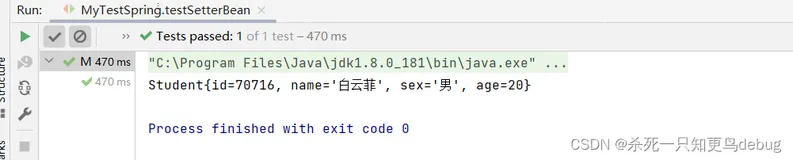
输出结果:
这是通过定义JdkRegexpMethodPointcut切入点的方式来实现AOP,通过这种编程方式,可以针对业务方法进行包装或者监控。
但是这个JdkRegexpMethodPointcut还不是很好,它拦截的单位是类!而无法细分到方法。不过放心,后面还有3中切点技术~
用AspectJExpressionPointcut切点就可以实现专门对什么方法进行拦截。后面会有专门介绍与实例的。
本文章由[谙忆]编写, 所有权利保留。
转载请注明出处:http://blog.csdn.net/qq_26525215
本文源自【大学之旅_谙忆的博客】