localhost: Warning: $HADOOP_HOME is deprecated.问题解决

简介: 启动HADOOP或是停止时,都会输出这个WARNING。 解决办法如下: http://thysmichels.com/2012/02/11/tips-running-hadoop-on-ubuntu/ When you get this Warning: $HADOOP_HOME is ...

启动HADOOP或是停止时,都会输出这个WARNING。
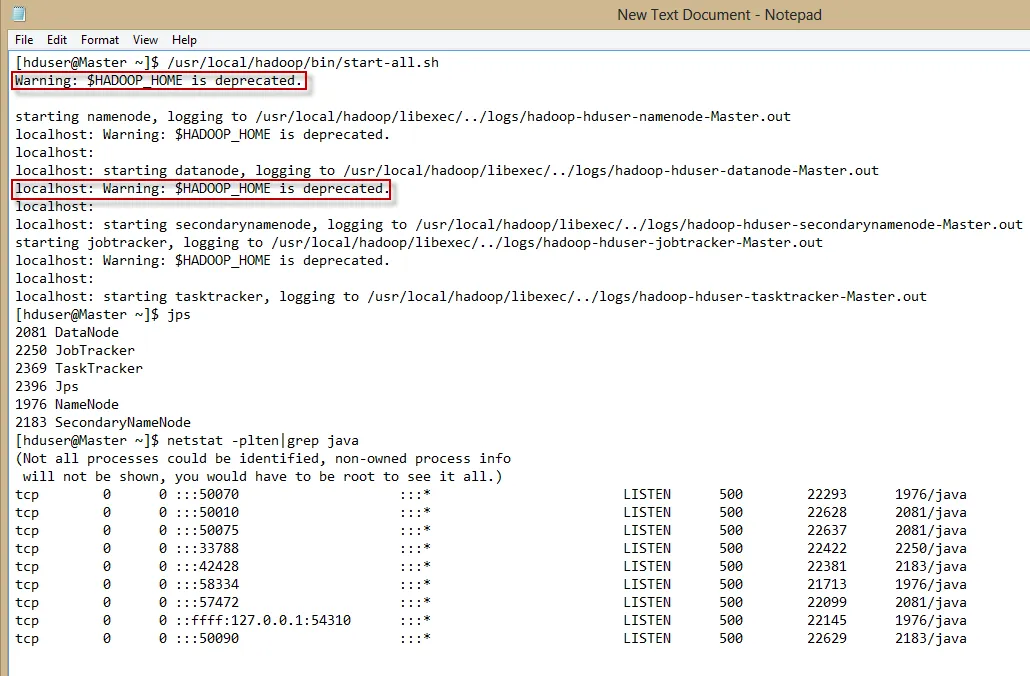
解决办法如下:

http://thysmichels.com/2012/02/11/tips-running-hadoop-on-ubuntu/

When you get this Warning: $HADOOP_HOME is deprecated

Solution: add “export HADOOP_HOME_WARN_SUPPRESS=”TRUE”"  in the hadoop-env.sh.

~~~~~~~~~~~~

顺带介绍其它常见错误及解决方法:

Tips running Hadoop on Ubuntu


Below is some tips when running Hadoop on Ubuntu. If you find some errors running Hadoop on Ubuntu please comment the problem and how you solved it.

When you get this Warning: $HADOOP_HOME is deprecated

Solution: add “export HADOOP_HOME_WARN_SUPPRESS=”TRUE”"  in the hadoop-env.sh.

Cannot create directory `/usr/local/hadoop/libexec/../logs

Solution: sudo chown -R hduser:hadoop /usr/local/hadoop/

Enter passphrase when running ./start-all.sh

Solution: ssh-keygen -t rsa -P “”     Create a ssh-key without a password.

Warning: <property>/<configuration> not set

Solution: make sure <property> and <configuration> tags are populated in core.site.xml, mapred.site.xml, hdfs.site.xml

Send or retrieve file to and from HDFS

Solution:

Send file to HDFS > bin/hadoop dfs -put /home/someone/interestingFile.txt /user/yourUserName/

Get file from HDFS > bin/hadoop dfs -get foo localFile

ssh: connect to host localhost port 22: Connection refused
Solution: By default Ubuntu will not have ssh installed so you will have to install and start it.

Install > sudo apt-get install ssh

Start > sudo service ssh start

hadoop Incompatible namespaceIDs in /app/hadoop/tmp/*

Solution: 

  1. Stop the cluster: ./stop-dfs.sh
  2. Delete the directory specified on the DataNode: rm -r /app/hadoop/tmp/*
  3. Reformat the NameNode: hadoop namenode -format

OR

  1. Stop the DataNode: ./stop.dfs.sh
  2. Edit the value of namespaceID in /current/VERSION to match the value of the current NameNode.
  3. Restart the DataNode: ./start.dfs.sh

hadoop java.net.UnknownHostException: ubuntu: ubuntu

Solution: 

1. Add ubuntu as your localhost IP to your /etc/hosts file: sudo vi /etc/hosts

2. Restart your network: sudo /etc/init.d/networking restart

So your /etc/hosts file on your master machine will look something like this:

172.16.62.152      master
172.16.62.151      slave
172.16.62.152      ubuntu

On your slave machine

172.16.62.152      master
172.16.62.151      slave
172.16.62.151      ubuntu

If none of it works then you can go and change the master/localhost hostname to the ipaddress in core-site.xml, mapred-site.xml

 

目录
相关文章
|
SQL 程序员 HIVE
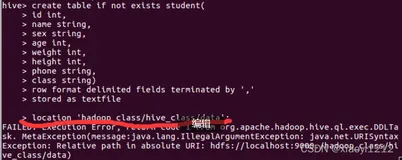
【hive】Exception: Relative path in absolute URI: hdfs://localhost:9000./hadoop_class/hive_class/data)
FAILED: Execution Error, return code 1 from org.apache.hadoop.hive.ql.exec.DDLTask. MetaException(message:java.lang.IllegalArgumentException: java.net.URISyntaxException: Relative path in absolute URI: hdfs://localhost:9000./hadoop_class/hive_class/data)
545 0
【hive】Exception: Relative path in absolute URI: hdfs://localhost:9000./hadoop_class/hive_class/data)
|
分布式计算 Hadoop 网络安全
Hadoop localhost: frankxulei@localhost: Permission denied (publickey,password)
Hadoop localhost: frankxulei@localhost: Permission denied (publickey,password),错误解决办法
6475 0
|
开发工具 分布式计算 Hadoop
hadoop_异常_01_ Unable to determine address of the host-falling back to "localhost" address java.net.UnknownHostException: rayner
一、异常现象 安装好hadoop之后,执行格式化namenode命令时,抛出以下异常: 18/03/21 21:02:10 WARN net.DNS: Unable to determine local hostname -falling back to "localhost" java.
2021 0
|
分布式计算 Hadoop Java
localhost: Error: JAVA_HOME is not set. [Hadoop] Error: JAVA_HOME is not set
<div class="multicntwrap" style="color:rgb(66,66,66); font-family:'Hiragino Sans GB W3','Hiragino Sans GB',Arial,Helvetica,simsun,u5b8bu4f53"> <div class="multicnt"> <h3 class="title pre fs1" st
3262 0
|
SQL 分布式计算 Hadoop
Warning: $HADOOP_HOME is deprecated.的原因以及解决方法
<p style="line-height:23.8px; color:rgb(51,51,51); font-family:Arial; font-size:14px"> <span style="font-size:18px">今天把hadoop从0.20.2版本升级到1.2.1版本之后,在很多时候都会报如下警告:Warning: $HADOOP_HOME is deprecated
1690 0
|
分布式计算 Java Hadoop
java.lang.IllegalArgumentException: Wrong FS: hdfs://localhost:54310/user/Hadoop/b, expected: file:/
java.lang.IllegalArgumentException: Wrong FS: hdfs://localhost:54310/user/Hadoop/b, expected: file:///         at org.
1435 0
|
分布式计算 Kubernetes Hadoop
大数据-82 Spark 集群模式启动、集群架构、集群管理器 Spark的HelloWorld + Hadoop + HDFS
1290 6
|
分布式计算 资源调度 Hadoop
大数据-80 Spark 简要概述 系统架构 部署模式 与Hadoop MapReduce对比
630 2
|
存储 分布式计算 Hadoop
从“笨重大象”到“敏捷火花”:Hadoop与Spark的大数据技术进化之路
882 79
|
存储 分布式计算 大数据
Flume+Hadoop:打造你的大数据处理流水线
本文介绍了如何使用Apache Flume采集日志数据并上传至Hadoop分布式文件系统(HDFS)。Flume是一个高可用、可靠的分布式系统,适用于大规模日志数据的采集和传输。文章详细描述了Flume的安装、配置及启动过程,并通过具体示例展示了如何将本地日志数据实时传输到HDFS中。同时,还提供了验证步骤,确保数据成功上传。最后,补充说明了使用文件模式作为channel以避免数据丢失的方法。
1108 4

相关实验场景

更多