(一)注册阿里云账号并开通oss服务
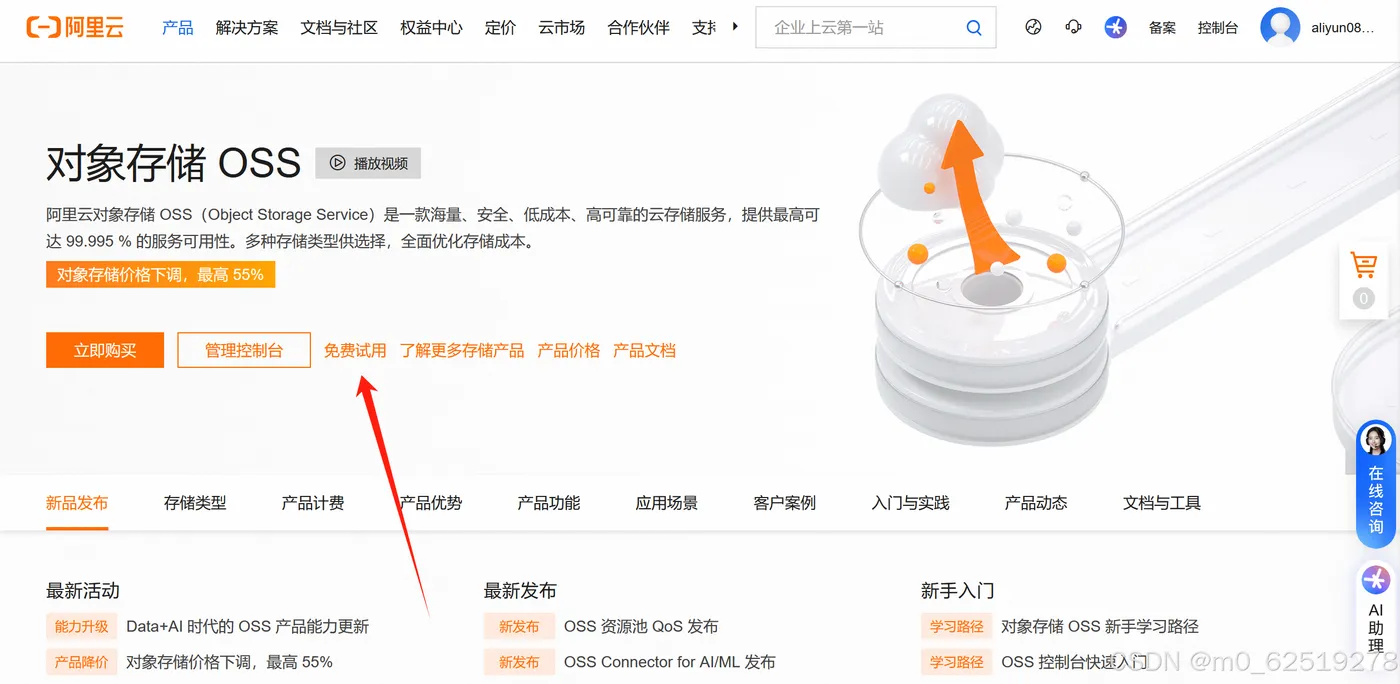
1. 进入对象存储OSS-首页,点击“立即试用”
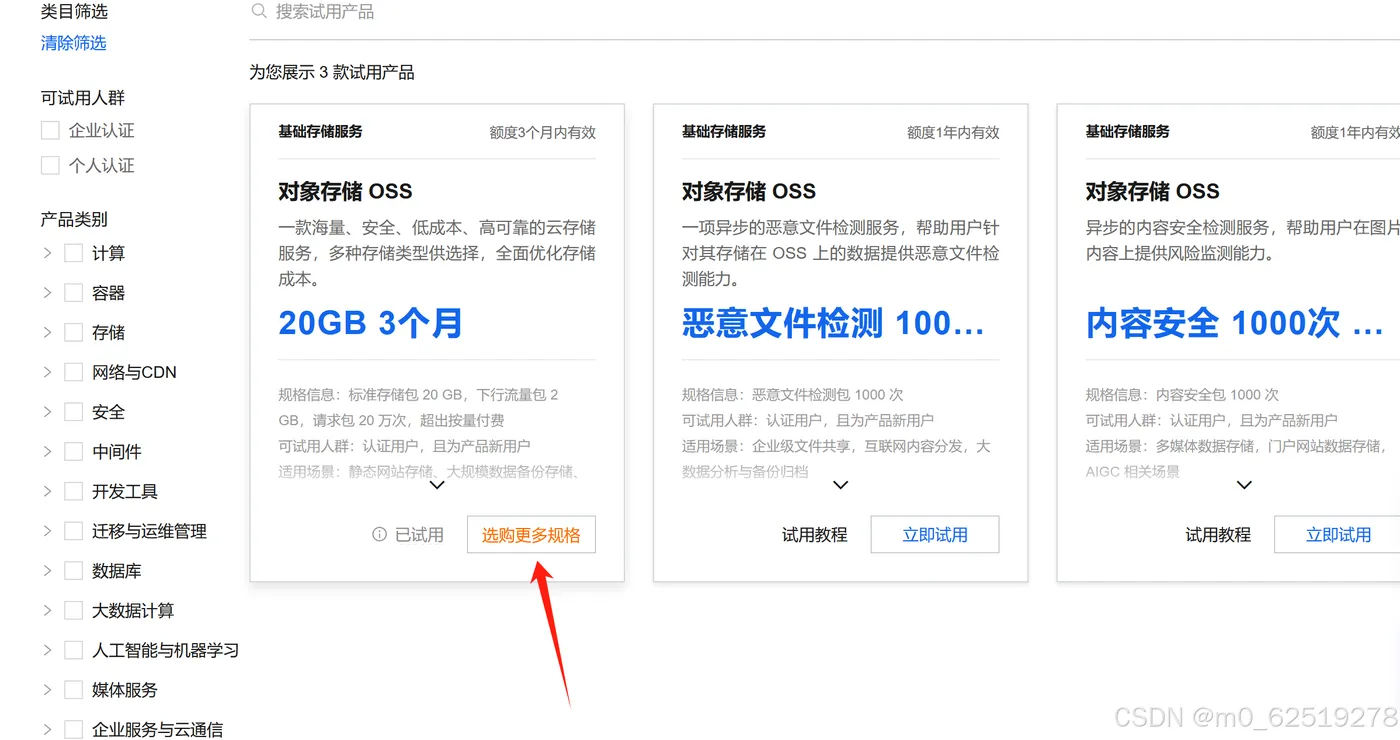
2. 点击20GB 3个月的“立即试用”(我这里已经开通了所以是选购更多规格)
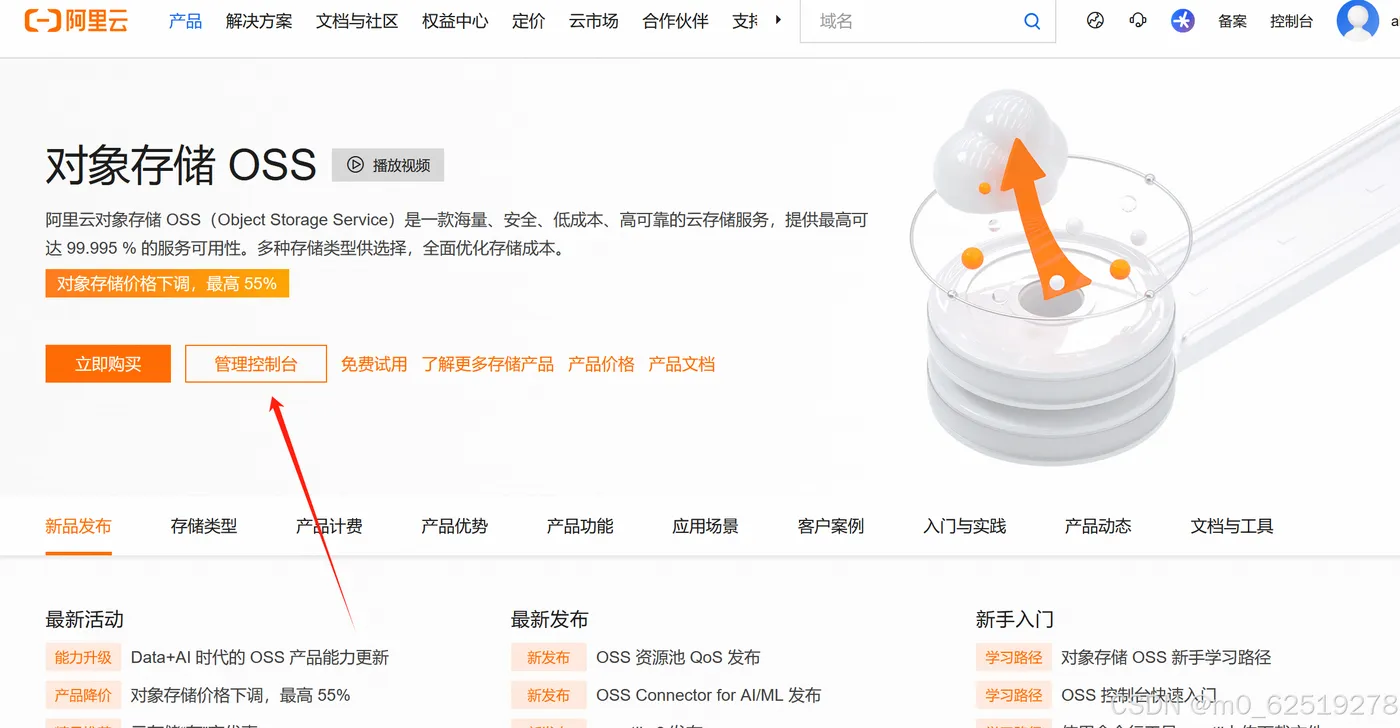
3. 点击“管理控制台”
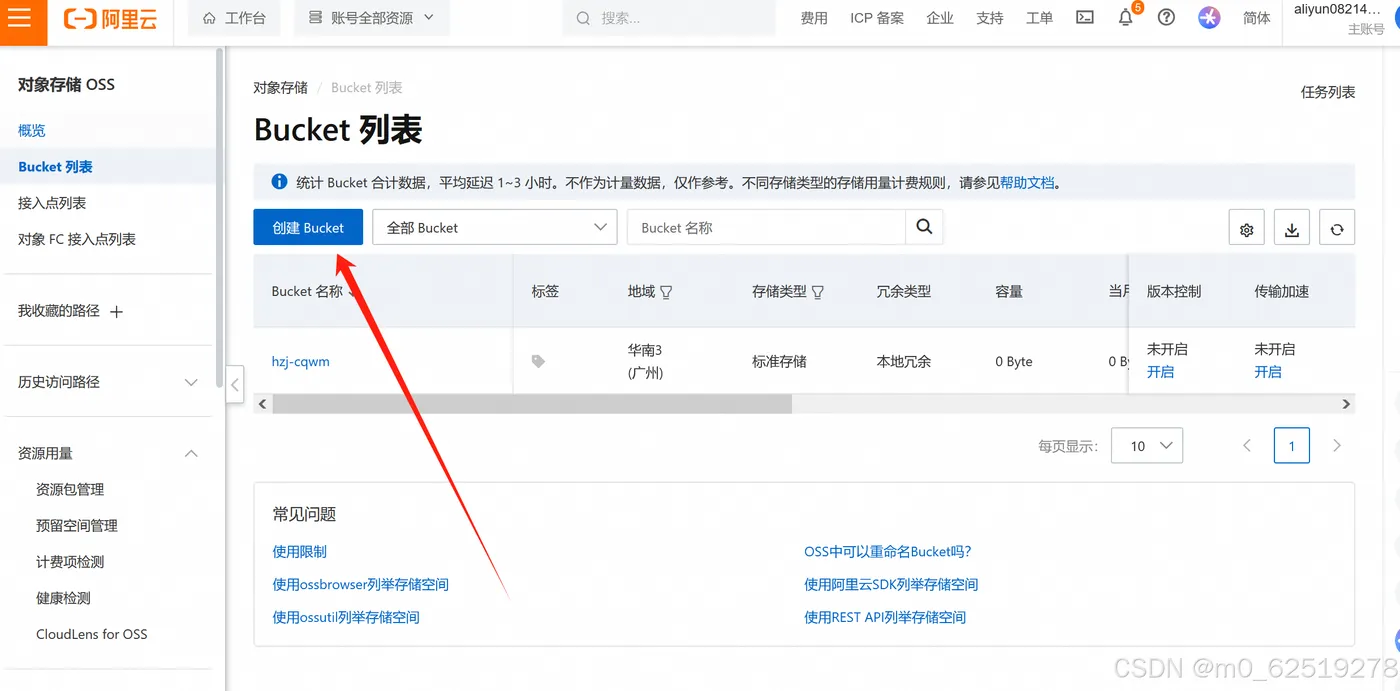
4. 创建bucket,填写对应的信息(只关注bucket名称、地址即可,别的可以不管)
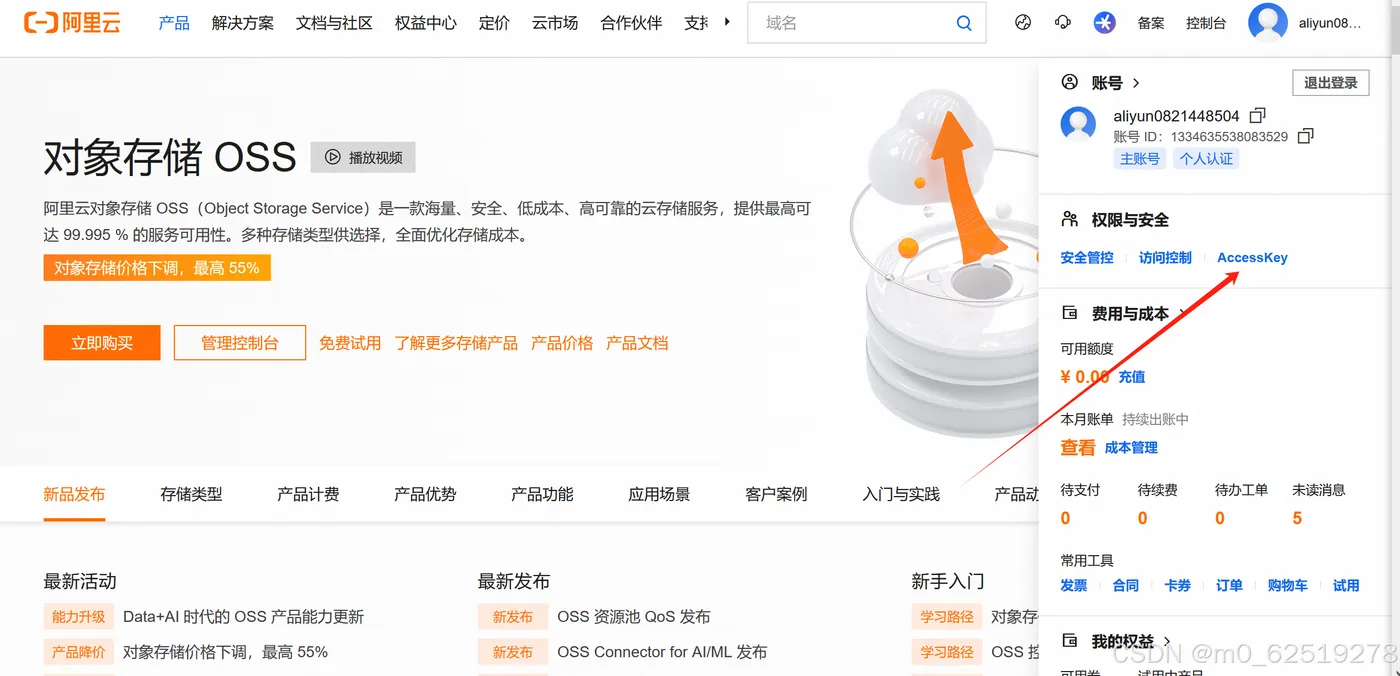
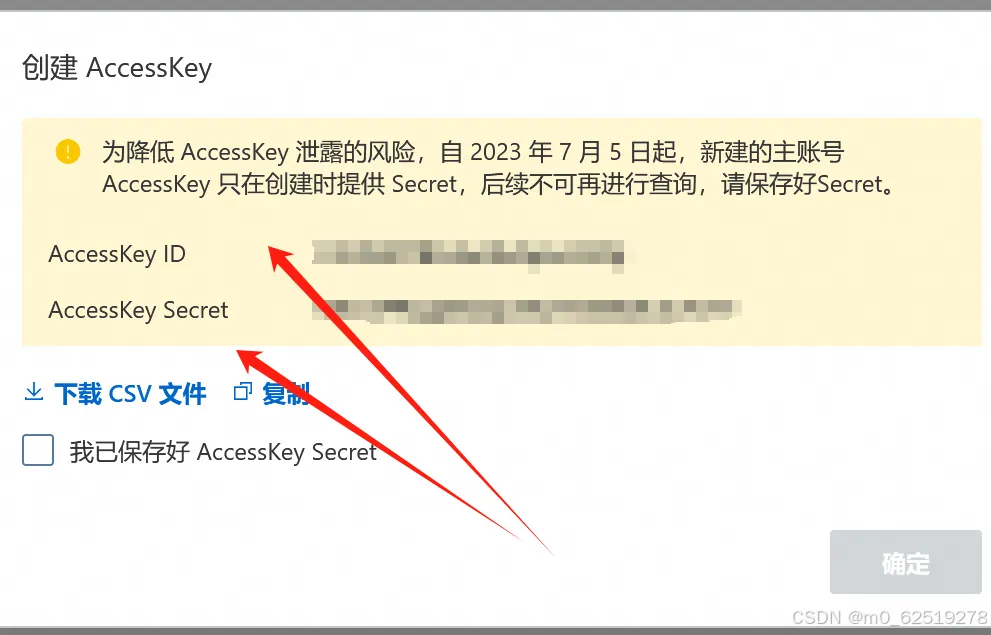
5. 获取AccessKey,进入并创建AccessKey,他会自动生成一个accessKeyId和accessKeySecret给你,请妥善保存
(二)在idea中配置阿里云oss
参考文档:OSS Java SDK快速入门_对象存储(OSS)-阿里云帮助中心
首先添加对应的依赖
<dependency>
    <groupId>com.aliyun.oss</groupId>
    <artifactId>aliyun-sdk-oss</artifactId>
    <version>3.17.4</version>
</dependency>
如果使用的是Java 9及以上的版本,则需要添加以下JAXB相关依赖
<dependency>
    <groupId>javax.xml.bind</groupId>
    <artifactId>jaxb-api</artifactId>
    <version>2.3.1</version>
</dependency>
<dependency>
    <groupId>javax.activation</groupId>
    <artifactId>activation</artifactId>
    <version>1.1.1</version>
</dependency>
<!-- no more than 2.3.3-->
<dependency>
    <groupId>org.glassfish.jaxb</groupId>
    <artifactId>jaxb-runtime</artifactId>
    <version>2.3.3</version>
</dependency>
入门程序(本地上传)
package com.sky.test;
import com.aliyun.oss.*;
import com.aliyun.oss.model.PutObjectRequest;
import com.aliyun.oss.model.PutObjectResult;
import java.io.File;
public class demoOSS {
    public static void main(String[] args) throws Exception {
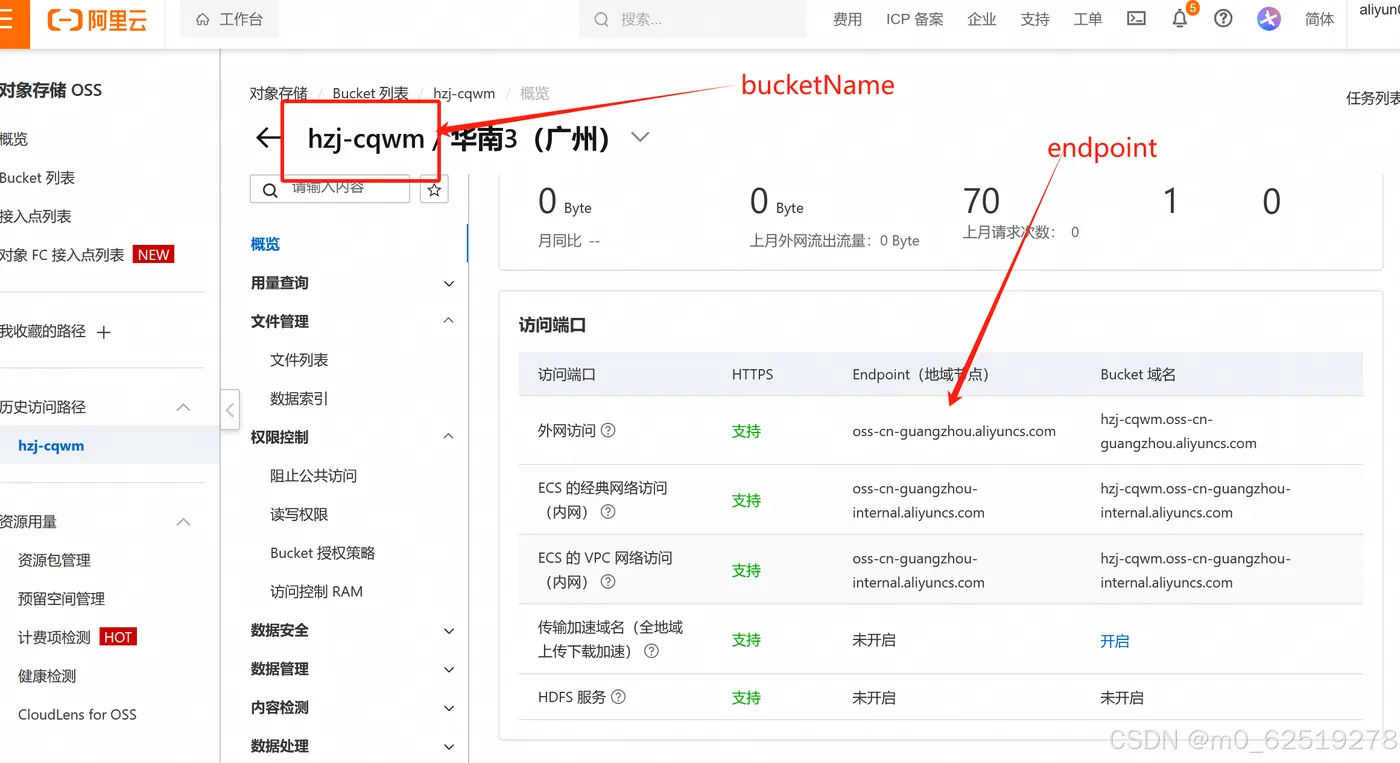
        // Endpoint(地域节点),在bucket的概览可以查看
        String endpoint = "";

        // 先前获取的accessKeyId和accessKeySecret
        String accessKeyId = "";
        String accessKeySecret = "";
        // 填写Bucket名称,这是你刚刚自定义的
        String bucketName = "";
        // 指定你要上传的文件在阿里云叫什么名字
        String objectName = "1.jpg";
        // 填写你要上传的本地文件的完整路径,例如D:\\localpath\\examplefile.txt。
        String filePath= "";
        // 填写Bucket所在地域。以华东1(杭州)为例,Region填写为cn-hangzhou
        // 这个要根据你的bucket所在地域修改
        String region = "cn-guangzhou";
        // 创建OSSClient实例
        OSS ossClient = new OSSClientBuilder().build(endpoint,accessKeyId,accessKeySecret);
        try {
            // 创建PutObjectRequest对象
            PutObjectRequest putObjectRequest = new PutObjectRequest(bucketName, objectName, new File(filePath));
            // 如果需要上传时设置存储类型和访问权限,请参考以下示例代码
            // ObjectMetadata metadata = new ObjectMetadata();
            // metadata.setHeader(OSSHeaders.OSS_STORAGE_CLASS, StorageClass.Standard.toString());
            // metadata.setObjectAcl(CannedAccessControlList.Private);
            // putObjectRequest.setMetadata(metadata);
            // 上传文件
            PutObjectResult result = ossClient.putObject(putObjectRequest);
        } catch (OSSException oe) {
            System.out.println("Caught an OSSException, which means your request made it to OSS, "
                    + "but was rejected with an error response for some reason.");
            System.out.println("Error Message:" + oe.getErrorMessage());
            System.out.println("Error Code:" + oe.getErrorCode());
            System.out.println("Request ID:" + oe.getRequestId());
            System.out.println("Host ID:" + oe.getHostId());
        } catch (ClientException ce) {
            System.out.println("Caught an ClientException, which means the client encountered "
                    + "a serious internal problem while trying to communicate with OSS, "
                    + "such as not being able to access the network.");
            System.out.println("Error Message:" + ce.getMessage());
        } finally {
            if (ossClient != null) {
                ossClient.shutdown();
            }
        }
    }
}
以上信息不知道的可以看下面两图
(三)接入oss到具体的项目中
首先在pom.xml添加对应的依赖,就是前面那两个,如果加了就不用再管了
1. 在application.yml中配置
aliyun:
  oss:
    endpoint: //填入对应的值
    accessKeyId:  //填入对应的值
    accessKeySecret:  //填入对应的值
    bucketName:   //填入对应的值
2. 写对应的类(这里参考苍穹外卖的)
①配置属性类,用于管理阿里云oss的相关属性,@ConfigurationProperties(prefix = "aliyun.oss")会自动把application.yml中对应前缀的值映射到这些属性中
package com.example.config;
import org.springframework.boot.context.properties.ConfigurationProperties;
import org.springframework.stereotype.Component;
import lombok.Data;
import javax.validation.constraints.NotNull;
@Component
@ConfigurationProperties(prefix = "aliyun.oss")
@Data
public class AliOssProperties {
    @NotNull
    private String endpoint;
    @NotNull
    private String accessKeyId;
    @NotNull
    private String accessKeySecret;
    @NotNull
    private String bucketName;
}
② 配置方法类,集中管理与阿里云相关的操作方法
package com.example.util;
import com.aliyun.oss.OSS;
import com.aliyun.oss.OSSClientBuilder;
import com.aliyun.oss.OSSException;
import com.aliyun.oss.ClientException;
import lombok.AllArgsConstructor;
import lombok.Data;
import lombok.extern.slf4j.Slf4j;
import org.springframework.stereotype.Component;
import java.io.ByteArrayInputStream;
@Data
@AllArgsConstructor
@Slf4j
public class AliOssUtil {
    //这几个属性在具体的阿里云操作方法中也是需要的
    private String endpoint;
    private String accessKeyId;
    private String accessKeySecret;
    private String bucketName;
    /**
     * 文件上传
     *
     * @param bytes      文件字节数组
     * @param objectName 文件在OSS中的名称
     * @return 文件访问路径
     */
    public String upload(byte[] bytes, String objectName) {
        try (OSS ossClient = new OSSClientBuilder().build(endpoint, accessKeyId, accessKeySecret)) {
            ossClient.putObject(bucketName, objectName, new ByteArrayInputStream(bytes));
        } catch (OSSException oe) {
            log.error("OSSException: {}", oe.getErrorMessage());
            // 根据需要重新抛出异常或返回特定的错误信息
        } catch (ClientException ce) {
            log.error("ClientException: {}", ce.getMessage());
            // 根据需要重新抛出异常或返回特定的错误信息
        }
        String fileUrl = String.format("https://%s.%s/%s", bucketName, endpoint, objectName);
        log.info("文件上传到: {}", fileUrl);
        return fileUrl;
    }
}
上面这个upload方法用于图片上传功能,它的入参是MultipartFile文件数据,接收到文件后他会把文件上传到阿里云oss,然后根据阿里云oss的url命名规则获取对应的url,并把url作为反参
③ 让配置方法类注册为bean,这样可以被其他方法(比如我们的controller调用)
package com.example.config;
import com.example.util.AliOssUtil;
import lombok.extern.slf4j.Slf4j;
import org.springframework.context.annotation.Bean;
import org.springframework.context.annotation.Configuration;
import org.springframework.boot.autoconfigure.condition.ConditionalOnMissingBean;
@Configuration
@Slf4j
public class OssConfiguration {
    @Bean
    @ConditionalOnMissingBean
    public AliOssUtil aliOssUtil(AliOssProperties aliOssProperties){
        log.info("开始创建阿里云文件上传工具类对象,{}", aliOssProperties);
        return new AliOssUtil(
                aliOssProperties.getEndpoint(),
                aliOssProperties.getAccessKeyId(),
                aliOssProperties.getAccessKeySecret(),
                aliOssProperties.getBucketName()
        );
    }
}
这三个类有点像,第一次看未免有点懵,我说一下它们各自的作用:
第一个是阿里云的属性配置类,主要用来管理你在阿里云的各项私有属性,比如bucketName,accessKeyId等
第二个是方法类,集中管理你和阿里云的各项交互操作(除了这个upload方法外还有很多文件上传下载方法,这些需要你根据实际的业务需求再写)
第三个是注册类,把属性传给方法类并将方法类注册到容器中,借此方法类中的方法可以被其他类调用
如果你觉得麻烦很绕,其实把这些都写在一个类里面也是可以的(就一个AliOss类,注入属性定义方法注册到容器中),不过在实际开发中通常会像上面这样分多模块,拆开多个以解耦
④我们可以在controller中调用与阿里云有关的方法:
package com.example.controller;
import com.example.util.AliOssUtil;
import com.example.common.Result;
import com.example.constant.MessageConstant;
import io.swagger.annotations.Api;
import io.swagger.annotations.ApiOperation;
import lombok.extern.slf4j.Slf4j;
import org.springframework.beans.factory.annotation.Autowired;
import org.springframework.web.bind.annotation.*;
import org.springframework.web.multipart.MultipartFile;
import java.io.IOException;
import java.util.UUID;
@RestController
@RequestMapping("/admin/common/")
@Api(tags = "通用接口")
@Slf4j
public class CommonController {
    @Autowired
    private AliOssUtil aliOssUtil;
    @PostMapping("/upload")
    @ApiOperation("文件上传")
    public Result<String> upload(@RequestParam("file") MultipartFile file){
        log.info("文件上传,{}", file.getOriginalFilename());
        if (file.isEmpty()) {
            return Result.error("文件不能为空");
        }
        try {
            String originalFilename = file.getOriginalFilename();
            String extension = originalFilename.substring(originalFilename.lastIndexOf("."));
            String objectName = UUID.randomUUID().toString() + extension;
            String filePath = aliOssUtil.upload(file.getBytes(), objectName);
            if (filePath != null) {
                return Result.success(filePath);
            } else {
                return Result.error(MessageConstant.UPLOAD_FAILED);
            }
        } catch (IOException e) {
            log.error("文件上传失败,{}", e.getMessage());
        }
        return Result.error(MessageConstant.UPLOAD_FAILED);
    }
}
当前端传一个图片文件过来后,controller对应的方法会调用upload方法,把图片上传到阿里云oss并返回一个url,前端接收到这个url之后又可以把他渲染成图片显示在页面上
提示:如果返回的url是正确的,却出现读取不了的情况,去权限控制把读写权限改为公共读即可