什么场景适合使用 Sidecar 部署方式
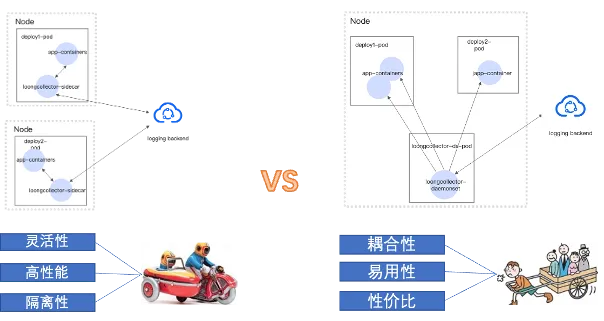
Sidecar部署模式 vs Daemonset部署模式
Sidecar部署模式 |
Daemonset部署 |
|
适用场景 |
1. Serverless容器环境
2. 高数据量场景
3. 安全容器运行时
4. 多租户隔离需求
|
|
优势特点 |
|
|
挑战 |
|
|
总结
Sidecar 部署方式的核心优势在于隔离性与灵活性:
- 每个 Pod 都拥有独立的采集器实例,实现强隔离与故障隔离,便于满足多租户与金融等合规场景的严格数据隔离要求;
- 可以针对不同应用定制采集配置,适配差异化需求;
- 采集能力随 Pod 数量线性扩展,能够从容应对高并发、高数据量或批处理场景,避免单节点瓶颈。
- 同时,Sidecar 能很好适配 Serverless/Virtual Kubelet、Knative 以及 Kata、gVisor 等安全容器运行时,在无法部署 DaemonSet 的环境下依然可用。
Sidecar 部署模式日志采集难点
K8s 元信息获取
- 无法直接复用 DaemonSet 的做法:Sidecar 若像 DaemonSet 一样通过 CRI/Docker 与 Runtime 交互,会对节点 Runtime 施加额外压力,且在 Serverless/安全容器等场景往往不可行或权限受限。
- 访问隔离与权限:通过 K8s API 获取元信息需要合适的 RBAC 权限与 API 速率控制,否则会引发权限和 API Server 压力问题。
生命周期管理
DaemonSet 模式下,LoongCollector-ds 能在节点侧完整感知业务 Pod 的生命周期;而在 Sidecar 模式中,LoongCollector 与业务容器同生共死,受 Pod 启停顺序与信号传递影响更大,无法保证容器之间的先后顺序。实际问题主要出现在两类场景:
- 有限生命的 Pod(短周期 Job):Pod 生命周期很短,LoongCollector 可能尚未完全 ready,业务即结束,容易造成日志缺失。
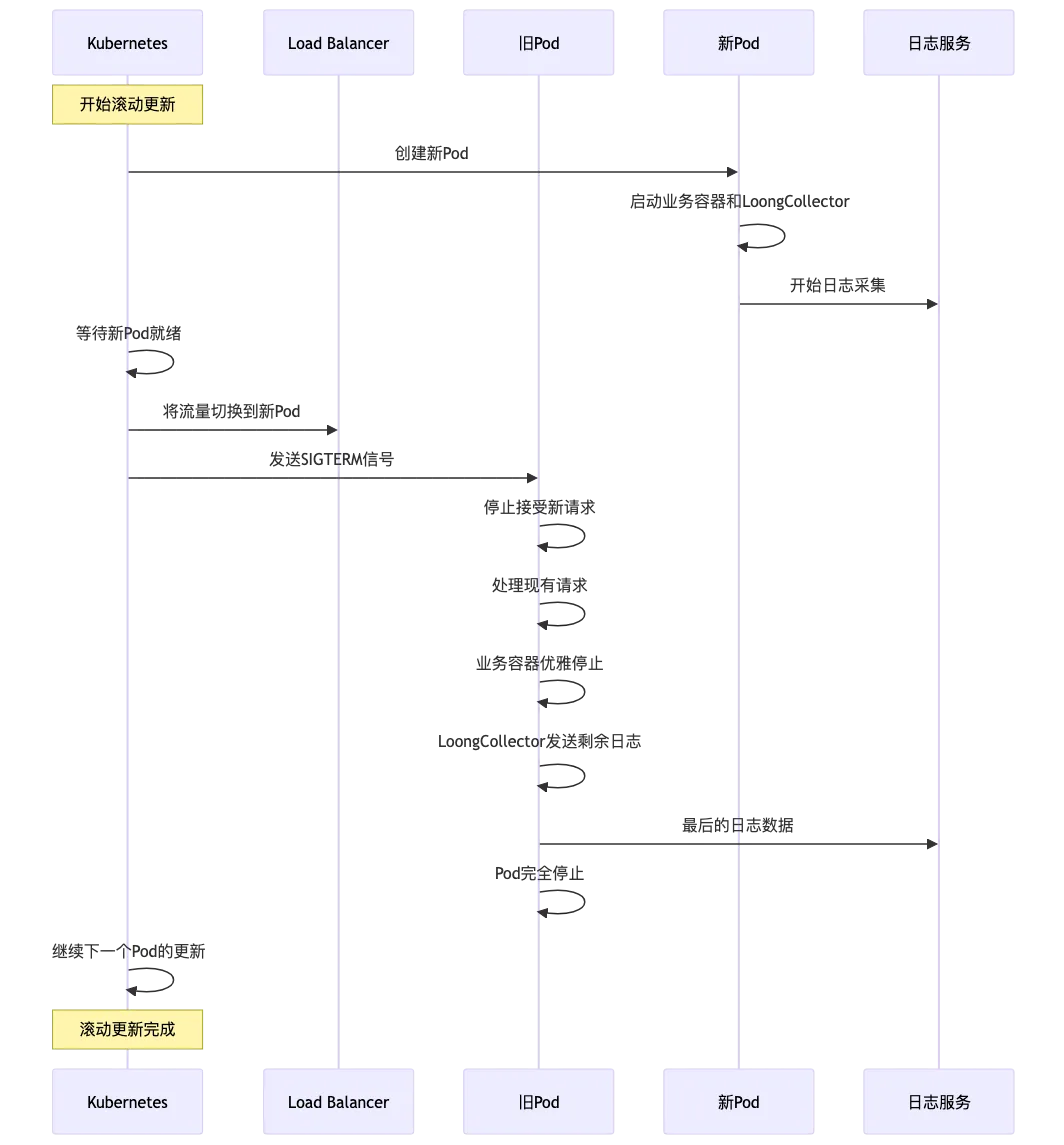
- 长周期运行的 Pod:在重启/滚动发布时,可能出现 LoongCollector 先停、业务后停,导致最后一段日志未能排空发送。
为理解为何上述场景更易丢数,需要看清根因:Pod 终止的信号传递路径与容器内 PID 1 的行为决定了能否“优雅”收尾。
为什么信号处理会影响日志完整性
Kubernetes 不直接向容器内所有进程发信号,而是由运行时仅向容器的 PID 1 发送停止信号。是否能够优雅退出,取决于 PID 1 是否正确转发信号并等待子进程退出;若不转发/不等待,往往在优雅期结束被 SIGKILL 强杀,出现日志未刷盘、缓冲未发送的问题。
Kubernetes 优雅停止流程
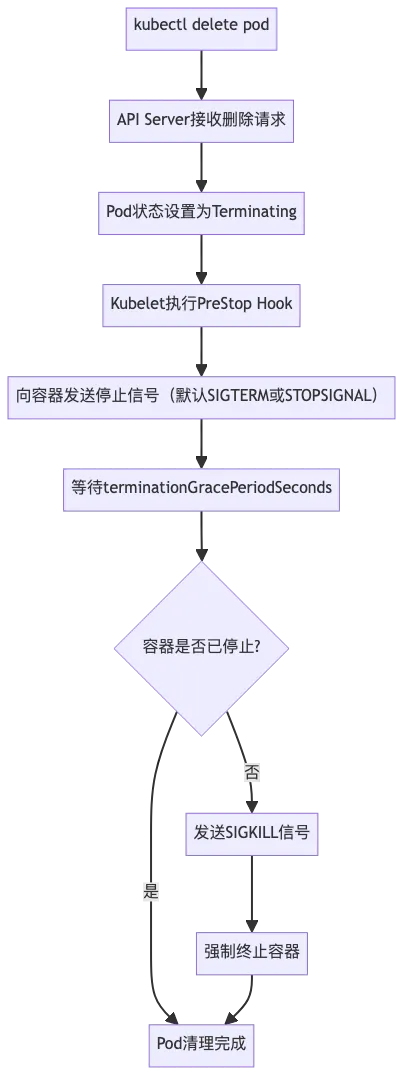
这意味着:在优雅期内,Sidecar 必须完成“停止新采集 → 读完当前文件 → 发送缓存数据 → 退出”。
PID 1 的职责要点
- kubelet 只向 PID 1 发信号;是否转发完全取决于 PID 1 的实现
- 不正确的 PID 1(如 shell 包装但不 exec)会导致真实业务进程收不到信号
- 若 PID 1 不 wait 子进程,容器可能被提前视为“已结束”,剩余日志来不及发送
常见错误用法
- Shell 包装未 exec(PID 1 成为 sh 而非业务进程)
# ❌
command: ["/bin/sh", "-c"]
args: ["myserver"]          # myserver 不是 PID 1
# ✅
command: ["/bin/sh", "-c"]
args: ["exec myserver"]     # 使用 exec 替换 shell 为业务进程
- 后台化/占位进程撑容器
# ❌
myserver &; tail -f /dev/null
# ✅(wrapper 负责转发与等待)
#!/bin/bash
_term() { kill -TERM "$APP_PID" 2>/dev/null || true; wait "$APP_PID"; }
trap _term SIGTERM SIGINT SIGQUIT
myserver & APP_PID=$!
wait "$APP_PID"
- 双叉(daemonize)未关闭
- 例如 Nginx 需使用
daemon off;以避免 fork 到后台导致 PID 1 不可控。
STOPSIGNAL 与镜像差异
容器运行时会优先读取镜像的 STOPSIGNAL。没有该配置时才默认使用 SIGTERM。因此:
- 部分镜像(如官方 Nginx)接收的是
SIGQUIT而非SIGTERM - 自研镜像可设置
STOPSIGNAL SIGUSR1等实现更合适的退出路径 - 使用第三方镜像前应检查其
STOPSIGNAL配置,避免信号处理预期不符
因此,在设计 Sidecar 的信号处理逻辑时,必须确认业务镜像的实际 STOPSIGNAL,并据此实现正确的转发与等待。
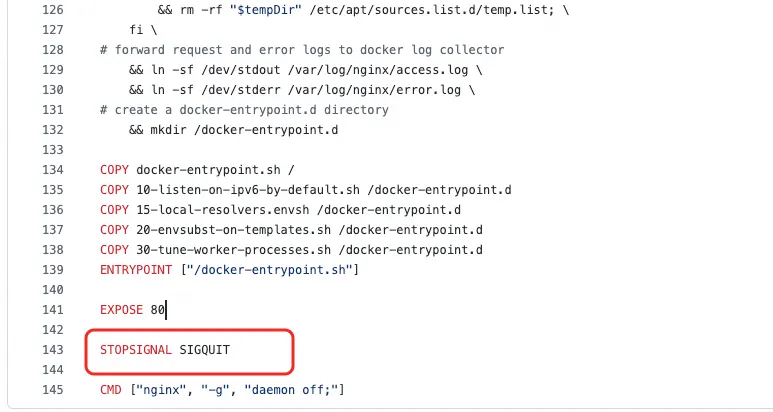
上图为 Nginx 镜像的 Dockerfile,指定使用 SIGQUIT 作为停止信号,此时仅拦截 SIGTERM 并无效果。
LoongCollector Sidecar 场景日志采集最佳部署实践
为解决上述挑战,本章系统给出 LoongCollector 在 Sidecar 场景的最佳部署实践,围绕生命周期与信号处理、原生 Sidecar 方案、资源与限流参数、采集完整性保障与可观测性,提供可直接落地的配置范式。
容器元信息富化方案
使用 Downward API:通过环境变量向 Sidecar 注入当前 Pod 的稳定元信息(如 pod_name、namespace、pod_uid、labels 的白名单子集),避免高频调用 Runtime 或 API Server。
- name: ALIYUN_LOG_ENV_TAGS
              value: "_pod_name_|_pod_ip_|_namespace_|_node_name_"

            # Pod信息注入
            - name: "_pod_name_"
              valueFrom:
                fieldRef:
                  fieldPath: metadata.name
            - name: "_pod_ip_"
              valueFrom:
                fieldRef:
                  fieldPath: status.podIP
            - name: "_namespace_"
              valueFrom:
                fieldRef:
                  fieldPath: metadata.namespace
            - name: "_node_name_"
              valueFrom:
                fieldRef:
                  fieldPath: spec.nodeName
生命周期管理方案
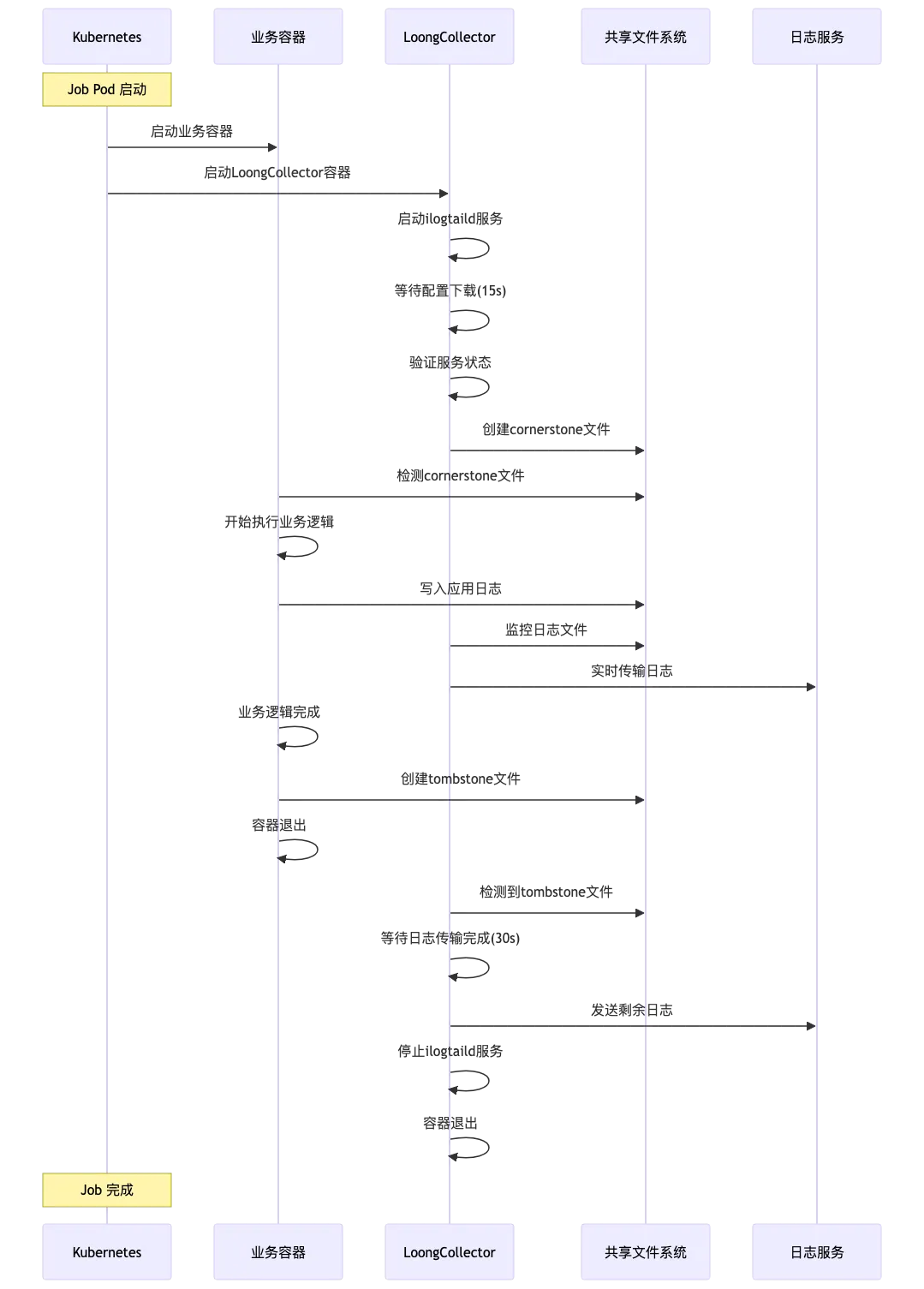
轻量级生命周期协作机制
短周期Job类型部署
详细配置解析
apiVersion: batch/v1
kind: Job
metadata:
  name: demo-job
spec:
  backoffLimit: 3
  activeDeadlineSeconds: 3600
  completions: 1
  parallelism: 1

  template:
    spec:
      restartPolicy: Never
      terminationGracePeriodSeconds: 300

      containers:
        # 业务容器
        - name: demo-job
          image: debian:bookworm-slim
          command: ["/bin/bash", "-c"]
          args:
            - |
              # 等待LoongCollector准备就绪
              echo "[$(date)] Business: Waiting for LoongCollector to be ready..."
              until [[ -f /tasksite/cornerstone ]]; do
                sleep 1
              done
              echo "[$(date)] Business: LoongCollector is ready, starting business logic"

              # 执行业务逻辑
              echo "Hello, World!" >> /app/logs/business.log

              # 保存退出码
              retcode=$?
              echo "[$(date)] Business: Task completed with exit code: $retcode"

              # 通知LoongCollector业务完成
              touch /tasksite/tombstone
              echo "[$(date)] Business: Tombstone created, exiting"

              exit $retcode

          # 资源限制
          resources:
            requests:
              cpu: "100m"
              memory: "128Mi"
            limits:
              cpu: "500"
              memory: "512Mi"

          # 卷挂载
          volumeMounts:
            - name: app-logs
              mountPath: /app/logs
            - name: tasksite
              mountPath: /tasksite
        # LoongCollector Sidecar容器
        - name: loongcollector
          image: aliyun-observability-release-registry.cn-hongkong.cr.aliyuncs.com/loongcollector/loongcollector:v3.1.1.0-20fa5eb-aliyun
          command: ["/bin/bash", "-c"]
          args:
            - |
              echo "[$(date)] LoongCollector: Starting initialization"

              # 启动LoongCollector服务
              /etc/init.d/loongcollectord start

              # 等待配置下载和服务就绪
              sleep 15

              # 验证服务状态
              if /etc/init.d/loongcollectord status; then
                echo "[$(date)] LoongCollector: Service started successfully"
                touch /tasksite/cornerstone
              else
                echo "[$(date)] LoongCollector: Failed to start service"
                exit 1
              fi

              # 等待业务容器完成
              echo "[$(date)] LoongCollector: Waiting for business container to complete"
              until [[ -f /tasksite/tombstone ]]; do
                sleep 2
              done

              echo "[$(date)] LoongCollector: Business completed, waiting for log transmission"
              # 给足够时间传输剩余日志
              sleep 30

              echo "[$(date)] LoongCollector: Stopping service"
              /etc/init.d/loongcollectord stop

              echo "[$(date)] LoongCollector: Shutdown complete"

          # 健康检查
          livenessProbe:
            exec:
              command: ["/etc/init.d/loongcollectord", "status"]
            initialDelaySeconds: 30
            periodSeconds: 10
            timeoutSeconds: 5
            failureThreshold: 3

          # 资源配置
          resources:
            requests:
              cpu: "100m"
              memory: "128Mi"
            limits:
              cpu: "500m"
              memory: "512Mi"

          # 环境变量配置
          env:
            - name: ALIYUN_LOGTAIL_USER_ID
              value: "your-user-id"
            - name: ALIYUN_LOGTAIL_USER_DEFINED_ID
              value: "your-user-defined-id"
            - name: ALIYUN_LOGTAIL_CONFIG
              value: "/etc/ilogtail/conf/cn-hongkong/ilogtail_config.json"
            - name: ALIYUN_LOG_ENV_TAGS
              value: "_pod_name_|_pod_ip_|_namespace_|_node_name_"

            # Pod信息注入
            - name: "_pod_name_"
              valueFrom:
                fieldRef:
                  fieldPath: metadata.name
            - name: "_pod_ip_"
              valueFrom:
                fieldRef:
                  fieldPath: status.podIP
            - name: "_namespace_"
              valueFrom:
                fieldRef:
                  fieldPath: metadata.namespace
            - name: "_node_name_"
              valueFrom:
                fieldRef:
                  fieldPath: spec.nodeName

          # 卷挂载
          volumeMounts:
            - name: app-logs
              mountPath: /app/logs
              readOnly: true
            - name: tasksite
              mountPath: /tasksite
            - name: tz-config
              mountPath: /etc/localtime
              readOnly: true

      # 卷定义
      volumes:
        - name: app-logs
          emptyDir: {}
        - name: tasksite
          emptyDir:
            medium: Memory
            sizeLimit: "10Mi"
        - name: tz-config
          hostPath:
            path: /usr/share/zoneinfo/Asia/Shanghai
协作流程
长周期任务部署
详细配置解析
apiVersion: apps/v1
kind: Deployment
metadata:
  name: nginx-demo
  namespace: production
  labels:
    app: nginx-demo
    version: v1.0.0
spec:
  replicas: 3
  strategy:
    type: RollingUpdate
    rollingUpdate:
      maxUnavailable: 1
      maxSurge: 1
  selector:
    matchLabels:
      app: nginx-demo
  template:
    metadata:
      labels:
        app: nginx-demo
        version: v1.0.0
    spec:
      terminationGracePeriodSeconds: 600  # 10分钟优雅停止时间

      containers:
        # 业务容器 - Web应用
        - name: nginx-demo
          image: nginx:1.21-alpine
          # 启动命令和信号处理
          command: ["/bin/sh", "-c"]
          args:
            - |
              # 定义信号处理函数
              _term_handler() {
                  echo "[$(date)] [nginx-demo] Caught SIGTERM, starting graceful shutdown..."

                  # 发送QUIT信号给Nginx进行优雅停止
                  if [ -n "$NGINX_PID" ]; then
                      kill -QUIT "$NGINX_PID" 2>/dev/null || true
                      echo "[$(date)] [nginx-demo] Sent SIGQUIT to Nginx PID: $NGINX_PID"

                      # 等待Nginx优雅停止
                      wait "$NGINX_PID"
                      EXIT_CODE=$?
                      echo "[$(date)] [nginx-demo] Nginx stopped with exit code: $EXIT_CODE"
                  fi

                  # 通知LoongCollector业务容器已停止
                  echo "[$(date)] [nginx-demo] Writing tombstone file"
                  touch /tasksite/tombstone

                  exit $EXIT_CODE
              }

              # 注册信号处理
              trap _term_handler SIGTERM SIGINT SIGQUIT
              # 等待LoongCollector准备就绪
              echo "[$(date)] [nginx-demo]: Waiting for LoongCollector to be ready..."
              until [[ -f /tasksite/cornerstone ]]; do
                sleep 1
              done
              echo "[$(date)] [nginx-demo]: LoongCollector is ready, starting business logic"

              # 启动Nginx
              echo "[$(date)] [nginx-demo] Starting Nginx..."
              nginx -g 'daemon off;' &
              NGINX_PID=$!
              echo "[$(date)] [nginx-demo] Nginx started with PID: $NGINX_PID"

              # 等待Nginx进程
              wait $NGINX_PID
              EXIT_CODE=$?

              # 非信号导致的退出也要通知LoongCollector
              if [ ! -f /tasksite/tombstone ]; then
                  echo "[$(date)] [nginx-demo] Unexpected exit, writing tombstone"
                  touch /tasksite/tombstone
              fi

              exit $EXIT_CODE

          # 资源配置
          resources:
            requests:
              cpu: "200m"
              memory: "256Mi"
            limits:
              cpu: "1000m"
              memory: "1Gi"

          # 卷挂载
          volumeMounts:
            - name: nginx-logs
              mountPath: /var/log/nginx
            - name: tasksite
              mountPath: /tasksite
            - name: tz-config
              mountPath: /etc/localtime
              readOnly: true
        # LoongCollector Sidecar容器
        - name: loongcollector
          image: aliyun-observability-release-registry.cn-shenzhen.cr.aliyuncs.com/loongcollector/loongcollector:v3.1.1.0-20fa5eb-aliyun
          command: ["/bin/bash", "-c"]
          args:
            - |
              echo "[$(date)] LoongCollector: Starting initialization"

              # 启动LoongCollector服务
              /etc/init.d/loongcollectord start

              # 等待配置下载和服务就绪
              sleep 15

              # 验证服务状态
              if /etc/init.d/loongcollectord status; then
                echo "[$(date)] LoongCollector: Service started successfully"
                touch /tasksite/cornerstone
              else
                echo "[$(date)] LoongCollector: Failed to start service"
                exit 1
              fi

              # 等待业务容器完成
              echo "[$(date)] LoongCollector: Waiting for business container to complete"
              until [[ -f /tasksite/tombstone ]]; do
                sleep 2
              done

              echo "[$(date)] LoongCollector: Business completed, waiting for log transmission"
              # 给足够时间传输剩余日志
              sleep 30

              echo "[$(date)] LoongCollector: Stopping service"
              /etc/init.d/loongcollectord stop

              echo "[$(date)] LoongCollector: Shutdown complete"

          # 健康检查
          livenessProbe:
            exec:
              command: ["/etc/init.d/loongcollectord", "status"]
            initialDelaySeconds: 30
            periodSeconds: 10
            timeoutSeconds: 5
            failureThreshold: 3
          # 资源配置
          resources:
            requests:
              cpu: "100m"
              memory: "128Mi"
            limits:
              cpu: "2000m"
              memory: "2048Mi"

          # 环境变量配置
          env:
            - name: ALIYUN_LOGTAIL_USER_ID
              value: "1234567890"
            - name: ALIYUN_LOGTAIL_USER_DEFINED_ID
              value: "nginx-demo-cluster"
            - name: ALIYUN_LOGTAIL_CONFIG
              value: "/etc/ilogtail/conf/cn-zhenzhen/ilogtail_config.json"

            # 启用全量排空模式,确保Pod停止时发送所有日志
            - name: enable_full_drain_mode
              value: "true"

            # 追加 Pod 环境信息作为日志标签
            - name: "ALIYUN_LOG_ENV_TAGS"
              value: "_pod_name_|_pod_ip_|_namespace_|_node_name_|_node_ip_"
            # 获取 Pod 和 Node 的信息
            - name: "_pod_name_"
              valueFrom:
                fieldRef:
                  fieldPath: metadata.name
            - name: "_pod_ip_"
              valueFrom:
                fieldRef:
                  fieldPath: status.podIP
            - name: "_namespace_"
              valueFrom:
                fieldRef:
                  fieldPath: metadata.namespace
            - name: "_node_name_"
              valueFrom:
                fieldRef:
                  fieldPath: spec.nodeName
            - name: "_node_ip_"
              valueFrom:
                fieldRef:
                  fieldPath: status.hostIP

          # 卷挂载
          volumeMounts:
            - name: nginx-logs
              mountPath: /var/log/nginx
              readOnly: true
            - name: tasksite
              mountPath: /tasksite
            - name: tz-config
              mountPath: /etc/localtime
              readOnly: true

      # 卷定义
      volumes:
        - name: nginx-logs
          emptyDir: {}
        - name: tasksite
          emptyDir:
            medium: Memory
            sizeLimit: "50Mi"
        - name: tz-config
          hostPath:
            path: /usr/share/zoneinfo/Asia/Shanghai
PS: 本方案中 sidecar 的 loongcollector 不在外层脚本显式 trap SIGTERM,原因是生命周期协调由业务容器主导:业务通过 cornerstone/tombstone 与 loongcollector sidecar 协作,loongcollector 仅在检测到 tombstone 后执行排空并有序停止。
协作流程
利用原生 Sidecar 方案进行生命周期管理
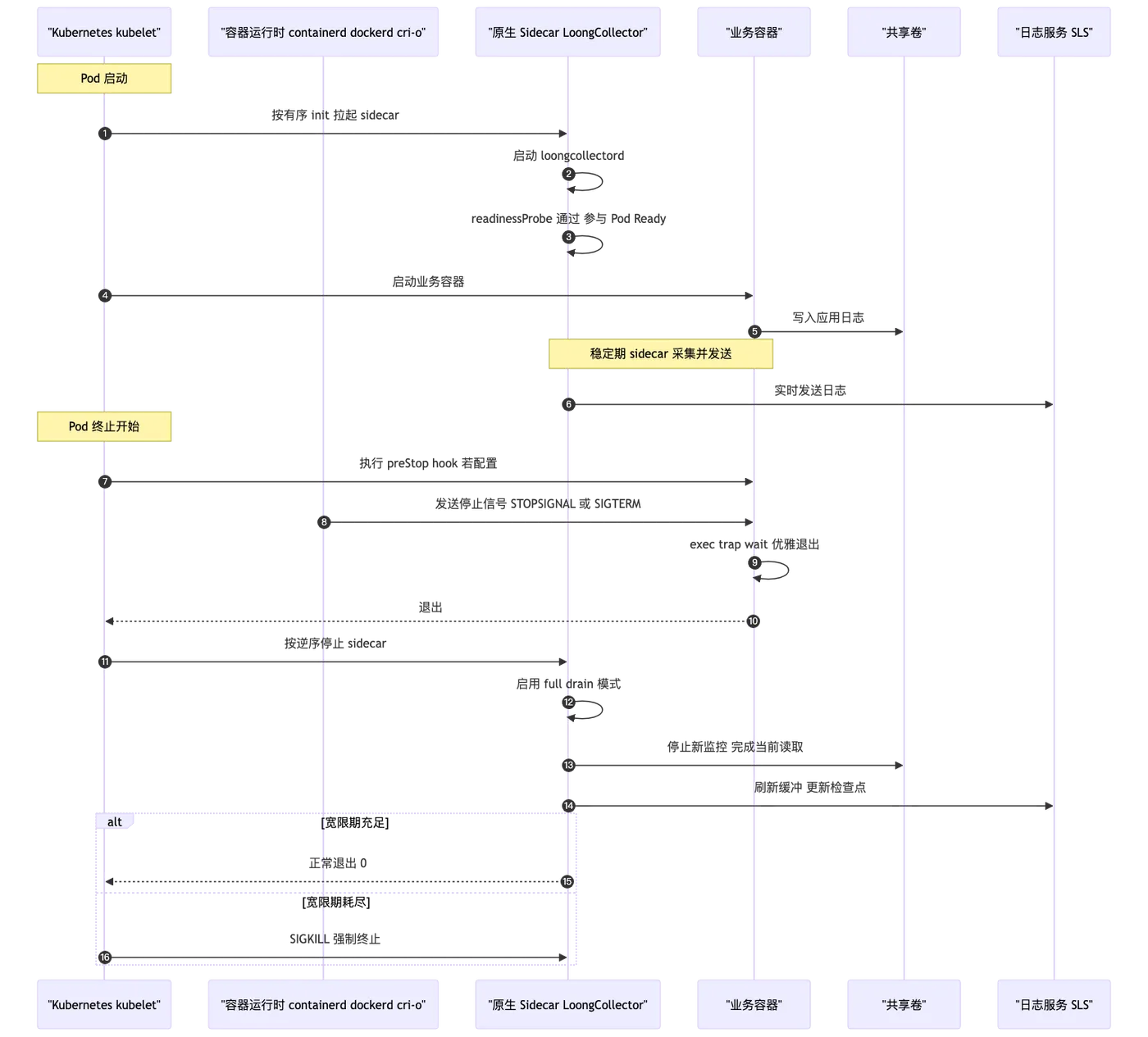
- Kubernetes v1.29 起默认启用原生 Sidecar 特性,v1.33 起稳定;无需手动开启即可使用。
- 表达方式:在
initContainers中定义一个restartPolicy: Always的容器,即为“原生 sidecar”。 - 兼容性:若集群版本较低或未启用该能力,可继续使用“普通多容器 Pod”方式部署,但需自行保证顺序与协作。
原生 Sidecar 能带来什么
- 有序启动:sidecar 以“可重启 init 容器”的形式按顺序拉起,可与其他 init 容器组合实现复杂初始化流程。
- Pod 就绪联动:若为 sidecar 配置
readinessProbe,其结果可参与 Pod Ready 判定,避免“业务先跑、采集未就绪”。 - 终止顺序:Pod 终止时,kubelet 会先让主应用容器完全停止,再按定义顺序的逆序停止 sidecar,减少“sidecar 先停”的风险。
注意:从 K8s 视角,若主容器耗尽了全部优雅事件,sidecar 仍可能收到 SIGTERM→SIGKILL 被快速终止,因此仍需结合足够的 terminationGracePeriodSeconds 。
部署样例
在原生 Sidecar 场景中,无需区分任务的类型,因为原生 Sidercar 的机制保证了,loongcollector 一定是先启动,最后退出。这里以一个Deployment 为例子:
apiVersion: apps/v1
kind: Deployment
metadata:
  name: demo
  labels:
    app: demo
spec:
  replicas: 1
  selector:
    matchLabels:
      app: demo
  template:
    metadata:
      labels:
        app: demo
    spec:
      terminationGracePeriodSeconds: 300
      # 原生 sidecar:以可重启 init 容器方式声明
      initContainers:
        - name: loongcollector
          image: aliyun-observability-release-registry.cn-hongkong.cr.aliyuncs.com/loongcollector/loongcollector:v3.1.1.0-20fa5eb-aliyun
          # 关键配置
          restartPolicy: Always
          # 配置 startupProbe, 延迟20s进行探测,保证LoongCollector配置拉取完成
          startupProbe:
            exec: { command: ["/etc/init.d/loongcollectord", "status"] }
            initialDelaySeconds: 20
            periodSeconds: 3
            failureThreshold: 5
          # 环境变量配置
          env:
            - name: ALIYUN_LOGTAIL_USER_ID
              value: "your-user-id"
            - name: ALIYUN_LOGTAIL_USER_DEFINED_ID
              value: "your-user-defined-id"
            - name: ALIYUN_LOGTAIL_CONFIG
              value: "/etc/ilogtail/conf/cn-hongkong/ilogtail_config.json"
            # 启用全量排空模式,确保Pod停止时发送所有日志
            - name: enable_full_drain_mode
              value: "true"
            # 追加 Pod 环境信息作为日志标签
            - name: "ALIYUN_LOG_ENV_TAGS"
              value: "_pod_name_|_pod_ip_|_namespace_|_node_name_|_node_ip_"
            # 获取 Pod 和 Node 的信息
            - name: "_pod_name_"
              valueFrom:
                fieldRef:
                  fieldPath: metadata.name
            - name: "_pod_ip_"
              valueFrom:
                fieldRef:
                  fieldPath: status.podIP
            - name: "_namespace_"
              valueFrom:
                fieldRef:
                  fieldPath: metadata.namespace
            - name: "_node_name_"
              valueFrom:
                fieldRef:
                  fieldPath: spec.nodeName
            - name: "_node_ip_"
              valueFrom:
                fieldRef:
                  fieldPath: status.hostIP
          volumeMounts:
            - name: demo-logs
              mountPath: /app/logs
              readOnly: true
      containers:
        # 业务容器
        - name: demo-job
          image: debian:bookworm-slim
          command: ["/bin/bash", "-c"]
          args:
            - |
              _term_handler() {
                  echo "[$(date)] Caught SIGTERM, forwarding to demo ..."
                  sleep 10
                  exit 0
              }
              trap _term_handler SIGQUIT SIGTERM SIGINT
              while true; do
                  echo "hello world ..." >> /app/logs/demo.log
                  sleep 1
              done
          # 资源限制
          resources:
            requests:
              cpu: "100m"
              memory: "128Mi"
            limits:
              cpu: "500"
              memory: "512Mi"
          volumeMounts:
            - name: demo-logs
              mountPath: /app/logs
      volumes:
        - name: demo-logs
          emptyDir: {}
影响日志采集完整性的关键配置说明
确保日志采集的完整性是LoongCollector Sidecar部署的核心目标。以下配置参数直接影响日志数据的完整性和可靠性。
LoongCollector 资源配置
在大数据量场景下,合理的资源配置是保证端上采集性能的关键基础。关键配置参数如下:
# 根据日志产生速率配置CPU、内存资源
resources:
  limits:
    cpu: "2000m"
    memory: "2Gi"
# 影响采集性能的参数
env:
  - name: cpu_usage_limit
    value: "2"
  - name: mem_usage_limit
    value: "2048"
  - name: max_bytes_per_sec
    value: "209715200"
  - name: process_thread_count
    value: "8"
  - name: send_request_concurrency
    value: "20"
具体数据量与对应配置关系可以参考文档。
服务端 Quota 配置
服务端quota限制或网络异常会导致端上数据发送受阻,从而反压到文件采集侧,影响日志完整性。推荐使用CloudLens for SLS监控Project资源配额
首次采集配置优化
Pod启动时的首次文件采集策略直接影响数据完整性,特别是在高速数据写入场景。

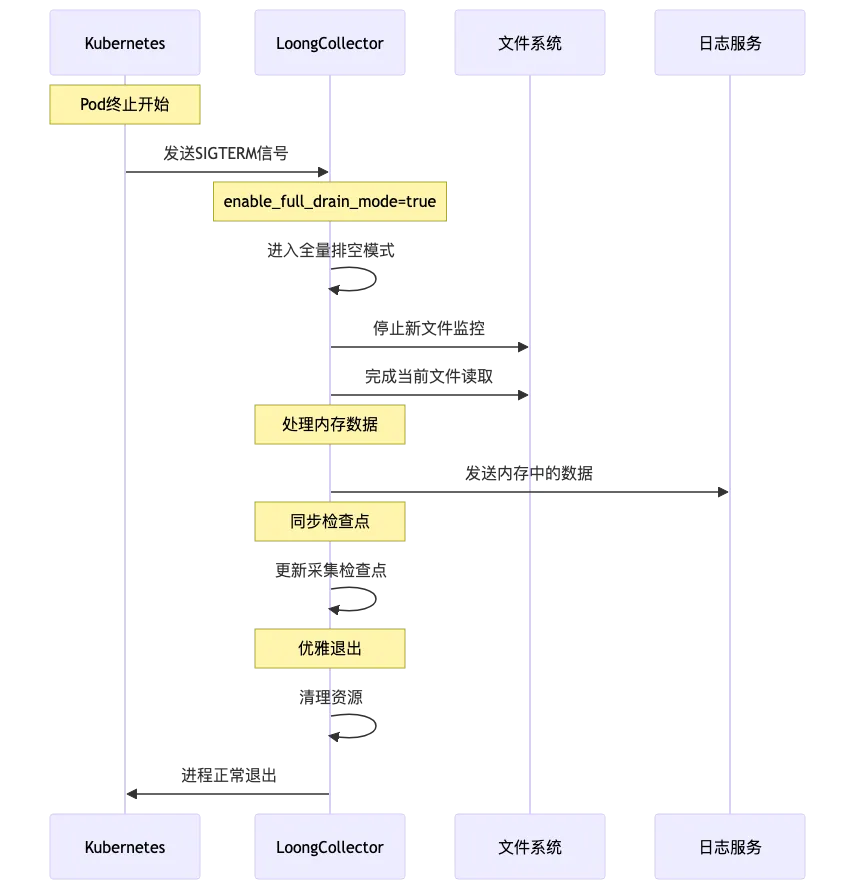
enable_full_drain_mode
这是确保数据完整性的关键参数,保证LoongCollector在收到SIGTERM信号时完成所有数据采集和发送。
# 影响采集完整性的参数
env:
  - name: enable_full_drain_mode
    value: "true"                          # 启用全量排空模式
总结
LoongCollector 的 Sidecar 部署适用于强隔离、精细化配置与弹性扩展场景。要实现稳定、完整的采集,关键在于落实生命周期与信号方案,并配套优化端侧与服务端参数。本文提供两条可选路径:轻量化协作和原生 Sidecar 方案(v1.29+ 可用,v1.33 稳定且默认开启)。按需选用或组合,可在 Kubernetes 中稳定落地 LoongCollector Sidecar,构建可靠且高效的日志采集链路。