问题描述
API Management服务的自动缩放通过门户配置非常的便捷。但是如果使用Terraform呢?
在官网关于APIM模板(azurerm_api_management)的介绍中,并没有发现可以设置auto scale的参数。那么,应该如何配置呢?

问题解答
由于Azure API Management(APIM)的自动缩放功能是通过Azure Monitor来实现的,作为一个单独的自动缩放设置资源来实现的。
Teffaform是基于azurerm_monitor_autoscale_setting来实现Azure APIM自动缩放功能的。
模板结构如下(完整的模板见附件):
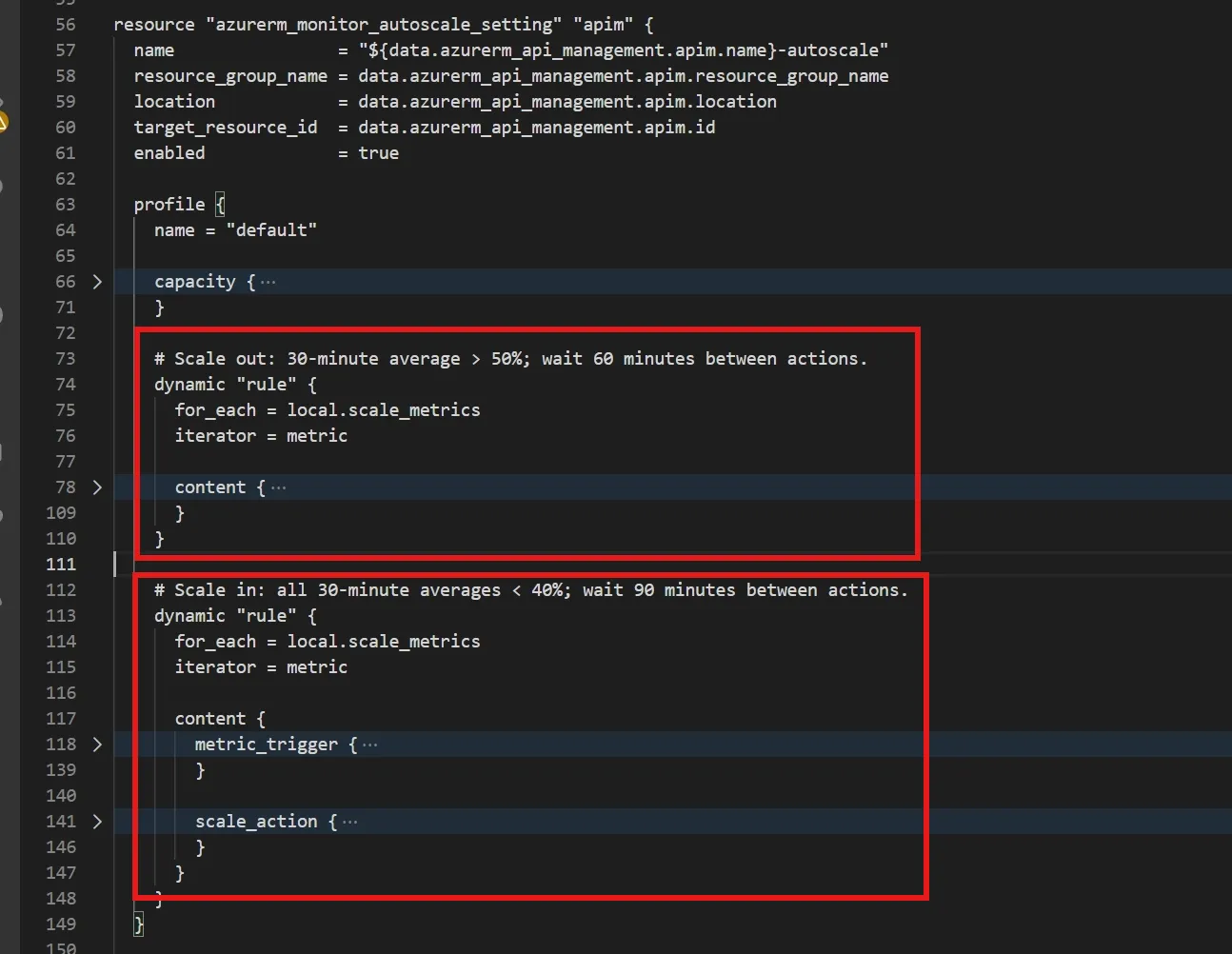
在准备好模板之后,需要先登录到中国区Azure云( 先设置云环境 az cloud set --name AzureChinaCloud 后,在使用 az login 登录)。
随后,初始化 Terraform 文件并生成执行计划。
#初始化
terraform init
#验证
terraform validate
#生成执行计划文件
terraform plan -out=apim-autoscale.tfplan
#开始执行修改
terraform apply apim-autoscale.tfplan
初始化会下载 Provider,并生成依赖锁文件。校验通过只表示配置结构有效,不代表云端权限、指标和配额已验证。部署前,先在门户检查目标 APIM 是否已有自动缩放设置。
注意:如果在生成Plan文件的时候遇见如下错误,这是因为在Terraform模板文件中没有执行云环境有关。在Provider "azurerm"内容中配置 environment = "china" 就可以解决此问题。
Planning failed. Terraform encountered an error while generating this plan.
│ Error: building account: could not acquire access token to parse claims: running Azure CLI:
exit status 1: ERROR: V2Error: invalid_resource AADSTS500011:
The resource principal named https://graph.microsoft.com was not found in the tenant named ********-****-****-****-************.
This can happen if the application has not been installed by the administrator of the tenant or consented to by any user in the tenant.
 You might have sent your authentication request to the wrong tenant.
Trace ID:*********** Timestamp: 2026-10-28 06:43:12Z.
Status: Response_Status.Status_IncorrectConfiguration, Error code: 3399614475, Tag: 508634112
│ Run the command below to authenticate interactively; additional arguments may be added as needed:
│ az logout
│ az login --tenant "****************" --scope "https://graph.microsoft.com/.default"
│   with provider["registry.terraform.io/hashicorp/azurerm"],
│   on autoscale.tf line 12, in provider "azurerm":
│   12: provider "azurerm" {
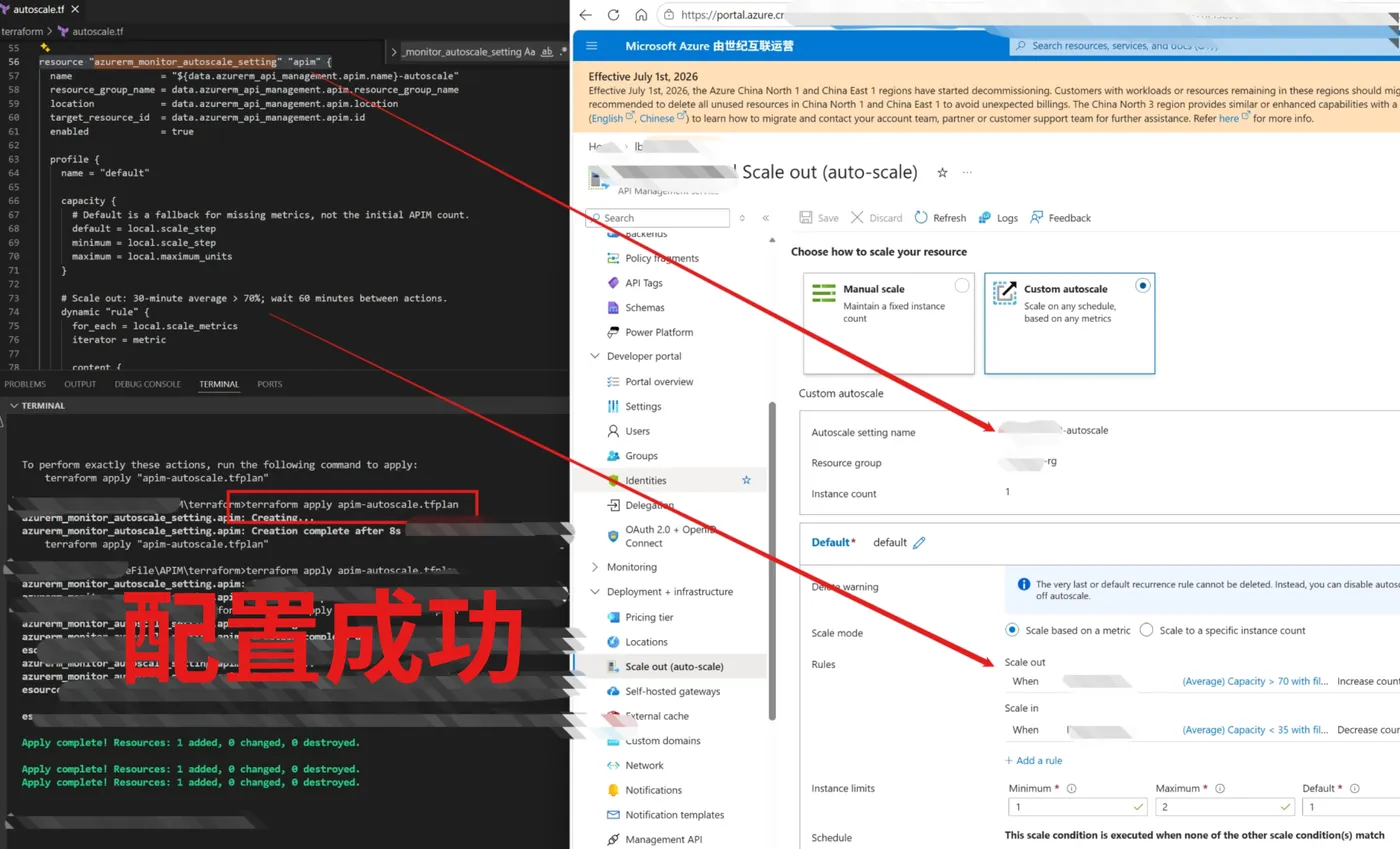
执行完成后,可APIM门户中查看是否生效。
附录:完整的Teffaform模板
terraform {
  required_version = ">= 1.5.0"
  required_providers {
    azurerm = {
      source  = "hashicorp/azurerm"
      version = "~> 5.11"
    }
  }
}
provider "azurerm" {
  environment = "china"
  features {}
  subscription_id = "**********  your subscription id"
  # Authenticate externally; do not store credentials in this file.
}
# Read only: this configuration does not create, import, or manage the APIM itself.
# Existing ID: /subscriptions/**********/resourceGroups/lb-*******-rg/providers/Microsoft.ApiManagement/service/lb**********02
data "azurerm_api_management" "apim" {
  name                = "your apim name **********
  resource_group_name = "your reousrce group **********
}
variable "apim_scale_step" {
  type        = number
  description = "Units per scaling action. If APIM explicitly selects availability zones, set this to the number of selected zones; otherwise leave 1."
  default     = 1
  validation {
    condition     = var.apim_scale_step >= 1 && var.apim_scale_step <= 3 && floor(var.apim_scale_step) == var.apim_scale_step
    error_message = "apim_scale_step must be an integer from 1 to 3 matching the explicit zone count, or 1 for automatic/no explicit zones."
  }
}
locals {
  apim_tier = split("_", data.azurerm_api_management.apim.sku_name)[0]
  is_v2     = endswith(lower(local.apim_tier), "v2")
  # Capacity is not supported on v2. Scale out on either CPU or memory;
  # Azure Monitor requires all scale-in rules to be satisfied before scaling in.
  scale_metrics = local.is_v2 ? ["CpuPercent_Gateway", "MemoryPercent_Gateway"] : ["Capacity"]
  # This provider's APIM data source does not export zones. For explicitly
  # selected zones, set apim_scale_step to the zone count before applying.
  scale_step = var.apim_scale_step
  # Preserve the requested cap of 5 where supported; classic Basic/Standard
  # have lower limits. Round down to a valid explicit-zone multiple.
  requested_maximum = min(5, lookup({ Basic = 2, Standard = 4 }, local.apim_tier, 5))
  maximum_units     = floor(local.requested_maximum / local.scale_step) * local.scale_step
}
resource "azurerm_monitor_autoscale_setting" "apim" {
  name                = "${data.azurerm_api_management.apim.name}-autoscale"
  resource_group_name = data.azurerm_api_management.apim.resource_group_name
  location            = data.azurerm_api_management.apim.location
  target_resource_id  = data.azurerm_api_management.apim.id
  enabled             = true
  profile {
    name = "default"
    capacity {
      # Default is a fallback for missing metrics, not the initial APIM count.
      default = local.scale_step
      minimum = local.scale_step
      maximum = local.maximum_units
    }
    # Scale out: 30-minute average > 70%; wait 60 minutes between actions.
    dynamic "rule" {
      for_each = local.scale_metrics
      iterator = metric
      content {
        metric_trigger {
          metric_name              = metric.value
          metric_namespace         = "Microsoft.ApiManagement/service"
          metric_resource_id       = data.azurerm_api_management.apim.id
          divide_by_instance_count = false
          time_grain               = "PT1M"
          statistic                = "Average"
          time_window              = "PT30M"
          time_aggregation         = "Average"
          operator                 = "GreaterThan"
          threshold                = 70
          # Only the primary region can be autoscaled. v2 metrics have no dimensions.
          dynamic "dimensions" {
            for_each = local.is_v2 ? [] : [data.azurerm_api_management.apim.location]
            content {
              name     = "Location"
              operator = "Equals"
              values   = [dimensions.value]
            }
          }
        }
        scale_action {
          direction = "Increase"
          type      = "ChangeCount"
          value     = tostring(local.scale_step)
          cooldown  = "PT60M"
        }
      }
    }
    # Scale in: all 30-minute averages < 35%; wait 90 minutes between actions.
    dynamic "rule" {
      for_each = local.scale_metrics
      iterator = metric
      content {
        metric_trigger {
          metric_name              = metric.value
          metric_namespace         = "Microsoft.ApiManagement/service"
          metric_resource_id       = data.azurerm_api_management.apim.id
          divide_by_instance_count = false
          time_grain               = "PT1M"
          statistic                = "Average"
          time_window              = "PT30M"
          time_aggregation         = "Average"
          operator                 = "LessThan"
          threshold                = 35
          dynamic "dimensions" {
            for_each = local.is_v2 ? [] : [data.azurerm_api_management.apim.location]
            content {
              name     = "Location"
              operator = "Equals"
              values   = [dimensions.value]
            }
          }
        }
        scale_action {
          direction = "Decrease"
          type      = "ChangeCount"
          value     = tostring(local.scale_step)
          cooldown  = "PT90M"
        }
      }
    }
  }
  lifecycle {
    precondition {
      condition     = contains(["Basic", "Standard", "Premium", "BasicV2", "StandardV2", "PremiumV2"], local.apim_tier)
      error_message = "Autoscale requires a supported dedicated APIM tier; Developer and Consumption are not supported by this configuration."
    }
    precondition {
      condition     = local.maximum_units >= local.scale_step
      error_message = "The maximum unit count must accommodate the configured availability zones."
    }
  }
}
# If an autoscale setting already exists for this APIM, import that setting
# into azurerm_monitor_autoscale_setting.apim instead of creating a second one.
# Protect Terraform state: data sources can include sensitive APIM properties.
参考资料
APIM 自动缩放 : https://learn.microsoft.com/azure/api-management/api-management-howto-autoscale
Terraform 自动缩放资源 : https://registry.terraform.io/providers/hashicorp/azurerm/latest/docs/resources/monitor_autoscale_setting
当在复杂的环境中面临问题,格物之道需:浊而静之徐清,安以动之徐生。 云中,恰是如此!