零、写在前面
📌 本系列教程完整目录:ArcGIS JS 系列基础教程(100个项目常用热门功能)
💡 在线示例:完整可运行的 HTML 示例,无需任何环境配置,可直接在浏览器中打开体验
🗂️ 专栏导航:收藏 + 关注,专栏文章第一时间送达❤️ 一键三连:点赞(给教程充电)+ 评论(提问必回)+ 收藏(下次再看)
一、功能介绍
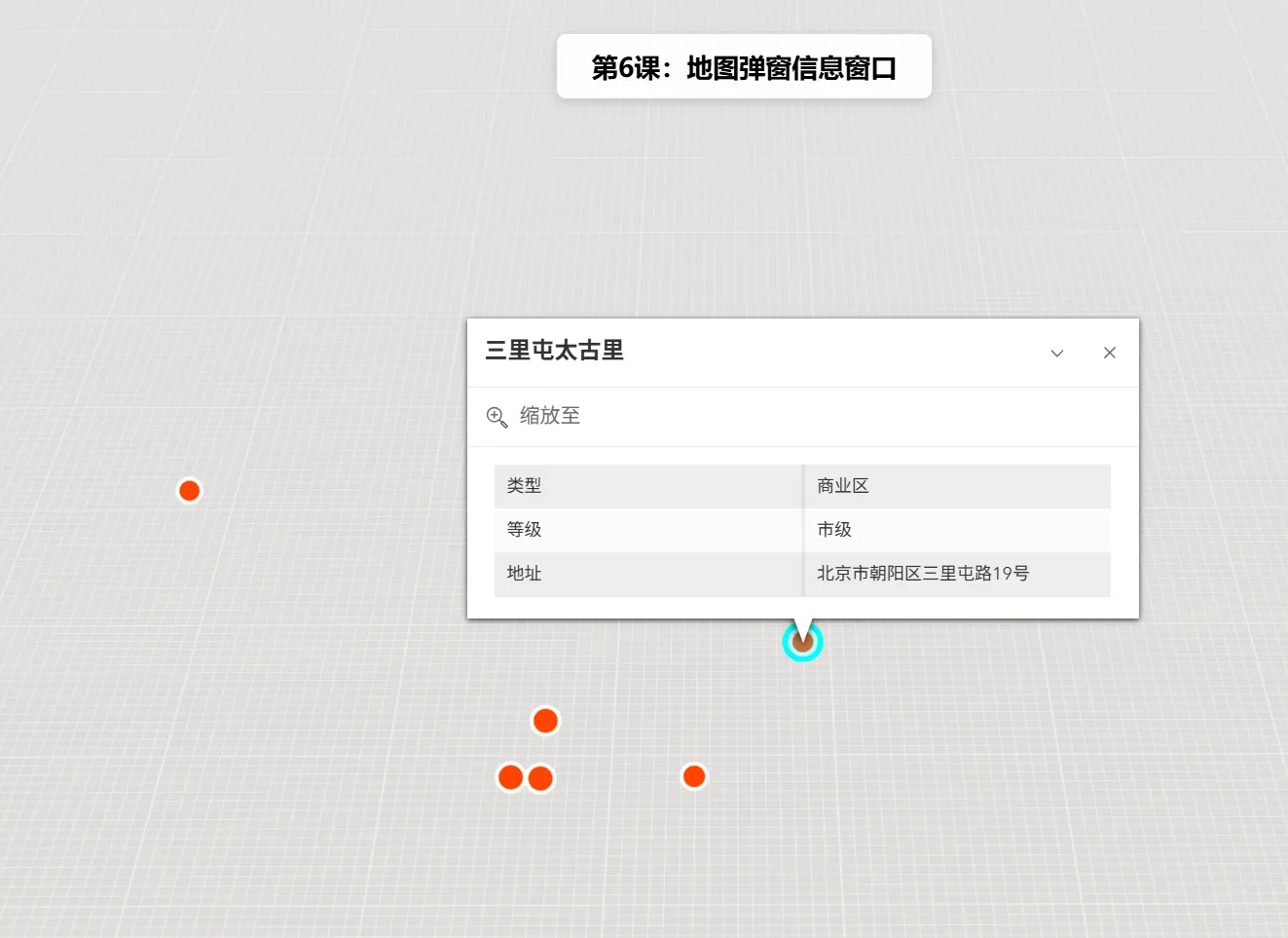
弹窗(Popup)是 ArcGIS JS 中用于在地图上展示要素详细信息的交互式窗口。当用户点击地图上的某个要素(如建筑物、兴趣点、行政区划等)时,弹窗会显示该要素的属性信息,如名称、面积、人口、类型等。支持自定义模板、动态字段、附件查看等高级功能。
二、功能实现
使用
MapView的popup属性配置弹窗模板,通过popupTemplate定义字段显示格式。关键步骤:
- 创建
Graphic并设置popupTemplate- 将
Graphic添加到GraphicsLayer- 配置
MapView.popup启用点击触发弹窗三、功能应用
- 城市信息展示:点击建筑物显示建筑名称、楼层数、用途等信息。
- 兴趣点(POI)查询:点击餐厅、加油站等显示详细信息、评分、联系方式。
- 行政区划查询:点击省/市/区县显示区域面积、人口、GDP 等数据。
- 数据采集:弹窗内支持编辑和提交表单,实现现场数据采集。
四、核心代码
<!DOCTYPE html>
<html lang="zh-CN">
<head>
 <meta charset="UTF-8">
 <meta name="viewport" content="width=device-width, initial-scale=1.0">
 <title>第6课:地图弹窗信息窗口</title>
 <link rel="stylesheet" href="https://js.arcgis.com/5.0/esri/themes/light/main.css">
 <script type="module" src="https://js.arcgis.com/5.0/"></script>
 <style>
     body {
        margin: 0; padding: 0; font-family: "Microsoft YaHei", sans-serif; }
     #mapContainer {
        width: 100vw; height: 100vh; }
     .page-title {

         position: absolute; top: 20px; left: 50%; transform: translateX(-50%);
         background: rgba(255,255,255,0.95); padding: 10px 24px; border-radius: 6px;
         font-size: 18px; font-weight: bold; z-index: 100;
         box-shadow: 0 2px 8px rgba(0,0,0,0.15);
     }
 </style>
</head>
<body>
<h1 class="page-title">第6课:地图弹窗信息窗口</h1>
<div id="mapContainer"></div>
<script type="module">
 const Map = await $arcgis.import("@arcgis/core/Map.js");
 const MapView = await $arcgis.import("@arcgis/core/views/MapView.js");
 const Graphic = await $arcgis.import("@arcgis/core/Graphic.js");
 const GraphicsLayer = await $arcgis.import("@arcgis/core/layers/GraphicsLayer.js");
 const getTianditu = await $arcgis.import("https://openlayers.vip/examples/resources/tianditu.js");
 // 获取天地图底图
 const vecLayers = getTianditu.default({
        type: "vec_w" });
 // 创建地图
 const map = new Map({

     basemap: {
        baseLayers: [vecLayers.base, vecLayers.anno] }
 });
 // 创建MapView(2D视图,原生支持popup和constraints)
 const view = new MapView({

     container: "mapContainer",
     map: map,
     center: [116.4074, 39.9042],
     zoom: 12,
     popup: {

         dockEnabled: true,
         dockOptions: {

             position: "bottom-left",
             buttonEnabled: false,
             collapseEnabled: false
         }
     }
 });
 // 创建GraphicsLayer存储要素
 const graphicsLayer = new GraphicsLayer();
 map.add(graphicsLayer);
 // 示例数据:北京主要地标
 const landmarks = [
     {

         name: "故宫博物院",
         type: "景区",
         level: "5A级",
         address: "北京市东城区景山前街4号",
         coords: [116.3975, 39.9182]
     },
     {

         name: "天安门广场",
         type: "广场",
         level: "国家级",
         address: "北京市东城区东长安街",
         coords: [116.3975, 39.9042]
     },
     {

         name: "国家大剧院",
         type: "文化设施",
         level: "特级",
         address: "北京市西城区西长安街2号",
         coords: [116.3917, 39.9045]
     },
     {

         name: "北京站",
         type: "交通枢纽",
         level: "特等站",
         address: "北京市东城区建国门内大街甲13号",
         coords: [116.4274, 39.9046]
     },
     {

         name: "三里屯太古里",
         type: "商业区",
         level: "市级",
         address: "北京市朝阳区三里屯路19号",
         coords: [116.4495, 39.9385]
     },
     {

         name: "中关村",
         type: "科技园区",
         level: "国家级",
         address: "北京市海淀区中关村大街",
         coords: [116.3126, 39.9831]
     }
 ];
 // 创建弹窗模板
 const createPopupTemplate = (name, type, level, address) => ({

     title: name,
     content: [
         {

             type: "fields",
             fieldInfos: [
                 {

                     fieldName: "type",
                     label: "类型",
                     visible: true,
                     format: {
        digitSeparator: false }
                 },
                 {

                     fieldName: "level",
                     label: "等级",
                     visible: true
                 },
                 {

                     fieldName: "address",
                     label: "地址",
                     visible: true
                 }
             ]
         }
     ]
 });
 // 添加标注
 landmarks.forEach((landmark, index) => {

     const graphic = new Graphic({

         geometry: {

             type: "point",
             longitude: landmark.coords[0],
             latitude: landmark.coords[1]
         },
         symbol: {

             type: "simple-marker",
             color: [230, 76, 60, 0.9],
             outline: {

                 color: [255, 255, 255, 0.5],
                 width: 1
             },
             size: index < 3 ? 12 : 10
         },
         attributes: {

             name: landmark.name,
             type: landmark.type,
             level: landmark.level,
             address: landmark.address
         },
         popupTemplate: createPopupTemplate(
             landmark.name,
             landmark.type,
             landmark.level,
             landmark.address
         )
     });
     graphicsLayer.add(graphic);
 });
 // 默认弹出第一个点的信息
 view.when(() => {

     view.popup.open({

         location: {
        longitude: 116.3975, latitude: 39.9182 },
         title: landmarks[0].name,
         content: `类型:${
         landmarks[0].type}<br>等级:${
         landmarks[0].level}<br>地址:${
         landmarks[0].address}`
     });
     console.log("地图弹窗信息窗口示例加载完成!");
 });
</script>
</body>
</html>
五、在线示例
🔗 在线体验地址:https://southjor.github.io/arcgis-examples/lessons/lesson6.html
六、弹窗参数速查
| 参数 | 类型 | 说明 | 默认值 |
|---|---|---|---|
title |
String | 弹窗标题(支持字段表达式) | null |
content |
Array/Object | 弹窗内容(支持文本、字段、附件等) | null |
fieldInfos |
Array | 字段显示配置(标签名、格式、可见性) | null |
actions |
Array | 自定义操作按钮 | null |
dockEnabled |
Boolean | 是否启用停靠模式 | false |
collapseEnabled |
Boolean | 是否显示折叠按钮 | true |
七、系列导航
⬅️ 上一篇:ArcGIS JS 基础教程(5):地图限制缩放级别和显示范围
➡️ 下一篇:[ArcGIS JS 基础教程(7):Global与Local场景模式
](https://webgis.blog.csdn.net/article/details/161017592)
💬 有问题欢迎在评论区留言,我会第一时间回复!
📢 关注我的专栏,后续持续更新 ArcGIS JS 100 个常用功能教程