Pip:pip 20.2.3 from pip (python 3.8)
环境配置
注:这套环境配置为本文验证通过的环境配置及版本,避免踩坑请尽量按照环境配置里提到的配置及版本
Esrally客户端环境
- 版本
Linux环境:Centos 7.9
Python:3.8.7
Pip:pip 20.2.3 from pip (python 3.8)
Java:openjdk version 1.8.0_302 (build 1.8.0_302-b08)
Git:2.7.5
Esrally:2.3.0
- 配置
内存:32G
硬盘:SSD云硬盘 100GB
CPU个数:1
CPU核心数:16
背景
在大数据时代的今天,业务量越来越大,每天动辄都会产生上百GB、上TB的数据,所以拥有一个性能强劲的Elasticsearch集群就显得尤为重要。我们需要模拟大量网络日志、用户行为日志的读写动作,衡量各性能的指标,找出集群瓶颈所在,以确认我们需要怎样的硬件配置以及业务优化,才能满足现有的业务量,这就是我们在业务上线前所必要做的。
在前两篇的部署文档中,我们遇到了多个难解决的问题,并且一一解决了。所以这里,我们将所有坑都避开,出一个完整版避坑指南。
部署
一:安装Python3
1. 安装依赖
- 安装bzip2开发包
这里必须要安装,否则在执行esrally的时候会提示缺少_bz2。
[root@VM-10-15-centos ~]# yum -y install bzip2-devel
Running transaction
  Installing : bzip2-devel-1.0.6-13.el7.x86_64                                                                                                                                                                                                                            1/1
  Verifying  : bzip2-devel-1.0.6-13.el7.x86_64                                                                                                                                                                                                                            1/1

Installed:
  bzip2-devel.x86_64 0:1.0.6-13.el7

Complete!
- 安装openssl开发包
这也是必装项,否则在执行esrally的时候会提示缺少_ssl。
[root@VM-10-15-centos ~]# yum -y install openssl-devel
Installed:
  openssl-devel.x86_64 1:1.0.2k-22.el7_9

Dependency Installed:
  keyutils-libs-devel.x86_64 0:1.5.8-3.el7   krb5-devel.x86_64 0:1.15.1-50.el7   libcom_err-devel.x86_64 0:1.42.9-19.el7   libkadm5.x86_64 0:1.15.1-50.el7   libselinux-devel.x86_64 0:2.5-15.el7   libsepol-devel.x86_64 0:2.5-10.el7   libverto-devel.x86_64 0:0.2.5-4.el7
  pcre-devel.x86_64 0:8.32-17.el7

Dependency Updated:
  openssl.x86_64 1:1.0.2k-22.el7_9                                                                                                    openssl-libs.x86_64 1:1.0.2k-22.el7_9

Complete!
2. 下载python3.6.7源码并解压
[root@VM-10-15-centos dy]# wget https://www.python.org/ftp/python/3.8.7/Python-3.8.7.tgz
Saving to: ‘Python-3.8.7.tgz’

100%[====================================================================================================================================================================================================================================>] 24,468,684  4.74MB/s   in 19s

2021-10-21 12:44:45 (1.20 MB/s) - ‘Python-3.8.7.tgz’ saved [24468684/24468684]

[root@VM-10-15-centos dy]# tar -zxf Python-3.8.7.tgz
3. 编译并安装
[root@VM-10-15-centos dy]# cd Python-3.8.7/
[root@VM-10-15-centos Python-3.8.7]# ./configure prefix=/usr/local/python3
configure: creating ./config.status
config.status: creating Makefile.pre
config.status: creating Misc/python.pc
config.status: creating Misc/python-embed.pc
config.status: creating Misc/python-config.sh
config.status: creating Modules/ld_so_aix
config.status: creating pyconfig.h
creating Modules/Setup.local
creating Makefile

If you want a release build with all stable optimizations active (PGO, etc),
please run ./configure --enable-optimizations

[root@VM-10-15-centos Python-3.8.7]# make && make install
Looking in links: /tmp/tmp6t_hcj5i
Processing /tmp/tmp6t_hcj5i/setuptools-49.2.1-py3-none-any.whl
Processing /tmp/tmp6t_hcj5i/pip-20.2.3-py2.py3-none-any.whl
Installing collected packages: setuptools, pip
Successfully installed pip-20.2.3 setuptools-49.2.1
4. 配置python3环境变量
[root@VM-10-15-centos Python-3.8.7]# echo 'export PYTHON3_HOME=/usr/local/python3' >> /etc/profile
[root@VM-10-15-centos Python-3.8.7]# echo 'export PATH=$PATH:$PYTHON3_HOME/bin' >> /etc/profile
[root@VM-10-15-centos Python-3.8.7]# tail -2 /etc/profile
export PYTHON3_HOME=/usr/local/python3
export PATH=$PATH:$PYTHON3_HOME/bin
[root@VM-10-15-centos Python-3.8.7]# source /etc/profile
5. 验证
[root@VM-10-15-centos Python-3.8.7]# python3 -V
Python 3.8.7
[root@VM-10-15-centos Python-3.8.7]# pip3 -V
pip 20.2.3 from /usr/local/python3/lib/python3.8/site-packages/pip (python 3.8)
二:安装JDK
1. 安装java
[root@VM-10-15-centos ~]# yum -y install java-1.8.0
Installed:
  java-1.8.0-openjdk.x86_64 1:1.8.0.302.b08-0.el7_9

Complete!
2. 配置java环境变量
[root@VM-10-15-centos esrally]# which java
/usr/bin/java
[root@VM-10-15-centos esrally]# ll /usr/bin/java
lrwxrwxrwx 1 root root 22 Oct 19 18:20 /usr/bin/java -> /etc/alternatives/java
[root@VM-10-15-centos esrally]# ll /etc/alternatives/java
lrwxrwxrwx 1 root root 73 Oct 19 18:20 /etc/alternatives/java -> /usr/lib/jvm/java-1.8.0-openjdk-1.8.0.302.b08-0.el7_9.x86_64/jre/bin/java
最终定位到java命令位于/usr/lib/jvm/java-1.8.0-openjdk-1.8.0.302.b08-0.el7_9.x86_64/jre,所以将这个目录配置为JAVA_HOME
[root@VM-10-15-centos esrally]# echo 'export JAVA_HOME=/usr/lib/jvm/java-1.8.0-openjdk-1.8.0.302.b08-0.el7_9.x86_64/jre' >> /etc/profile
[root@VM-10-15-centos esrally]# tail -1 /etc/profile
export JAVA_HOME=/usr/lib/jvm/java-1.8.0-openjdk-1.8.0.302.b08-0.el7_9.x86_64/jre
[root@VM-10-15-centos esrally]# source /etc/profile
[root@VM-10-15-centos esrally]# echo $JAVA_HOME
/usr/lib/jvm/java-1.8.0-openjdk-1.8.0.302.b08-0.el7_9.x86_64/jre
JAVA_HOME的配置是必要的,我们在使用esrally时会用到它。
三:安装Git
1. 安装编译依赖
这里我们需要通过编译的方式安装git,首先安装编译依赖:
[root@VM-10-15-centos ~]# yum -y install curl-devel expat-devel gettext-devel openssl-devel zlib-devel gcc perl-ExtUtils-MakeMaker
Installed:
  expat-devel.x86_64 0:2.1.0-12.el7                                                    gettext-devel.x86_64 0:0.19.8.1-3.el7                                                    perl-ExtUtils-MakeMaker.noarch 0:6.68-3.el7

Dependency Installed:
  gdbm-devel.x86_64 0:1.10-8.el7              gettext-common-devel.noarch 0:0.19.8.1-3.el7   git.x86_64 0:1.8.3.1-23.el7_8           libdb-devel.x86_64 0:5.3.21-25.el7     perl-ExtUtils-Install.noarch 0:1.58-299.el7_9   perl-ExtUtils-Manifest.noarch 0:1.61-244.el7
  perl-ExtUtils-ParseXS.noarch 1:3.18-3.el7   perl-Git.noarch 0:1.8.3.1-23.el7_8             perl-Test-Harness.noarch 0:3.28-3.el7   perl-devel.x86_64 4:5.16.3-299.el7_9   pyparsing.noarch 0:1.5.6-9.el7                  systemtap-sdt-devel.x86_64 0:4.0-13.el7

Complete!
2. 下载git源码
这里的--no-check-certificate参数一定要加上,否则在下载的时候会报Issued certificate has expired
[root@VM-10-15-centos ~]# wget https://mirrors.edge.kernel.org/pub/software/scm/git/git-2.7.5.tar.gz --no-check-certificate
Saving to: ‘git-2.7.5.tar.gz’

100%[====================================================================================================================================================================================================================================>] 5,724,154    424KB/s   in 79s

2021-10-19 18:58:08 (71.2 KB/s) - ‘git-2.7.5.tar.gz’ saved [5724154/5724154]
3. 解压并编译安装
[root@VM-10-15-centos ~]# tar -zxvf git-2.7.5.tar.gz
[root@VM-10-15-centos ~]# cd git-2.7.5/
[root@VM-10-15-centos git-2.7.5]# make prefix=/usr/local/git all
[root@VM-10-15-centos git-2.7.5]# make prefix=/usr/local/git install
4. 卸载旧版git
卸载安装Git编译依赖时自动安装的低版本Git
[root@VM-10-15-centos git-2.7.5]# rpm -qa | grep -w git
git-1.8.3.1-23.el7_8.x86_64
[root@VM-10-15-centos git-2.7.5]# rpm -e git-1.8.3.1-23.el7_8.x86_64 --nodeps
4. 配置git环境变量:
[root@VM-10-15-centos git-2.7.5]# echo 'export GIT2_HOME=/usr/local/git' >> /etc/profile
[root@VM-10-15-centos git-2.7.5]# echo 'export PATH=$PATH:$GIT2_HOME/bin' >> /etc/profile
[root@VM-10-15-centos git-2.7.5]# tail -2 /etc/profile
export GIT2_HOME=/usr/local/git
export PATH=$PATH:$GIT2_HOME/bin
[root@VM-10-15-centos git-2.7.5]# source /etc/profile
[root@VM-10-15-centos git-2.7.5]# git --version
git version 2.7.5
四:安装Esrally
1. 获取安装包
通过esrally在GitHub上的官方项目中来获取新版安装包:
https://github.com/elastic/rally/releases/
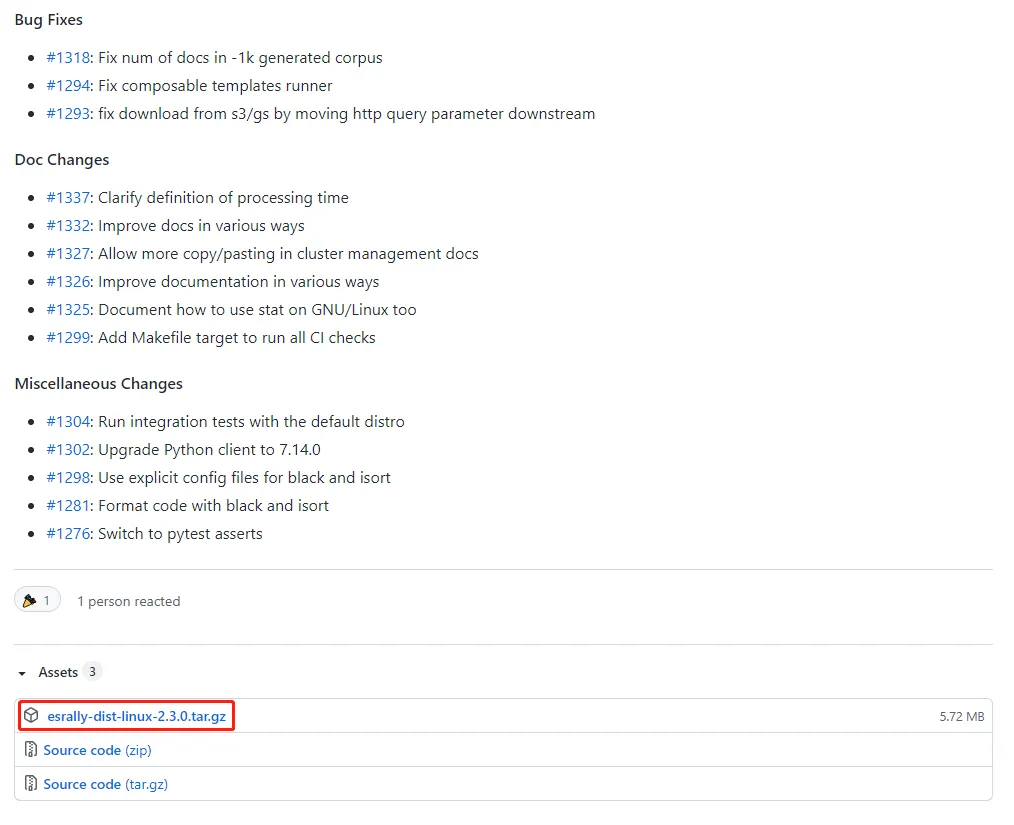
截图来自 —— Esrally官方GitHub项目
2. 解压并安装
将安装包传至服务器上并解压:
[root@VM-10-15-centos dy]# ll
total 5860
-rw-r--r-- 1 root root 5999548 Oct 21 12:32 esrally-dist-linux-2.3.0.tar.gz
[root@VM-10-15-centos dy]# tar -zxf esrally-dist-linux-2.3.0.tar.gz
[root@VM-10-15-centos dy]# ll
total 5864
drwxrwxr-x 3 1001 1002    4096 Oct  6 15:18 esrally-dist-2.3.0
-rw-r--r-- 1 root root 5999548 Oct 21 12:32 esrally-dist-linux-2.3.0.tar.gz
执行安装:
[root@VM-10-15-centos dy]# cd esrally-dist-2.3.0/
[root@VM-10-15-centos esrally-dist-2.3.0]# ll
total 8
drwxrwxr-x 2 1001 1002 4096 Oct  6 15:18 bin
-rwxrw-r-- 1 1001 1002 1193 Oct  6 15:18 install.sh
[root@VM-10-15-centos esrally-dist-2.3.0]# bash install.sh
Installing Rally 2.3.0...
Looking in links: file:///home/dy/esrally-dist-2.3.0/bin
Processing ./bin/esrally-2.3.0-py3-none-any.whl
Processing ./bin/yappi-1.2.3.tar.gz
Processing ./bin/psutil-5.8.0-cp38-cp38-manylinux2010_x86_64.whl
Processing ./bin/certifi-2021.5.30-py2.py3-none-any.whl
Processing ./bin/ijson-2.6.1.tar.gz
Processing ./bin/elasticsearch-7.14.0-py2.py3-none-any.whl
Processing ./bin/jsonschema-3.1.1-py2.py3-none-any.whl
Processing ./bin/Jinja2-2.11.3-py2.py3-none-any.whl
Processing ./bin/tabulate-0.8.7-py3-none-any.whl
Processing ./bin/py-cpuinfo-7.0.0.tar.gz
Processing ./bin/thespian-3.10.1.zip
Processing ./bin/google_resumable_media-1.1.0-py2.py3-none-any.whl
Processing ./bin/google_auth-1.22.1-py2.py3-none-any.whl
Processing ./bin/urllib3-1.26.7-py2.py3-none-any.whl
Processing ./bin/aiohttp-3.7.4.post0-cp38-cp38-manylinux2014_x86_64.whl
Requirement already satisfied: setuptools in /usr/local/python3/lib/python3.8/site-packages (from jsonschema==3.1.1->esrally==2.3.0) (49.2.1)
Processing ./bin/importlib_metadata-4.8.1-py3-none-any.whl
Processing ./bin/pyrsistent-0.18.0-cp38-cp38-manylinux1_x86_64.whl
Processing ./bin/six-1.16.0-py2.py3-none-any.whl
Processing ./bin/attrs-21.2.0-py2.py3-none-any.whl
Processing ./bin/MarkupSafe-2.0.1.tar.gz
Processing ./bin/google_crc32c-1.3.0-cp38-cp38-manylinux_2_12_x86_64.manylinux2010_x86_64.whl
Processing ./bin/requests-2.26.0-py2.py3-none-any.whl
Processing ./bin/rsa-4.7.2-py3-none-any.whl
Processing ./bin/pyasn1_modules-0.2.8-py2.py3-none-any.whl
Processing ./bin/cachetools-4.2.4-py3-none-any.whl
Processing ./bin/async_timeout-3.0.1-py3-none-any.whl
Processing ./bin/multidict-5.2.0-cp38-cp38-manylinux_2_5_x86_64.manylinux1_x86_64.manylinux_2_12_x86_64.manylinux2010_x86_64.whl
Processing ./bin/chardet-4.0.0-py2.py3-none-any.whl
Processing ./bin/typing_extensions-3.10.0.2-py3-none-any.whl
Processing ./bin/yarl-1.6.3-cp38-cp38-manylinux2014_x86_64.whl
Processing ./bin/zipp-3.6.0-py3-none-any.whl
Processing ./bin/charset_normalizer-2.0.6-py3-none-any.whl
Processing ./bin/idna-3.2-py3-none-any.whl
Processing ./bin/pyasn1-0.4.8-py2.py3-none-any.whl
Using legacy 'setup.py install' for yappi, since package 'wheel' is not installed.
Using legacy 'setup.py install' for ijson, since package 'wheel' is not installed.
Using legacy 'setup.py install' for py-cpuinfo, since package 'wheel' is not installed.
Using legacy 'setup.py install' for thespian, since package 'wheel' is not installed.
Using legacy 'setup.py install' for MarkupSafe, since package 'wheel' is not installed.
Installing collected packages: yappi, psutil, certifi, ijson, urllib3, async-timeout, multidict, attrs, chardet, typing-extensions, idna, yarl, aiohttp, elasticsearch, zipp, importlib-metadata, pyrsistent, six, jsonschema, MarkupSafe, Jinja2, tabulate, py-cpuinfo, thespian, google-crc32c, charset-normalizer, requests, google-resumable-media, pyasn1, rsa, pyasn1-modules, cachetools, google-auth, esrally
    Running setup.py install for yappi ... done
    Running setup.py install for ijson ... done
    Running setup.py install for MarkupSafe ... done
    Running setup.py install for py-cpuinfo ... done
    Running setup.py install for thespian ... done
Successfully installed Jinja2-2.11.3 MarkupSafe-2.0.1 aiohttp-3.7.4.post0 async-timeout-3.0.1 attrs-21.2.0 cachetools-4.2.4 certifi-2021.5.30 chardet-4.0.0 charset-normalizer-2.0.6 elasticsearch-7.14.0 esrally-2.3.0 google-auth-1.22.1 google-crc32c-1.3.0 google-resumable-media-1.1.0 idna-3.2 ijson-2.6.1 importlib-metadata-4.8.1 jsonschema-3.1.1 multidict-5.2.0 psutil-5.8.0 py-cpuinfo-7.0.0 pyasn1-0.4.8 pyasn1-modules-0.2.8 pyrsistent-0.18.0 requests-2.26.0 rsa-4.7.2 six-1.16.0 tabulate-0.8.7 thespian-3.10.1 typing-extensions-3.10.0.2 urllib3-1.26.7 yappi-1.2.3 yarl-1.6.3 zipp-3.6.0
[root@VM-10-15-centos esrally-dist-2.3.0]# esrally --version
esrally 2.3.0
可以看到,esrally已经安装好了,版本为2.3.0。
小结
至此,esrally的安装就结束了。后续会继续使用这个esrally客户端,对当前Elasticsearch市面上几大主流的配置机型进行实际压测,届时会继续分享给大家。