本文全文完整记录了部署过程中踩坑的经过,不建议参考本文来直接部署,部署前建议完整阅读完 踩坑实录(上) 以及 踩坑实录(下) 。
友情提示
- 本文全文完整记录了部署过程中踩坑的经过,不建议参考本文来直接部署,部署前建议完整阅读完 踩坑实录(上) 以及 踩坑实录(下) 。
- 本文另有完整的 避坑版部署指南 ,全文可放心食用,可参考直接部署。
环境配置
注:这套环境配置为本文验证通过的环境配置及版本,避免踩坑请尽量按照环境配置里提到的配置及版本
Esrally客户端环境版本
Linux环境:centos7.9
Python:3.6.7
Pip:10.0.1 from pip (python 3.6)
Java:openjdk version 1.8.0_302 (build 1.8.0_302-b08)
Git:2.7.5
Esrally:1.4.1
Esrally客户端环境配置
内存:32G
硬盘:SSD云硬盘 100GB
CPU个数:1
CPU核心数:16
背景
在大数据时代的今天,业务量越来越大,每天动辄都会产生上百GB、上TB的数据,所以拥有一个性能强劲的Elasticsearch集群就显得尤为重要。我们需要模拟大量网络日志、用户行为日志的读写动作,衡量各性能的指标,找出集群瓶颈所在,以确认我们需要怎样的硬件配置以及业务优化,才能满足现有的业务量,这就是我们在业务上线前所必要做的。
部署
一:安装python3
1. 下载python3.6.7源码并解压
[root@VM-10-15-centos ~]# wget https://www.python.org/ftp/python/3.6.7/Python-3.6.7.tgz
Length: 22969142 (22M) [application/octet-stream]
Saving to: ‘Python-3.6.7.tgz.1’

100%[====================================================================================================================================================================================================================================>] 22,969,142  16.3MB/s   in 1.3s
2021-10-19 17:06:33 (16.3 MB/s) - ‘Python-3.6.7.tgz.1’ saved [22969142/22969142]

[root@VM-10-15-centos ~]# tar -zxvf Python-3.6.7.tgz
2. 编译并安装
[root@VM-10-15-centos ~]# cd Python-3.6.7/
[root@VM-10-15-centos Python-3.6.7]# ./configure prefix=/usr/local/python3
[root@VM-10-15-centos Python-3.6.7]# make && make install
3. 配置python3环境变量
[root@VM-10-15-centos Python-3.6.7]# echo 'export PYTHON3_HOME=/usr/local/python3' >> /etc/profile
[root@VM-10-15-centos Python-3.6.7]# echo 'export PATH=$PATH:$PYTHON3_HOME/bin' >> /etc/profile
[root@VM-10-15-centos Python-3.6.7]# tail -2 /etc/profile
export PYTHON3_HOME=/usr/local/python3
export PATH=$PATH:$PYTHON3_HOME/bin
[root@VM-10-15-centos Python-3.6.7]# source /etc/profile
4. 验证
[root@VM-10-15-centos Python-3.6.7]# python3 -V
Python 3.6.7
[root@VM-10-15-centos Python-3.6.7]# pip3 -V
pip 10.0.1 from /usr/local/python3/lib/python3.6/site-packages/pip (python 3.6)
二:安装JDK
1. 安装java
[root@VM-10-15-centos ~]# yum -y install java-1.8.0
Installed:
  java-1.8.0-openjdk.x86_64 1:1.8.0.302.b08-0.el7_9

Complete!
2. 配置java环境变量
[root@VM-10-15-centos esrally]# which java
/usr/bin/java
[root@VM-10-15-centos esrally]# ll /usr/bin/java
lrwxrwxrwx 1 root root 22 Oct 19 18:20 /usr/bin/java -> /etc/alternatives/java
[root@VM-10-15-centos esrally]# ll /etc/alternatives/java
lrwxrwxrwx 1 root root 73 Oct 19 18:20 /etc/alternatives/java -> /usr/lib/jvm/java-1.8.0-openjdk-1.8.0.302.b08-0.el7_9.x86_64/jre/bin/java
最终定位到java命令位于/usr/lib/jvm/java-1.8.0-openjdk-1.8.0.302.b08-0.el7_9.x86_64/jre,所以将这个目录配置为JAVA_HOME
[root@VM-10-15-centos esrally]# echo 'export JAVA_HOME=/usr/lib/jvm/java-1.8.0-openjdk-1.8.0.302.b08-0.el7_9.x86_64/jre' >> /etc/profile
[root@VM-10-15-centos esrally]# tail -1 /etc/profile
export JAVA_HOME=/usr/lib/jvm/java-1.8.0-openjdk-1.8.0.302.b08-0.el7_9.x86_64/jre
[root@VM-10-15-centos esrally]# source /etc/profile
[root@VM-10-15-centos esrally]# echo $JAVA_HOME
/usr/lib/jvm/java-1.8.0-openjdk-1.8.0.302.b08-0.el7_9.x86_64/jre
这个JAVA_HOME的配置是必要的,我们在使用esrally时会用到它。
三:安装esrally
1. 安装esrally
[root@VM-10-15-centos Python-3.6.7]# pip3 install esrally
Installing collected packages: docutils, urllib3, jmespath, six, python-dateutil, botocore, s3transfer, boto3, tabulate, psutil, thespian, MarkupSafe, Jinja2, elasticsearch, py-cpuinfo, zipp, typing-extensions, importlib-metadata, pyrsistent, attrs, jsonschema, certifi, esrally
  Running setup.py install for tabulate ... done
  Running setup.py install for psutil ... done
  Running setup.py install for thespian ... done
  Running setup.py install for py-cpuinfo ... done
Successfully installed Jinja2-2.10.3 MarkupSafe-2.0.1 attrs-21.2.0 boto3-1.10.32 botocore-1.13.50 certifi-2021.10.8 docutils-0.15.2 elasticsearch-7.0.5 esrally-1.4.1 importlib-metadata-4.8.1 jmespath-0.10.0 jsonschema-3.1.1 psutil-5.6.5 py-cpuinfo-3.2.0 pyrsistent-0.18.0 python-dateutil-2.8.2 s3transfer-0.2.1 six-1.16.0 tabulate-0.8.5 thespian-3.9.3 typing-extensions-3.10.0.2 urllib3-1.26.7 zipp-3.6.0
2. 验证
[root@VM-10-15-centos Python-3.6.7]# esrally --version
Traceback (most recent call last):
  File "/usr/local/python3/lib/python3.6/site-packages/pkg_resources/__init__.py", line 783, in resolve
    raise VersionConflict(dist, req).with_context(dependent_req)
pkg_resources.ContextualVersionConflict: (urllib3 1.26.7 (/usr/local/python3/lib/python3.6/site-packages), Requirement.parse('urllib3<1.26,>=1.20; python_version >= "3.4"'), {
   'botocore'})
这里发现无法通过验证,报错信息关键词为:
Requirement.parse('urllib3<1.26,>=1.20; python_version >= "3.4"')
urllib3要求<1.26并且>=1.20,我们来看一下当前urllib3的版本:
[root@VM-10-15-centos Python-3.6.7]# pip3 list | grep urllib3
urllib3            1.26.7
很显然,版本大于1.26了,那我们安装1.25吧:
[root@VM-10-15-centos Python-3.6.7]# pip3 install urllib3==1.25
Looking in indexes: http://mirrors.example.com/pypi/simple
Collecting urllib3==1.25
  Downloading http://mirrors.example.com/pypi/packages/81/9b/715e96377cc1f87e71d9d4259c6f88bf561a539622ba3042e73188e0bc2d/urllib3-1.25-py2.py3-none-any.whl (149kB)
    100% |████████████████████████████████| 153kB 1.8MB/s
Installing collected packages: urllib3
  Found existing installation: urllib3 1.26.7
    Uninstalling urllib3-1.26.7:
      Successfully uninstalled urllib3-1.26.7
Successfully installed urllib3-1.25
再次执行esrally命令:
[root@VM-10-15-centos Python-3.6.7]# esrally --version
Traceback (most recent call last):
  File "/usr/local/python3/lib/python3.6/site-packages/esrally/utils/io.py", line 18, in <module>
    import bz2
  File "/usr/local/python3/lib/python3.6/bz2.py", line 23, in <module>
    from _bz2 import BZ2Compressor, BZ2Decompressor
ModuleNotFoundError: No module named '_bz2'
又报了一个错,经过确认,这个问题是因为缺少bzip2的开发包,需要安装bzip2-devel之后再重新编译python。
安装bzip2开发包:
[root@VM-10-15-centos Python-3.6.7]# yum -y install bzip2-devel
Running transaction
  Installing : bzip2-devel-1.0.6-13.el7.x86_64                                                                                                                                                                                                                            1/1
  Verifying  : bzip2-devel-1.0.6-13.el7.x86_64                                                                                                                                                                                                                            1/1

Installed:
  bzip2-devel.x86_64 0:1.0.6-13.el7

Complete!
重新编译安装python:
[root@VM-10-15-centos ~]# cd Python-3.6.7/
[root@VM-10-15-centos Python-3.6.7]# ./configure prefix=/usr/local/python3
[root@VM-10-15-centos Python-3.6.7]# make && make install
再次执行esrally命令:
[root@VM-10-15-centos Python-3.6.7]# esrally --version
esrally 1.4.1
配置esrally:
[root@VM-10-15-centos Python-3.6.7]# esrally configure
[root@VM-10-15-centos Python-3.6.7]# ll ~/.rally
total 16
drwxr-xr-x 6 root root 4096 Oct 20 11:04 benchmarks
-rw-r--r-- 1 root root 1354 Oct 19 19:25 logging.json
drwxr-xr-x 2 root root 4096 Oct 19 19:25 logs
-rw-r--r-- 1 root root  674 Oct 19 19:43 rally.ini
执行此命令后会在当前用户根目录下生成 .rally 目录,至此,esrally就安装好了。
验证实例
我们根据官方文档来执行一个例子:
[root@VM-10-15-centos ~]# esrally --distribution-version=5.0.0

    ____        ____
   / __ \____ _/ / /_  __
  / /_/ / __ `/ / / / / /
 / _, _/ /_/ / / / /_/ /
/_/ |_|\__,_/_/_/\__, /
                /____/

Traceback (most recent call last):

  File "/usr/local/python3/lib/python3.6/site-packages/elasticsearch/connection/http_urllib3.py", line 2, in <module>
    import ssl
  File "/usr/local/python3/lib/python3.6/ssl.py", line 101, in <module>
    import _ssl             # if we can't import it, let the error propagate
ModuleNotFoundError: No module named '_ssl'
验证失败,发现又报错了。经过确认,这个是由于缺少openssl开发包,需要安装openssl-devel之后再重新编译python。
1. 安装openssl开发包
[root@VM-10-15-centos ~]# yum -y install openssl-devel
Installed:
  openssl-devel.x86_64 1:1.0.2k-22.el7_9

Dependency Installed:
  keyutils-libs-devel.x86_64 0:1.5.8-3.el7   krb5-devel.x86_64 0:1.15.1-50.el7   libcom_err-devel.x86_64 0:1.42.9-19.el7   libkadm5.x86_64 0:1.15.1-50.el7   libselinux-devel.x86_64 0:2.5-15.el7   libsepol-devel.x86_64 0:2.5-10.el7   libverto-devel.x86_64 0:0.2.5-4.el7
  pcre-devel.x86_64 0:8.32-17.el7

Dependency Updated:
  openssl.x86_64 1:1.0.2k-22.el7_9                                                                                                    openssl-libs.x86_64 1:1.0.2k-22.el7_9

Complete!
再次验证:
[root@VM-10-15-centos ~]# esrally --distribution-version=5.0.0

    ____        ____
   / __ \____ _/ / /_  __
  / /_/ / __ `/ / / / / /
 / _, _/ /_/ / / / /_/ /
/_/ |_|\__,_/_/_/\__, /
                /____/

[ERROR] Cannot race. Error in race control (('Cannot load track None. List the available tracks with esrally list tracks.', None))

Getting further help:
*********************
* Check the log files in /root/.rally/logs for errors.
* Read the documentation at https://esrally.readthedocs.io/en/1.4.1/
* Ask a question on the forum at https://discuss.elastic.co/c/elasticsearch/rally
* Raise an issue at https://github.com/elastic/rally/issues and include the log files in /root/.rally/logs.

-------------------------------
[INFO] FAILURE (took 8 seconds)
-------------------------------
这个报错是因为缺少git命令,无法加载track,需要安装一下git。
2. 安装Git命令
[root@VM-10-15-centos ~]# yum -y install git                                                                                                                                                                                                                   4/4

Installed:
  git.x86_64 0:1.8.3.1-23.el7_8

Dependency Installed:
  perl-Error.noarch 1:0.17020-2.el7                                                       perl-Git.noarch 0:1.8.3.1-23.el7_8                                                       perl-TermReadKey.x86_64 0:2.30-20.el7

Complete!
再次验证:
[root@VM-10-15-centos ~]# esrally --distribution-version=5.0.0

    ____        ____
   / __ \____ _/ / /_  __
  / /_/ / __ `/ / / / / /
 / _, _/ /_/ / / / /_/ /
/_/ |_|\__,_/_/_/\__, /
                /____/

[WARNING] No Internet connection detected. Automatic download of track data sets etc. is disabled.
[ERROR] Cannot race. Error in race control (('[/root/.rally/benchmarks/tracks/default] must be a git repository.\n\nPlease run:\ngit -C /root/.rally/benchmarks/tracks/default init', None))

Getting further help:
*********************
* Check the log files in /root/.rally/logs for errors.
* Read the documentation at https://esrally.readthedocs.io/en/1.4.1/
* Ask a question on the forum at https://discuss.elastic.co/c/elasticsearch/rally
* Raise an issue at https://github.com/elastic/rally/issues and include the log files in /root/.rally/logs.

--------------------------------
[INFO] FAILURE (took 12 seconds)
--------------------------------
这次报错信息变了,关键词信息为:
Please run:
git -C /root/.rally/benchmarks/tracks/default init
那我们初始化一下目录吧:
[root@VM-10-15-centos ~]# git -C /root/.rally/benchmarks/tracks/default init
Unknown option: -C
usage: git [--version] [--help] [-c name=value]
           [--exec-path[=<path>]] [--html-path] [--man-path] [--info-path]
           [-p|--paginate|--no-pager] [--no-replace-objects] [--bare]
           [--git-dir=<path>] [--work-tree=<path>] [--namespace=<name>]
           <command> [<args>]
很显然,命令不兼容这个版本的git,通过了解,esrally需要安装git版本>=1.9,所以需要重新安装一下git。
这里我们需要通过编译的方式安装git,首先安装编译依赖:
[root@VM-10-15-centos ~]# yum -y install curl-devel expat-devel gettext-devel openssl-devel zlib-devel gcc perl-ExtUtils-MakeMaker
Installed:
  expat-devel.x86_64 0:2.1.0-12.el7                                                    gettext-devel.x86_64 0:0.19.8.1-3.el7                                                    perl-ExtUtils-MakeMaker.noarch 0:6.68-3.el7

Dependency Installed:
  gdbm-devel.x86_64 0:1.10-8.el7              gettext-common-devel.noarch 0:0.19.8.1-3.el7   git.x86_64 0:1.8.3.1-23.el7_8           libdb-devel.x86_64 0:5.3.21-25.el7     perl-ExtUtils-Install.noarch 0:1.58-299.el7_9   perl-ExtUtils-Manifest.noarch 0:1.61-244.el7
  perl-ExtUtils-ParseXS.noarch 1:3.18-3.el7   perl-Git.noarch 0:1.8.3.1-23.el7_8             perl-Test-Harness.noarch 0:3.28-3.el7   perl-devel.x86_64 4:5.16.3-299.el7_9   pyparsing.noarch 0:1.5.6-9.el7                  systemtap-sdt-devel.x86_64 0:4.0-13.el7

Complete!
下载git源码:
[root@VM-10-15-centos ~]# wget https://mirrors.edge.kernel.org/pub/software/scm/git/git-2.7.5.tar.gz
ERROR: cannot verify mirrors.edge.kernel.org's certificate, issued by ‘/C=US/O=Let's Encrypt/CN=R3’:
  Issued certificate has expired.
To connect to mirrors.edge.kernel.org insecurely, use `--no-check-certificate'.
竟然报了个错,提示需要指定--no-check-certificate,那我们指定一下吧:
[root@VM-10-15-centos ~]# wget https://mirrors.edge.kernel.org/pub/software/scm/git/git-2.7.5.tar.gz --no-check-certificate
Saving to: ‘git-2.7.5.tar.gz’

100%[====================================================================================================================================================================================================================================>] 5,724,154    424KB/s   in 79s

2021-10-19 18:58:08 (71.2 KB/s) - ‘git-2.7.5.tar.gz’ saved [5724154/5724154]
解压并编译安装:
[root@VM-10-15-centos ~]# tar -zxvf git-2.7.5.tar.gz
[root@VM-10-15-centos ~]# cd git-2.7.5/
[root@VM-10-15-centos git-2.7.5]# make prefix=/usr/local/git all
[root@VM-10-15-centos git-2.7.5]# make prefix=/usr/local/git install
配置git环境变量:
[root@VM-10-15-centos git-2.7.5]# echo 'export GIT2_HOME=/usr/local/git' >> /etc/profile
[root@VM-10-15-centos git-2.7.5]# echo 'export PATH=$PATH:$GIT2_HOME/bin' >> /etc/profile
[root@VM-10-15-centos git-2.7.5]# tail -2 /etc/profile
export GIT2_HOME=/usr/local/git
export PATH=$PATH:$GIT2_HOME/bin
[root@VM-10-15-centos git-2.7.5]# source /etc/profile
验证:
[root@VM-10-15-centos git-2.7.5]# git --version
git version 1.8.3.1
GG了,看来系统命令路径比用户命令的路径的优先级要高:
[root@VM-10-15-centos git-2.7.5]# which git
/usr/bin/git
[root@VM-10-15-centos git-2.7.5]# /usr/bin/git --version
git version 1.8.3.1
没办法,那我们只能卸载掉操作系统系统的git命令了:
[root@VM-10-15-centos git-2.7.5]# rpm -qa | grep -w git
git-1.8.3.1-23.el7_8.x86_64
[root@VM-10-15-centos git-2.7.5]# rpm -e git-1.8.3.1-23.el7_8.x86_64
error: Failed dependencies:
    git = 1.8.3.1-23.el7_8 is needed by (installed) perl-Git-1.8.3.1-23.el7_8.noarch
    git is needed by (installed) gettext-devel-0.19.8.1-3.el7.x86_64
报了个错,提示git命令有依赖,但是看了下面的两个包,都是我们需要用到的,所以只能强制卸载这个git了,加个--deps参数:
[root@VM-10-15-centos git-2.7.5]# rpm -e git-1.8.3.1-23.el7_8.x86_64 --nodeps
[root@VM-10-15-centos git-2.7.5]# git --version
-bash: /usr/bin/git: No such file or directory
再次加载环境变量,让bash识别到我们的用户命令路径:
[root@VM-10-15-centos git-2.7.5]# source /etc/profile
[root@VM-10-15-centos git-2.7.5]# git --version
git version 2.7.5
我们再次执行一下git目录初始化命令:
[root@VM-10-15-centos git-2.7.5]# git -C /root/.rally/benchmarks/tracks/default init
Reinitialized existing Git repository in /root/.rally/benchmarks/tracks/default/.git/
发现已经可以执行了,那我们再运行一下官方的esrally例子,来确认一下esrally是否可用:
[root@VM-10-15-centos ~]# esrally --distribution-version=5.0.0

    ____        ____
   / __ \____ _/ / /_  __
  / /_/ / __ `/ / / / / /
 / _, _/ /_/ / / / /_/ /
/_/ |_|\__,_/_/_/\__, /
                /____/

[WARNING] Could not update tracks. Continuing with your locally available state.
[ERROR] Cannot race. Error in mechanic (('Could not clone from [https://github.com/elastic/rally-teams] to [/root/.rally/benchmarks/teams/default]', None))

Getting further help:
*********************
* Check the log files in /root/.rally/logs for errors.
* Read the documentation at https://esrally.readthedocs.io/en/1.4.1/
* Ask a question on the forum at https://discuss.elastic.co/c/elasticsearch/rally
* Raise an issue at https://github.com/elastic/rally/issues and include the log files in /root/.rally/logs.

---------------------------------
[INFO] FAILURE (took 308 seconds)
---------------------------------
报错提示无法克隆,那我们就手动克隆吧。
3. 手动克隆rally-teams
[root@VM-10-15-centos ~]# git clone https://github.com/elastic/rally-teams /root/.rally/benchmarks/teams/default
Cloning into '/root/.rally/benchmarks/teams/default'...
remote: Enumerating objects: 2020, done.
remote: Counting objects: 100% (198/198), done.
remote: Compressing objects: 100% (129/129), done.
remote: Total 2020 (delta 100), reused 100 (delta 36), pack-reused 1822
Receiving objects: 100% (2020/2020), 240.94 KiB | 52.00 KiB/s, done.
Resolving deltas: 100% (1031/1031), done.
Checking connectivity... done.
克隆成功,我们再来运行一下官方的esrally例子,确认esrally是否可用:
[root@VM-10-15-centos esrally]# esrally --distribution-version=5.0.0

    ____        ____
   / __ \____ _/ / /_  __
  / /_/ / __ `/ / / / / /
 / _, _/ /_/ / / / /_/ /
/_/ |_|\__,_/_/_/\__, /
                /____/

[WARNING] Could not update tracks. Continuing with your locally available state.
[WARNING] Track [geonames] uses the deprecated property [cluster-settings]. Please replace it with an explicit call to the cluster settings API.
[INFO] Preparing for race ...
[INFO] Downloading Elasticsearch 5.0.0 (26.1 MB total size)                         [100%]
[ERROR] Cannot race. ('Cannot launch Elasticsearch as root. Please run Rally as a non-root user.', None)
    Traceback (most recent call last):
  File "/usr/local/python3/lib/python3.6/site-packages/esrally/mechanic/mechanic.py", line 565, in receiveMsg_StartNodes
    self.mechanic.start_engine()
  File "/usr/local/python3/lib/python3.6/site-packages/esrally/mechanic/mechanic.py", line 680, in start_engine
    self.nodes = self.launcher.start(self.node_configs)
  File "/usr/local/python3/lib/python3.6/site-packages/esrally/mechanic/launcher.py", line 130, in start
    return [self._start_node(node_configuration, node_count_on_host) for node_configuration in node_configurations]
  File "/usr/local/python3/lib/python3.6/site-packages/esrally/mechanic/launcher.py", line 130, in <listcomp>
    return [self._start_node(node_configuration, node_count_on_host) for node_configuration in node_configurations]
  File "/usr/local/python3/lib/python3.6/site-packages/esrally/mechanic/launcher.py", line 159, in _start_node
    node_pid = self._start_process(binary_path, env)
  File "/usr/local/python3/lib/python3.6/site-packages/esrally/mechanic/launcher.py", line 210, in _start_process
    raise exceptions.LaunchError("Cannot launch Elasticsearch as root. Please run Rally as a non-root user.")
esrally.exceptions.LaunchError: ('Cannot launch Elasticsearch as root. Please run Rally as a non-root user.', None)

Getting further help:
*********************
* Check the log files in /root/.rally/logs for errors.
* Read the documentation at https://esrally.readthedocs.io/en/1.4.1/
* Ask a question on the forum at https://discuss.elastic.co/c/elasticsearch/rally
* Raise an issue at https://github.com/elastic/rally/issues and include the log files in /root/.rally/logs.

---------------------------------
[INFO] FAILURE (took 135 seconds)
---------------------------------
这次又报了一个新的错误,提示不能使用root用户来启动elasticsearch,请用非root用户运行,那好吧,我们换个用户:
[root@VM-10-15-centos esrally]# useradd dy
[root@VM-10-15-centos esrally]# su - dy
然后重复一遍上面的操作,配置esrally:
[dy@VM-10-15-centos ~]$ esrally configure
手动克隆rally-teams:
[dy@VM-10-15-centos ~]$ git clone https://github.com/elastic/rally-teams ~/.rally/benchmarks/teams/default
Cloning into '/home/dy/.rally/benchmarks/teams/default'...
remote: Enumerating objects: 2020, done.
remote: Counting objects: 100% (198/198), done.
remote: Compressing objects: 100% (129/129), done.
remote: Total 2020 (delta 100), reused 100 (delta 36), pack-reused 1822
Receiving objects: 100% (2020/2020), 240.94 KiB | 0 bytes/s, done.
Resolving deltas: 100% (1031/1031), done.
Checking connectivity... done.
然后我们再执行试一下:
[dy@VM-10-15-centos ~]$ esrally --distribution-version=5.0.0

    ____        ____
   / __ \____ _/ / /_  __
  / /_/ / __ `/ / / / / /
 / _, _/ /_/ / / / /_/ /
/_/ |_|\__,_/_/_/\__, /
                /____/

[INFO] Preparing for race ...
[WARNING] Could not update teams. Continuing with your locally available state.
[ERROR] Cannot race. ('Cannot download Elasticsearch distribution from [https://artifacts.elastic.co/downloads/elasticsearch/elasticsearch-5.0.0-linux-x86_64.tar.gz]. Please check that the specified version [5.0.0] is correct.', None)
Traceback (most recent call last):
  File "/usr/local/python3/lib/python3.6/site-packages/esrally/mechanic/mechanic.py", line 565, in receiveMsg_StartNodes
    self.mechanic.start_engine()
  File "/usr/local/python3/lib/python3.6/site-packages/esrally/mechanic/mechanic.py", line 676, in start_engine
    binaries = self.supply()
  File "/usr/local/python3/lib/python3.6/site-packages/esrally/mechanic/supplier.py", line 218, in __call__
    supplier.fetch()
  File "/usr/local/python3/lib/python3.6/site-packages/esrally/mechanic/supplier.py", line 361, in fetch
    "version [%s] is correct." % (download_url, self.version))
esrally.exceptions.SystemSetupError: ('Cannot download Elasticsearch distribution from [https://artifacts.elastic.co/downloads/elasticsearch/elasticsearch-5.0.0-linux-x86_64.tar.gz]. Please check that the specified version [5.0.0] is correct.', None)

Getting further help:
*********************
* Check the log files in /home/dy/.rally/logs for errors.
* Read the documentation at https://esrally.readthedocs.io/en/1.4.1/
* Ask a question on the forum at https://discuss.elastic.co/c/elasticsearch/rally
* Raise an issue at https://github.com/elastic/rally/issues and include the log files in /home/dy/.rally/logs.

---------------------------------
[INFO] FAILURE (took 135 seconds)
---------------------------------
4. 切换elasticsearch版本
这里发现反复执行都无法下载elasitcsearch 5.0.0的包,那我们就换个6.0.0的版本吧:
[dy@VM-10-15-centos ~]$ esrally --distribution-version=6.0.0

    ____        ____
   / __ \____ _/ / /_  __
  / /_/ / __ `/ / / / / /
 / _, _/ /_/ / / / /_/ /
/_/ |_|\__,_/_/_/\__, /
                /____/

[WARNING] Could not update tracks. Continuing with your locally available state.
[INFO] Preparing for race ...
[INFO] Downloading Elasticsearch 6.0.0 (26.7 MB total size)                         [100%]
[INFO] Downloading data for track geonames (252.9 MB total size)                  [100.0%]
[INFO] Decompressing track data from [/home/dy/.rally/benchmarks/data/geonames/documents-2.json.bz2] to [/home/dy/.rally/benchmarks/data/geonames/documents-2.json] (resulting size: 3.30 GB) ... [OK]
[INFO] Preparing file offset table for [/home/dy/.rally/benchmarks/data/geonames/documents-2.json] ... [OK]
[INFO] Racing on track [geonames], challenge [append-no-conflicts] and car ['defaults'] with version [6.0.0].

Running delete-index                                                           [100% done]
Running create-index                                                           [100% done]
Running check-cluster-health                                                   [100% done]
Running index-append                                                           [100% done]
Running refresh-after-index                                                    [100% done]
Running force-merge                                                            [100% done]
Running refresh-after-force-merge                                              [100% done]
Running wait-until-merges-finish                                               [100% done]
Running index-stats                                                            [100% done]
Running node-stats                                                             [100% done]
Running default                                                                [100% done]
Running term                                                                   [100% done]
Running phrase                                                                 [100% done]
Running country_agg_uncached                                                   [100% done]
Running country_agg_cached                                                     [100% done]
Running scroll                                                                 [100% done]
Running expression                                                             [100% done]
Running painless_static                                                        [100% done]
Running painless_dynamic                                                       [100% done]
Running large_terms                                                            [100% done]
Running large_filtered_terms                                                   [100% done]
Running large_prohibited_terms                                                 [100% done]
在压测的过程中,我们发现esrally在本地启动了一个单机版的es,端口为39200:
[root@VM-10-15-centos ~]# netstat -ntpl | grep java
tcp6       0      0 127.0.0.1:39200         :::*                    LISTEN      10239/java
tcp6       0      0 127.0.0.1:39300         :::*                    LISTEN      10239/java
[dy@VM-10-15-centos distributions]$ curl localhost:39200
{

  "name" : "rally-node-0",
  "cluster_name" : "rally-benchmark",
  "cluster_uuid" : "Sov2ib1YRQaFvM2BK_cFsQ",
  "version" : {

    "number" : "6.0.0",
    "build_hash" : "8f0685b",
    "build_date" : "2017-11-10T18:41:22.859Z",
    "build_snapshot" : false,
    "lucene_version" : "7.0.1",
    "minimum_wire_compatibility_version" : "5.6.0",
    "minimum_index_compatibility_version" : "5.0.0"
  },
  "tagline" : "You Know, for Search"
}
[dy@VM-10-15-centos distributions]$ curl localhost:39200/_cluster/health?pretty
{

  "cluster_name" : "rally-benchmark",
  "status" : "green",
  "timed_out" : false,
  "number_of_nodes" : 1,
  "number_of_data_nodes" : 1,
  "active_primary_shards" : 5,
  "active_shards" : 5,
  "relocating_shards" : 0,
  "initializing_shards" : 0,
  "unassigned_shards" : 0,
  "delayed_unassigned_shards" : 0,
  "number_of_pending_tasks" : 0,
  "number_of_in_flight_fetch" : 0,
  "task_max_waiting_in_queue_millis" : 0,
  "active_shards_percent_as_number" : 100.0
}
[dy@VM-10-15-centos distributions]$ curl localhost:39200/_cat/indices?pretty
green open geonames f0F3JQEmQA6asmM_rWXtrw 5 0 11396503 0 3.2gb 3.2gb
压测过程中,CPU使用率还是比较高的:

最终输出了一份压测报告,但由于篇幅次数限制的缘故,无法贴上压测报告。
感兴趣的同学可以移步:Elasticsearch单机本地16核32G压测报告
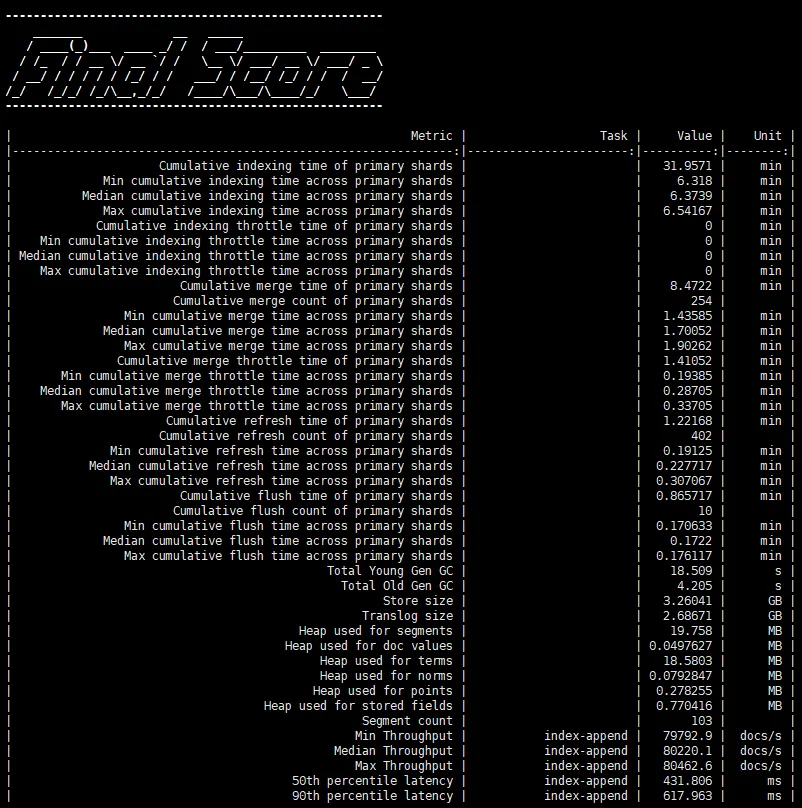
截图来源 —— Elasticsearch单机本地16核32G压测报告
小结
至此,esrally的安装和实例验证就结束了。后续会使用这个esrally客户端,对当前Elasticsearch市面上几大主流的配置机型进行实际压测,届时会继续分享给大家。