前面我们学习了 Elasticsearch集群异常状态(RED、YELLOW)原因分析 ,了解到了当集群发生主分片无法上线的情况下,集群状态会变为RED,此时相应的RED索引读写请求都会受到严重的影响。
背景
- 前面我们学习了 Elasticsearch集群异常状态(RED、YELLOW)原因分析 ,了解到了当集群发生主分片无法上线的情况下,集群状态会变为RED,此时相应的RED索引读写请求都会受到严重的影响。
- 这里我们将介绍索引分片损坏这种情况,当索引分片发生损坏时,对应的主分片会无法分配,且状态也会是RED。然而分片的损坏的情况又分为很多种,有些只是表象,可以通过一些手段恢复,但有些则是真实的物理损坏,且无法恢复,只能丢弃部分数据,甚至整块分片。
问题
场景:磁盘故障引起的checksum异常
这种情况也比较常见,一般我们可以通过explain api来确认:
[root@sh ~]# curl -s -XGET localhost:9200/_cluster/allocation/explain?pretty
{

  "index" : "twitter",
  "shard" : 0,
  "primary" : true,
  "current_state" : "unassigned",
  "unassigned_info" : {

    "reason" : "ALLOCATION_FAILED",
    "at" : "2018-11-06T06:11:15.562Z",
    "failed_allocation_attempts" : 5,
    "details" : "failed shard on node [CxXWE8BiQbS4ThB9AvvGQA]: failed recovery, failure RecoveryFailedException[[t
witter][0]: Recovery failed on {node-1}{CxXWE8BiQbS4ThB9AvvGQA}{yYDvXMKnS9KhaIlzPEsJNg}{10.142.0.2}{10.142.0.2:9300
}]; nested: IndexShardRecoveryException[failed to recover from gateway]; nested: EngineCreationFailureException[fai
led to create engine]; nested: CorruptIndexException[misplaced codec footer (file truncated?): length=0 but footerL
ength==16 (resource=SimpleFSIndexInput(path=\"/var/lib/elasticsearch/nodes/0/indices/l1VcSQySRmuyFGTBBPjX9g/0/trans
log/translog-1228.ckp\"))]; ",
    "last_allocation_status" : "no"
  },
  "can_allocate" : "no",
  "allocate_explanation" : "cannot allocate because allocation is not permitted to any of the nodes that hold an in
-sync shard copy",
  "node_allocation_decisions" : [
    {

      "node_id" : "CxXWE8BiQbS4ThB9AvvGQA",
      "node_name" : "node-1",
      "transport_address" : "10.142.0.2:9300",
      "node_decision" : "no",
      "store" : {

        "in_sync" : true,
        "allocation_id" : "gxegPAMyQa21MH5NxQEACw"
      },
      "deciders" : [
        {

          "decider" : "max_retry",
          "decision" : "NO",
          "explanation" : "shard has exceeded the maximum number of retries [5] on failed allocation attempts - man
ually call [/_cluster/reroute?retry_failed=true] to retry, [unassigned_info[[reason=ALLOCATION_FAILED], at[2018-11-
06T06:11:15.562Z], failed_attempts[5], delayed=false, details[failed shard on node [CxXWE8BiQbS4ThB9AvvGQA]: failed
 recovery, failure RecoveryFailedException[[twitter][0]: Recovery failed on {node-1}{CxXWE8BiQbS4ThB9AvvGQA}{yYDvXM
KnS9KhaIlzPEsJNg}{10.142.0.2}{10.142.0.2:9300}]; nested: IndexShardRecoveryException[failed to recover from gateway
]; nested: EngineCreationFailureException[failed to create engine]; nested: CorruptIndexException[misplaced codec f
ooter (file truncated?): length=0 but footerLength==16 (resource=SimpleFSIndexInput(path=\"/var/lib/elasticsearch/n
odes/0/indices/l1VcSQySRmuyFGTBBPjX9g/0/translog/translog-1228.ckp\"))]; ], allocation_status[deciders_no]]]"
        }
      ]
    }
  ]
}
或者通过日志信息来确认:
[o.e.a.a.c.a.TransportClusterAllocationExplainAction] [1624264340001550732] explaining the allocation for [ClusterAllocationExplainRequest[index=qw_cust_group,shard=3,primary?=true,includeYesDecisions?=false], found shard [[qw_cust_group][3], node[null], [P], recovery_source[existing recovery], s[UNASSIGNED], unassigned_info[[reason=ALLOCATION_FAILED], at[2021-09-29T07:10:25.054Z], failed_attempts[13], delayed=false, details[failed recovery, failure RecoveryFailedException[[qw_cust_group][3]: Recovery failed on {1624264340001550832}{bbNH-12CS7uy8dYTYAywgQ}{_PqMaYD_T-yz1u67-ifKdQ}{172.23.15.115}{172.23.15.115:9300}{temperature=hot, rack=cvm_8_800007, set=800007, region=8, ip=9.15.112.197}]; nested: IndexShardRecoveryException[failed to recover from gateway]; nested: EngineCreationFailureException[failed to create engine]; nested: CorruptIndexException[misplaced codec footer (file truncated?): length=0 but footerLength==16 (resource=SimpleFSIndexInput(path="/data1/containers/1624264340001550832/es/data/nodes/0/indices/d1_CneTOQcCCgatoDMX8Ag/3/translog/translog-2705.ckp"))]; ], allocation_status[deciders_no]]]
[o.e.c.a.s.ShardStateAction] [1624264340001550732] [qw_cust_group][3] received shard failed for shard id [[qw_cust_group][3]], allocation id [HlWMLhDHTDe3hYFjY7oo0g], primary term [0], message [failed recovery], failure [RecoveryFailedException[[qw_cust_group][3]: Recovery failed on {1624264340001550832}{bbNH-12CS7uy8dYTYAywgQ}{_PqMaYD_T-yz1u67-ifKdQ}{172.23.15.115}{172.23.15.115:9300}{temperature=hot, rack=cvm_8_800007, set=800007, region=8, ip=9.15.112.197}]; nested: IndexShardRecoveryException[failed to recover from gateway]; nested: EngineCreationFailureException[failed to create engine]; nested: CorruptIndexException[misplaced codec footer (file truncated?): length=0 but footerLength==16 (resource=SimpleFSIndexInput(path="/data1/containers/1624264340001550832/es/data/nodes/0/indices/d1_CneTOQcCCgatoDMX8Ag/3/translog/translog-2705.ckp"))]; ]
org.elasticsearch.indices.recovery.RecoveryFailedException: [qw_cust_group][3]: Recovery failed on {1624264340001550832}{bbNH-12CS7uy8dYTYAywgQ}{_PqMaYD_T-yz1u67-ifKdQ}{172.23.15.115}{172.23.15.115:9300}{temperature=hot, rack=cvm_8_800007, set=800007, region=8, ip=9.15.112.197}
    at org.elasticsearch.index.shard.IndexShard.lambda$startRecovery$1(IndexShard.java:1488) ~[elasticsearch-5.6.4.jar:5.6.4]
    at org.elasticsearch.common.util.concurrent.ThreadContext$ContextPreservingRunnable.run(ThreadContext.java:569) ~[elasticsearch-5.6.4.jar:5.6.4]
    at java.util.concurrent.ThreadPoolExecutor.runWorker(Unknown Source) ~[?:1.8.0_181]
    at java.util.concurrent.ThreadPoolExecutor$Worker.run(Unknown Source) ~[?:1.8.0_181]
    at java.lang.Thread.run(Unknown Source) [?:1.8.0_181]
Caused by: org.elasticsearch.index.shard.IndexShardRecoveryException: failed to recover from gateway
    at org.elasticsearch.index.shard.StoreRecovery.internalRecoverFromStore(StoreRecovery.java:365) ~[elasticsearch-5.6.4.jar:5.6.4]
    at org.elasticsearch.index.shard.StoreRecovery.lambda$recoverFromStore$0(StoreRecovery.java:90) ~[elasticsearch-5.6.4.jar:5.6.4]
    at org.elasticsearch.index.shard.StoreRecovery.executeRecovery(StoreRecovery.java:257) ~[elasticsearch-5.6.4.jar:5.6.4]
    at org.elasticsearch.index.shard.StoreRecovery.recoverFromStore(StoreRecovery.java:88) ~[elasticsearch-5.6.4.jar:5.6.4]
    at org.elasticsearch.index.shard.IndexShard.recoverFromStore(IndexShard.java:1236) ~[elasticsearch-5.6.4.jar:5.6.4]
    at org.elasticsearch.index.shard.IndexShard.lambda$startRecovery$1(IndexShard.java:1484) ~[elasticsearch-5.6.4.jar:5.6.4]
    ... 4 more
Caused by: org.elasticsearch.index.engine.EngineCreationFailureException: failed to create engine
    at org.elasticsearch.index.engine.InternalEngine.<init>(InternalEngine.java:163) ~[elasticsearch-5.6.4.jar:5.6.4]
    at org.elasticsearch.index.engine.InternalEngineFactory.newReadWriteEngine(InternalEngineFactory.java:25) ~[elasticsearch-5.6.4.jar:5.6.4]
    at org.elasticsearch.index.shard.IndexShard.newEngine(IndexShard.java:1602) ~[elasticsearch-5.6.4.jar:5.6.4]
    at org.elasticsearch.index.shard.IndexShard.createNewEngine(IndexShard.java:1584) ~[elasticsearch-5.6.4.jar:5.6.4]
    at org.elasticsearch.index.shard.IndexShard.internalPerformTranslogRecovery(IndexShard.java:1027) ~[elasticsearch-5.6.4.jar:5.6.4]
    at org.elasticsearch.index.shard.IndexShard.performTranslogRecovery(IndexShard.java:987) ~[elasticsearch-5.6.4.jar:5.6.4]
    at org.elasticsearch.index.shard.StoreRecovery.internalRecoverFromStore(StoreRecovery.java:360) ~[elasticsearch-5.6.4.jar:5.6.4]
    at org.elasticsearch.index.shard.StoreRecovery.lambda$recoverFromStore$0(StoreRecovery.java:90) ~[elasticsearch-5.6.4.jar:5.6.4]
    at org.elasticsearch.index.shard.StoreRecovery.executeRecovery(StoreRecovery.java:257) ~[elasticsearch-5.6.4.jar:5.6.4]
    at org.elasticsearch.index.shard.StoreRecovery.recoverFromStore(StoreRecovery.java:88) ~[elasticsearch-5.6.4.jar:5.6.4]
    at org.elasticsearch.index.shard.IndexShard.recoverFromStore(IndexShard.java:1236) ~[elasticsearch-5.6.4.jar:5.6.4]
    at org.elasticsearch.index.shard.IndexShard.lambda$startRecovery$1(IndexShard.java:1484) ~[elasticsearch-5.6.4.jar:5.6.4]
    ... 4 more
Caused by: org.apache.lucene.index.CorruptIndexException: misplaced codec footer (file truncated?): length=0 but footerLength==16 (resource=SimpleFSIndexInput(path="/data1/containers/1624264340001550832/es/data/nodes/0/indices/d1_CneTOQcCCgatoDMX8Ag/3/translog/translog-2705.ckp"))
    at org.apache.lucene.codecs.CodecUtil.checksumEntireFile(CodecUtil.java:523) ~[lucene-core-6.6.1.jar:6.6.1 unknown - boicehuang - 2018-11-20 19:03:10]
    at org.elasticsearch.index.translog.Checkpoint.read(Checkpoint.java:98) ~[elasticsearch-5.6.4.jar:5.6.4]
    at org.elasticsearch.index.translog.Translog.recoverFromFiles(Translog.java:237) ~[elasticsearch-5.6.4.jar:5.6.4]
    at org.elasticsearch.index.translog.Translog.<init>(Translog.java:177) ~[elasticsearch-5.6.4.jar:5.6.4]
    at org.elasticsearch.index.engine.InternalEngine.openTranslog(InternalEngine.java:272) ~[elasticsearch-5.6.4.jar:5.6.4]
    at org.elasticsearch.index.engine.InternalEngine.<init>(InternalEngine.java:160) ~[elasticsearch-5.6.4.jar:5.6.4]
    at org.elasticsearch.index.engine.InternalEngineFactory.newReadWriteEngine(InternalEngineFactory.java:25) ~[elasticsearch-5.6.4.jar:5.6.4]
    at org.elasticsearch.index.shard.IndexShard.newEngine(IndexShard.java:1602) ~[elasticsearch-5.6.4.jar:5.6.4]
    at org.elasticsearch.index.shard.IndexShard.createNewEngine(IndexShard.java:1584) ~[elasticsearch-5.6.4.jar:5.6.4]
    at org.elasticsearch.index.shard.IndexShard.internalPerformTranslogRecovery(IndexShard.java:1027) ~[elasticsearch-5.6.4.jar:5.6.4]
    at org.elasticsearch.index.shard.IndexShard.performTranslogRecovery(IndexShard.java:987) ~[elasticsearch-5.6.4.jar:5.6.4]
    at org.elasticsearch.index.shard.StoreRecovery.internalRecoverFromStore(StoreRecovery.java:360) ~[elasticsearch-5.6.4.jar:5.6.4]
    at org.elasticsearch.index.shard.StoreRecovery.lambda$recoverFromStore$0(StoreRecovery.java:90) ~[elasticsearch-5.6.4.jar:5.6.4]
    at org.elasticsearch.index.shard.StoreRecovery.executeRecovery(StoreRecovery.java:257) ~[elasticsearch-5.6.4.jar:5.6.4]
    at org.elasticsearch.index.shard.StoreRecovery.recoverFromStore(StoreRecovery.java:88) ~[elasticsearch-5.6.4.jar:5.6.4]
    at org.elasticsearch.index.shard.IndexShard.recoverFromStore(IndexShard.java:1236) ~[elasticsearch-5.6.4.jar:5.6.4]
    at org.elasticsearch.index.shard.IndexShard.lambda$startRecovery$1(IndexShard.java:1484) ~[elasticsearch-5.6.4.jar:5.6.4]
    ... 4 more
其共同的关键信息都是:file truncated?
解决方案
方案一:REOPEN分片
reopen的目的是触发索引分片重新上线,直接调用_close和_open api即可:
[root@sh ~]# curl -s -XPOST localhost:9200/twitter/_close?pretty
{

  "acknowledged": true
}
[root@sh ~]# curl -s -XPOST localhost:9200/twitter/_open?pretty
{

  "acknowledged": true,
  "shards_acknowledged": true
}
方案二:分配陈腐的分片
如果reopen索引无法使分片上线,则需要考虑使用reroute api分配stale primary。执行这个api之前,我们需要得到一些信息:
- 索引名称和分片ID可以通过explain api直观看到;
- 节点名称可以通过unassigned_info.details得到。
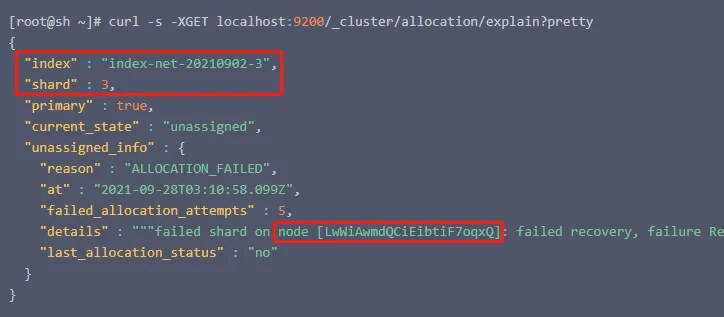
根据这些信息,我们就可以执行reroute api了:
[root@sh ~]# curl -s -H "Content-Type:application/json" -XPOST "localhost:9200/_cluster/reroute?pretty" -d '
{

  "commands": [
    {

      "allocate_stale_primary": {

      "index": "{索引名称}",
      "shard": "{分片ID}",
      "node": "{节点名称}",
      "accept_data_loss": true
      }
    }
  ]
}
方案三:清理corrupt文件

在故障目录,如果出现corrupt开头的文件,则需要清理掉这个文件。corrupt开头的文件是记录文件损坏的位置,不移除这个文件,分配stale是无法恢复,移除了这个文件才能恢复。清理完corrupt文件之后,再重试方案二。
方案四:丢弃分片(三思!慎用!)
如果分配陈腐的分片也无法使分片上线,为了不影响索引读写请求,就只能丢弃掉损坏的分片了,这是最糟糕的情况:
[root@sh ~]# curl -s -H "Content-Type:application/json" -XPOST "localhost:9200/_cluster/reroute?pretty" -d '
{

    "commands" : [
        {

          "allocate_empty_primary" : {

              "index" : "{索引名称}",
              "shard" : "{分片ID}",
              "node" : "{节点名称}",
              "accept_data_loss": true
          }
        }
    ]
}'