AI 人像景点打卡照生成接口的异步接入与工程化实践
在旅行、社交与本地生活类业务中,自动生成「人 + 地标」的写实照片是一个常见需求。阿里云云市场上架的 AI 人像景点打卡照生成接口提供了一套完整的异步任务方案:上传人物底图、指定打卡地点与姿势要求后,服务端依次完成意图解析、提示词融合、图像生成与结果持久化,调用方通过轮询拿到最终照片。本文以该接口为样例,梳理其协议、参数、返回结构,并重点讨论异步任务型 API 的通用工程化接入思路,方便迁移到同类型的图像生成任务中。
1. 背景与适用场景
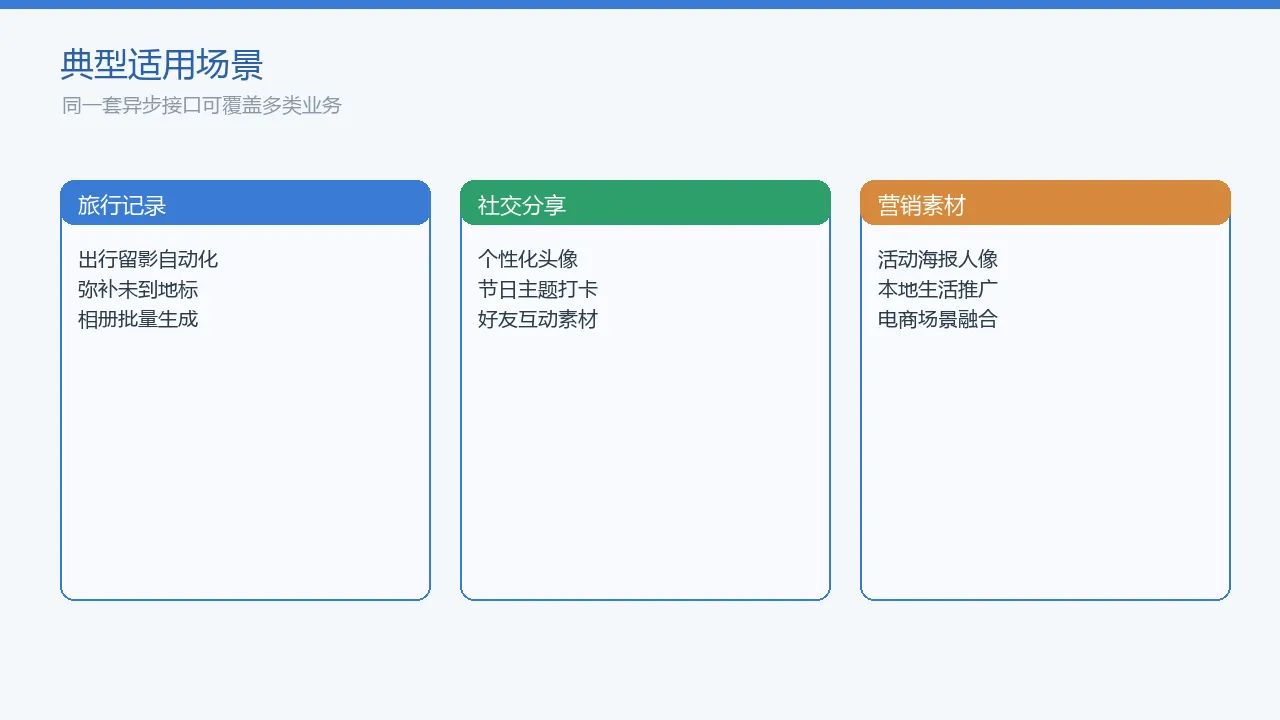
传统的人像与景点合成通常需要专业设计工具或本地 GPU 推理,链路长、成本高。将这类能力以 API 形式接入后,业务端只需关心「人物底图 + 地点描述 + 姿势要求」三要素,即可把生图过程托管到云端。常见接入方包括:
- 旅行记录类应用:用户上传自拍照后自动生成地标打卡照,用于游记或相册。
- 社交与内容平台:节日/活动主题下批量产出可分享的写实图片。
- 本地生活/电商营销:将模特与门店/景区/地标融合,快速生成活动素材。
这类接口的核心特点是异步:创建任务立即返回任务号,真正的生图结果需要二次轮询获取,因此接入重点不在单次 HTTP 调用,而在任务状态机、重试与缓存策略。
2. 接口概览
| 项 | 说明 |
|---|---|
| 协议 | HTTPS |
| 请求方式 | POST |
| 数据格式 | JSON |
| 鉴权方式 | 阿里云 APPCODE(Header: Authorization: APPCODE <appcode>) |
| 接口路径 | /viewPointCheck/execute |
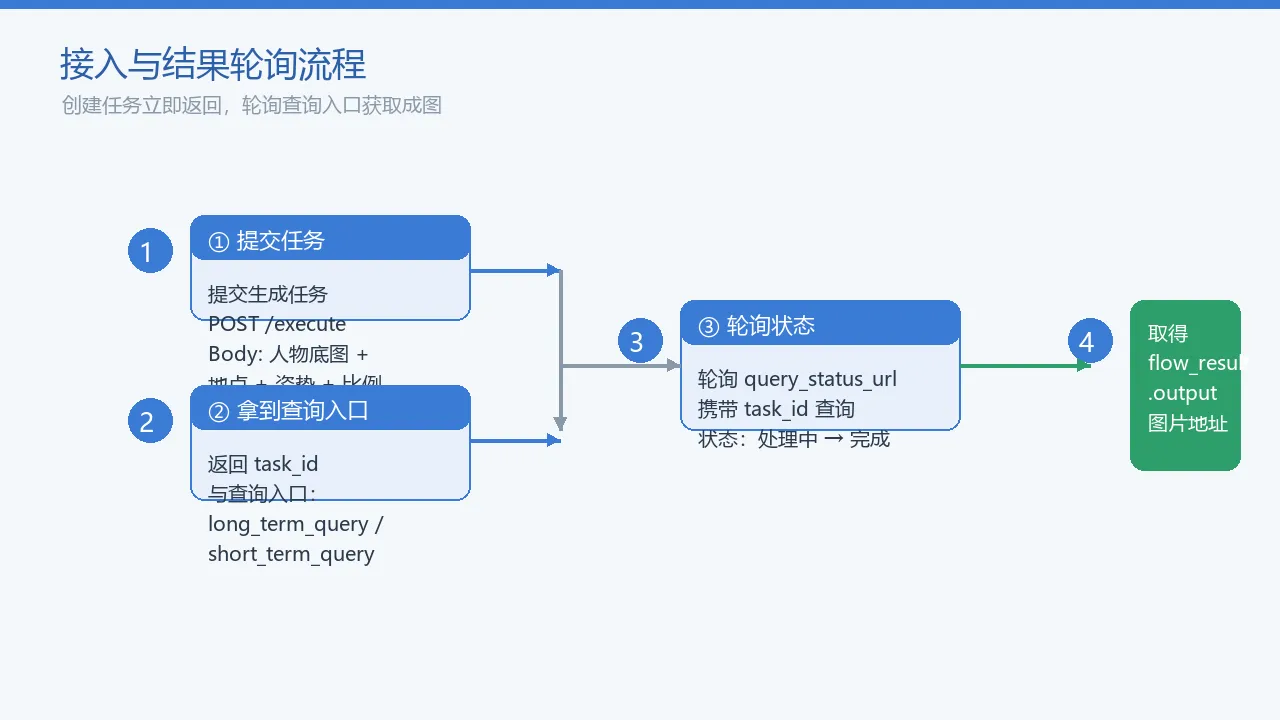
调用流程分为四步:
- 向执行接口提交人物底图、地点与姿势等参数;
- 接口返回任务 ID 与两类查询入口(长期查询入口 / 短期查询入口);
- 调用方按一定间隔轮询查询入口;
- 当任务完成时,从
flow_result.output中取出生成图片地址。
3. 请求参数
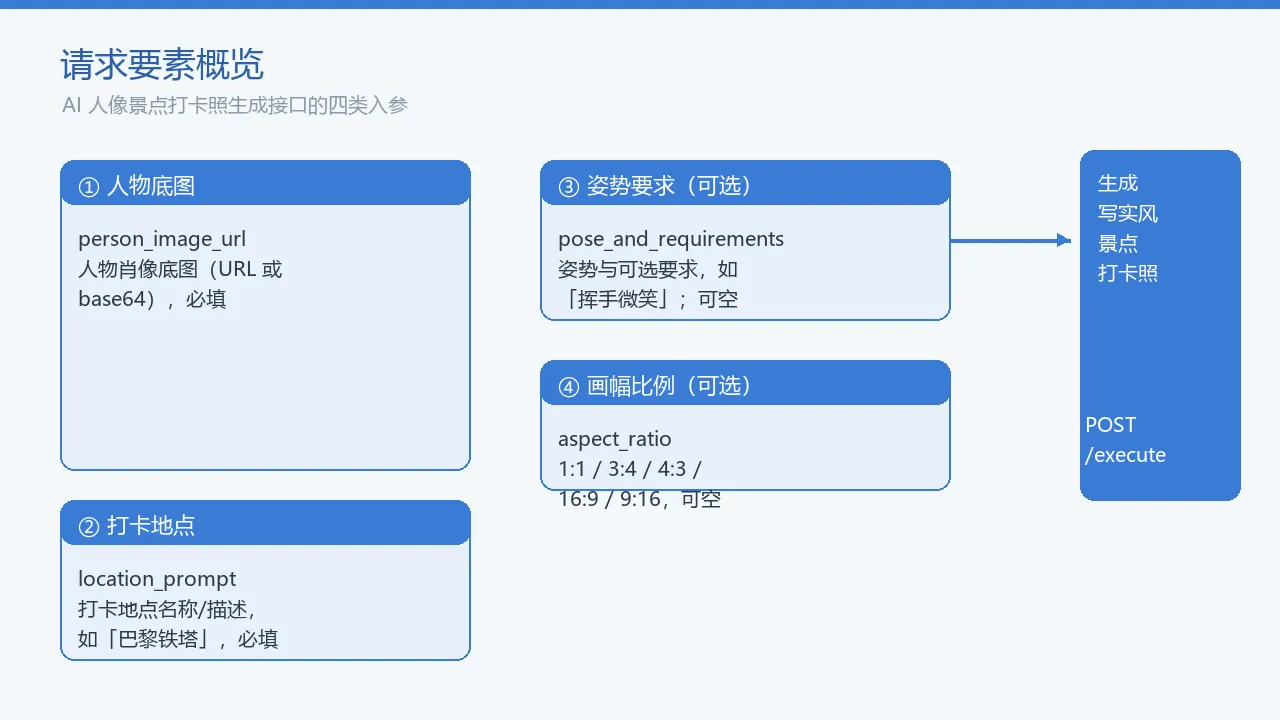
| 参数名 | 类型 | 必填 | 说明 |
|---|---|---|---|
person_image_url |
string | 是 | 人物肖像底图的公网 URL 或 base64 编码字符串 |
location_prompt |
string | 是 | 打卡地点名称或简短描述,例如「巴黎铁塔」「故宫红墙」 |
pose_and_requirements |
string | 否 | 人物姿势及其他可选要求,例如「挥手微笑,穿着休闲风衣」;不传时服务端使用默认自然站立姿势 |
aspect_ratio |
string | 否 | 生成图片比例,可选 1:1、3:4、4:3、16:9、9:16 |
请求体示例:
{

  "person_image_url": "<person_image_url>",
  "pose_and_requirements": "挥手微笑,穿着休闲风衣",
  "location_prompt": "巴黎铁塔",
  "aspect_ratio": "16:9"
}
4. 返回结构
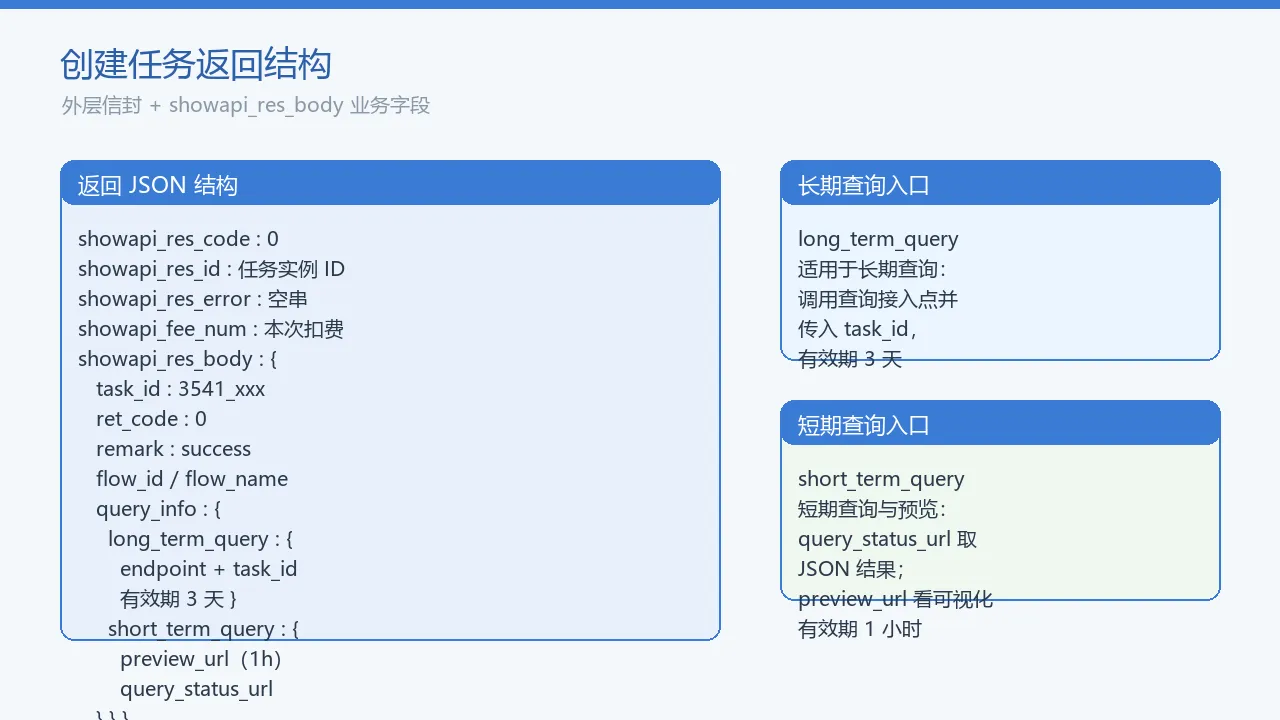
创建任务成功时,返回的外层信封如下:
| 字段 | 类型 | 说明 |
|---|---|---|
showapi_res_code |
int | 外层状态码,0 表示调用网关成功 |
showapi_res_error |
string | 外层错误信息,成功时为空 |
showapi_res_id |
string | 本次请求实例 ID,用于排错 |
showapi_fee_num |
int | 本次调用费用计数 |
showapi_res_body |
object | 业务响应体 |
showapi_res_body 中的关键字段:
| 字段 | 类型 | 说明 |
|---|---|---|
task_id |
string | 本次生成任务唯一标识 |
ret_code |
int | 业务状态码,0 表示任务创建成功 |
remark |
string | 业务状态描述 |
flow_id / flow_name |
string | 工作流标识与名称 |
query_info |
object | 包含长期查询入口与短期查询入口 |
完整成功响应示例:
{

  "showapi_res_body": {

    "query_info": {

      "long_term_query": {

        "endpoint": "查询接入点",
        "param": {
    "task_id": "3541_6a703dbf3c51f2492b001fe2" },
        "desc": "适用于长期查询,请调用查询接入点并传入 task_id,有效期为 3 天。"
      },
      "short_term_query": {

        "preview_url": "<preview_url>",
        "query_status_url": "<query_status_url>",
        "desc": "短期查询与可视化预览,有效期 1 小时。"
      }
    },
    "task_id": "3541_6a703dbf3c51f2492b001fe2",
    "ret_code": 0,
    "remark": "success",
    "flow_id": "6a599e393c51f2492b001fe2",
    "flow_name": "景点打卡照生成"
  },
  "showapi_res_id": "6a703dbf3c51f2492b001fe3",
  "showapi_res_error": "",
  "showapi_fee_num": 0,
  "showapi_res_code": 0
}
实际轮询地址以返回结果为准,
flow_result.output中携带生成图片地址。
5. 错误码与排查
由于该接口未单独列出错误码表,错误信息主要通过两层通道传递:
| 层级 | 字段 | 含义 | 排查建议 |
|---|---|---|---|
| 网关层 | HTTP 401 / 403 | 鉴权失败 | 检查 Authorization: APPCODE <appcode> 头是否正确,APPCODE 是否已开通当前接口权限 |
| 业务层 | showapi_res_body.ret_code = 1 |
参数错误 | 检查 person_image_url 是否为空、location_prompt 是否为空、aspect_ratio 是否在枚举范围内 |
参数错误时的响应示例:
{

  "showapi_res_error": "",
  "showapi_res_id": "6a59ec66fb638c93475e2ce9",
  "showapi_res_code": 0,
  "showapi_fee_num": 0,
  "showapi_res_body": {

    "remark": "参数错误,请检查传入参数内容!",
    "ret_code": 1
  }
}
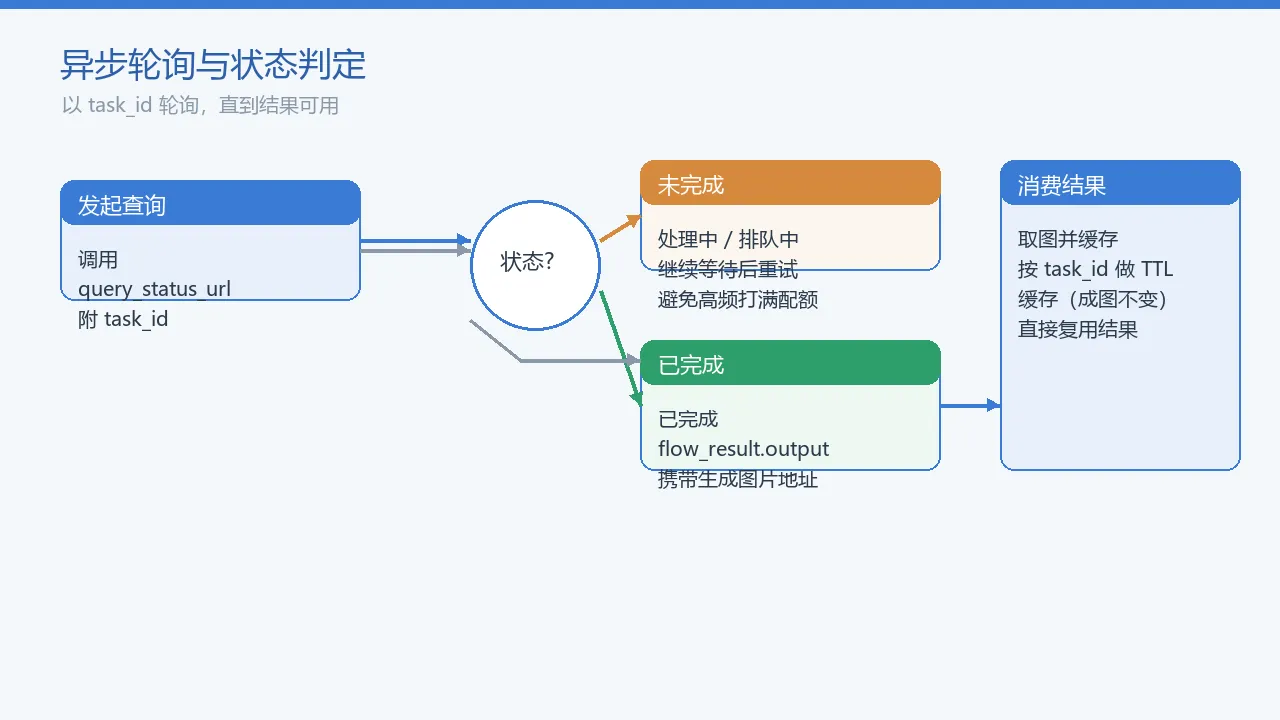
轮询阶段常见异常:
- 任务仍在处理中:此时
flow_result尚未包含output,调用方应继续等待; - 任务失败:需要从
flow_result的异常字段中提取原因; - 查询入口过期:短期入口有效期 1 小时,长期入口有效期 3 天,超过有效期后无法再获取结果。
6. 频控与合规
该接口属于 AI 生图类资源,服务端通常对调用频率和并发有保护。接入时应注意:
- 调用频次:QPS 与每日调用上限以控制台实时配置为准,批量生成时应做客户端节流;
- 人物底图隐私:
person_image_url为人脸或全身照,属于敏感个人信息。应遵循最小必要原则,不在日志中完整记录 URL,结果图片按需存储并设置合理的过期时间; - 内容合规:生成内容应符合平台规范,避免输入涉及肖像权、地标版权等争议场景的描述;
- 结果缓存:同一份底图、地点、姿势生成的图片是稳定的,适合按
task_id做短期缓存,避免重复轮询与重复扣费。
7. 多语言接入示例
curl
HOST="<your_api_host>"
APPCODE="<your_appcode>"

curl -X POST "https://${HOST}/viewPointCheck/execute" \
  -H "Authorization: APPCODE ${APPCODE}" \
  -H "Content-Type: application/json; charset=UTF-8" \
  -d '{
    "person_image_url": "<person_image_url>",
    "location_prompt": "巴黎铁塔",
    "pose_and_requirements": "挥手微笑,穿着休闲风衣",
    "aspect_ratio": "16:9"
  }'
Python
import json
import requests

HOST = "<your_api_host>"
APPCODE = "<your_appcode>"
URL = f"https://{HOST}/viewPointCheck/execute"

headers = {

    "Authorization": f"APPCODE {APPCODE}",
    "Content-Type": "application/json; charset=UTF-8",
}

payload = {

    "person_image_url": "<person_image_url>",
    "location_prompt": "巴黎铁塔",
    "pose_and_requirements": "挥手微笑,穿着休闲风衣",
    "aspect_ratio": "16:9",
}

resp = requests.post(URL, headers=headers, json=payload, timeout=30)
print(resp.json())
Java
import java.net.URI;
import java.net.http.*;
import java.nio.charset.StandardCharsets;

public class CheckinExecute {

    public static void main(String[] args) throws Exception {

        String host = "<your_api_host>";
        String appcode = "<your_appcode>";
        String body = "{"
            + "\"person_image_url\":\"<person_image_url>\","
            + "\"location_prompt\":\"巴黎铁塔\","
            + "\"pose_and_requirements\":\"挥手微笑,穿着休闲风衣\","
            + "\"aspect_ratio\":\"16:9\""
            + "}";
        HttpRequest req = HttpRequest.newBuilder()
            .uri(URI.create("https://" + host + "/viewPointCheck/execute"))
            .header("Authorization", "APPCODE " + appcode)
            .header("Content-Type", "application/json; charset=UTF-8")
            .POST(HttpRequest.BodyPublishers.ofString(body))
            .build();
        HttpResponse<String> resp = HttpClient.newHttpClient()
            .send(req, HttpResponse.BodyHandlers.ofString(StandardCharsets.UTF_8));
        System.out.println(resp.body());
    }
}
PHP
<?php
$host = '<your_api_host>';
$appcode = '<your_appcode>';
$body = json_encode([
    'person_image_url' => '<person_image_url>',
    'location_prompt' => '巴黎铁塔',
    'pose_and_requirements' => '挥手微笑,穿着休闲风衣',
    'aspect_ratio' => '16:9',
]);

$ch = curl_init("https://{$host}/viewPointCheck/execute");
curl_setopt($ch, CURLOPT_POST, true);
curl_setopt($ch, CURLOPT_POSTFIELDS, $body);
curl_setopt($ch, CURLOPT_RETURNTRANSFER, true);
curl_setopt($ch, CURLOPT_HTTPHEADER, [
    "Authorization: APPCODE {$appcode}",
    "Content-Type: application/json; charset=UTF-8",
]);
$response = curl_exec($ch);
curl_close($ch);
echo $response;
Node.js
const axios = require('axios');

const HOST = '<your_api_host>';
const APPCODE = '<your_appcode>';

async function execute() {

  const resp = await axios.post(
    `https://${
     HOST}/viewPointCheck/execute`,
    {

      person_image_url: '<person_image_url>',
      location_prompt: '巴黎铁塔',
      pose_and_requirements: '挥手微笑,穿着休闲风衣',
      aspect_ratio: '16:9',
    },
    {

      headers: {

        Authorization: `APPCODE ${
     APPCODE}`,
        'Content-Type': 'application/json; charset=UTF-8',
      },
      timeout: 30000,
    }
  );
  console.log(resp.data);
}

execute().catch(console.error);
8. 接入工程实践
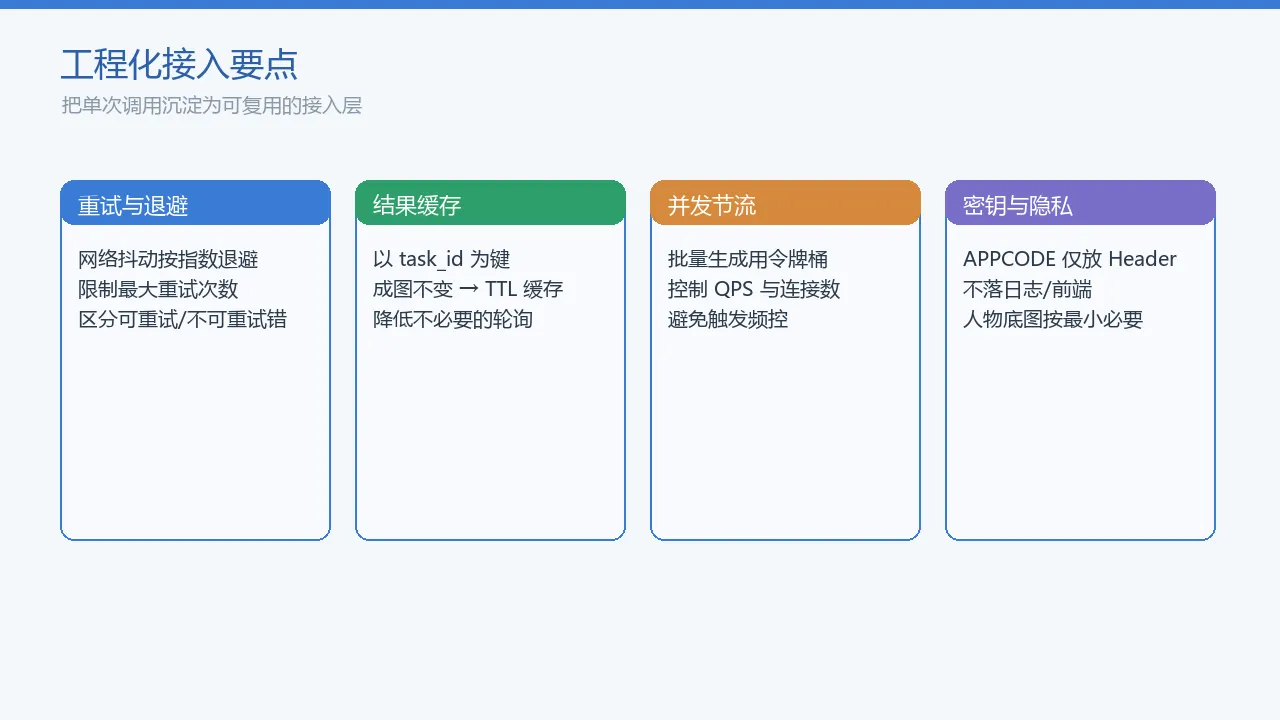
异步任务型 API 接入时,建议把单次 HTTP 调用封装成一个可复用的客户端,统一处理鉴权、重试、轮询与缓存。
8.1 带退避的重试
网络抖动或偶发 5xx 时,指数退避比重试更稳妥,避免给服务端造成脉冲压力:
import time
import requests

def post_with_retry(url, headers, json, max_retry=3):
    for attempt in range(max_retry):
        try:
            resp = requests.post(url, headers=headers, json=json, timeout=30)
            if resp.status_code < 500:
                return resp
        except requests.RequestException:
            pass
        time.sleep(2 ** attempt)
    return resp
8.2 异步轮询与结果缓存
生成结果与入参一一对应,且成图后不会变化,适合按 task_id 缓存:
import time
import requests

CACHE = {
   }

def poll_until_done(query_url, task_id, max_wait=600):
    key = task_id
    if key in CACHE:
        return CACHE[key]

    deadline = time.time() + max_wait
    interval = 2
    while time.time() < deadline:
        r = requests.post(query_url, json={
   "task_id": task_id}, timeout=20)
        data = r.json()
        output = data.get("flow_result", {
   }).get("output")
        if output:
            CACHE[key] = output
            return output
        time.sleep(interval)
        interval = min(interval * 2, 10)
    raise TimeoutError("轮询超时")
8.3 并发节流
批量生成场景下,建议使用令牌桶或信号量控制并发,避免触发频控:
import threading
from concurrent.futures import ThreadPoolExecutor

sem = threading.Semaphore(3)

def create_task(payload):
    with sem:
        return post_with_retry(URL, HEADERS, payload)

with ThreadPoolExecutor(max_workers=5) as pool:
    results = list(pool.map(create_task, payload_list))
8.4 密钥与隐私安全
- APPCODE 仅放在服务端代码中,不暴露给前端或客户端二进制;
- 请求/响应日志中脱敏处理
Authorization头; - 人物底图 URL 如果是临时预签名链接,应设置较短有效期;
- 生成的结果图片存储到业务自己的对象存储,并配置生命周期策略。
9. 技术 FAQ
Q1: person_image_url 必须传 URL 吗?能否直接传 base64?
可以传 URL 或 base64 字符串。若用 base64,注意编码后字符串较大,建议使用独立的对象存储 URL 以减少请求体体积并便于复用。
Q2: 为什么调用成功但拿不到图片?
该接口为异步任务。创建任务成功后需要先用返回的 task_id 轮询查询入口,待任务状态为完成时才能从 flow_result.output 中取图。短期查询入口有效期 1 小时,长期入口 3 天。
Q3: 是否支持批量生成?
接口本身按单次任务设计,批量场景在业务侧维护任务队列,用线程池或异步任务框架控制并发,并对同一 task_id 的结果做缓存。
Q4: 返回 ret_code: 1 是什么原因?
通常是必填参数为空或 aspect_ratio 不在可选枚举范围内。请检查 person_image_url、location_prompt 以及比例字段。
Q5: 人物底图有什么要求?
建议提供清晰、正面或半身的人物照片,避免多人合影、过度遮挡或低分辨率图像,以提高生成质量与稳定性。
10. 小结
本文以 AI 人像景点打卡照生成接口为例,梳理了异步图像生成 API 的接入要点:
- 请求侧关注四要素:人物底图、打卡地点、姿势要求、画幅比例;
- 响应侧的核心是
task_id与两类查询入口,短期入口适合快速调试,长期入口适合生产系统; - 工程化重点在于任务轮询、失败重试、结果缓存、并发节流与密钥安全;
- 数据合规层面需妥善保存人脸/人体照片,并配置合理的图片生命周期。
这套思路同样适用于其他「提交任务 → 轮询结果」型的 AI 生成接口,只需替换参数与状态字段即可迁移。