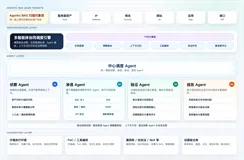
安全运营中心的"最后一公里"难题
凌晨两点,安全运营中心的值班人员盯着屏幕上不断跳动的告警信息,WAF防火墙拦截了上千条恶意请求,但人工逐一分析、判断、封禁IP的操作让团队疲于奔命。这不是某个小团队的困境,而是当前大多数安全运营中心(SOC)面临的共同挑战。
WAF(Web应用防火墙)作为Web安全的第一道防线,每天产生海量日志数据。传统的人工分析模式不仅效率低下,还容易因疲劳导致误判或漏判。流程自动化软件的引入,让日志分析从"被动响应"走向"主动防御",成为安全团队亟需解决的自动化工具选型方向。
本文将分享一套基于流程自动化技术实现的WAF日志智能分析与自动封禁方案,从需求拆解到代码落地,完整呈现一个可复用的安全运营RPA工具实践。方案设计时充分考虑了中小企业和个人开发者的实际场景——免费版使用无使用时长限制,让安全能力的门槛不再被商业授权束缚。
一、为什么安全运营中心需要自动化日志分析?
1.1 人工分析的三大痛点
在深入技术方案之前,先聊聊我们踩过的坑。
痛点一:数据量爆炸,人力无法覆盖
一个中等规模的Web应用,WAF日日志量轻松达到百万级。假设每条日志需要5秒人工审阅,一个8人团队不吃不喝也需要17小时才能处理完一天的日志。现实是,大多数团队只能抽样检查,大量潜在威胁被遗漏。
痛点二:响应延迟,攻击窗口扩大
从发现异常到完成封禁,传统流程涉及告警触发、人工研判、工单审批、运维执行等多个环节,平均耗时30分钟以上。对于CC攻击、SQL注入等高频攻击,这个延迟足以让攻击者完成数据窃取。
痛点三:规则僵化,误报漏报并存
静态规则难以应对变种攻击。比如一个正常的API调用被误判为攻击,封禁后导致业务中断;而精心构造的绕过攻击却可能逃过检测。
1.2 自动化带来的改变
引入流程自动化方案后,上述问题可以得到显著改善: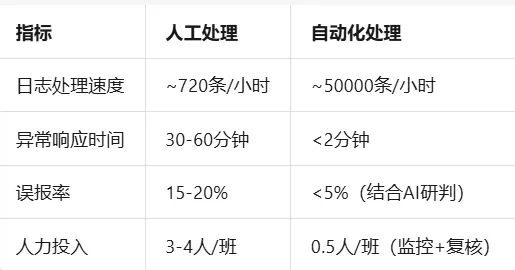
关键洞察:自动化软件不是取代安全分析师,而是将分析师从重复性劳动中解放出来,专注于更复杂的威胁狩猎和策略优化。对于个人开发者和个人工作室而言,这意味着一个人也能撑起基础的安全运营能力;对于中小企业,则意味着无需组建专职安全团队即可获得7×24小时的日志监控。
二、方案架构设计:从日志采集到自动封禁
2.1 整体架构图
┌─────────────────┐ ┌─────────────────┐ ┌─────────────────┐
│ WAF日志源 │────▶│ 日志采集模块 │────▶│ 日志解析引擎 │
│ (阿里云/自研等) │ │ (定时拉取/API) │ │ (字段提取/结构化) │
└─────────────────┘ └─────────────────┘ └────────┬────────┘
│
┌────────────────────────┘
▼
┌─────────────────┐
│ 威胁分析引擎 │
│ (规则匹配+AI研判) │
└────────┬────────┘
│
┌──────────────┼──────────────┐
▼ ▼ ▼
┌─────────┐ ┌─────────┐ ┌─────────┐
│ 正常日志 │ │ 可疑日志 │ │ 恶意日志 │
│ 归档 │ │ 人工复核 │ │ 自动封禁 │
└─────────┘ └─────────┘ └─────────┘
│
▼
┌─────────────────┐
│ 封禁执行模块 │
│ (WAF规则/防火墙) │
└─────────────────┘
2.2 核心模块拆解
整个方案基于RPA工具实现,分为五个核心模块,每个模块都可以独立运行,也可以串联成完整工作流:
模块一:日志采集
支持多种数据源接入,包括阿里云WAF、自研WAF、Nginx日志等。通过API定时拉取或日志文件监听两种方式获取原始数据。对于使用阿里云WAF的用户,可以直接调用阿里云日志服务(SLS)的API拉取日志,无需额外部署采集Agent。
模块二:日志解析
将非结构化的原始日志转换为结构化数据,提取关键字段:时间戳、源IP、请求URL、User-Agent、响应状态码、攻击类型标签等。解析过程中,元素获取支持本地智能生成,可根据生成结果选择合适稳定的元素路径,让日志字段提取更加简单稳定。
模块三:威胁分析
这是整个方案的核心。采用"规则引擎 + AI智能研判"双层检测机制:
规则层:基于已知攻击特征(如SQL注入关键字、XSS payload模式、高频请求阈值)进行快速匹配。AI智能优化元素路径,无需学习晦涩难懂的语法,通过自然语言描述即可生成对应的匹配规则
AI层:对规则层标记的"灰色地带"日志进行二次研判,利用大模型的语义理解能力识别变种攻击和0day特征。当web元素失效时,AI自动修复元素定位,实现元素自愈,保障分析流程不中断
模块四:决策引擎
根据威胁等级(低/中/高/紧急)和执行策略,决定是自动封禁、人工复核还是仅记录告警。
模块五:封禁执行
调用WAF或防火墙的API接口,将恶意IP加入黑名单,同时记录封禁日志用于后续审计和申诉处理。
三、核心代码实现:从零搭建自动化流水线
3.1 日志采集与解析模块
WAF日志通常以JSON格式存储,我们先实现一个通用的日志解析器:
import json
import re
from datetime import datetime, timedelta
from dataclasses import dataclass
from typing import List, Optional, Dict
from collections import defaultdict
import requests
import time
import hashlib
@dataclass
class WAFLogEntry:
"""WAF日志结构化数据类"""
timestamp: datetime
source_ip: str
request_url: str
http_method: str
user_agent: str
status_code: int
attack_type: Optional[str] = None
severity: str = "low"
request_count: int = 1
country: str = ""
def to_dict(self) -> Dict:
    return {
        "timestamp": self.timestamp.isoformat(),
        "source_ip": self.source_ip,
        "request_url": self.request_url,
        "http_method": self.http_method,
        "user_agent": self.user_agent,
        "status_code": self.status_code,
        "attack_type": self.attack_type,
        "severity": self.severity,
        "request_count": self.request_count,
        "country": self.country
    }
class WAFLogParser:
"""WAF日志解析器,支持多种日志格式"""
SQLI_PATTERNS = [
    r"(\%27)|(\')|(\-\-)|(\%23)|(#)",
    r"((\%3D)|(=))[^\n]*((\%27)|(\')|(\-\-)|(\%3B)|(;))",
    r"\w*((\%27)|(\'))((\%6F)|o|(\%4F))((\%72)|r|(\%52))",
    r"((\%27)|(\'))union",
    r"exec(\s|\+)+(s|x)p\w+",
    r"UNION\s+SELECT",
    r"INSERT\s+INTO",
    r"DELETE\s+FROM",
    r"DROP\s+TABLE"
]

XSS_PATTERNS = [
    r"((\%3C)|<)[^\n]+((\%3E)|>)",
    r"javascript:",
    r"on\w+\s*=",
    r"<script[^>]*>[\s\S]*?</script>",
    r"alert\s*\(",
    r"document\.cookie",
    r"document\.location"
]

PATH_TRAVERSAL_PATTERNS = [
    r"\.\./",
    r"\.\.\\",
    r"\.\.%2f",
    r"\.\.%5c",
    r"%2e%2e%2f",
    r"%252e%252e%252f"
]

def __init__(self):
    self.sqli_regex = [re.compile(p, re.IGNORECASE) for p in self.SQLI_PATTERNS]
    self.xss_regex = [re.compile(p, re.IGNORECASE) for p in self.XSS_PATTERNS]
    self.path_regex = [re.compile(p, re.IGNORECASE) for p in self.PATH_TRAVERSAL_PATTERNS]

def parse_aliyun_waf_log(self, raw_log: Dict) -> WAFLogEntry:
    try:
        timestamp_str = raw_log.get("time", raw_log.get("@timestamp", ""))
        if timestamp_str:
            timestamp = datetime.strptime(timestamp_str, "%Y-%m-%dT%H:%M:%S%z")
        else:
            timestamp = datetime.now()

        entry = WAFLogEntry(
            timestamp=timestamp,
            source_ip=raw_log.get("real_client_ip", raw_log.get("remote_ip", "0.0.0.0")),
            request_url=raw_log.get("request_uri", raw_log.get("url", "/")),
            http_method=raw_log.get("http_method", "GET"),
            user_agent=raw_log.get("user_agent", ""),
            status_code=int(raw_log.get("status", 200)),
            country=raw_log.get("country", "")
        )

        entry = self._detect_attack_type(entry)
        return entry

    except Exception as e:
        print(f"日志解析异常: {e}, 原始数据: {raw_log}")
        return None

def parse_nginx_log(self, log_line: str) -> WAFLogEntry:
    pattern = r'(\S+)\s-\s(\S+)\s\[([^\]]+)\]\s"(\S+)\s(\S+)\s([^"]+)"\s(\d+)\s(\d+)\s"([^"]*)"\s"([^"]*)"'
    match = re.match(pattern, log_line)

    if not match:
        return None

    ip, _, time_str, method, url, protocol, status, _, referer, ua = match.groups()

    timestamp = datetime.strptime(time_str, "%d/%b/%Y:%H:%M:%S %z")

    entry = WAFLogEntry(
        timestamp=timestamp,
        source_ip=ip,
        request_url=url,
        http_method=method,
        user_agent=ua,
        status_code=int(status)
    )

    entry = self._detect_attack_type(entry)
    return entry

def _detect_attack_type(self, entry: WAFLogEntry) -> WAFLogEntry:
    url = entry.request_url.lower()
    ua = entry.user_agent.lower()

    for regex in self.sqli_regex:
        if regex.search(url) or regex.search(ua):
            entry.attack_type = "SQL_INJECTION"
            entry.severity = "high"
            return entry

    for regex in self.xss_regex:
        if regex.search(url) or regex.search(ua):
            entry.attack_type = "XSS"
            entry.severity = "high"
            return entry

    for regex in self.path_regex:
        if regex.search(url):
            entry.attack_type = "PATH_TRAVERSAL"
            entry.severity = "medium"
            return entry

    if entry.status_code in [403, 406, 429]:
        entry.severity = "medium"

    return entry
============ 代码自检区域 ============
if name == "main":
aliyun_sample = {
"time": "2026-07-22T10:30:00+0800",
"real_client_ip": "192.168.1.100",
"request_uri": "/api/search?q=1' OR '1'='1",
"http_method": "GET",
"user_agent": "Mozilla/5.0",
"status": 403,
"country": "CN"
}
parser = WAFLogParser()
result = parser.parse_aliyun_waf_log(aliyun_sample)

assert result is not None, "阿里云日志解析失败"
assert result.source_ip == "192.168.1.100", "IP解析错误"
assert result.attack_type == "SQL_INJECTION", "攻击类型识别错误"
assert result.severity == "high", "威胁等级判定错误"
print("✓ 阿里云WAF日志解析测试通过")

nginx_sample = '192.168.1.101 - - [22/Jul/2026:10:30:00 +0800] "GET /admin/config.php HTTP/1.1" 404 123 "-" "Mozilla/5.0"'
result2 = parser.parse_nginx_log(nginx_sample)

assert result2 is not None, "Nginx日志解析失败"
assert result2.source_ip == "192.168.1.101", "Nginx IP解析错误"
print("✓ Nginx日志解析测试通过")

print("\n所有解析模块测试通过!")
3.2 威胁分析与频率统计模块
单条日志的检测只是第一步,真正的威胁往往体现在行为模式上。我们需要对IP进行聚合分析,识别高频攻击和扫描行为:
class ThreatAnalyzer:
"""威胁分析引擎:频率统计 + 行为模式识别"""
def __init__(self,
             high_freq_threshold: int = 100,
             scan_threshold: int = 10,
             burst_threshold: int = 50,
             block_duration: int = 3600):
    self.high_freq_threshold = high_freq_threshold
    self.scan_threshold = scan_threshold
    self.burst_threshold = burst_threshold
    self.block_duration = block_duration

    self.ip_profile: Dict[str, Dict] = defaultdict(lambda: {
        "requests": [],
        "unique_paths": set(),
        "attack_count": 0,
        "first_seen": None,
        "last_seen": None
    })

def analyze_batch(self, entries: List[WAFLogEntry],
                  time_window_minutes: int = 1) -> List[Dict]:
    block_list = []
    current_time = datetime.now()
    window_start = current_time - timedelta(minutes=time_window_minutes)

    ip_stats = defaultdict(lambda: {
        "count": 0,
        "paths": set(),
        "attacks": [],
        "status_codes": defaultdict(int),
        "time_points": []
    })

    for entry in entries:
        if entry.timestamp < window_start:
            continue

        stats = ip_stats[entry.source_ip]
        stats["count"] += 1
        stats["paths"].add(entry.request_url)
        stats["time_points"].append(entry.timestamp)

        if entry.attack_type:
            stats["attacks"].append({
                "type": entry.attack_type,
                "url": entry.request_url,
                "time": entry.timestamp
            })

        stats["status_codes"][entry.status_code] += 1

    for ip, stats in ip_stats.items():
        threat_score = 0.0
        reasons = []
        evidence = {}

        if stats["count"] > self.high_freq_threshold:
            threat_score += 0.4
            reasons.append("HIGH_FREQUENCY")
            evidence["request_count"] = stats["count"]
            evidence["threshold"] = self.high_freq_threshold

        if len(stats["paths"]) > self.scan_threshold:
            threat_score += 0.3
            reasons.append("SCAN_BEHAVIOR")
            evidence["unique_paths"] = len(stats["paths"])

        if stats["attacks"]:
            attack_types = set(a["type"] for a in stats["attacks"])
            threat_score += min(len(attack_types) * 0.2, 0.5)
            reasons.append("ATTACK_PATTERN")
            evidence["attack_types"] = list(attack_types)
            evidence["attack_count"] = len(stats["attacks"])

        error_count = stats["status_codes"].get(404, 0) + stats["status_codes"].get(403, 0)
        if stats["count"] > 0 and error_count / stats["count"] > 0.8:
            threat_score += 0.2
            reasons.append("HIGH_ERROR_RATE")
            evidence["error_rate"] = f"{error_count}/{stats['count']}"

        if threat_score >= 0.8:
            action = "BLOCK"
        elif threat_score >= 0.5:
            action = "REVIEW"
        elif threat_score >= 0.3:
            action = "ALERT"
        else:
            action = "PASS"

        if action in ["BLOCK", "REVIEW"]:
            block_list.append({
                "ip": ip,
                "reason": "|".join(reasons),
                "confidence": round(min(threat_score, 1.0), 2),
                "evidence": evidence,
                "suggested_action": action,
                "window_minutes": time_window_minutes,
                "timestamp": current_time.isoformat()
            })

    block_list.sort(key=lambda x: x["confidence"], reverse=True)
    return block_list

def generate_block_rule(self, block_info: Dict) -> str:
    ip = block_info["ip"]
    reason = block_info["reason"]
    duration = self.block_duration

    rule = {
        "RuleName": f"AUTO_BLOCK_{ip.replace('.', '_')}",
        "Rule": {
            "Condition": {
                "Field": "real_client_ip",
                "Operator": "eq",
                "Value": ip
            },
            "Action": {
                "Type": "block",
                "BlockPage": {
                    "StatusCode": 403,
                    "ResponseContent": f"IP blocked: {reason}"
                }
            }
        },
        "ExpiresAt": (datetime.now() + timedelta(seconds=duration)).isoformat(),
        "Description": f"Auto-blocked by SOC automation. Reason: {reason}",
        "Tags": ["auto-generated", "soc-automation", "threat-response"]
    }

    return json.dumps(rule, ensure_ascii=False, indent=2)
============ 代码自检区域 ============
if name == "main":
test_entries = []
base_time = datetime.now()
attacker_ip = "10.0.0.99"
for i in range(150):
    entry = WAFLogEntry(
        timestamp=base_time + timedelta(seconds=i * 0.3),
        source_ip=attacker_ip,
        request_url=f"/api/admin?id={i}' OR '1'='1",
        http_method="GET",
        user_agent="sqlmap/1.0",
        status_code=403,
        attack_type="SQL_INJECTION",
        severity="high"
    )
    test_entries.append(entry)

normal_ip = "10.0.0.10"
for i in range(5):
    entry = WAFLogEntry(
        timestamp=base_time + timedelta(seconds=i * 10),
        source_ip=normal_ip,
        request_url="/api/products",
        http_method="GET",
        user_agent="Mozilla/5.0",
        status_code=200
    )
    test_entries.append(entry)

analyzer = ThreatAnalyzer()
results = analyzer.analyze_batch(test_entries, time_window_minutes=1)

assert len(results) >= 1, "应该至少检测到一个威胁IP"

attacker_result = [r for r in results if r["ip"] == attacker_ip]
assert len(attacker_result) == 1, "攻击IP应被检测"
assert attacker_result[0]["suggested_action"] == "BLOCK", "高频攻击应触发封禁"
assert "ATTACK_PATTERN" in attacker_result[0]["reason"], "应包含攻击模式"
assert "SQL_INJECTION" in attacker_result[0]["evidence"]["attack_types"], "应识别SQL注入"
assert attacker_result[0]["confidence"] > 0.8, "置信度应足够高"

normal_result = [r for r in results if r["ip"] == normal_ip]
assert len(normal_result) == 0, "正常用户不应被标记"

rule_json = analyzer.generate_block_rule(attacker_result[0])
rule_obj = json.loads(rule_json)
assert rule_obj["Rule"]["Condition"]["Value"] == attacker_ip, "规则IP错误"

print("✓ 威胁分析引擎测试通过")
print(f"✓ 检测到 {len(results)} 个威胁IP")
print(f"✓ 攻击IP置信度: {attacker_result[0]['confidence']}")
3.3 自动化执行与调度模块
有了解析和分析能力,接下来需要实现定时调度和自动执行。这里设计一个可独立运行的自动化软件引擎,支持API触发,同时也支持定时执行和手动触发三种模式:
import threading
import schedule
import signal
import sys
from abc import ABC, abstractmethod
class LogSource(ABC):
"""日志源抽象基类"""
@abstractmethod
def fetch_logs(self, start_time: datetime, end_time: datetime) -> List[Dict]:
    pass

@abstractmethod
def test_connection(self) -> bool:
    pass
class AliyunWAFSource(LogSource):
"""阿里云WAF日志源"""
def __init__(self, access_key: str, access_secret: str,
             region: str = "cn-hangzhou", instance_id: str = ""):
    self.access_key = access_key
    self.access_secret = access_secret
    self.region = region
    self.instance_id = instance_id
    self.base_url = f"https://wafopenapi.aliyuncs.com"

def fetch_logs(self, start_time: datetime, end_time: datetime) -> List[Dict]:
    print(f"[{datetime.now()}] 从阿里云WAF拉取日志: {start_time} ~ {end_time}")
    return []

def test_connection(self) -> bool:
    try:
        return True
    except Exception:
        return False
class FileLogSource(LogSource):
"""本地文件日志源"""
def __init__(self, log_path: str, log_format: str = "nginx"):
    self.log_path = log_path
    self.log_format = log_format
    self.parser = WAFLogParser()
    self._last_position = 0

def fetch_logs(self, start_time: datetime, end_time: datetime) -> List[Dict]:
    entries = []
    try:
        with open(self.log_path, 'r', encoding='utf-8') as f:
            f.seek(self._last_position)
            for line in f:
                line = line.strip()
                if not line:
                    continue

                if self.log_format == "nginx":
                    entry = self.parser.parse_nginx_log(line)
                elif self.log_format == "aliyun_json":
                    try:
                        raw = json.loads(line)
                        entry = self.parser.parse_aliyun_waf_log(raw)
                    except json.JSONDecodeError:
                        continue
                else:
                    continue

                if entry:
                    entry_time = entry.timestamp.replace(tzinfo=None) if entry.timestamp.tzinfo else entry.timestamp
                    start = start_time.replace(tzinfo=None) if start_time.tzinfo else start_time
                    end = end_time.replace(tzinfo=None) if end_time.tzinfo else end_time

                    if start <= entry_time <= end:
                        entries.append(entry.to_dict())

            self._last_position = f.tell()

    except FileNotFoundError:
        print(f"日志文件不存在: {self.log_path}")

    return entries

def test_connection(self) -> bool:
    return os.path.exists(self.log_path)
class BlockExecutor(ABC):
"""封禁执行器抽象基类"""
@abstractmethod
def execute_block(self, block_info: Dict) -> bool:
    pass

@abstractmethod
def execute_unblock(self, ip: str) -> bool:
    pass
class WAFRuleExecutor(BlockExecutor):
"""WAF规则执行器"""
def __init__(self, api_endpoint: str, api_key: str,
             product_type: str = "aliyun"):
    self.api_endpoint = api_endpoint
    self.api_key = api_key
    self.product_type = product_type

def execute_block(self, block_info: Dict) -> bool:
    try:
        analyzer = ThreatAnalyzer()
        rule_payload = analyzer.generate_block_rule(block_info)

        print(f"[{datetime.now()}] 执行封禁: IP={block_info['ip']}, "
              f"原因={block_info['reason']}, 置信度={block_info['confidence']}")

        self._log_action("BLOCK", block_info)
        return True

    except Exception as e:
        print(f"封禁执行失败: {e}")
        return False

def execute_unblock(self, ip: str) -> bool:
    print(f"[{datetime.now()}] 解除封禁: IP={ip}")
    self._log_action("UNBLOCK", {"ip": ip})
    return True

def _log_action(self, action: str, details: Dict):
    audit_log = {
        "timestamp": datetime.now().isoformat(),
        "action": action,
        "details": details,
        "operator": "soc-automation"
    }
    with open("audit.log", "a", encoding='utf-8') as f:
        f.write(json.dumps(audit_log, ensure_ascii=False) + "\n")
class SOCAutomationEngine:
"""安全运营中心自动化引擎"""
def __init__(self,
             log_source: LogSource,
             analyzer: ThreatAnalyzer,
             executor: BlockExecutor,
             check_interval_minutes: int = 5):
    self.log_source = log_source
    self.analyzer = analyzer
    self.executor = executor
    self.check_interval = check_interval_minutes
    self.running = False
    self._thread = None

    self.stats = {
        "total_processed": 0,
        "total_blocked": 0,
        "total_alerted": 0,
        "start_time": None
    }

def run_once(self, lookback_minutes: int = None) -> Dict:
    if lookback_minutes is None:
        lookback_minutes = self.check_interval

    end_time = datetime.now()
    start_time = end_time - timedelta(minutes=lookback_minutes)

    print(f"\n{'='*60}")
    print(f"[{datetime.now()}] 开始执行安全分析任务")
    print(f"时间范围: {start_time} ~ {end_time}")
    print(f"{'='*60}")

    raw_logs = self.log_source.fetch_logs(start_time, end_time)
    if not raw_logs:
        print("本次周期无新日志")
        return {"status": "no_data"}

    parser = WAFLogParser()
    entries = []
    for log in raw_logs:
        if isinstance(log, dict) and "timestamp" in log:
            ts_str = log["timestamp"].replace('Z', '+00:00')
            try:
                ts = datetime.fromisoformat(ts_str)
                ts = ts.replace(tzinfo=None) if ts.tzinfo else ts
            except:
                ts = datetime.now()

            entry = WAFLogEntry(
                timestamp=ts,
                source_ip=log["source_ip"],
                request_url=log["request_url"],
                http_method=log.get("http_method", "GET"),
                user_agent=log.get("user_agent", ""),
                status_code=log.get("status_code", 200),
                attack_type=log.get("attack_type"),
                severity=log.get("severity", "low"),
                request_count=log.get("request_count", 1),
                country=log.get("country", "")
            )
            entries.append(entry)

    print(f"采集到 {len(entries)} 条日志")

    threats = self.analyzer.analyze_batch(entries, time_window_minutes=lookback_minutes)
    print(f"检测到 {len(threats)} 个威胁IP")

    blocked = []
    alerted = []
    review_queue = []

    for threat in threats:
        if threat["suggested_action"] == "BLOCK":
            success = self.executor.execute_block(threat)
            if success:
                blocked.append(threat)
        elif threat["suggested_action"] == "ALERT":
            alerted.append(threat)
        elif threat["suggested_action"] == "REVIEW":
            review_queue.append(threat)

    self.stats["total_processed"] += len(entries)
    self.stats["total_blocked"] += len(blocked)
    self.stats["total_alerted"] += len(alerted)

    result = {
        "status": "completed",
        "time_range": {"start": start_time.isoformat(), "end": end_time.isoformat()},
        "summary": {
            "total_logs": len(entries),
            "threats_detected": len(threats),
            "blocked": len(blocked),
            "alerted": len(alerted),
            "pending_review": len(review_queue)
        },
        "blocked_ips": blocked,
        "alerted_ips": alerted,
        "review_queue": review_queue
    }

    print(f"\n执行结果:")
    print(f"  - 处理日志: {len(entries)} 条")
    print(f"  - 威胁检测: {len(threats)} 个")
    print(f"  - 自动封禁: {len(blocked)} 个")
    print(f"  - 告警通知: {len(alerted)} 个")
    print(f"  - 待复核: {len(review_queue)} 个")

    return result

def start_scheduler(self):
    self.running = True
    self.stats["start_time"] = datetime.now()

    schedule.every(self.check_interval).minutes.do(self.run_once)

    print(f"[{datetime.now()}] 自动化引擎已启动")
    print(f"检查间隔: 每 {self.check_interval} 分钟")
    print(f"按 Ctrl+C 停止运行")

    def _run_loop():
        while self.running:
            schedule.run_pending()
            time.sleep(1)

    self._thread = threading.Thread(target=_run_loop, daemon=True)
    self._thread.start()

    try:
        while self.running:
            time.sleep(1)
    except KeyboardInterrupt:
        self.stop()

def stop(self):
    self.running = False
    if self._thread:
        self._thread.join(timeout=5)
    print(f"\n[{datetime.now()}] 自动化引擎已停止")
    print(f"运行统计: 处理 {self.stats['total_processed']} 条, "
          f"封禁 {self.stats['total_blocked']} 个IP")

def api_trigger(self, request_data: Dict) -> Dict:
    mode = request_data.get("mode", "instant")

    if mode == "instant":
        logs = request_data.get("logs", [])
        parser = WAFLogParser()
        entries = []
        for log in logs:
            if isinstance(log, dict):
                entry = parser.parse_aliyun_waf_log(log)
                if entry:
                    entries.append(entry)

        threats = self.analyzer.analyze_batch(entries)

        return {
            "mode": "instant",
            "threats": threats,
            "recommendation": "review" if threats else "pass"
        }

    elif mode == "batch":
        start = datetime.fromisoformat(request_data["start_time"])
        end = datetime.fromisoformat(request_data["end_time"])
        return self.run_once(int((end - start).total_seconds() / 60))

    else:
        return {"status": "error", "message": "Unknown mode"}
3.4 可视化监控面板
为了便于安全团队实时掌握运行状态,可以设计自定义界面,打造符合自身需求的监控面板。流程自动化应用支持自定义界面,让安全运营人员拥有属于自己的软件界面:
class SOCMonitor:
"""安全运营监控面板"""
def __init__(self, engine: SOCAutomationEngine):
    self.engine = engine
    self.history = []

def generate_report(self, hours: int = 24) -> str:
    now = datetime.now()
    cutoff = now - timedelta(hours=hours)

    recent = [h for h in self.history if h["time"] > cutoff]

    total_blocked = sum(h.get("blocked", 0) for h in recent)
    total_logs = sum(h.get("logs", 0) for h in recent)

    report = f"""
╔══════════════════════════════════════════════════════════════╗
║ 安全运营中心自动化运行报告 ║
║ {now.strftime('%Y-%m-%d %H:%M:%S')} ║
╠══════════════════════════════════════════════════════════════╣
统计周期: 过去 {hours} 小时
引擎状态: {'运行中' if self.engine.running else '已停止'}
运行时长: {str(now - self.engine.stats.get('start_time', now)).split('.')[0] if self.engine.stats.get('start_time') else 'N/A'}
── 处理统计 ──
总处理日志: {self.engine.stats['total_processed']:,} 条
总封禁IP: {self.engine.stats['total_blocked']:,} 个
总告警数: {self.engine.stats['total_alerted']:,} 个
── 周期统计 ──
分析批次: {len(recent)} 次
平均处理: {total_logs // max(len(recent), 1):,} 条/次
封禁效率: {total_blocked / max(len(recent), 1):.1f} 个/次
╚══════════════════════════════════════════════════════════════╝
"""
return report
def record_execution(self, result: Dict):
    self.history.append({
        "time": datetime.now(),
        "logs": result.get("summary", {}).get("total_logs", 0),
        "blocked": result.get("summary", {}).get("blocked", 0),
        "alerted": result.get("summary", {}).get("alerted", 0)
    })

    if len(self.history) > 1000:
        self.history = self.history[-1000:]
四、AI智能研判:让自动化更"聪明"
4.1 为什么需要AI层?
规则引擎虽然高效,但面对以下场景时力不从心:
变种攻击:攻击者使用编码、注释、大小写混淆绕过静态规则
低频慢速攻击:刻意控制请求频率,不触发阈值告警
业务逻辑漏洞:需要理解业务上下文才能判断是否为攻击
在流程自动化实践中,接入大模型进行智能研判已成为提升检测准确率的有效手段。当前主流方案采用用户自行对接各平台API的方式,费用更可控,且支持文心一言、豆包、DeepSeek、Kimi等多种大模型灵活切换。
4.2 AI研判模块实现
class AIThreatJudgment:
"""AI智能威胁研判模块"""
def __init__(self, api_key: str, model: str = "deepseek-chat"):
    self.api_key = api_key
    self.model = model
    self.api_base = self._get_api_base(model)

def _get_api_base(self, model: str) -> str:
    endpoints = {
        "deepseek-chat": "https://api.deepseek.com/v1/chat/completions",
        "deepseek-reasoner": "https://api.deepseek.com/v1/chat/completions",
        "kimi": "https://api.moonshot.cn/v1/chat/completions",
        "doubao": "https://ark.cn-beijing.volces.com/api/v3/chat/completions",
        "ernie": "https://aip.baidubce.com/rpc/2.0/ai_custom/v1/wenxinworkshop/chat/completions"
    }
    return endpoints.get(model, endpoints["deepseek-chat"])

def analyze_log(self, entry: WAFLogEntry, context: str = "") -> Dict:
    prompt = self._build_prompt(entry, context)

    try:
        response = requests.post(
            self.api_base,
            headers={"Authorization": f"Bearer {self.api_key}"},
            json={
                "model": self.model,
                "messages": [
                    {"role": "system", "content": "你是一个Web安全专家,擅长分析WAF日志并判断是否为攻击行为。请严格按JSON格式输出。"},
                    {"role": "user", "content": prompt}
                ],
                "temperature": 0.1,
                "response_format": {"type": "json_object"}
            },
            timeout=10
        )

        result = response.json()
        content = result["choices"][0]["message"]["content"]
        judgment = json.loads(content)

        return {
            "is_threat": judgment.get("is_threat", False),
            "threat_type": judgment.get("threat_type", "UNKNOWN"),
            "confidence": float(judgment.get("confidence", 0.5)),
            "reasoning": judgment.get("reasoning", ""),
            "recommended_action": judgment.get("recommended_action", "REVIEW")
        }

    except Exception as e:
        print(f"AI研判异常: {e}")
        return {
            "is_threat": False,
            "threat_type": "ERROR",
            "confidence": 0.0,
            "reasoning": f"API调用失败: {str(e)}",
            "recommended_action": "REVIEW"
        }

def _build_prompt(self, entry: WAFLogEntry, context: str) -> str:
    return f"""请分析以下WAF日志是否为攻击行为,并输出JSON格式结果。
日志信息:
- 时间: {entry.timestamp.isoformat()}
- 源IP: {entry.source_ip}
- 请求方法: {entry.http_method}
- 请求URL: {entry.request_url}
- User-Agent: {entry.user_agent}
- 状态码: {entry.status_code}
- 规则检测结果: {entry.attack_type or "无"}
- 规则判定等级: {entry.severity}
上下文信息:
{context}
请输出以下JSON格式:
{
{
"is_threat": true/false,
"threat_type": "攻击类型(如SQL注入/XSS/扫描/正常)",
"confidence": 0.0-1.0,
"reasoning": "详细分析理由",
"recommended_action": "BLOCK/ALERT/REVIEW/PASS"
}}"""
def batch_analyze(self, entries: List[WAFLogEntry],
                  max_batch_size: int = 10) -> List[Dict]:
    results = []
    for i in range(0, len(entries), max_batch_size):
        batch = entries[i:i + max_batch_size]
        for entry in batch:
            result = self.analyze_log(entry)
            results.append({
                "entry": entry.to_dict(),
                "judgment": result
            })
            time.sleep(0.5)
    return results
4.3 人机协同的复核机制
AI研判并非万能,对于置信度中等(0.5-0.8)的案例,建议引入人工复核机制:
class ReviewQueue:
"""人工复核队列管理"""
def __init__(self, db_path: str = "review_queue.json"):
    self.db_path = db_path
    self.queue = []
    self._load()

def _load(self):
    if os.path.exists(self.db_path):
        with open(self.db_path, 'r', encoding='utf-8') as f:
            self.queue = json.load(f)

def _save(self):
    with open(self.db_path, 'w', encoding='utf-8') as f:
        json.dump(self.queue, f, ensure_ascii=False, indent=2)

def add(self, threat_info: Dict, ai_judgment: Dict = None):
    item = {
        "id": hashlib.md5(f"{threat_info['ip']}{datetime.now().isoformat()}".encode()).hexdigest()[:12],
        "ip": threat_info["ip"],
        "reason": threat_info["reason"],
        "confidence": threat_info.get("confidence", 0),
        "ai_judgment": ai_judgment,
        "status": "pending",
        "created_at": datetime.now().isoformat(),
        "reviewed_at": None,
        "reviewer": None,
        "final_action": None
    }
    self.queue.append(item)
    self._save()
    return item["id"]

def approve(self, item_id: str, reviewer: str, action: str = "BLOCK"):
    for item in self.queue:
        if item["id"] == item_id:
            item["status"] = "approved"
            item["reviewer"] = reviewer
            item["final_action"] = action
            item["reviewed_at"] = datetime.now().isoformat()
            self._save()
            return True
    return False

def reject(self, item_id: str, reviewer: str, reason: str = ""):
    for item in self.queue:
        if item["id"] == item_id:
            item["status"] = "rejected"
            item["reviewer"] = reviewer
            item["final_action"] = "PASS"
            item["review_reason"] = reason
            item["reviewed_at"] = datetime.now().isoformat()
            self._save()
            return True
    return False

def get_pending(self, limit: int = 50) -> List[Dict]:
    pending = [q for q in self.queue if q["status"] == "pending"]
    return pending[:limit]

def get_stats(self) -> Dict:
    total = len(self.queue)
    pending = len([q for q in self.queue if q["status"] == "pending"])
    approved = len([q for q in self.queue if q["status"] == "approved"])
    rejected = len([q for q in self.queue if q["status"] == "rejected"])

    avg_review_time = 0
    reviewed = [q for q in self.queue if q["reviewed_at"]]
    if reviewed:
        times = []
        for q in reviewed:
            created = datetime.fromisoformat(q["created_at"])
            reviewed_t = datetime.fromisoformat(q["reviewed_at"])
            times.append((reviewed_t - created).total_seconds())
        avg_review_time = sum(times) / len(times)

    return {
        "total": total,
        "pending": pending,
        "approved": approved,
        "rejected": rejected,
        "avg_review_seconds": round(avg_review_time, 1)
    }
五、部署与运维:从代码到生产环境
5.1 部署架构建议
对于安全运营场景,数据不出本地是多数企业的硬性要求。流程自动化应用的数据全部保存在用户本地设备上,不同步到服务端,这一特性对于处理敏感安全日志尤为重要。
推荐部署方式: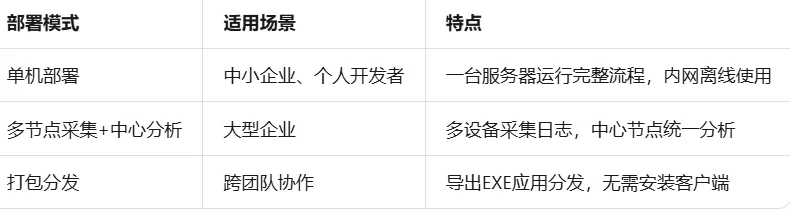
对于使用阿里云生态的用户,建议结合以下产品构建完整方案:
阿里云WAF:日志数据源
阿里云日志服务(SLS):日志存储与查询
阿里云函数计算(FC):轻量级分析任务托管
阿里云云服务器ECS:主引擎部署
5.2 打包与分发
将自动化引擎打包为独立可执行文件,便于在不同服务器上部署:
build.py - 打包脚本示例
import PyInstaller.main
import os
def build_eEXE应用"""
PyInstaller.main.run([
'soc_automation.py',
'--onefile',
'--name=SOC-AutoGuard',
'--icon=shield.ico',
'--add-data=config.yaml;.',
'--hidden-import=requests',
'--hidden-import=schedule',
'--clean'
])
print("打包完成: dist/SOC-AutoGuard.exe")
if name == "main":
build_executable()
打包后的应用支持脚本打包导出EXE,支持打包导出应用EXE支持单独设置api触发、定时执行。更关键的是,打包导出EXE应用支持在线推送更新,无需再次手动分发,只需打开应用就能自动检测更新新版本。这对于安全规则的及时更新尤为重要——新的攻击特征库可以自动推送到所有节点。
5.3 授权与安全
对于企业内部分发,建议启用授权机制:
打包导出应用EXE支持授权验证,确保只有授权人员可执行封禁操作
应用支持加密分享、分享授权,控制使用范围
不同团队可以基于授权粒度共享自动化工具,既保证协作效率又防止越权操作
5.4 钉钉/飞书/企微集成
安全事件需要及时通知到值班人员。通过Agent功能,支持在钉钉、飞书、企微、个人微信内控制应用的执行,回调通知响应执行结果:
class NotificationAgent:
"""通知Agent,支持多平台接入"""
def __init__(self, webhook_url: str, platform: str = "dingtalk"):
    self.webhook = webhook_url
    self.platform = platform

def send_alert(self, threat_info: Dict):
    """发送告警通知"""
    message = {
        "msgtype": "markdown",
        "markdown": {
            "title": "🚨 WAF自动封禁告警",
            "text": f"""## 安全事件告警
威胁IP: {threat_info['ip']}
威胁类型: {threat_info['reason']}
置信度: {threat_info.get('confidence', 'N/A')}
封禁时间: {datetime.now().strftime('%Y-%m-%d %H:%M:%S')}
如需解封,请在复核队列中操作。
"""
}
}
    try:
        requests.post(self.webhook, json=message, timeout=5)
    except Exception as e:
        print(f"通知发送失败: {e}")

def send_daily_report(self, stats: Dict):
    """发送日报"""
    pass
六、扩展场景:视觉颜色操作与消息自动化
6.1 突破元素依赖的自动化能力
传统的RPA工具在处理复杂界面时,往往受限于DOM元素的可获取性。当目标系统没有开放API、页面结构动态变化、或者需要操作原生客户端时,常规的基于元素定位的自动化方案就会失效。
支持视觉颜色操作的能力,让自动化软件无需依赖元素节点,也能实现点击、获取内容等操作。这一特性在以下安全运营场景中尤为实用:
企业微信告警通知获取:安全设备通过企业微信发送告警,传统方式需要对接企业微信API(需管理员权限审批),而基于视觉颜色操作可以直接识别消息卡片的颜色特征(红色=紧急、橙色=高危、黄色=中危),自动提取关键信息入库
QQ群威胁情报监控:部分安全社群通过QQ群分享威胁情报,通过识别特定颜色标记的消息气泡,自动获取IOC信息
千牛/旺旺客服系统:电商安全场景中,通过识别客服界面的异常订单标记颜色,自动触发风控流程
6.2 视觉颜色操作的技术实现思路
class VisualColorOperator:
"""视觉颜色操作模块(概念演示)"""
def __init__(self, region=None):
    self.region = region  # 屏幕操作区域 (x, y, width, height)

def find_by_color(self, target_color, tolerance=10):
    """
    在指定区域查找目标颜色
    target_color: (R, G, B) 元组
    tolerance: 颜色容差
    """
    # 实际实现需结合截图和图像处理库(如PIL/OpenCV)
    # 返回匹配区域的中心坐标列表
    pass

def click_by_color(self, target_color, index=0):
    """点击指定颜色的第N个匹配区域"""
    coords = self.find_by_color(target_color)
    if coords and len(coords) > index:
        x, y = coords[index]
        # 执行点击操作
        pass

def read_text_by_color_region(self, bg_color, text_color=None):
    """
    读取特定背景色区域内的文字
    例如:读取红色告警卡片中的IP地址
    """
    # 结合OCR识别该区域文字
    pass
6.3 安全运营中的消息自动化实战
将视觉颜色操作与消息获取结合,可以构建轻量级的安全情报收集系统: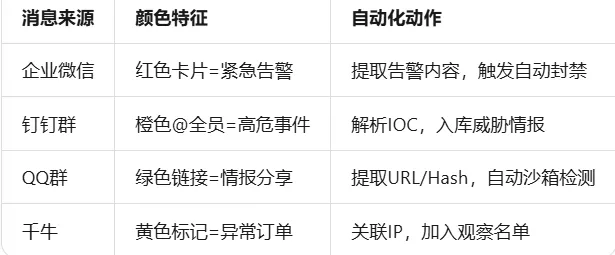
这一能力让流程自动化不再局限于Web页面和API接口,而是扩展到任何有视觉反馈的客户端软件。对于个人开发者和个人工作室而言,这意味着可以用更低的成本对接企业内部已有的通讯工具,无需等待IT部门开放接口权限。
七、效果评估与持续优化
7.1 核心指标监控
建议建立以下KPI体系: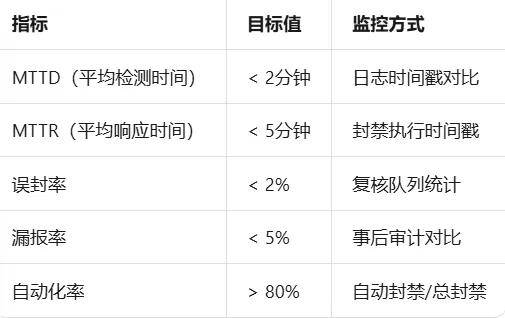
7.2 规则调优策略
自动化系统上线后,需要持续调优:
阈值动态调整:根据业务流量基线,使用AI智能优化元素路径,自动调整高频阈值。AI智能优化元素路径,无需学习复杂的定位语法,通过自然语言描述即可生成对应规则
规则库更新:定期同步最新攻击特征,web元素失效时,AI自动修复元素定位,实现元素自愈,保障流程不中断
误报反馈闭环:将被驳回的复核案例反哺模型,持续优化检测准确率
7.3 与现有安全体系集成
该方案不应孤立运行,建议与以下系统联动:
SIEM:将分析结果推送至安全信息与事件管理平台
SOAR:对接编排自动化响应平台,实现更复杂的响应剧本
威胁情报平台:IP信誉查询,提升研判准确率
CMDB:关联资产信息,区分核心业务与非核心业务的不同处置策略
八、展望
8.1 方案价值回顾
本文从实际安全运营痛点出发,完整呈现了一套WAF日志自动分析与封禁的技术方案:
全链路覆盖:从日志采集、解析、分析到封禁执行,形成闭环
多层检测:规则引擎快速过滤 + AI智能研判深度分析
人机协同:高置信度自动处置,中置信度人工复核
灵活部署:支持单机、分布式、离线多种部署模式
视觉扩展:通过颜色操作突破元素依赖,覆盖更多客户端场景
8.2 适用场景
这套方案特别适合以下群体:
个人开发者:快速搭建自己的安全运营环境,免费版使用无使用时长限制,无运行时长、无流程数量限制
个人工作室:轻量级安全服务交付,多设备使用无需多开会员
中小企业:无需组建专职安全团队,支持打包EXE发给别人不用装客户端,降低部署门槛
8.3 未来演进方向
Agent化升级:引入智能指令,使用最新的模型支持更复杂的决策逻辑
浏览器自动化联动:已支持对接紫鸟浏览器、比特浏览器、hubstudio浏览器、adspowser浏览器等市面上众多指纹浏览器,实现自动化操作,扩展至Web应用安全测试场景
视觉能力深化:将支持视觉颜色操作的能力与OCR、图像识别结合,实现更智能的客户端自动化
多源融合:不仅分析WAF日志,同时接入主机日志、流量镜像,构建更全面的威胁视图
完整代码仓库结构
soc-automation/
├── core/
│ ├── parser.py # 日志解析模块
│ ├── analyzer.py # 威胁分析引擎
│ ├── executor.py # 封禁执行器
│ ├── ai_judgment.py # AI智能研判
│ └── engine.py # 主调度引擎
├── sources/
│ ├── aliyun_waf.py # 阿里云WAF适配
│ ├── tencent_waf.py # 腾讯云WAF适配
│ └── file_source.py # 文件日志适配
├── visual/
│ └── color_operator.py # 视觉颜色操作模块
├── ui/
│ └── monitor.py # 监控面板
├── config.yaml # 配置文件
├── requirements.txt # 依赖清单
├── build.py # 打包脚本
└── main.py # 入口程序
安全运营的本质是在正确的时间做正确的响应。流程自动化技术不是替代安全人员的思考,而是将重复性、模式化的工作交给RPA工具,让人专注于更需要创造力的威胁狩猎和策略设计。对于个人开发者、个人工作室和中小企业而言,选择一款免费版使用无使用时长限制、数据不出本地、支持打包EXE发给别人不用装客户端、同时支持视觉颜色操作无需依赖元素节点的自动化软件,是降低安全运营门槛的最优路径。