什么是Function Calling?大模型无法访问实时数据和外部系统,Function Calling 允许模型调用外部工具(API、数据库、自定义函数等),获取信息或执行操作,突破模型自身能力的限制。模型支持Function Calling能力,使用Function Calling功能,通过引入外部工具,使得大模型可以与外部世界进行交互。在阿里云百炼平台:https://www.aliyun.com/product/bailian 调用AI大模型,并使用Function Calling功能。
工作原理
Function Calling 通过应用程序与大模型之间的多步骤交互实现:
- 发起第一次模型调用
应用程序向大模型发送用户问题和可用工具清单。 - 接收模型的工具调用指令(工具名称与入参)
若模型判断需要调用外部工具,返回JSON格式的指令,指定函数名称与入参。
若模型判断无需调用工具,会返回自然语言格式的回复。
- 在应用端运行工具
应用程序执行指定工具,获取输出结果。 - 发起第二次模型调用
将工具输出结果添加到消息数组(messages),再次调用模型。 - 接收来自模型的最终响应
模型综合工具输出与用户问题,生成自然语言回复。
工作流程示意图 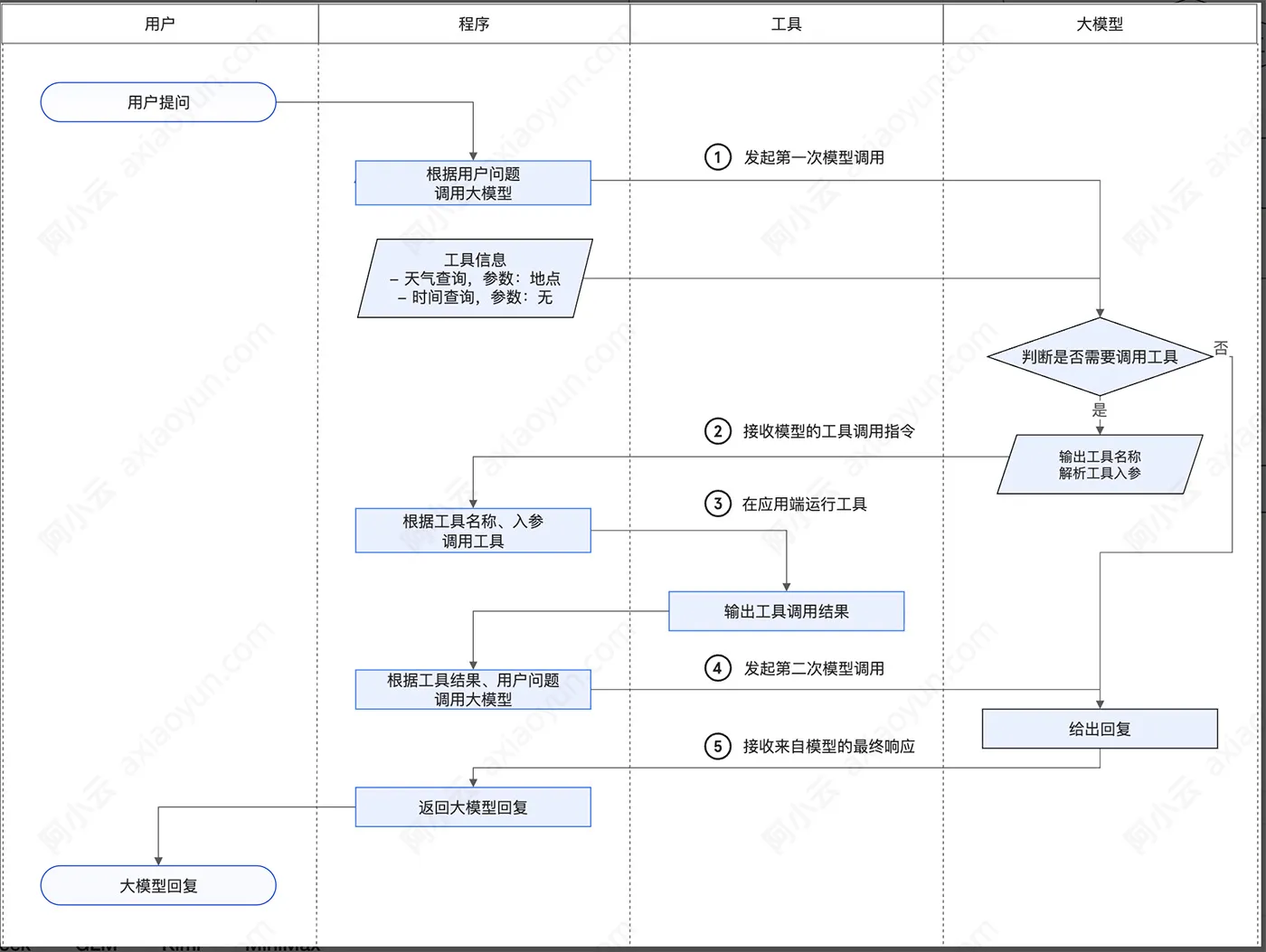
哪些模型支持Function Calling?
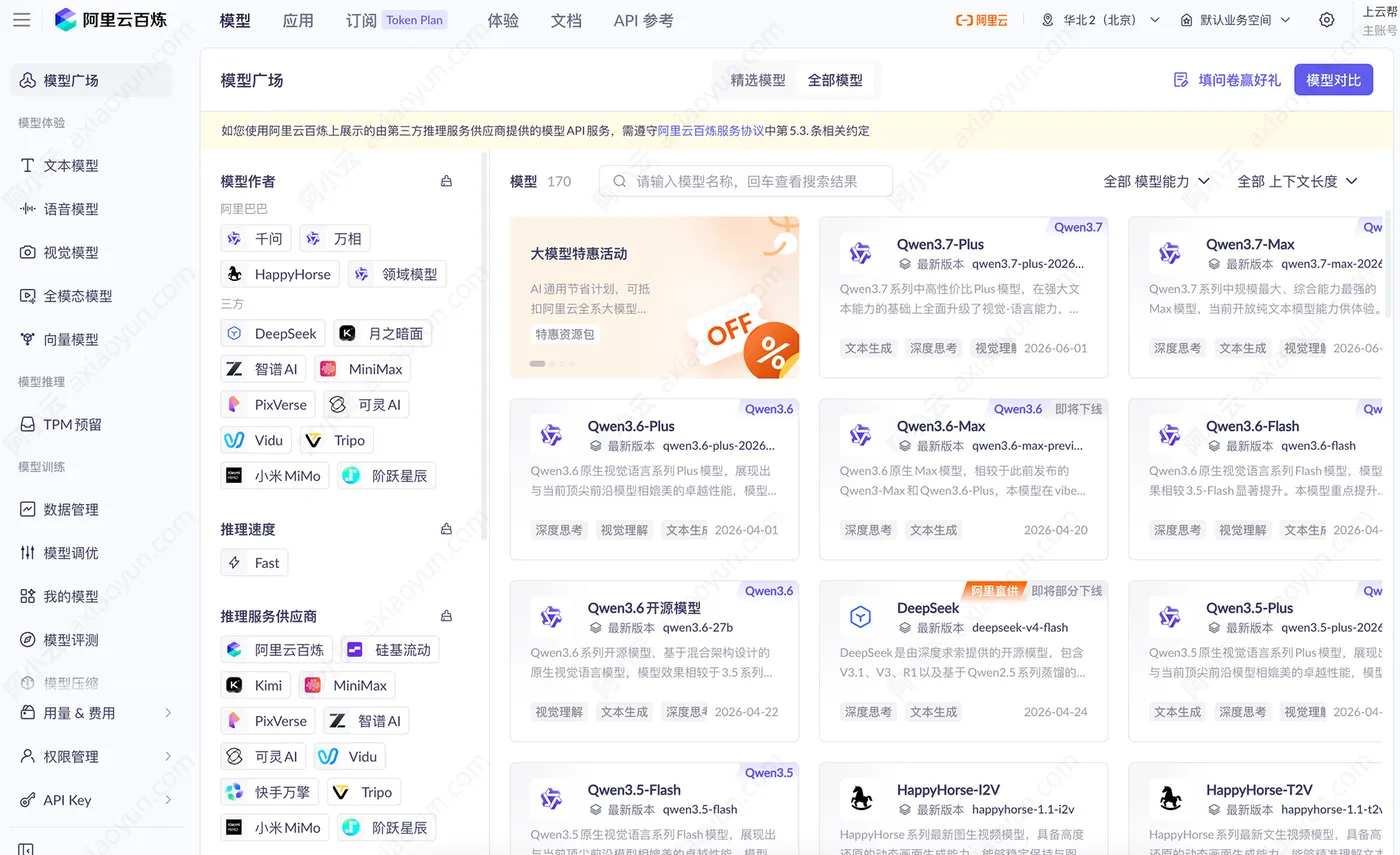
阿里云百炼千问、DeepSeek、GLM、Kimi和MiniMax支持Function Calling的模型版本如下,更多模型在阿里云百炼平台查看:https://www.aliyun.com/product/bailian
千问
文本生成模型:
- 千问Max:Qwen3.7-Max系列、Qwen3.6-Max系列、Qwen3-Max系列、Qwen-Max系列
- 千问Plus:Qwen3.7-Plus系列、Qwen3.6-Plus系列、Qwen3.5-Plus系列、Qwen-Plus系列
- 千问Flash:Qwen3.6-Flash系列、Qwen3.5-Flash系列、Qwen-Flash系列
- 千问Coder:Qwen3-Coder系列、Qwen2.5-Coder系列、Qwen-Coder系列
- 千问Turbo:Qwen-Turbo系列
- Qwen3.6开源系列
- Qwen3.5开源系列
- Qwen3开源系列
- Qwen2.5开源系列
多模态模型:
- 千问VL: Qwen3-VL-Plus系列、 Qwen3-VL-Flash系列
- 千问Omni:Qwen3.5-Omni-Plus系列、Qwen3.5-Omni-Flash系列、Qwen3-Omni-Flash系列
- 千问Omni-Realtime:Qwen3.5-Omni-Plus-Realtime系列、Qwen3.5-Omni-Flash-Realtime系列
- Qwen3-VL 开源系列
DeepSeek
阿里云百炼部署
- deepseek-v4-pro
- deepseek-v4-flash
- deepseek-v3.2
- deepseek-v3.2-exp(非思考模式)
- deepseek-v3.1(非思考模式)
- deepseek-r1
- deepseek-r1-0528
- deepseek-v3
硅基流动部署
- siliconflow/deepseek-v3.2
- siliconflow/deepseek-v3.1-terminus
- siliconflow/deepseek-r1-0528
- siliconflow/deepseek-v3-0324
快手万擎部署
- vanchin/deepseek-v3.2-think
- vanchin/deepseek-v3.1-terminus
- vanchin/deepseek-r1
- vanchin/deepseek-v3
GLM
- glm-5.2
- glm-5.1
- glm-5
- glm-4.7
- glm-4.6
- glm-4.5
- glm-4.5-air
Kimi
阿里云百炼部署
- kimi-k2.6
- kimi-k2.5
- kimi-k2-thinking
- Moonshot-Kimi-K2-Instruct
月之暗面部署
kimi/kimi-k3、kimi/kimi-k2.7-code-highspeed、kimi/kimi-k2.7-code、kimi/kimi-k2.6、kimi/kimi-k2.5
MiniMax
阿里云百炼部署
- MiniMax-M2.5
- MiniMax-M2.1
稀宇科技部署
- MiniMax/MiniMax-M3
- MiniMax/MiniMax-M2.7
- MiniMax/MiniMax-M2.5
- MiniMax/MiniMax-M2.1
Function Calling使用教程:
以下示例演示天气查询场景的完整 Function Calling 流程。
OpenAI 兼容:
Python:
from openai import OpenAI
from datetime import datetime
import json
import os
import random

# 初始化客户端
client = OpenAI(
    # 若没有配置环境变量,请用阿里云百炼API Key将下行替换为:api_key="sk-xxx",
    # 各地域的API Key不同。获取API Key:https://help.aliyun.com/zh/model-studio/get-api-key
    api_key=os.getenv("DASHSCOPE_API_KEY"),
    # 以下为华北2(北京)地域的URL,调用时请将WorkspaceId替换为真实的业务空间ID,各地域的URL不同。
    base_url="https://{WorkspaceId}.cn-beijing.maas.aliyuncs.com/compatible-mode/v1",
)
# 模拟用户问题
USER_QUESTION = "北京天气咋样"
# 定义工具列表
tools = [
    {
        "type": "function",
        "function": {
            "name": "get_current_weather",
            "description": "当你想查询指定城市的天气时非常有用。",
            "parameters": {
                "type": "object",
                "properties": {
                    "location": {
                        "type": "string",
                        "description": "城市或县区,比如北京市、杭州市、余杭区等。",
                    }
                },
                "required": ["location"],
            },
        },
    },
]

# 模拟天气查询工具
def get_current_weather(arguments):
    weather_conditions = ["晴天", "多云", "雨天"]
    random_weather = random.choice(weather_conditions)
    location = arguments["location"]
    return f"{location}今天是{random_weather}。"

# 封装模型响应函数
def get_response(messages):
    completion = client.chat.completions.create(
        model="qwen3.6-plus",
        extra_body={"enable_thinking": False},
        messages=messages,
        tools=tools,
    )
    return completion

messages = [{"role": "user", "content": USER_QUESTION}]
response = get_response(messages)
assistant_output = response.choices[0].message
if assistant_output.content is None:
    assistant_output.content = ""
messages.append(assistant_output)
# 如果不需要调用工具,直接输出内容
if assistant_output.tool_calls is None:
    print(f"无需调用天气查询工具,直接回复:{assistant_output.content}")
else:
    # 进入工具调用循环
    while assistant_output.tool_calls is not None:
        tool_call = assistant_output.tool_calls[0]
        tool_call_id = tool_call.id
        func_name = tool_call.function.name
        arguments = json.loads(tool_call.function.arguments)
        print(f"正在调用工具 [{func_name}],参数:{arguments}")
        # 执行工具
        tool_result = get_current_weather(arguments)
        # 构造工具返回信息
        tool_message = {
            "role": "tool",
            "tool_call_id": tool_call_id,
            "content": tool_result,  # 保持原始工具输出
        }
        print(f"工具返回:{tool_message['content']}")
        messages.append(tool_message)
        # 再次调用模型,获取总结后的自然语言回复
        response = get_response(messages)
        assistant_output = response.choices[0].message
        if assistant_output.content is None:
            assistant_output.content = ""
        messages.append(assistant_output)
    print(f"助手最终回复:{assistant_output.content}")
Node.js
import OpenAI from 'openai';

// 初始化客户端
const openai = new OpenAI({
  // 若没有配置环境变量,请用阿里云百炼API Key将下行替换为:apiKey: "sk-xxx",
  // 各地域的API Key不同。获取API Key:https://help.aliyun.com/zh/model-studio/get-api-key
  apiKey: process.env.DASHSCOPE_API_KEY,
  // 以下为华北2(北京)地域的URL,调用时请将WorkspaceId替换为真实的业务空间ID,各地域的URL不同。
  baseURL: "https://{WorkspaceId}.cn-beijing.maas.aliyuncs.com/compatible-mode/v1",
});

// 定义工具列表
const tools = [
  {
    type: "function",
    function: {
      name: "get_current_weather",
      description: "当你想查询指定城市的天气时非常有用。",
      parameters: {
        type: "object",
        properties: {
          location: {
            type: "string",
            description: "城市或县区,比如北京市、杭州市、余杭区等。",
          },
        },
        required: ["location"],
      },
    },
  },
];

// 模拟天气查询工具
const getCurrentWeather = (args) => {
  const weatherConditions = ["晴天", "多云", "雨天"];
  const randomWeather = weatherConditions[Math.floor(Math.random() * weatherConditions.length)];
  const location = args.location;
  return `${location}今天是${randomWeather}。`;
};

// 封装模型响应函数
const getResponse = async (messages) => {
  const response = await openai.chat.completions.create({
    model: "qwen3.6-plus",
    enable_thinking: false,
    messages: messages,
    tools: tools,
  });
  return response;
};

const main = async () => {
  const input = "北京天气咋样";

  let messages = [
    {
      role: "user",
      content: input,
    }
  ];
  let response = await getResponse(messages);
  let assistantOutput = response.choices[0].message;
  // 确保 content 不是 null
  if (!assistantOutput.content) assistantOutput.content = "";
  messages.push(assistantOutput);
  // 判断是否需要调用工具
  if (!assistantOutput.tool_calls) {
    console.log(`无需调用天气查询工具,直接回复:${assistantOutput.content}`);
  } else {
    // 进入工具调用循环
    while (assistantOutput.tool_calls) {
      const toolCall = assistantOutput.tool_calls[0];
      const toolCallId = toolCall.id;
      const funcName = toolCall.function.name;
      const funcArgs = JSON.parse(toolCall.function.arguments);
      console.log(`正在调用工具 [${funcName}],参数:`, funcArgs);
      // 执行工具
      const toolResult = getCurrentWeather(funcArgs);
      // 构造工具返回信息
      const toolMessage = {
        role: "tool",
        tool_call_id: toolCallId,
        content: toolResult,
      };
      console.log(`工具返回:${toolMessage.content}`);
      messages.push(toolMessage);
      // 再次调用模型获取自然语言总结
      response = await getResponse(messages);
      assistantOutput = response.choices[0].message;
      if (!assistantOutput.content) assistantOutput.content = "";
      messages.push(assistantOutput);
    }
    console.log(`助手最终回复:${assistantOutput.content}`);
  }
};

// 启动程序
main().catch(console.error);
运行后得到如下输出:
正在调用工具 [get_current_weather],参数:{'location': '北京'}
工具返回:北京今天是多云。
助手最终回复:北京今天是多云的天气。
如何使用Function Calling?
Function Calling 支持两种传入工具信息的方式:
- 方式一:通过 tools 参数传入(推荐)
参见如何使用,按照定义工具、创建 messages 数组、发起 Function Calling、运行工具函数、大模型总结工具函数输出的步骤调用。 - 方式二:通过 System Message 传入
通过 tools 参数传入效果最佳,服务端会自动适配最优 prompt 模板。如使用 Qwen 模型且不期望使用 tools 参数,参见通过 System Message 传入工具信息。
以下以 OpenAI 兼容接口为例,通过 tools 参数分步骤介绍 Function Calling 的详细用法。
假设业务场景会收到天气查询与时间查询两类问题。
1. 定义工具
工具连接大模型与外部服务,首先需定义工具。
1.1. 创建工具函数
创建两个工具函数:天气查询工具与时间查询工具。
- 天气查询工具
接收arguments参数,arguments格式为{"location": "查询的地点"}。工具的输出为字符串,格式为:“{位置}今天是{天气}”。
为了便于演示,此处定义的天气查询工具并不真正查询天气,会从晴天、多云、雨天随机选择。在实际业务中可使用如 高德天气查询 等工具进行替换。
- 时间查询工具
时间查询工具不需要输入参数。工具的输出为字符串,格式为:“当前时间:{查询到的时间}。”。
如果使用 Node.js,请运行
npm install date-fns 安装获取时间的工具包 date-fns:
Python:
## 步骤1:定义工具函数

# 添加导入random模块
import random
from datetime import datetime

# 模拟天气查询工具。返回结果示例:“北京今天是雨天。”
def get_current_weather(arguments):
    # 定义备选的天气条件列表
    weather_conditions = ["晴天", "多云", "雨天"]
    # 随机选择一个天气条件
    random_weather = random.choice(weather_conditions)
    # 从 JSON 中提取位置信息
    location = arguments["location"]
    # 返回格式化的天气信息
    return f"{location}今天是{random_weather}。"

# 查询当前时间的工具。返回结果示例:“当前时间:2024-04-15 17:15:18。“
def get_current_time():
    # 获取当前日期和时间
    current_datetime = datetime.now()
    # 格式化当前日期和时间
    formatted_time = current_datetime.strftime('%Y-%m-%d %H:%M:%S')
    # 返回格式化后的当前时间
    return f"当前时间:{formatted_time}。"

# 测试工具函数并输出结果,运行后续步骤时可以去掉以下四句测试代码
print("测试工具输出:")
print(get_current_weather({"location": "上海"}))
print(get_current_time())
print("\n")
Node.js:
// 步骤1:定义工具函数

// 导入时间查询工具
import { format } from 'date-fns';

function getCurrentWeather(args) {
    // 定义备选的天气条件列表
    const weatherConditions = ["晴天", "多云", "雨天"];
    // 随机选择一个天气条件
    const randomWeather = weatherConditions[Math.floor(Math.random() * weatherConditions.length)];
    // 从 JSON 中提取位置信息
    const location = args.location;
    // 返回格式化的天气信息
    return `${location}今天是${randomWeather}。`;
}

function getCurrentTime() {
    // 获取当前日期和时间
    const currentDatetime = new Date();
    // 格式化当前日期和时间
    const formattedTime = format(currentDatetime, 'yyyy-MM-dd HH:mm:ss');
    // 返回格式化后的当前时间
    return `当前时间:${formattedTime}。`;
}

// 测试工具函数并输出结果,运行后续步骤时可以去掉以下四句测试代码
console.log("测试工具输出:")
console.log(getCurrentWeather({location:"上海"}));
console.log(getCurrentTime());
console.log("\n")
运行工具后,得到输出:
测试工具输出:
上海今天是多云。
当前时间:2025-01-08 20:21:45。
更多详细的使用教程,请移步到官方文档:https://help.aliyun.com/zh/model-studio/qwen-function-calling