四、Kubernetes核心资源模型
4.1 Pod —— 最小调度单元
Pod是K8s中最小的部署和调度单元,不是单个容器,而是一组共享网络和存储的容器集合。
apiVersion: v1
kind: Pod
metadata:
  name: myapp-pod
  namespace: default
  labels:
    app: myapp
    version: v1
  annotations:
    prometheus.io/scrape: "true"
    prometheus.io/port: "8080"
spec:
  # 优雅停机时间(秒)
  terminationGracePeriodSeconds: 30

  # Init容器(在主容器启动前顺序执行)
  initContainers:
  - name: init-db
    image: busybox:latest
    command: ['sh', '-c', 'until nslookup mysql; do echo waiting; sleep 2; done;']

  # 主容器
  containers:
  - name: myapp
    image: myapp:v1
    imagePullPolicy: IfNotPresent  # Always/Never/IfNotPresent

    # 端口定义
    ports:
    - containerPort: 8080
      name: http
      protocol: TCP

    # 环境变量
    env:
    - name: DB_HOST
      value: "mysql-service"
    - name: JAVA_OPTS
      value: "-Xmx512m"

    # 资源限制(requests保证调度,limits限制上限)
    resources:
      requests:
        memory: "256Mi"
        cpu: "250m"
      limits:
        memory: "512Mi"
        cpu: "500m"

    # 存活探针(容器故障时重启)
    livenessProbe:
      httpGet:
        path: /health
        port: 8080
      initialDelaySeconds: 30
      periodSeconds: 10

    # 就绪探针(只有就绪才接收流量)
    readinessProbe:
      tcpSocket:
        port: 8080
      initialDelaySeconds: 5
      periodSeconds: 5

    # 启动探针(用于启动慢的容器)
    startupProbe:
      httpGet:
        path: /health
        port: 8080
      failureThreshold: 30
      periodSeconds: 10

    # 挂载卷
    volumeMounts:
    - name: config
      mountPath: /app/config
      readOnly: true
    - name: data
      mountPath: /app/data

  # 卷定义
  volumes:
  - name: config
    configMap:
      name: app-config
  - name: data
    persistentVolumeClaim:
      claimName: app-pvc

  # 调度约束
  nodeSelector:
    disktype: ssd

  # 亲和性/反亲和性
  affinity:
    nodeAffinity:
      requiredDuringSchedulingIgnoredDuringExecution:
        nodeSelectorTerms:
        - matchExpressions:
          - key: kubernetes.io/e2e-az-name
            operator: In
            values:
            - us-east-1a
    podAntiAffinity:
      preferredDuringSchedulingIgnoredDuringExecution:
      - weight: 100
        podAffinityTerm:
          labelSelector:
            matchExpressions:
            - key: app
              operator: In
              values:
              - myapp
          topologyKey: kubernetes.io/hostname

  # 容忍污点
  tolerations:
  - key: "dedicated"
    operator: "Equal"
    value: "gpu"
    effect: "NoSchedule"

status:
  phase: Running  # Pending/Running/Succeeded/Failed/Unknown
  podIP: 10.244.1.5
  hostIP: 192.168.1.100
4.2 Pod生命周期与健康检查
┌─────────────────────────────────────────────────────────────────┐
│                        Pod生命周期                               │
├─────────────────────────────────────────────────────────────────┤
│                                                                 │
│   Pending ──→ Running ──→ Succeeded (正常退出)                  │
│      │           │                                             │
│      │           └──→ Failed (异常退出)                         │
│      │                                                        │
│      └──→ 调度失败/镜像拉取失败                                  │
│                                                                 │
└─────────────────────────────────────────────────────────────────┘

Pod内部状态转换:
ContainerCreating → Running → Terminating → 移除
三种探针(Probe):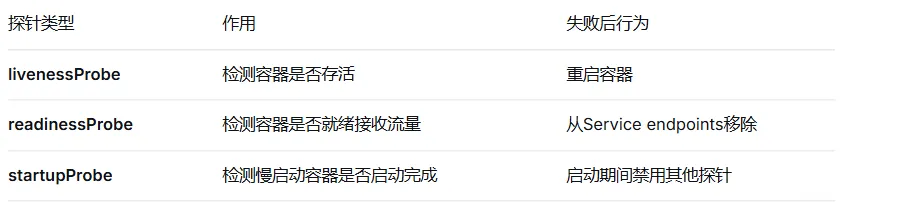
# livenessProbe的三种检测方式
livenessProbe:
  # HTTP GET检测
  httpGet:
    path: /health
    port: 8080
    httpHeaders:
    - name: Custom-Header
      value: Awesome

  # TCP Socket检测
  tcpSocket:
    port: 8080

  # 命令执行检测
  exec:
    command:
    - cat
    - /tmp/healthy
4.3 Deployment —— 无状态应用控制器
Deployment是K8s最常用的工作负载控制器,管理无状态应用的完整生命周期。
apiVersion: apps/v1
kind: Deployment
metadata:
  name: myapp-deployment
  labels:
    app: myapp
spec:
  # 期望副本数
  replicas: 3

  # 标签选择器(必须与Pod模板匹配)
  selector:
    matchLabels:
      app: myapp
      tier: frontend

  # Pod模板
  template:
    metadata:
      labels:
        app: myapp
        tier: frontend
    spec:
      containers:
      - name: myapp
        image: myapp:v2
        ports:
        - containerPort: 8080

  # 更新策略
  strategy:
    type: RollingUpdate  # RollingUpdate / Recreate
    rollingUpdate:
      maxSurge: 1        # 最多超过期望副本数1个
      maxUnavailable: 0  # 最多不可用0个(零停机)

  # 版本回滚保留历史
  revisionHistoryLimit: 10

  # 就绪等待时间(Pod就绪后稳定期)
  minReadySeconds: 10

  # 进度截止时间(秒)
  progressDeadlineSeconds: 600
滚动更新(Rolling Update)原理:
初始状态: v1版本,3个Pod
┌────┐ ┌────┐ ┌────┐
│v1.1│ │v1.2│ │v1.3│
└────┘ └────┘ └────┘

Step 1: 启动1个v2 Pod(maxSurge=1)
┌────┐ ┌────┐ ┌────┐ ┌────┐
│v1.1│ │v1.2│ │v1.3│ │v2.1│
└────┘ └────┘ └────┘ └────┘

Step 2: v2.1就绪后,停止1个v1 Pod(maxUnavailable=0)
┌────┐ ┌────┐ ┌────┐ ┌────┐
│v1.2│ │v1.3│ │v2.1│(v1.1停止)
└────┘ └────┘ └────┘

Step 3: 重复直到全部替换
┌────┐ ┌────┐ ┌────┐
│v2.1│ │v2.2│ │v2.3│
└────┘ └────┘ └────┘

最终状态: 3个v2版本Pod
版本回滚操作:
# 查看历史版本
kubectl rollout history deployment/myapp-deployment

# 回滚到上一个版本
kubectl rollout undo deployment/myapp-deployment

# 回滚到指定版本
kubectl rollout undo deployment/myapp-deployment --to-revision=2

# 查看回滚状态
kubectl rollout status deployment/myapp-deployment
4.4 Service —— 服务发现与负载均衡
Pod生命周期短暂,IP动态变化,Service提供固定的访问入口。
apiVersion: v1
kind: Service
metadata:
  name: myapp-service
spec:
  # Service类型:
  # - ClusterIP: 集群内部访问(默认)
  # - NodePort: 通过节点端口暴露
  # - LoadBalancer: 云厂商负载均衡器
  # - ExternalName: 映射到外部域名
  type: ClusterIP

  # 端口映射
  ports:
  - port: 80           # Service端口
    targetPort: 8080   # Pod端口
    protocol: TCP
    name: http
  - port: 443
    targetPort: 8443
    name: https

  # Pod选择器
  selector:
    app: myapp
    tier: frontend

  # 会话保持(基于ClientIP)
  sessionAffinity: ClientIP
  sessionAffinityConfig:
    clientIP:
      timeoutSeconds: 10800
Service与Endpoints关系:
# 查看Service对应的Endpoints
kubectl get endpoints myapp-service

# 输出示例:
NAME            ENDPOINTS
myapp-service   10.244.1.5:8080,10.244.2.3:8080,10.244.3.7:8080
4.5 Ingress —— 七层路由
Ingress管理集群内服务的外部HTTP/HTTPS访问。
apiVersion: networking.k8s.io/v1
kind: Ingress
metadata:
  name: myapp-ingress
  annotations:
    # 使用nginx-ingress控制器
    kubernetes.io/ingress.class: nginx
    # 配置重写规则
    nginx.ingress.kubernetes.io/rewrite-target: /$2
    # 配置CORS
    nginx.ingress.kubernetes.io/enable-cors: "true"
    # 配置限流
    nginx.ingress.kubernetes.io/limit-rps: "10"
spec:
  # TLS配置
  tls:
  - hosts:
    - myapp.example.com
    secretName: myapp-tls

  rules:
  - host: myapp.example.com
    http:
      paths:
      # 路径路由
      - path: /api(/|$)(.*)
        pathType: Prefix
        backend:
          service:
            name: api-service
            port:
              number: 8080

      # 默认后端
      - path: /
        pathType: Prefix
        backend:
          service:
            name: frontend-service
            port:
              number: 80
4.6 水平自动扩缩容(HPA)
HPA(Horizontal Pod Autoscaler)根据指标自动调整Pod数量。
apiVersion: autoscaling/v2
kind: HorizontalPodAutoscaler
metadata:
  name: myapp-hpa
spec:
  scaleTargetRef:
    apiVersion: apps/v1
    kind: Deployment
    name: myapp-deployment

  minReplicas: 2
  maxReplicas: 10

  metrics:
  # CPU使用率
  - type: Resource
    resource:
      name: cpu
      target:
        type: Utilization
        averageUtilization: 60

  # 内存使用量
  - type: Resource
    resource:
      name: memory
      target:
        type: AverageValue
        averageValue: 500Mi

  # 自定义指标(需要metrics-server或Prometheus)
  - type: Pods
    pods:
      metric:
        name: http_requests_per_second
      target:
        type: AverageValue
        averageValue: 1000

  behavior:
    scaleDown:
      stabilizationWindowSeconds: 300  # 缩容稳定窗口5分钟
      policies:
      - type: Percent
        value: 10
        periodSeconds: 60
    scaleUp:
      stabilizationWindowSeconds: 0   # 扩容立即执行
      policies:
      - type: Percent
        value: 100
        periodSeconds: 15
配置metrics-server:
# 部署metrics-server
kubectl apply -f https://github.com/kubernetes-sigs/metrics-server/releases/latest/download/components.yaml

# 查看资源使用情况
kubectl top nodes
kubectl top pods