四、前后端联调完整流程
4.1 开发前的约定(接口设计阶段)
在写代码之前,前后端需要先约定好接口规范:
# 接口文档示例(YAML格式)

接口名称: 用户登录
接口路径: POST /api/v1/auth/login
请求体:
  - username: string, required, 用户名/手机号
  - password: string, required, 密码(MD5加密后)
  - captcha: string, required, 验证码

响应 - 成功 (200):
  - code: 200
  - message: "登录成功"
  - data:
      - token: string, JWT token
      - userId: number
      - username: string
      - expiresIn: number, token过期时间(秒)

响应 - 失败 (400/401):
  - code: 40001, 用户名不存在
  - code: 40002, 密码错误
  - code: 40003, 验证码错误
  - code: 40100, token过期

示例:
请求:
  POST /api/v1/auth/login
  {"username": "zhangsan", "password": "e10adc3949ba59abbe56e057f20f883e"}

响应:
  {"code":200,"message":"登录成功","data":{"token":"xxx","userId":1,"username":"张三"}}
4.2 Mock 数据(前后端并行开发)
后端接口还没写好时,前端可以用 Mock 数据模拟接口。
方式1:在代码中 Mock
// api/user.js
const isDev = process.env.NODE_ENV === 'development';

export async function getUserInfo(userId) {
  if (isDev) {
    // Mock 数据
    return {
      code: 200,
      data: {
        id: userId,
        username: '测试用户',
        avatar: 'https://example.com/avatar.jpg'
      }
    };
  }

  // 真实请求
  return fetch(`/api/users/${userId}`).then(res => res.json());
}
方式2:使用 Mock 服务(JSON Server)
# 安装
npm install -g json-server

# 创建 db.json
{
  "users": [
    { "id": 1, "name": "张三" },
    { "id": 2, "name": "李四" }
  ]
}

# 启动 Mock 服务
json-server --watch db.json --port 3001

# 现在可以访问
GET http://localhost:3001/users/1
方式3:使用 Mock.js 动态生成数据
// mock/index.js
import Mock from 'mockjs';

Mock.mock('/api/users', 'get', {
  'code': 200,
  'data|10': [{
    'id|+1': 1,
    'name': '@cname',
    'email': '@email',
    'avatar': '@image("100x100")',
    'age|18-60': 1
  }]
});
4.3 接口封装(前端最佳实践)
基础封装
// utils/request.js
const BASE_URL = import.meta.env.VITE_API_BASE_URL || '/api';

class HTTPClient {
  constructor() {
    this.baseURL = BASE_URL;
    this.timeout = 30000;
  }

  // 请求拦截器
  _interceptRequest(config) {
    // 添加 token
    const token = localStorage.getItem('token');
    if (token) {
      config.headers = {
        ...config.headers,
        'Authorization': `Bearer ${token}`
      };
    }

    // 添加时间戳(防缓存)
    if (config.method === 'get' && config.noCache) {
      config.params = {
        ...config.params,
        _t: Date.now()
      };
    }

    return config;
  }

  // 响应拦截器
  async _interceptResponse(response) {
    const data = await response.json();

    // 统一处理业务错误
    if (data.code !== 200) {
      // token 过期
      if (data.code === 401) {
        localStorage.removeItem('token');
        window.location.href = '/login';
      }

      // 显示错误提示
      console.error(`API Error: ${data.message}`);
      throw new Error(data.message);
    }

    return data.data;
  }

  async request(url, options = {}) {
    const config = this._interceptRequest({
      method: 'GET',
      headers: {
        'Content-Type': 'application/json'
      },
      ...options
    });

    const response = await fetch(this.baseURL + url, config);
    return this._interceptResponse(response);
  }

  get(url, params = {}, options = {}) {
    const queryString = new URLSearchParams(params).toString();
    const fullUrl = queryString ? `${url}?${queryString}` : url;
    return this.request(fullUrl, { ...options, method: 'GET' });
  }

  post(url, data = {}, options = {}) {
    return this.request(url, {
      ...options,
      method: 'POST',
      body: JSON.stringify(data)
    });
  }

  put(url, data = {}, options = {}) {
    return this.request(url, {
      ...options,
      method: 'PUT',
      body: JSON.stringify(data)
    });
  }

  patch(url, data = {}, options = {}) {
    return this.request(url, {
      ...options,
      method: 'PATCH',
      body: JSON.stringify(data)
    });
  }

  delete(url, options = {}) {
    return this.request(url, { ...options, method: 'DELETE' });
  }
}

export const http = new HTTPClient();
API 模块化
// api/user.js
import { http } from '@/utils/request';

export const userApi = {
  // 获取用户信息
  getUserInfo(userId) {
    return http.get(`/users/${userId}`);
  },

  // 获取用户列表
  getUserList(params) {
    return http.get('/users', params);
  },

  // 创建用户
  createUser(data) {
    return http.post('/users', data);
  },

  // 更新用户
  updateUser(userId, data) {
    return http.patch(`/users/${userId}`, data);
  },

  // 删除用户
  deleteUser(userId) {
    return http.delete(`/users/${userId}`);
  }
};
在组件中使用
// pages/UserList.jsx
import { userApi } from '@/api/user';
import { useState, useEffect } from 'react';

function UserList() {
  const [users, setUsers] = useState([]);
  const [loading, setLoading] = useState(false);
  const [error, setError] = useState(null);

  useEffect(() => {
    fetchUsers();
  }, []);

  const fetchUsers = async () => {
    setLoading(true);
    setError(null);

    try {
      const data = await userApi.getUserList({ page: 1, limit: 20 });
      setUsers(data.items);
    } catch (err) {
      setError(err.message);
    } finally {
      setLoading(false);
    }
  };

  if (loading) return <div>加载中...</div>;
  if (error) return <div>错误:{error}</div>;

  return (
    <ul>
      {users.map(user => (
        <li key={user.id}>{user.name}</li>
      ))}
    </ul>
  );
}
4.4 常见的请求库对比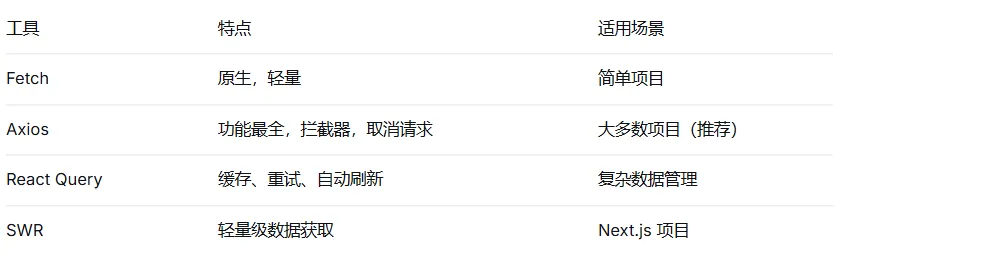
Axios 封装示例
// utils/axios.js
import axios from 'axios';

const instance = axios.create({
  baseURL: import.meta.env.VITE_API_BASE_URL,
  timeout: 30000,
  headers: {
    'Content-Type': 'application/json'
  }
});

// 请求拦截器
instance.interceptors.request.use(
  config => {
    const token = localStorage.getItem('token');
    if (token) {
      config.headers.Authorization = `Bearer ${token}`;
    }
    return config;
  },
  error => Promise.reject(error)
);

// 响应拦截器
instance.interceptors.response.use(
  response => {
    const res = response.data;
    if (res.code !== 200) {
      // 业务错误
      return Promise.reject(new Error(res.message));
    }
    return res.data;
  },
  error => {
    // HTTP 错误
    if (error.response?.status === 401) {
      localStorage.removeItem('token');
      window.location.href = '/login';
    }
    return Promise.reject(error);
  }
);

export default instance;